-
-
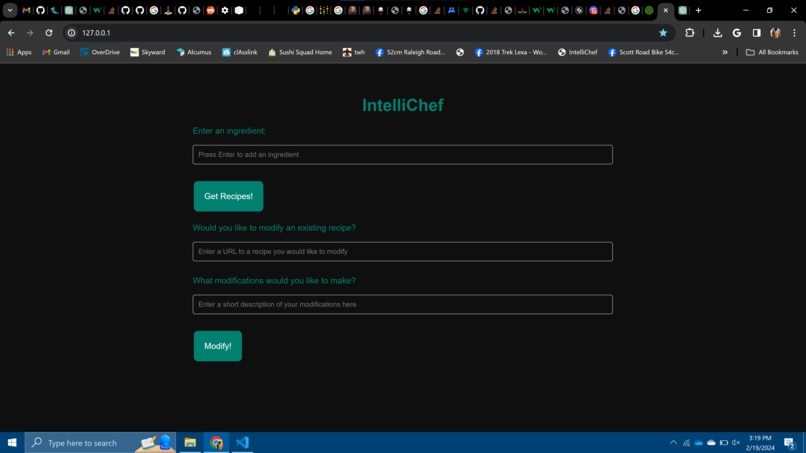
home screen
-
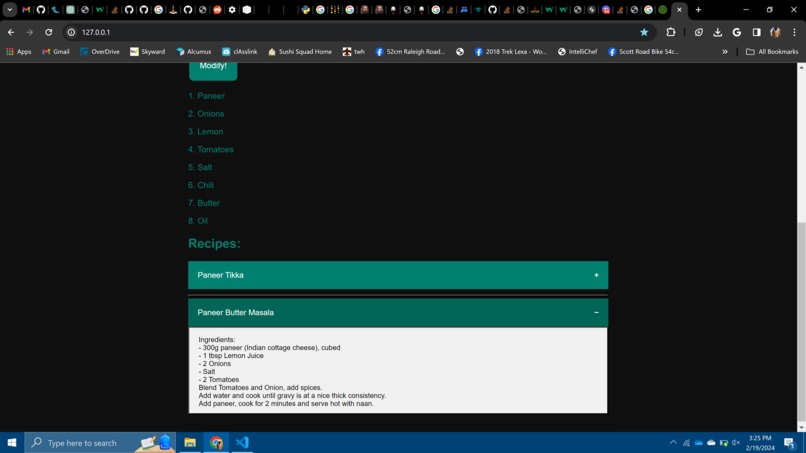
recipe output


Inspiration
Our entire team is currently on vacation in Hawaii, and on the morning of the 18th, we were hungry. As we investigated the fridge of our AirBnb, we couldn't find anything that was ready to eat, only a bunch of ingredients! To figure our what we could make to satisfy our hunger, we decided to ask ChatGPT what breakfast meals we could make with the items we had, and were pleasantly surprised by the recipes that we got back. As we cooked, we were sturggling to come up with an idea for the hackfest that went with the theme of smart living, when it hit us that we could make an app to do exactly what we had done just 10 minutes earlier. This was the conception of IntelliChef, a recipe building app powered by AI that will never leave you wondering what to cook!
What it does
IntelliChef is a web app that has multiple different ways to get the user teh recipe they want. The easiest option is for the user to allow our webpage to access their camera, take a photo of their fridge, pantry, or their ingredients, and upload it. This can all be done seamlessly within the website, including taking the photo. If the user chooses not to take a photo, they can instead manually enter their ingredients as text input. After their ingredients are recorded, the user can hit the Get Recipes! button, which will use GPT 4 Vision to identify the ingredients present in the image, and then uses GPT-3.5 to create 4 possible recipes the user can make with the ingredients they have. The website displays these recipes along with images created by DALL-E 2 of the dishes suggested. Another option the user has is to input a URL of an existing online recipe into the website, and specify a modification they would like to the recipe. For example, the user could ask to make a Paneer Butter Masala recipe vegan. IntelliChef will parse and send the contents of the provided URL to GPT-3.5 with the user's requested changes, and return the recipe modified by AI to f it the user's request. All recipes shown to the user include a calorie count, the ingredients required (in specific amounts), and detailed step-by-step instructions on how to make the dish.
How we built it
Our hackathon project was built using a flask backend. On top of that we used HTML/CSS/JS for the front end. In order to make a seamless product pipeline, we created “tools” which were python scripts holding the main AI functionality code which we called from our flask server. When user clicks the button(s) to generate a recipe/modify a recipe, a request is sent to our python AI tools. First, for generating recipes from pictures of fridges/pantries, we use Pillow, Base64, and flask to allow the user to take a photo from the flask web app. Then this image is uploaded for use by our python camera script which uses GPT 4 - vision to find all the food items from the image. Then this is passed on to generating a recipe. For generating a recipe, GPT 3.5 is used create a JSON file which creates recipes based on the user’s inputted ingredients (sent from front end -> flask -> python AI tool) as well as the calorie count and dietary restrictions associated with the recipe. Then the titles of these recipes generate images using Dalle-2 and then these JSON files along with the image is sent back to flask to show to the user. Then, for recipe modification, we call a different python AI tool and pass in the url of the recipe the user wants to modify. This url is then web scraped and cleaned using requests and BeautifulSoup to then pass it to Langchain. Langchainchunks the website content into smaller texts and then we use the ada-002 embeddings from OpenAI to create vectors of each chunk. These vectors are of the cosine metric and are 1536 dimensions. These vectors are then passed into the Pinecone vector database for storage. Then we take the user’s recipe modification, create vectors using this same embedding model and query our Pinecone vector db to return the top 10 chunks of the website content that relate to this query. Then these chunks of website are passed into a GPT 3.5 model as context and we query the model using the user’s requested modification to return a modified recipe to the flask backend to be displayed to the user.
In order to make the best use of our time as our entire team is currently traveling in Hawaii and didn’t have lots of time to work on this, we maximized our productivity and efficiency by splitting our roles into clearly defined responsibilities in order to minimize the time spent having to wait for others code to move as fast as possible. Sarthak worked primarily on building a user-friendly UI, Aditya worked on the AI pipeline with OpenAI and vector storage, and Siddhant worked on the flask backend to combine the different portions of our web app. Distributing our roles in this way allowed us to work in completely separate areas of our project which allowed us to minimize waiting times so we could all constantly work on building out this project efficiently and it minimized issues such as Git merge conflicts
Challenges we ran into
We an into several challenges in the making of this project. First, was the timing. Due to our trip to Hawaii, we had to balance building this project for the hackathon alongside all of our planned activities for the vacation. This led to us coding most of the project during car rides and using a mobile hotspot. Often we had very spotty internet which made it hard to unblock ourselves from issues with the various APIs we were using but nonetheless we were able to work through these difficulties and make a project we are proud of.
We had various technical challenges as well which we had to work through for this project. First, designing the frontend. Due to a lack of experience with front end frameworks, we decided on just using vanilla JS, CSS, and HTML. For ease of use and efficiency due to our limited time, we tried to use a website builder. Though, after multiple tried with various website builders, all of these had the issue of being unable to connect to a custom backend as this feature was kept behind a paywall, deeming the website builders unusable. This meant that we had to use valuable time to create an entire front end and UI from scratch which meant learning about styling techniques and design which was brand new for the members on our team. Next, using the camera with flask was a massive challenge to overcome. Not only is using a camera not native to flask and we had to write various code and use various plugins to make this work, but when we were able to finally get the camera to work, we realized this doesn’t run on our phone due to security issues (which was the device we planned to use for this product due to the recipes from fridge photo feature) so we spent lots of time trying to solve this issue. First we tried using flask https support but it unfortunately didn’t work for our project. After multiple YouTube videos and articles we settled on adjusting settings in chrome://flags to finally make it work for our product. Finally, a massive issue we had was with our environment and interpreter on our respective laptops. We had to use various API keys and some of us were using virtual environments and others were not, and others on Mac whereas others on Windows, which led to differences in certain files we needed to run as well as env and interpreter conflicts. We were able to settle this by everyone using their own virtual environments from a consolidated requirements.txt file. For our environment variables we used an online env vault to make development easier.
Accomplishments that we're proud of
Our team is super happy with our finished product, especially with the circumstances we were working in. We are especially proud of our use of multiple different AI models to create a new and innovative service. The seamless process of taking a photo within the website itself, accurately converting it into a list of ingredients, and returning a list of recipes is also one of our favorite features. Additionally, our server is able to read full websites via their URL, and vectorize their contents to be used with AI, which is a big accomplishment for us.
What we learned
Most of the concepts and APIs we used were completely new to our team before this project. We had never touched the OpenAI API, vectorized data, or fully coded a website from scratch. In making IntelliChef, we learned how to integrate AI into a python Flask server, how to create complex queries for a Large Language Model (LLM) such as GPT-3.5, and how to use object recognition and image generation. We also learned about vector search, the process needed to parse through websites and generate our query for GPT. This project gave us an opportunity to develop skills using cutting edge tools to create our product, and we all learned a lot.
What's next for IntelliChef
We hope to expand IntelliChef into a full fledged website. We also hope to convert it into a proper IOS and Android app using software like Xcode or Flutter. IntelliChef has the potential of transforming households and improving the efficiency of families as it reduces time spent finding recipes and shopping for groceries before a meal. Also, it reduces food waste which helps the environment overall making this product one that helps make living smarter. Additionally we want to expand the product’s features into providing more options for customizing the recipes and more options for modifying recipes to make this product one that can transform to any person or families needs.
Built With
- css
- flask
- html
- javascript
- openai
- pinecone
- python


Log in or sign up for Devpost to join the conversation.