-
-
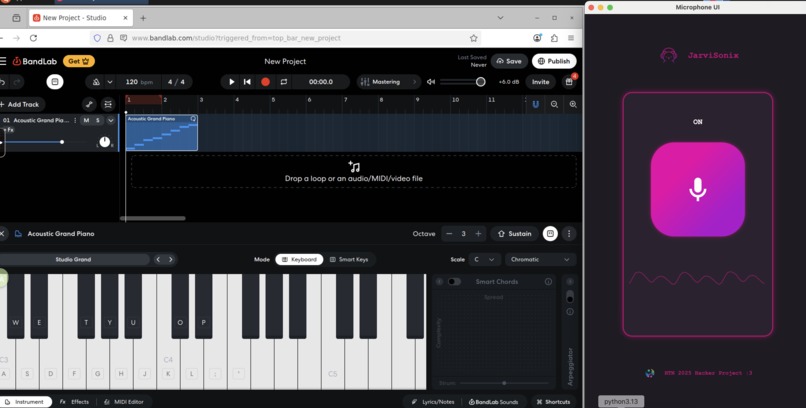
BandLab and JarviSonix UI


Inspiration
Our whole team loves music, but we realized that not everyone has the training or access to traditional tools needed to compose. Digital Audio Workstations (DAWs) can feel intimidating if you don’t know music theory, and for people with visual impairments they can be nearly impossible to navigate. We wanted to create a way for anyone to turn the simple act of humming or tapping into real music into something that is accessible, instant, and fun!
What it does
Our app turns natural sounds into full music tracks without a single click. The user simply says the name of an instrument, then hums a tune or taps a rhythm. The voice agent detects the instrument, records the audio, and converts it into a MIDI file using Spotify’s Basic Pitch. That MIDI file is automatically uploaded into BandLab Studio, where our computer agent assigns the correct instrument and plays it back. In just a few seconds, a raw musical idea becomes a shareable, editable track online.
How we built it
PyQt: We created a simple UI in PyQt that allows the user to mute and unmute the microphone.
VAPI + OpenAI: We integrated VAPI, a voice agent, to listen for the user’s spoken commands. Through prompt engineering, we guided the agent to ask for an instrument, confirm it, and then prompt the user to hum or create a rhythm.
Spotify’s Basic Pitch Python API: We used the predict_and_save() function from Spotify’s Basic Pitch to process WAV recordings of the user’s hums. The ICASSP-2022 model transcribed the audio into symbolic notes, producing a MIDI file (and optional CSV) that captured the rhythm and melody.
Python + CUA (Computer Use Agent) + Docker: We deployed BandLab Studio inside a Linux VM running in Docker. Using Python, we set up a CUA agent that could interact with the VM as if it were a human user. Our local code transferred the generated MIDI files into the VM, and the agent automated BandLab to import the files and assign the correct instrument, completing the end-to-end pipeline from humming to playback.
Challenges we ran into
Setting up CUA across environments: Our first challenge was deciding where and how to run the Computer Use Agent. While CUA supports Windows and macOS locally, the cloud option only supports Linux. At first, we considered GarageBand (macOS), but that wasn’t possible in the cloud. This forced us to choose: run in the cloud with BandLab (Linux-compatible and accessible across OSes), or run locally on our laptops, which had heavier system requirements and limited storage. We initially tried the cloud VM, but when we couldn’t get sound output working, we migrated the setup into Docker locally, which our laptops were just able to handle.
Getting audio output from the VM: Sound was critical to our project, but neither the cloud VM nor the Docker setup produced any at first. Without audio, users couldn’t hear their creations. After lots of trial and error, we finally discovered the right environment variable configuration in Docker to enable sound streaming from the VM.
Dependency conflicts: We ran into frustrating dependency issues while configuring CUA. Package version mismatches and conflicting installs slowed us down, but we eventually resolved them to get a stable setup.
Accomplishments that we're proud of
- We built a fully hands-free music creation pipeline: speak an instrument, hum a tune, and hear it played back in BandLab without clicking anything.
- We got CUA running inside Docker with working audio output, something that took a lot of trial and error.
- We integrated multiple moving parts including VAPI, OpenAI, Basic Pitch, Docker, BandLab, and CUA into a seamless end-to-end demo within hackathon time constraints.
- We created something that is not only technically challenging, but also accessible to people without music theory knowledge or sighted access to DAWs.
What we learned
- How to design prompts so our voice agent produces consistent responses while sounding natural.
- How to use Spotify’s Basic Pitch API to transcribe humming and rhythms into MIDI files.
- The challenges of working with autonomous computer agents (CUA) including setting them up across cloud, local, and Docker environments, and guiding them to perform precise tasks inside a DAW.
- How to debug audio streaming in VMs/Docker, including configuring the right environment variables for sound output.
What's next for JarviSonix
- Add more expressive voice controls: let users say things like “make it jazz” or “add drums” to instantly re-style their track.
- Expand transcription to handle chords and complex rhythms for richer compositions.
- Strengthen the accessibility and collaboration features to make music creation easier and more social.


Log in or sign up for Devpost to join the conversation.