-
-
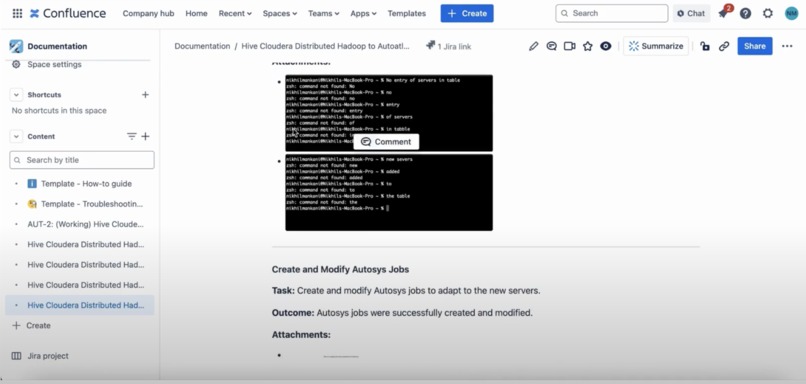
Generated Confluence Page
-
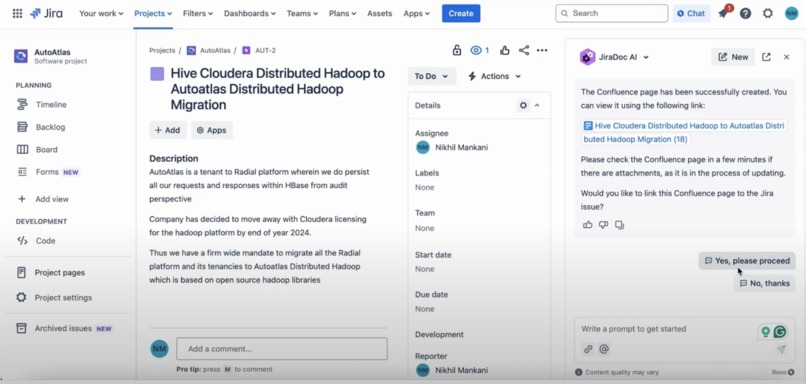
Confluence Link Created
-
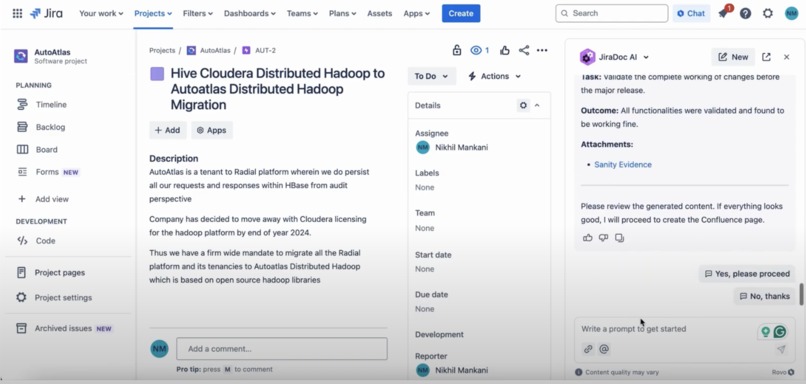
Content Generated and Check for Feedback


About the Project: JiraDoc AI 🌟
Inspiration 💡
Hi, we are Team Access Denied, and we’ve been exploring ways to improve task and documentation management for the past two years since we started our corporate life. One of the recurring challenges we’ve noticed with teams using Jira is the difficulty of turning tracked tasks into structured, meaningful documentation without spending hours manually compiling information.
We know that Jira excels at helping teams track progress and stay organized, providing a robust platform for task management. However, there’s an opportunity to enhance its capabilities by streamlining the creation of polished documentation, enabling teams to seamlessly transform their task data into well-structured insights without additional effort.
With JiraDoc AI, we are tackling this problem head-on, aiming to transform how teams manage their documentation by making the process smarter, faster, and more seamless.
What It Does 🤖
Picture this: your Jira board brimming with epics, tasks, and subtasks—each a piece of the puzzle that drives your project forward. But translating that wealth of information into meaningful documentation? That’s where the magic of JiraDoc AI begins.
🔍 Detailed Jira Data Fetching
JiraDoc AI dives deep into your Jira workspace, fetching everything from epics to the most nested subtasks using advanced JQL. Whether it’s a sprawling project or a tightly-knit sprint, the app captures it all with precision.

💡 AI-Powered Summarization
Next, the app employs the brilliance of Atlassian’s Rovo agent to distill that raw data into neatly structured and logically formatted Confluence pages. No clutter—just clarity.
🛠️ Interactive Refinements
But the story doesn’t end there. With JiraDoc AI, you’re in control. Want more details? Need a specific formatting tweak? The app listens and adapts in real-time, ensuring your documentation matches your exact needs.
📎 Attachment Automation
Manually linking Jira attachments to Confluence pages is a thing of the past. JiraDoc AI’s asynchronous processes handle uploads seamlessly, even for large projects with numerous files.
🔗 Seamless Integration
Every Confluence page created is instantly linked back to the corresponding Jira issue. Your team can navigate effortlessly between tasks and documentation, breaking down silos and boosting efficiency.
🔒 Security You Can Trust
In an era where data security is paramount, JiraDoc AI stands out. All operations occur within Atlassian’s ecosystem, with no external API calls. Your data stays safe, always.
How We Built It: Behind the Scenes 🛠️
The creation of JiraDoc AI is as fascinating as its functionality. Built on Atlassian’s Forge platform, the app takes full advantage of serverless architecture for scalability and efficiency.
💻 Rovo at the Core
The app’s intelligence is powered by Rovo, Atlassian’s AI-driven knowledge discovery system. From summarizing Jira details to enabling real-time refinements, Rovo ensures the app delivers smarter documentation every time.
🔗 Jira Search API
The app uses Jira’s advanced search capabilities to fetch data comprehensively, even across nested issues and subtasks.
⚡ Asynchronous Processes
Handling attachments for large-scale projects posed an exciting challenge. Using Forge’s async Q events, we achieved seamless uploads without compromising execution time limits.
🔒 Built for Security
From day one, we committed to a security-first design. By avoiding third-party APIs and leveraging Forge-hosted storage, JiraDoc AI ensures data never leaves Atlassian’s trusted environment.
Challenges We Ran Into 🚧
Along the way, we encountered some tough challenges that tested our problem-solving skills. One of the first hurdles was dealing with nested Jira data complexities. Parsing deeply nested sub-issues demanded a lot of robust logic to ensure everything was captured accurately and efficiently.
Then, we faced execution time limits when managing large volumes of attachments. To overcome this, we optimized the process by leveraging async Q events, ensuring the system could handle everything smoothly without slowing down.

Finally, the user experience posed its own set of challenges. We had to find the right balance between AI-driven automation and user feedback to ensure the documentation generated was not only accurate but also fine-tuned to the user’s needs. It was a delicate design challenge, but one we were determined to solve.
Accomplishments We're Proud Of 🎉
As we reflect on our journey, we’re thrilled to have created an end-to-end documentation tool that truly saves time and boosts productivity. It wasn’t always easy, but we tackled challenges head-on—like overcoming the complexities of nested data through advanced JQL handling. This breakthrough allowed us to streamline processes and make data more accessible. We also focused on developing prompts that strike the perfect balance between simplicity and power, ensuring they provide real-time feedback to users, making the entire experience smoother and more intuitive. Each milestone reinforced our drive to create something impactful.
What We Learned Along the Way 📚
As we embarked on this journey, we quickly discovered the incredible potential of Atlassian Forge. It wasn’t just a tool; it was the foundation that allowed us to build apps that are both secure and scalable, ensuring they could handle the demands of modern teams.
Diving deeper, we explored the art of asynchronous processes. With every iteration, we honed effective strategies to optimize these workflows, uncovering ways to make them faster, smoother, and more reliable.
But perhaps the most valuable lesson was understanding the people we were building for. Designing solutions that adapt to the diverse needs of teams taught us the true meaning of user-centricity. It wasn’t just about creating features—it was about crafting tools that empower teams to thrive in their unique ways.
Each of these lessons became the stepping stone toward building something truly impactful.
What's next for JiraDoc AI 🚀
We have many ideas for new features we'd like to develop in the future, such as:
Enhanced customization: Adding more formatting templates for diverse documentation needs.
Adoption of Caching: Using the caching feature (currently in EAP) at different places for maintaining the context
Integration with Bitbucket: Linking pull requests and commits to documentation for better traceability.
Analytics dashboard 📈: Providing insights into Jira activities and trends.


Log in or sign up for Devpost to join the conversation.