-
-
Game ON~

🐱 Cute Cat Runner – Project Story
🎯 Inspiration
I’ve always enjoyed the Google Chrome Dino Game, especially how simple yet addictive it is.
One day, I thought – what if we recreated it, but made it more colorful, fun, and cute?
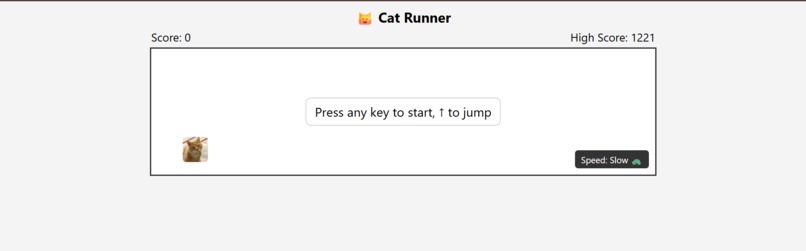
That’s how KittyJump was born — replacing the dinosaur with an adorable cat 🐾 and adding cheerful obstacles like bushes 🌿, mushrooms 🍄, and flowers 🌸.
📚 What I Learned
- HTML, CSS, and JavaScript Game Development basics.
- How to implement character movement and jumping mechanics.
- Using
getBoundingClientRect()for accurate collision detection. - Managing random obstacle generation for unpredictable gameplay.
- Local storage for high score tracking.
- Creating interactive UI elements like the Slow/Fast speed toggle.
🛠 How I Built It
- HTML – Structured the game container, cat character, score display, and control buttons.
- CSS – Designed a clean, minimalist look while keeping obstacles colorful and cute.
- JavaScript –
- Implemented jump physics for the cat.
- Generated random obstacles at varying distances.
- Added collision detection and game over logic.
- Kept track of scores and high scores using
localStorage. - Created a speed toggle for Slow 🐢 and Fast 🚀 modes.
- It wouldn't have been possible without ChatGPT's help.
⚡ Challenges I Faced
- Getting the cat to jump smoothly without glitches.
- Aligning obstacles so they all sit perfectly on the ground.
- Preventing false collision detection when obstacles have different heights.
- Making sure obstacle spacing felt natural and random instead of predictable.
- Balancing visual cuteness with the minimalist style.
📈 The Fun Factor
This project reminded me how small tweaks in design can completely change the mood of a game.
Adding flowers, mushrooms, and pastel colors transformed a plain survival game into something cheerful and lively.
The result is a game that feels both relaxing and challenging — perfect for a quick break.
Built with ❤️ using HTML, CSS, and JavaScript.
Built With
- chatgpt
- css3
- html5
- javascript
- vscode


Log in or sign up for Devpost to join the conversation.