-
-
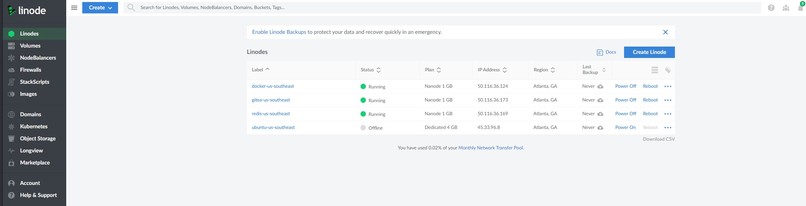
Active Linodes for shell demo purposes.
-
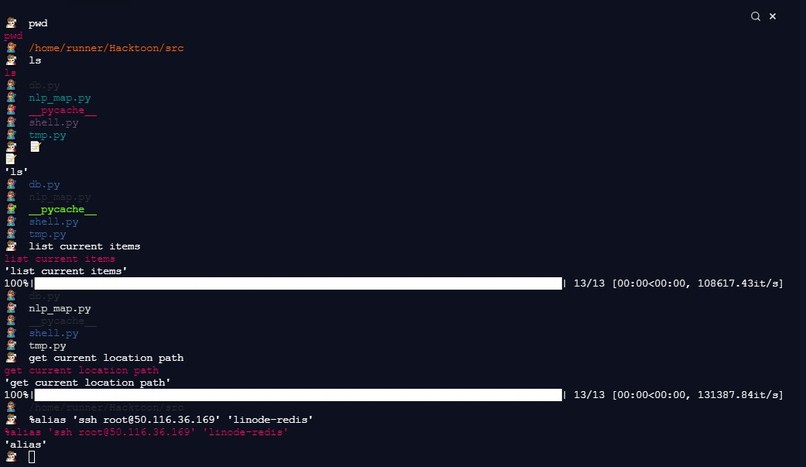
Demo inside Repl.it terminal
-

Logo


Inspiration 🦋
The goal was to bridge the gap between beginner users of Linux and the command line in general to the level of a frequent user. Therefore, creating a lightweight shell that uses visual elements and natural language interpretation occurred to us as a potential solution.
What it does
Natural Shell 🐚 provides a human-friendly medium to run basic Linux commands 🐧 without requiring the technical know-how 🧠 of CS students and professionals. This is accomplished primarily via two simplifications.
1) Each registered command is linked to a set of flexible emojis that closely resemble the action of said command. This allows interpretations of emojis or even combinations of emojis and text into valid commands, which are automatically executed in the background.
2) Each command can also be inferred from natural language, assuming the sentence is clear and unambiguous. For example, "where is my location" will be translated into "pwd" quietly. Even without matching an exact training sentence, the user-input will activate the command with the closest document similarity scores.
How we built it 🏗️
The shell is written in Python 🐍 100%. Reduced to its most basics, the shell is an infinite while loop to replicate REPL behavior. Inside the loop, a hierarchy of interpreters check which way is most appropriate to execute the raw user input. If the user already inputs valid commands, Python simply relays the commands directly to the underlying terminal. Otherwise, emoji-to-command translators and natural language interpreters will potentially handle the input.
Several ✨magic commands✨ are specifically made for the shell. For example, users may create aliases to exact and valid lines of commands. Some pre-linked aliases include ssh into virtual machines (VM) hosted by Linode and starting Docker containers.
The history of user commands is stored in a distributed Apache Cassandra database 🗃️, hosted by Datastax Astra.
Challenges we ran into 🚧
The main challenge is finding the correct Python libraries to handle NLP interpretation. Attempts to emulate keyboard keypresses was made, but that is still a work-in-progress. The team suffering from shrinkage of members during the event reduced the total number of man-hours available.
Accomplishments that we're proud of 🏆
The proudest aspect is integrating multiple technologies together, especially cloud technologies and Docker, to aid the shell.
What we learned 💡
💠 Coding a shell from scratch
💠 Applying NLP and statistical measures to execute correct commands
💠 How to use a distributed database like DataStax Astra
💠 Using Docker Desktop and Jina AI to apply real use of the shell
What's next for Natural Shell 🔮🕰️⌛
📅 Fix leftover bugs for magic commands and possibly add more useful magic commands.
📅 Implement multilingual support
📅 Allow setting different themes


Log in or sign up for Devpost to join the conversation.