-
-
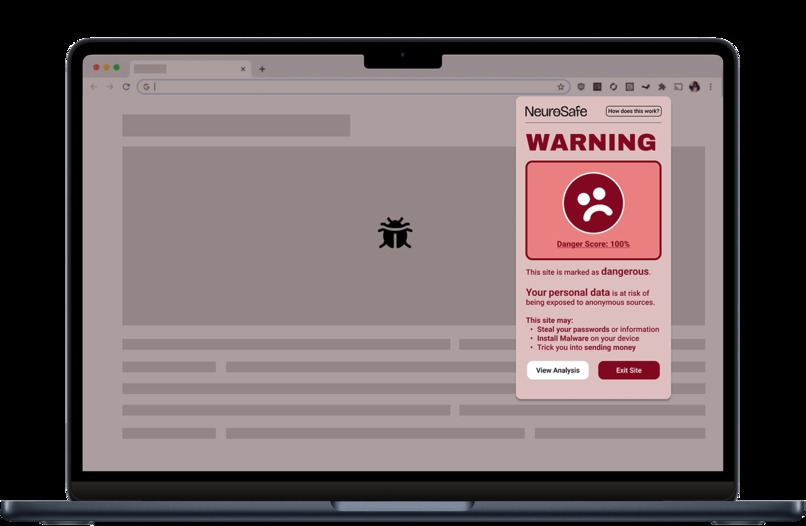
Project Overview
-
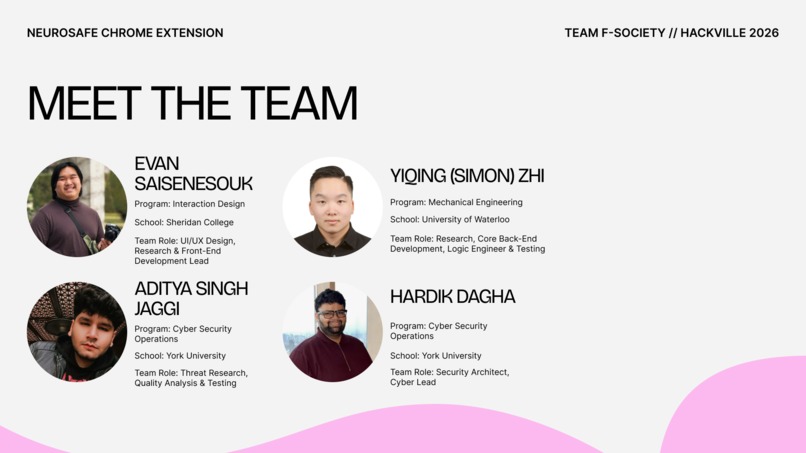
Team Members
-
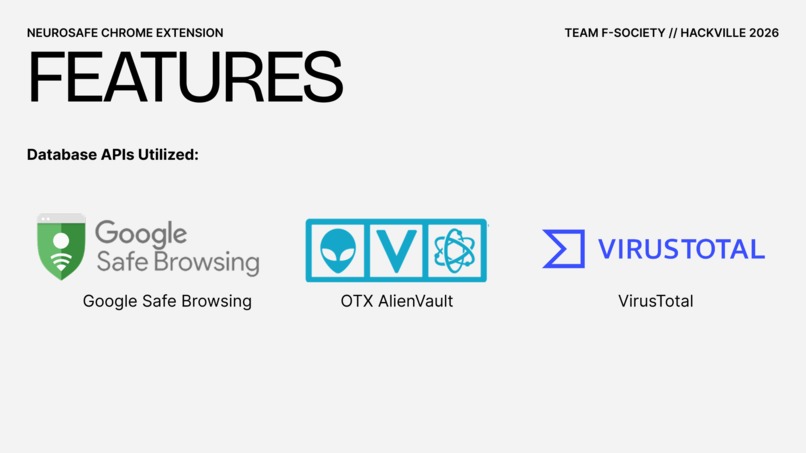
Database used
-
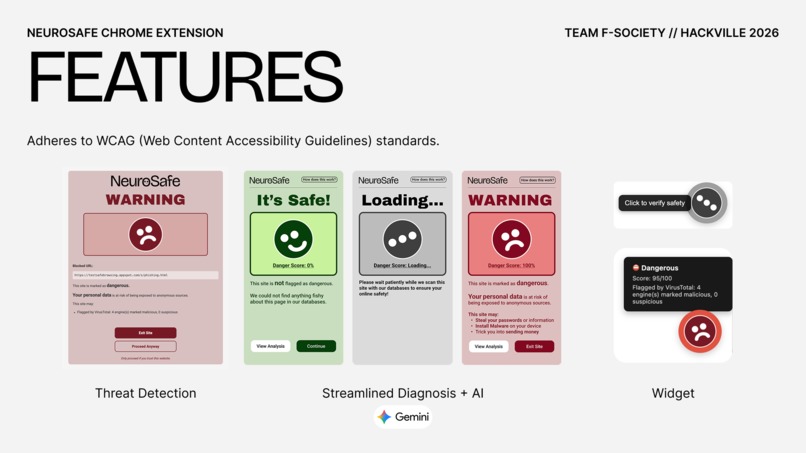
Features


Inspiration
Phishing emails and text messages have become pervasive in today’s digital environment. A research paper shows that an estimate 3.4 billion spam emails sent everyday [1]. In Canada, Phishing scams often pretend to be trusted services like CRA tax refunds and Interac e-Transfer notifications, and they are designed to create urgency and confusion. In fact, the Canadian Anti-Fraud Centre received 108,878 fraud reports in 2024, with over $638 million in reported losses, showing how common and costly these scams are [2]. For people with cognitive accessibility needs such as ADHD, autism, or dyslexia, phishing can be even harder to detect because it depends on fast decision-making and small details, and research also shows that lower cognition and weaker executive function are linked to higher phishing vulnerability [3]. Together, those trends are leading the idea of building a google extension to help the people with cognitive accessibility to have a better and saft environment.
We also looked into sites like A11Y and the official WCAG website to inform our design decisions and educate ourselves on how to design with accessibility in mind to ensure that our site is able to be used by those with cognitive disorders and those without allowing for multiple types of user to be able to access, learn, and be protected.
What it does
NeuroSafe is a Chrome extension designed to protect users from phishing and malicious websites, with a strong focus on cognitive accessibility. Our main goal is to inform and educate users instead of only blocking content, so users can build long-term online safety habits. When a user opens a suspicious webpage or clicks a risky link, the extension analyzes the site and displays a streamlined, highly visual warning experience (such as clear risk levels, simple explanations, and recommended actions). This is especially helpful for people with ADHD and other cognitive disorders, because it reduces decision overload and makes the safe choice easier to understand.
In addition to real-time detection, NeuroSafe includes an education page that teaches users common phishing patterns, helping them recognize scams on their own over time. Finally, the extension uses databases and domain checks to identify fake CRA-related phishing websites, and it can be supported with AI-assisted analysis to further detect suspicious page structures, misleading content, or hidden phishing behavior.
How we built it
After conducting some primary and secondary research into cognitive disorders, accessibility design standards, and our Canadian centric topic of CRA phishing scams, we prototyped the design in Figma to determine the layout of elements which we then ported over to VScode to develop the app. We were able to use API keys for three cyber security databases: Google Safe Browsing, OTX AlienVault, and VirusTotal. We used Ai tools like Github CoPilot and ChatGPT to help us fetch these APIs and realize our design and interaction ideas to implement them in a packagable file to be uploaded to Google Chrome Web Extensions.
Challenges we ran into
We all come from different backgrounds and fields but none of us are professional back end programmers. Nevertheless, we were able to overcome this obstacle by playing to our strength by covering a topic our Cyber Security team members were familiar with and by employing design strategies to organize ourself like the Double Diamond method (Discover, Define, Develop, Deliver). We also utilized GitHub copilot to fill in the gaps of our knowledge and to bring our ideas and prototype to life with a live functional chrome extension. The only caveat however is that at the moment it only works on the client side since we had issues uploading it to a proxy server like Vercel as our keys were not consistently working. Due to the time constraints we decided to test only with the running version on one of our team member’s devices to show the proof of concept.
Accomplishments that we're proud of
We are proud that we successfully built a working Manifest V3 Chrome extension that can detect suspicious websites while keeping the experience simple and accessible for users with ADHD and other cognitive disorders. We implemented a full HTML parsing pipeline using Chrome Offscreen Documents, allowing our extension to analyze real page structures such as login forms, hidden fields, and suspicious links instead of relying only on visible text. We also created a highly visual warning interface that reduces decision overload by showing clear risk levels and recommended actions. Finally, we are proud that our project includes an educational learning page, helping users understand phishing patterns so they can stay safe independently in the long term.
What we learned
- Learned how to make and code chrome web extensions
- Implemented the Double Diamond methodology
- Educated each-other about each of our different backgrounds and worked together as a team using our wide skill set
- Learned how to design for users with cognitive impairments as well as its importance, which will inform our future work
What's next for NeuroSafe
-Ideally we would be able to host server the online to allow anyone to use the extension if we were to publish it on the Google Web Extension store. -In the future we would like to conduct thorough user testing and interviews with people with a variety of users with different levels and types of cognitive disorder. -Additionally we would likely try to implement more features to cater to the needs of those with ADHD and Autism. While also evaluating our features for any changes or additions needed to be madento improve the experience
References: [1] AAG IT Services, “The Latest Phishing Statistics (2025),” AAG IT Services, 2025. [Online]. Available: https://aag-it.com/the-latest-phishing-statistics/ (accessed Jan. 17, 2026). [2] Government of Canada, “Fraud Prevention Month 2025,” Canada.ca, 2025. [Online]. Available: https://www.canada.ca/en/services/policing/fraud.html (accessed Jan. 17, 2026). [3] E. Pehlivanoglu, A. Y. Pehlivanoglu, J. I. Karlawish, and M. K. Wolk, “Phishing vulnerability compounded by older age, apolipoprotein E e4 genotype, and lower cognition,” PNAS Nexus, Oxford Academic, 2024. [Online]. Available: https://academic.oup.com/pnasnexus/article/3/1/pgae001/7486223 (accessed Jan. 17, 2026). [4] VirusTotal, “Upload,” VirusTotal. Accessed: Jan. 18, 2026. 𝑂 𝑛 𝑙 𝑖 𝑛 𝑒 Online. Available: https://www.virustotal.com/gui/home/upload [5] AT&T Cybersecurity, “OTX AlienVault,” Open Threat Exchange (OTX). Accessed: Jan. 18, 2026. 𝑂 𝑛 𝑙 𝑖 𝑛 𝑒 Online. Available: https://otx.alienvault.com/
Built With
- css
- figma
- google-safe-browsing
- html
- javascript
- otx-alien-value
- virustotal
- vs


Log in or sign up for Devpost to join the conversation.