-
-
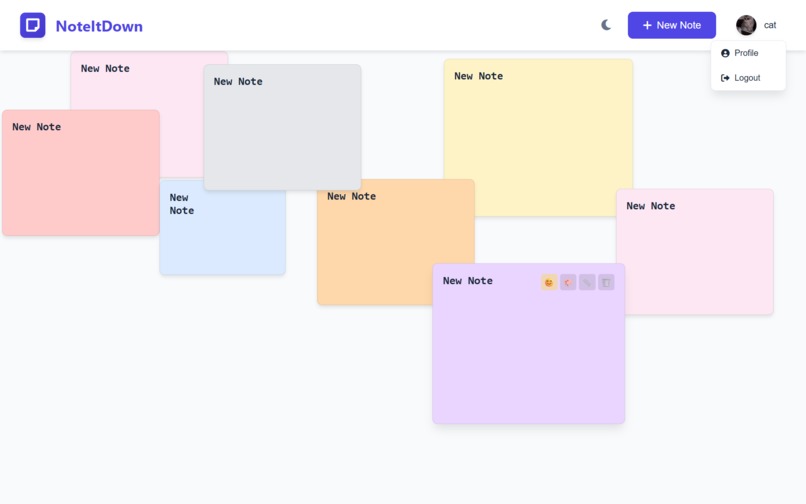
Cute, right??

📖 About the Project: NoteItDown — A Personal Notes App
"Sometimes, all you need is a spark — and the right tools to guide your fire."
🎯 The Real Inspiration
The story behind NoteItDown is very personal and simple — I’ve always wanted a cute, easy-to-use, and customizable notes app that actually works smoothly and looks nice. Most note-taking apps I’ve seen were either too dull or too complicated. I wanted something more me — something that feels friendly and beautiful while still being functional.
But I didn’t know how to build it completely on my own.
That’s where the Kiro Hackathon changed everything. It gave me the space and push to finally bring this idea to life. I didn’t build NoteItDown completely alone — and that’s the beauty of this journey. I used AI tools like ChatGPT to guide me step by step, and the Kiro platform helped me organize, learn, and build.
This project is proof that you don’t need to know everything to get started — if you’re willing to learn and ask for help, you can build amazing things.
🧠 What I Learned
Even though I used AI support and tools, I still learned a lot through the process:
- How a full-stack app works (frontend, backend, and database)
- Setting up authentication using JWT and bcrypt
- Creating a clean UI with customization features
- Working with MongoDB Atlas and environment variables
- Using Vercel for cloud deployment
- Debugging, experimenting, and improving logic with real-time support from ChatGPT
Using these tools actually helped me understand the why behind the code, not just the how. I didn’t memorize — I learned by doing.
🔨 How I Built It (with Help!)
I used AI tools throughout the journey:
- 💡 ChatGPT helped me write, fix, and understand the code.
- 🧩 Kiro gave me a structured space to build and experiment.
- 🛠️ I used Node.js, Express, MongoDB Atlas, and Vanilla JavaScript for the tech stack.
- 🌐 Deployed the app on Vercel with cloud storage.
The result is NoteItDown — a colorful, user-friendly notes app with:
- 🔐 Secure login/register
- 📝 Create, edit, and drag notes
- 🎨 Custom colors and sizes
- 😊 Emoji support
- 🌙 Light/Dark theme
- 👤 Profile image upload
- ☁️ Cloud sync with MongoDB
- 📱 Mobile responsive design
Check the full feature list and setup in the README.
🚧 Challenges Faced
- I wasn’t sure how to start from scratch, so I leaned on ChatGPT and Kiro for help.
- Debugging and deploying sometimes got confusing — especially handling JWT, bcrypt, and
.envfiles. - Designing a user-friendly drag-and-drop note system was tough, but very satisfying once it worked.
- Balancing learning and building was challenging but rewarding.
💬 Final Thoughts
NoteItDown is more than a project — it’s a testament to learning through tools, to creating with curiosity, and to building even when you don’t have all the answers.
If you're someone who feels stuck or overwhelmed — remember:
You don’t have to do it all alone. Use the tools, ask for help, and just begin.
I'm proud of what I built, not because it’s perfect — but because I showed up, used what I had, and turned an idea into something real.
Built With
- chatgpt
- css3
- github
- html5
- javascript
- kiro
- renderer


Log in or sign up for Devpost to join the conversation.