-
-
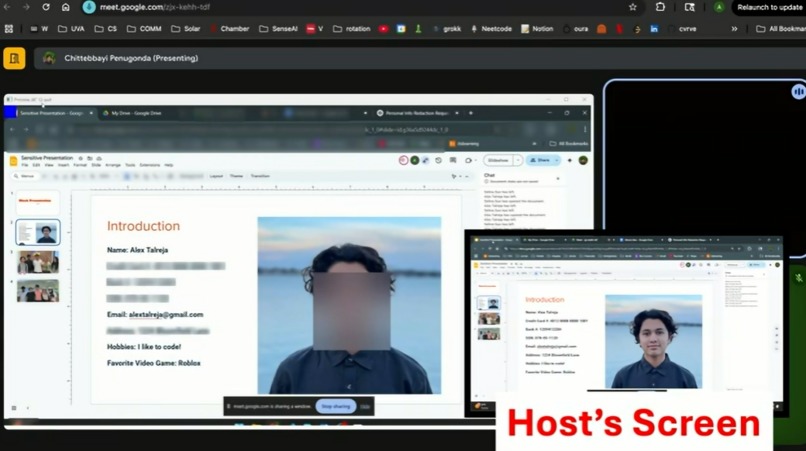
Live Blurring Demo
-
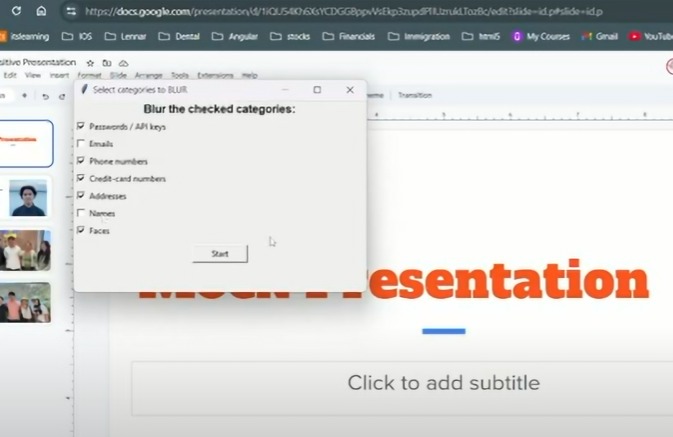
Customization Dashboard
-
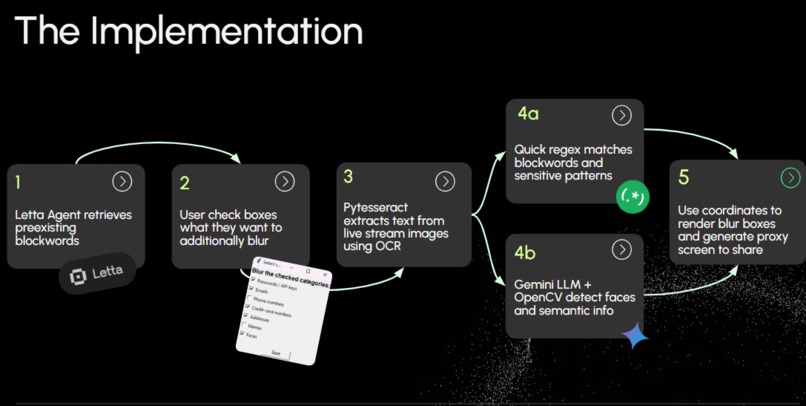
Implementation Diagram


Inspiration
With the spread of online video calling and thus, screen-sharing, we noticed how often passwords, API keys, or even faces of other people flash on a call before the user can react. We wanted a security net for screen-sharing that would serve to help prevent those accidents automatically, thus alleviating the pressure of relying on human reflexes.
What it does
Obscurify detects sensitive information on your screen and automatically blurs it when you want to screenshare. It works on both text and images, able to identify faces, passwords, names, addresses, and more. Obscurify can retrieve information from pre-defined lists of sensitive data and can allow the user to conditionally filter blurring for different categories of information with a simple checkbox panel. Fortunately, and with much difficultly, it runs fast enough for real-time conferencing.
How we built it
- Uses a Letta agent to retrieve personal information to hide from external curated block-word lists
- Uses tkinter for lightweight UI that allows users to choose additional items to censor
- Frames retrieved are split between two paths: PyTesseract OCR → regex match for private information Gemini Vision + OpenCV → face & semantic object detection
- Coordinates from both paths are merged and passed to an OpenCV blur renderer, which paints the boxes and publishes a proxy virtual screen/window that video calling apps like Zoom can pick up
- Adjustments for performance including image preprocessing, calculated delay, and threaded pipelines
Challenges we ran into
Achieving a workflow that processed frames fast enough to still have usage in live video conferences. We initially set up a flow that used two separate models per frame to render annotation boxes for faces and text, which caused the project to run extremely slowly. However, by adding threadpooling/asynchronous OCR, image downscaling, and using a faster model in combination with regex, we were able to significantly improve the frame rate. Also, we added image preprocessing to address problems with OCR accuracy on variable-resolution screens and different UIs.
Accomplishments that we're proud of
We are happy that we got a demo that works quick enough for its use case, as it is difficult to use an LLM like Gemini for such a niche task and be efficient for real-time streaming. If we were to have more time to work on Obscurify, we would seek to target a broader scope of censored information (profanity, inappropriate imagery, etc), interactive toggled blurs (using image segmentation), and using a custom pre-trained model to be more suited for this purpose, and thus more efficient.


Log in or sign up for Devpost to join the conversation.