-
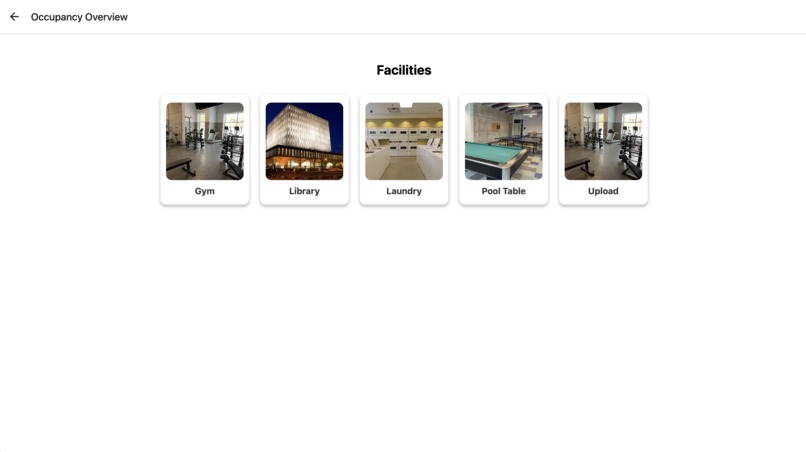
Home screen with icons for 4 facilities and an option to upload images
-
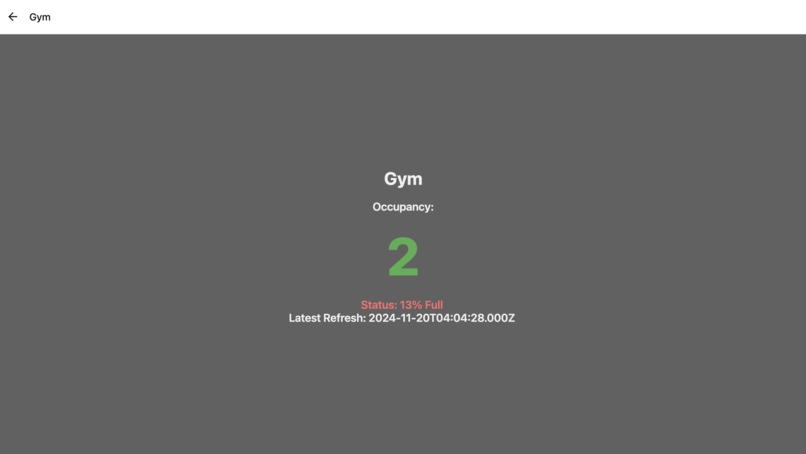
Each icon displays the location name, occupant numbers, and a status


Inspiration🤔:
Have you ever arrived at your favorite spot on campus, only to find it completely packed with people, lines stretching endlessly, and every seat taken? As fellow Waterloo students, we know that feeling all too well. The challenge of balancing time is something every student experiences, especially when starting a new journey and living by themselves. We don’t have the luxury of waiting hours in line just to grab lunch or access a service. The frustration of seeing valuable time slip away inspired us to think of a solution that prioritizes what students truly value: time and convenience.
What It Does👨🛠📋:
Octical is a mobile application allowing users to check the availability of commonly used facilities at Waterloo such as the gym, library, laundry room, and pool table. As a prototype, we allow users who are present at the facility to upload an image of the place. Our application will then detect the number of people in the image using AI software. Finally, other users can access this information to determine how busy the facility is, so they know whether or not the facility is open. Why go through all this effort to put the image when you can just display it to its users? We do this for user privacy reasons so that users aren’t constantly being watched by random strangers. In the future, if we can connect the application with a live camera feed, we would not require any person to upload a photo and could update automatically.
How we built it👷:
Frontend Application: For the frontend portion of the project, we decided to use React Native. We created our visually appealing website with an emphasis on practicability and simplicity. We connected our React Native App with an Express server to upload the images to a Vercel Blob with a POST request.
Backend Application: Using Vercel Blob to store the images uploaded from the front end, we retrieve them and feed them into the trained image recognition model to find the number of people in the image. This data is then sent to the front end to be displayed for the user. In addition to storing images, we sort them into folders based on where they were taken. We used the YOLOv8s image recognition model for the backend to train our model based on real data that we labelled.
Over the course of this project, we continuously used Github to sort and manage our code, giving us a complete backup in case of errors.
Challenges we encountered 😵🚧🏋️:
A major roadblock we encountered was trying to start an iOS app on Windows. One of our front-end developers had a Windows laptop so it made it extremely hard to test the code every time there were minor changes. Additionally, for some members of this team, it was their first time coding on TypeScript, so we faced issues in downloading the required programs and learning the language in the short time we had. In terms of the front-end, while creating the upload page, we struggled in receiving a photo input from the user and then relaying the information into the backend. As well, we faced some hurdles in the spacing and arranging the icons so that they would look visually appearing on all kinds of devices.
Accomplishments we are proud of 🎉🏆:
We are proud of successfully connecting the front-end and back-end of the program. Despite the challenges we encountered, we preserved and feel accomplished to have created an app that we, and others, would find useful in our day-to-day lives at the University of Waterloo.
What we learned☝️🤓🧑🏿🎓:
React Native was a program that most of our members had no prior knowledge of. Learning something from scratch was an extremely time-consuming and steep challenge. The initial startup of the app was extremely confusing, consisting of various files titled, App.tsx and App.json. It took time to understand how React Native works and how it differs from React.js, especially with mobile-specific features like navigation and platform-specific components. We spent hours learning the language, fixing errors, and experimenting to finally understand the basic components of React Native. Over time, we learned how to use libraries like React Navigation and manage data efficiently. By the end, we understood the structure of a React Native project and effectively made a desirable app.
What’s next✈️:
- Expanding on the limitations of our website, for example, the limited number of places recorded.
- Scaling our project beyond the school campus
- Adding prediction models that predict if an area is busy or not during a certain time, based on past information about crowds. This would be particularly useful when a photo hasn’t been uploaded in a while.
- Adding push notifications to alert users about crowd updates in their favorite spots, helping them make informed decisions on the go.
- Implementing a feature for users to rate facilities and provide feedback, creating a more interactive and community-driven experience.
- Adding a system for the library for users to find specific seats in places.


Log in or sign up for Devpost to join the conversation.