-
-
Logo
-
Glasses
-
Wall outlet with relay
-
Debugging
-
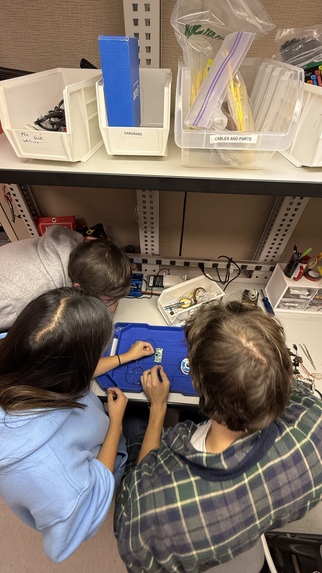
Soldering with the team


💡 Inspiration: The Magic of Simple Gestures 💡
We wanted to explore the idea of interacting with physical objects as easily as tapping icons in Augmented Reality (AR).
Instead of needing voice commands, proprietary apps, or complex hardware interfaces, we aimed for the most simple, intuitive gesture possible: just look at a thing and point at it. This natural movement bridges the gap between digital interaction and the physical world.
🚀 What PointAR Does
PointAR is a functional prototype demonstrating a seamless "look + point = action" workflow.
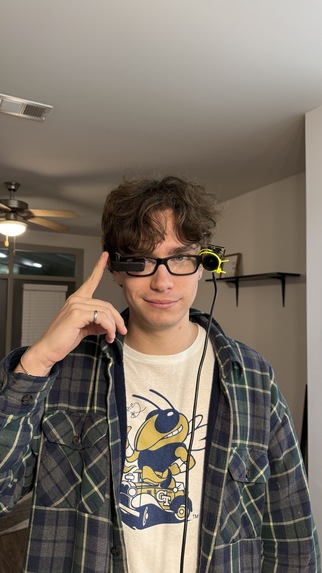
The user wears a pair of smart glasses with an attached camera. The glasses display a real-time overlay of the camera feed, providing an immediate AR experience:
- Object Detection: Bounding boxes highlight detected physical objects (in this case, lamps).
- Fingertip Cursor: Real-time fingertip tracking is visualized as a cursor overlay.
When the user’s fingertip lines up with a detected lamp and a pointing gesture is registered, the system sends a signal to a Raspberry Pi, which activates a wired relay, toggling the lamp’s power outlet ON or OFF.
🛠️ How We Built It: From Vision to Action 🛠️
We successfully created a full vision → interpretation → network → hardware → real-world action chain.
1. The Wearable Setup
We mounted a camera to the smart glasses, using them as an inexpensive, head-mounted AR display. This display shows the user exactly what the CV system is interpreting: the live camera feed plus the bounding boxes and fingertip tracking overlay.
2. The Computer Vision Core
We trained a custom computer vision model to reliably detect:
- Lamps from various angles and lighting conditions.
- Fingertips acting as a cursor element.
We employed a lot of iterative design to find the most reliable method:
- Initial Approach: QR codes for simple detection.
- Second Iteration: Finger direction ray-casting.
- Final Solution: A fully custom fingertip-as-cursor detection model for maximum accuracy.
3. Hardware Integration
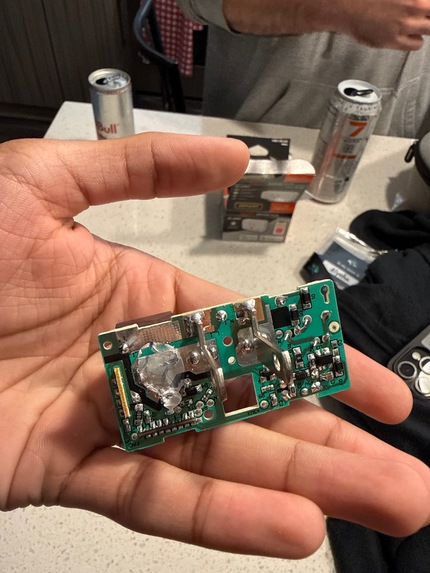
The CV model runs on a connected computer. Upon detecting a pointing gesture at a target object, it sends a network message to a Raspberry Pi. The Pi then controls a wired relay connected to a power outlet, completing the loop by toggling the lamp's power.
🛑 Challenges We Faced
We tackled a wide range of hurdles, from complex computer vision issues to the chaos of real-world hardware integration:
- CV Instability: Training a model to reliably identify one specific lamp from the head-mounted, shifting camera perspective.
- Fingertip Tracking: Achieving stable fingertip tracking despite fixed focal lengths, awkward hand positions, and individual variability.
- Hardware Scramble: Hunting down relays that wouldn’t explode and finding a soldering iron at a hackathon to wire the Pi to the relays.
- System Latency: Connecting the CV processing system to the Raspberry Pis with consistently reliable, low latency.
- Safety & Reliability: Keeping the custom-wired hardware from falling apart (or catching fire) and managing electrical components that ran surprisingly hot.
The good news: Despite all of this, we built a fully functioning prototype!
✅ Accomplishments We’re Proud Of
Our persistence led to several major successes:
- Functional AR Prototype: Building a functional AR-style pointing interface using entirely off-the-shelf components.
- Custom Models: Training a custom, real-time lamp detection model and creating a fingertip-driven cursor that aligns accurately in a head-mounted display.
- Rapid Iteration: Going from QR codes → gesture ray-casting → full fingertip detection within the duration of the hackathon.
- Hardware Success: Wiring the Raspberry Pi to a relay and successfully toggling a real lamp's power.
- Seamless Workflow: Making the entire “look + point = action” interaction feel truly seamless and intuitive.
- Safety First: Not blowing anything up (a major accomplishment in itself!).
🧠 Key Takeaways: What We Learned
The process taught us invaluable lessons in vision, hardware, and design:
- Model Training: Training models on a single object requires a surprising amount of images to account for lighting and angle variability.
- Wearable CV: Fingertip tracking from a head-mounted, first-person view is far more complex than it sounds.
- Integration: How to integrate wearable displays with real-time CV overlays for immediate user feedback.
- Hardware Safety: The safe, reliable methodology for connecting Raspberry Pis to high-power relays.
- Design Value: The immense value of iterative design—keep pushing new ideas when old ones fail.
⏭️ What’s Next for PointAR
The potential for simple, gesture-based control of the physical world is massive. Our future goals include:
- Object Expansion: Expanding object detection beyond just a single lamp to control multiple devices.
- Precision: Adding gaze tracking for more precise “look + point” interactions.
- Miniaturization: Miniaturizing the processing hardware so the CV system can run entirely on-device.
- Robustness: Improving the detection model's robustness in highly dynamic and uncontrolled environments.
- Tidiness: Cutting down on cables, zip-ties, and overall hardware bulk for a more refined user experience.
💬 TLDR
Finger go point, light turn on/off.
Built With
- cv
- flask
- gpio
- mediapipe
- python
- raspberry-pi




Log in or sign up for Devpost to join the conversation.