-
-
Project Logo
-
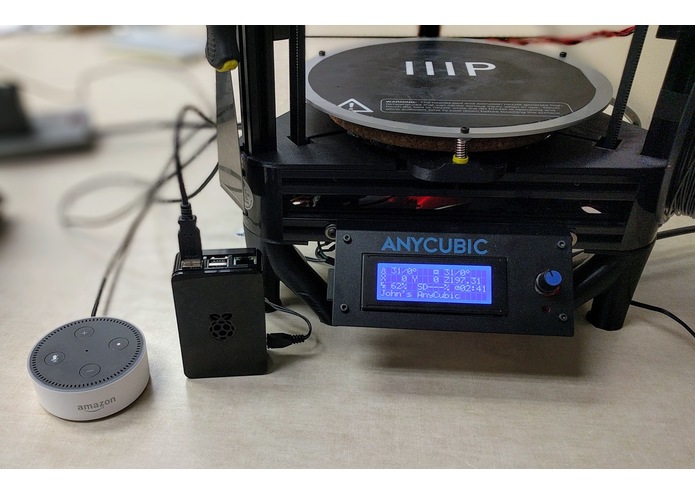
Devices Involved


Inspiration
Our main idea for this hackathon stemmed from our group's love affair with 3D printers. The number of steps it takes to go from a 3D model to an object in your hand is very intimidating for beginners. It is not unreasonable for you to want to skip these steps altogether. While this tool may be somewhat limiting to those with previous 3D printing knowledge, it creates a more accessible entry point for those new to the hobby.
What It Does
Printed Word acts as a seamless bridge between your words and the very code that runs 3D printers. By integrating a home assistant into the process of 3D printing, we can remove the intermediate steps that usually require the user to learn 3D modeling, slicing or in many cases both to get started printing. This is all while leaving room for growth in the complexity of what Alexa can understand and ultimately do with a given vocal command. Whether it be to change advanced printer settings, or simply telling the printer to preheat for you. The boundaries are truly endless.
How We Built It
We began our project by first allowing our Raspberry-Pi (imaged with OctoPrint) to be discoverable via the internet and connected to our test 3D Printer which allowed us remote access to OctoPrint via the web interface it provides. There is a secure API-key generator, as well as a login, to ensure your Raspberry-Pi and 3D printer are safe. This is a very important step on our list of goals to reach because if we cannot communicate to the Raspberry-Pi, we have no way to control the printer.
Creating new skills for Alexa on the Amazon Echo Dot allowed us to send custom API calls when we say a specific phrase. For example, you could say “Alexa, tell the 3D printer to auto-home” and in response, Alexa would give you a confirmation and then behind the scenes, an API call would be made to the OctoPrint and directed to auto-home the axes. Several different pronunciations can be added to Alexa’s expected vocabulary in order to allow several different approaches/commands to get the same outcome/direction. As such, the API of OctoPrint must be learned and implemented into different Alexa skill Intents so that they can be deployed and used on your Alexa enabled device.
Challenges We Ran Into
The largest roadblock we ran into during our development process was our ability to gain communication from one device to the other. We finally solved this issue having a 3rd party service communicate to the Raspberry-Pi and continually monitor the IP-address.
Our Proudest Moment
Being able to say “Alexa, tell the 3D printer to auto-home”. This was when all our eyes lit up and there were high fives all around. This was the very first command we were able to have the 3D printer execute by simply giving a vocalized command to Alexa. This was the point that we really knew that the idea was viable, and we now had a process by which we could create and add new features.
What We Learned
We came into this project with little to no experience in AWS, Alexa Skills, REST API calls, HTTP Requests, OctoPrint, server management, and I'm sure a lot of other things. But coming out of the hackathon, we each are a lot more comfortable with those skills. Being exposed to these ideas in a baptism by fire method allowed us to thrive.
What's Next for Printed Word
We see the skills we have taught Alexa being the very beginning of what is possible if this avenue was further explored. Having the conversation with Alexa being more fluid and adaptable would be very beneficial to grow the possibilities of this voice-to-3D-print idea. The ability for one with very limited knowledge in 3D printing to be able to access this rapidly growing technology with the benefit of their home assistant is a solid step towards the ubiquity of 3D printing, at-home manufacturing, and industrial applications.
The next major step to adding functionality to this hack would be to add access to the well-known content website Thingiverse. This is a social website where users can share their 3D model creations with the Internet. The end result would be to give the user the ability to tell Alexa to print their last “favorited” 3D model. Thingiverse has an in-depth API that gives us access to user info and controls similar to the OctoPrint API. Being able to favorite a post on a website, and then telling your home assistant to print that object is quite literally taking out multiple steps in order to receive a 3D printed object.
Built With
- amazon-alexa
- anycubic
- javascript
- json
- octoprint
- raspberry-pi
- rest-api


Log in or sign up for Devpost to join the conversation.