-
-

Process Notifier
-
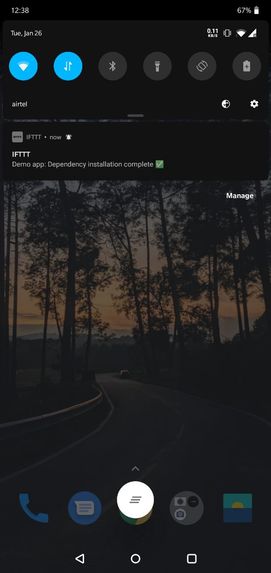
User being notified for completion of task via push notification
-
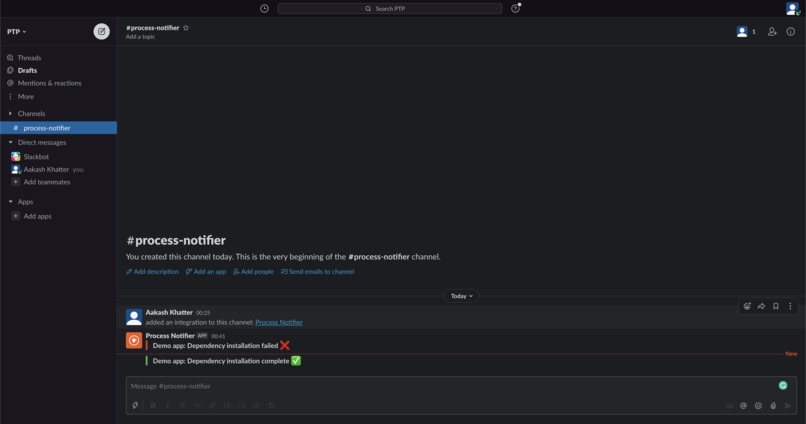
User being notified for completion and failure of task via slack


Inspiration
- In the company I work for, running a fresh project build used to take a good 15-20 minutes during which I usually went to the pantry to get some coffee or to the game room to play a quick game of FIFA only to come back after half an hour to realize that I made a typo and the build failed.
- I wanted to make something pluggable so that I could get a notification on my phone when a long-running command on my terminal had finished (either succeeded or failed).
What it does
Simply put, it notifies you of any command or task being run on your machine via the communication channel of your choice. As of now, it supports push notifications, Slack, and email.
How we built it
Story of building it
- While reading the postman docs for the hackathon thinking about ideas, I came across this public collection of APIs on webhooks and I realized that these monitors could be used as cloud function and that this was a good chance for me to finally make build notifier.
- While researching more I realized that in order to send notifications to a device you needed to have an app installed and I found that using IFTTT you could easily send notifications. But not everyone wants the IFTTT app on their phone so I decided to make more channels of communications like slack and email so that users can choose which medium/channel they want.
- This project is made by keeping extensibility in mind so adding a new communication medium to Build Notifier is a piece of cake.
How does it work
 To view a full-sized image, visit here
Setup
 To view a full-sized image, visit here
- Consumers of this project need a few keys for authentication around the channels they want to utilize and of-course the Postman API Key for the notifier to work.
- The
_setuprequest uses the Params view for the developers to quickly enter the keys and just hit Send for the entire setup to be done by the request.
Developer Workflow
- The bash script is provided with the project for quick setup of the notifier in your terminal, just include it in your .bashrc / .zshrc, put the webhook URL in it and the channels you want to be notified on (such as push notification/slack).
- Run your build/process commands as you normally along with the notifier in the terminal and provide any error/success messages that you'd want to pipe to your channel. For example,
npm i; notifier -s "Demo app: Dependency installation complete ✅" -f "Demo app: Dependency installation failed ❌"
- Since webhook is an API, you can even include it in your local build processes that aren't running in the terminal such as Android Studio/Xcode, and make the API call when you catch an error in your code/build failures.
Internals of Process Notifier
- When the webhook is called, it triggers a monitor run which essentially runs the process notifier collection (in layman terms, this is acting as a cloud function).
- The business logic in the
Routerrequest determines what all are the channels you've selected and by using advanced Postman APIs such aspm.setNextRequest, it validates the channels it supports and then loops over every channel and calls the request which can process data for that channel. - The channel requests are standalone, thus making the channels flexible in nature and are aware of how to handle the data passed along to it and then transform the data in a format that the corresponding channel API needs and then sends it along gracefully.
Challenges we ran into
- The biggest challenge in building Process Notifier was to figure out ways to make the whole UX of setting up and using the product easier for the fellow developers.
- Figuring out the Webhook creation API and understanding advanced workflows in Postman.
- Not hitting monitor invocations limits. Had to create 2 new accounts on Postman since due to an error in the code the monitor got invoked more than 1000 times.
Accomplishments that we're proud of
- Simplifying the setting up UX to just one form-like interface, all built right into postman, we're using the
paramssection as a UI-based form for the developers. - Providing alternate notification channels for people who don't want to install IFTTT app on their phones.
- Building a self-hosted interface for devs so that they have full control and transparency in what the scripts do.
- Structuring the code in a way that adding a new communication channel is a piece of cake/walk in the park.
What we learned
- Learned that Postman is not just a tool to test out API calls but by leveraging some of its advanced features we can build useful tools/full-blown products to increase the developer experience and build automation workflows.
- Learned how bash scripts can be used to make the UX of the tool better and reduce friction for users.
What's next for Process Notifier
- Adding more communication channels to Process Notifier like WhatsApp, Telegram so that more developers can easily setup the notifier on their system with minimal effort.
- Create recipes/scripts to use Process Notifier to notify about a variety of tasks, expanding the scope to CI/CD, etc.
- Figure out how to ship or inform people of the future bug fixes, improvements, and feature additions.


Log in or sign up for Devpost to join the conversation.