-
-
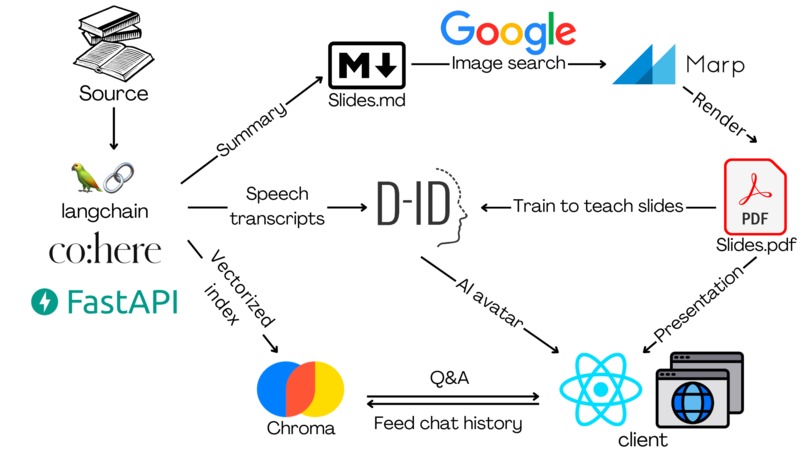
project procedure chart
-
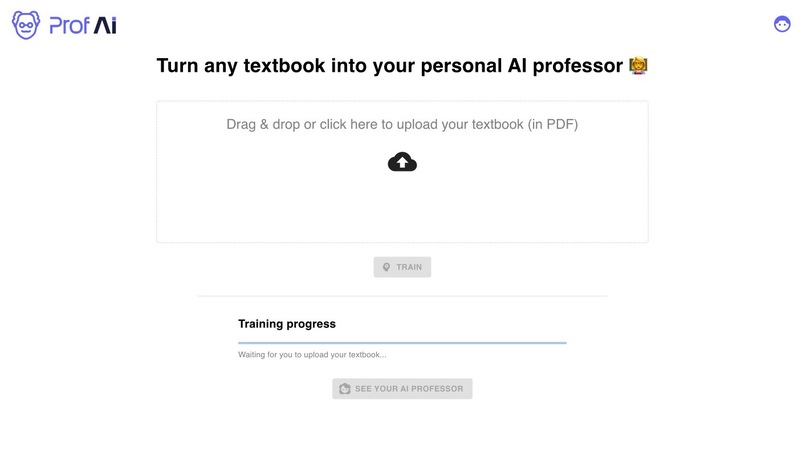
upload page
-
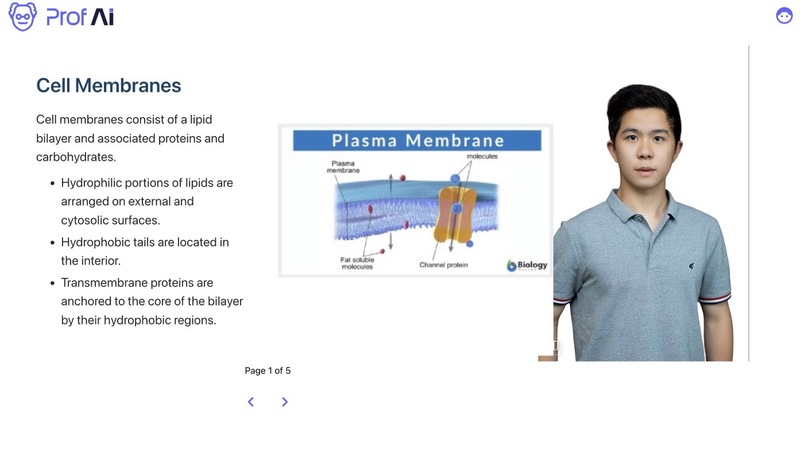
lecture page
-
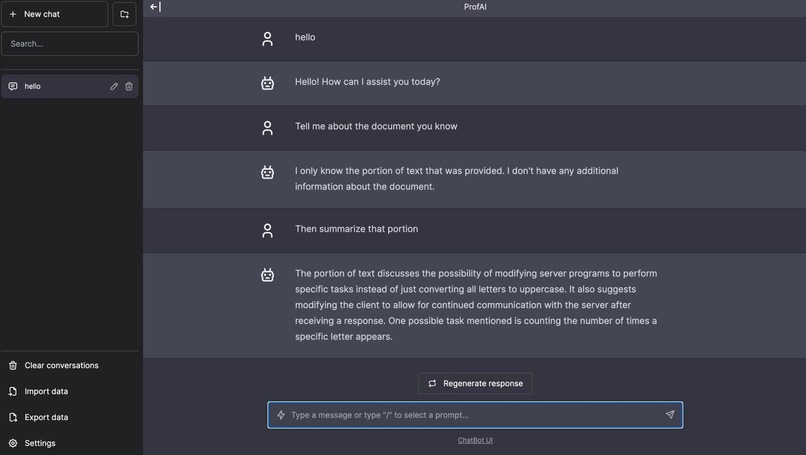
chat page


Inspiration
Reading textbooks are boring. As college students, we often fall asleep while reading chunks of texts. Or, when we're self-learning and reading a bunch of materials, we deseperately need someone to teach us. So we think, what if textbooks and any study materials can turn into AI professors that talk to you? This is how Prof AI comes.
What it does
Prof AI is an AI-powered web app that transforms your boring studying materials ( textbooks, papers and lecture notes, etc.) into an interactive learning experience that actually doesn't suck.
With Prof AI, your tedious textbook becomes:
- Your very own AI professor who teaches you stuff in a way you'll actually remember. Choose from tons of teaching styles - everything from humorous to engaging storytelling. Your AI prof knows how to keep things fun while helping the knowledge sink in.
- Presentation slides filled with pictures, graphics and animations that bring concepts to life on screen. Understand hard concepts in one glance of the crafted illustrations.
- A 24/7 Q&A space where you chat with your virtual professor and get instant answers to any questions you have. Stuck on a problem? Confused by a concept? Just ask and your AI prof will respond with helpful explanations using his or her vast knowledge.
How we built it
First of all, the user uploads a studying resource in any format, including documents, website links, videos, etc. We use LangChain loaders for different formats parse the resource to texts.
The parsed text goes into three pipelines:
Slides pipeline
We prompt-engineered OpenAI GPT to summarize the parsed text as slides in markdown format. Then, GPT extracts keywords from the generated slides, search for images relating to the keywords using Google Image Search, and insert the images into the slides. Finally, we convert the slides in markdown format into PDF using Marp, and render it in React using React-pdf.
Speech transcript pipeline
After feeding the parsed text and generated slides into GPT, prompt-engineered it to generate a speech transcript to teach the slides using the textbook material, as if it were a professor. We feed the speech transcript into Chat.D-ID, where it generates an AI avatar that reads out the transcript like a real person.
Q&A pipeline
We split the parsed text into chunks, convert them into text embeddings, and index them using the vector database Chroma. When user inputs a question, we do similarity search to get top-k chunks that are most similar to the question. Then, we feed the top-k chunks into GPT as context. GPT answers the question based on the given context.
To enable conversational memory, we update chat history after each Q&A, and feed the chat history into GPT as context. We use Chatbot UI as our UI for the Q&A space.
We use different chains in LangChain to achieve these three pipelines. We use Summarization Chain for slides & speech transcript chain. We use ConversationalRetrievalQAChain in Q&A pipeline.
Challenges we ran into
At first, GPT wasn't generating slides in an accurate markdown format. Also, the image keywords are irrelevant to the slides so the generated images can't match to the concept. We spent a lot of time refining our prompt to make sure GPT is generating output we want in a predictable way that fit into our pipelines.
Since our app has many components, putting them all together was complicated. For example, after we have the slides markdown generated, we still need to go through a series of steps to get it on the screen: convert to PDF using Marp -> pass PDF as Blob in Fast API -> parse Blob to PDF in React -> render PDF in React-pdf. Implementing this series of steps took us quite some time.
Accomplishments that we're proud of
We are amazed by how accurate the generated slides covers the textbook material and how relative the generated images illustrate the concepts. It seems like they are made by real professors who understand the textbook. Also, we are impressed by how realistic the AI avatar is, just like a real person talking.
What we learned
This is the first time any of us worked on building AI app. We discovered the power of LangChain, which empowers us to utilize the power of LLM in different ways. We also discovered the power of prompt engineering, training GPT to do the things that make this app a reality.
What's next for Prof AI
The speed to generate slides and AI avatar takes several minutes, which is quite long. We want to reduce this by parallelization of tasks using Kubernetes, and fine-tuning our own LLM model. These also allow the user to upload larger textbook and generate more accurate results.
In addition, we want to make our app a better study-centric app. We want to improve UI and build more features that make our app a better place to watch lecture and study new subjects.
Built With
- chroma
- co:here
- d-id
- fastapi
- javascript
- langchain
- marp
- openai
- python
- react


Log in or sign up for Devpost to join the conversation.