-
-
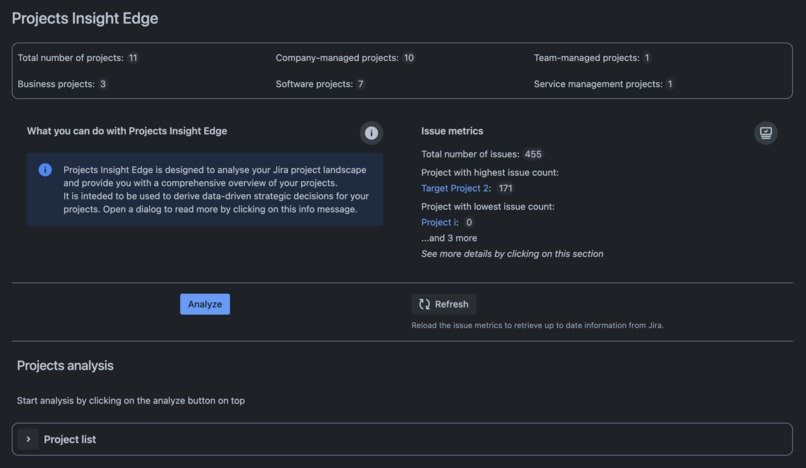
Insights Dashboard with basic data
-
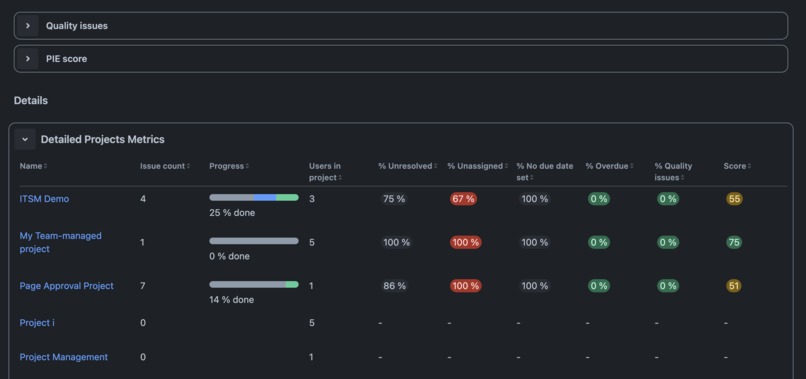
Insights Dashboard - results table
-
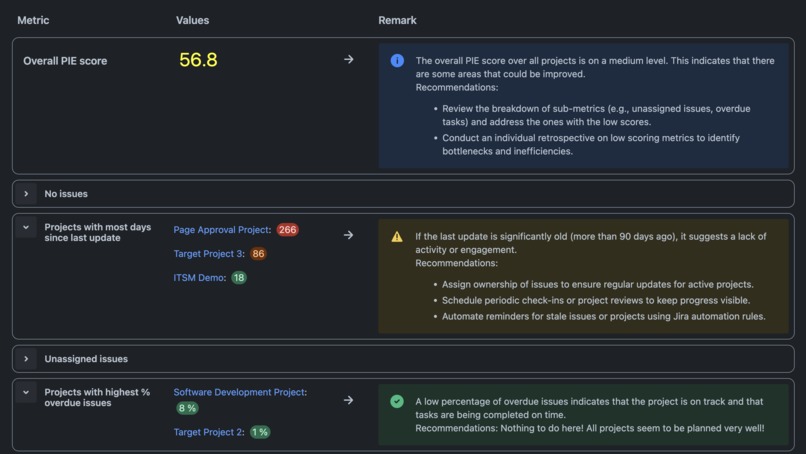
Insights Dashboard - analysis metrics and recommendations
-
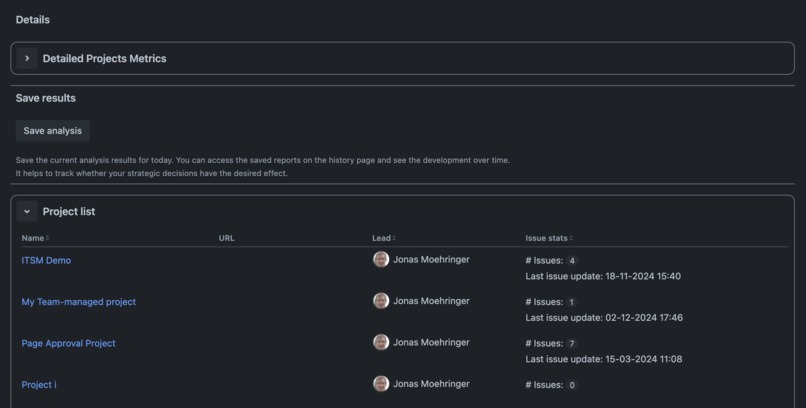
Insights Dashboard - save analysis option
-
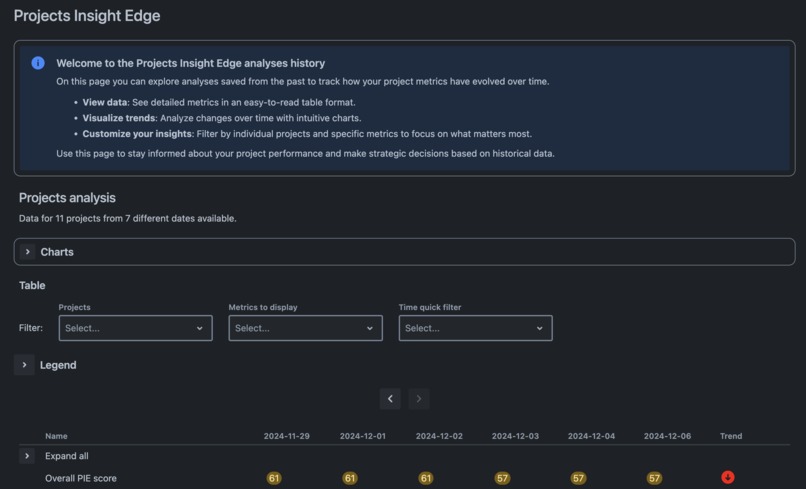
Insights History - information and filtering of results
-
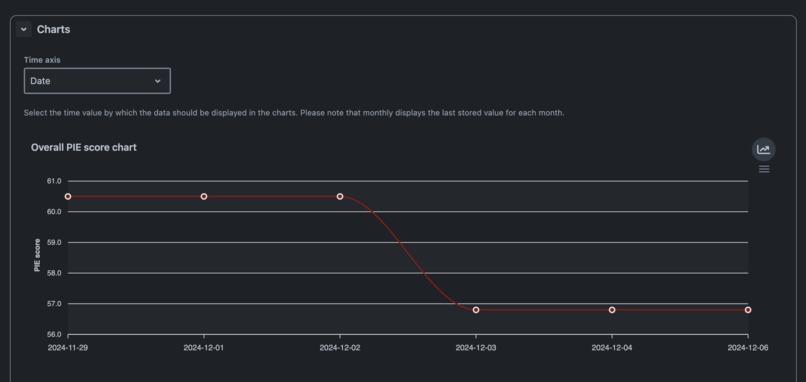
Insights History - PIE score chart
-
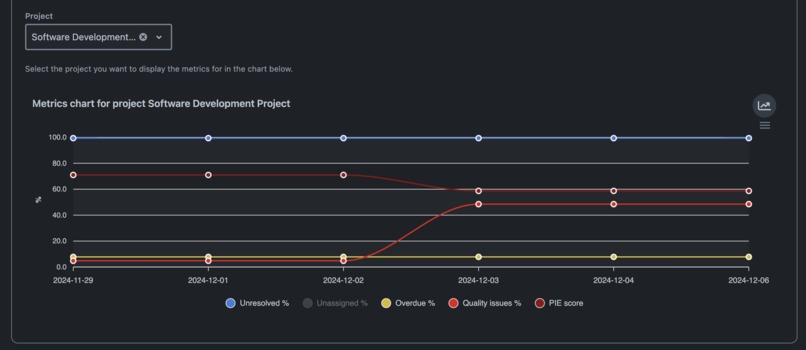
Insights History - project metrics chart
-
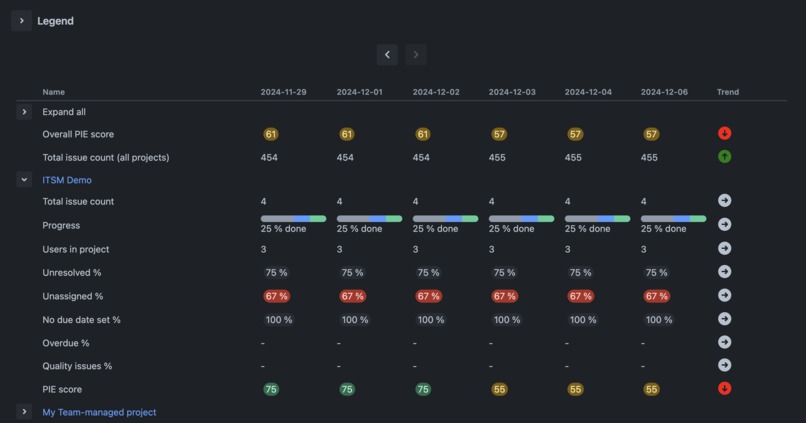
Insights History - projects table
-
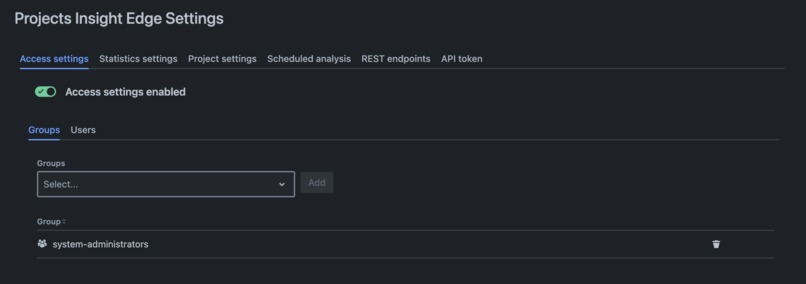
Admin Settings - access
-
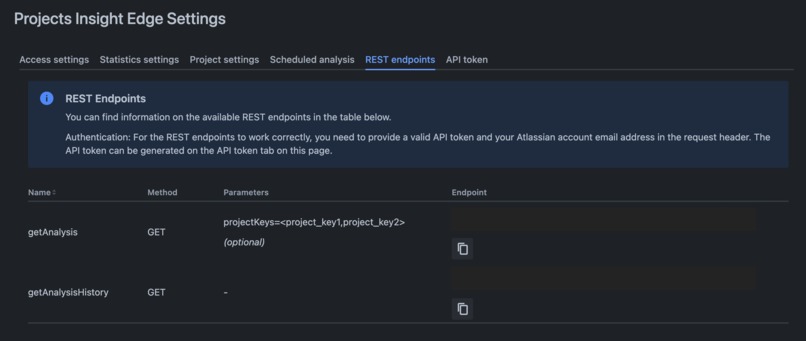
Admin Settings - REST APIs
-
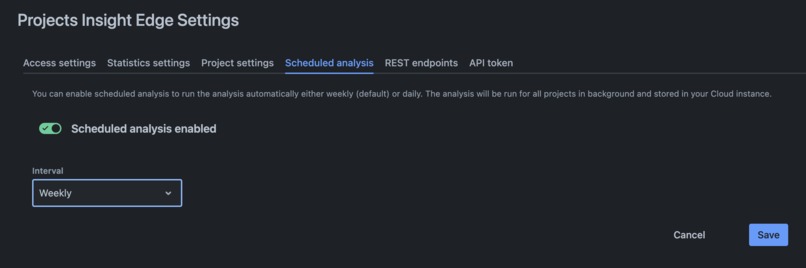
Admin Settings - schedule settings
-
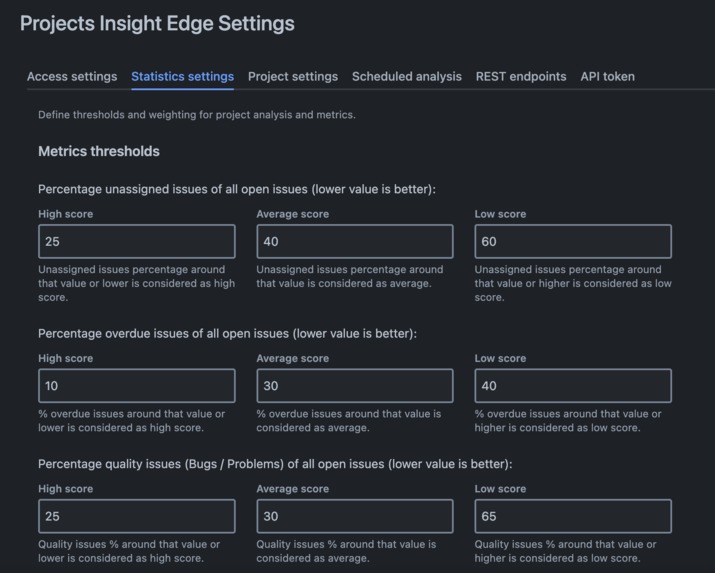
Admin Settings - metrics thresholds
-
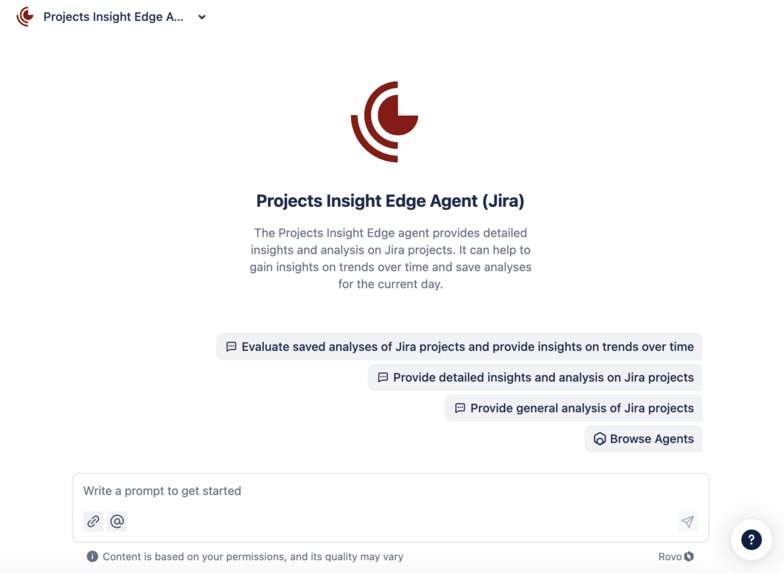
Rovo Agent - conversation starters
-
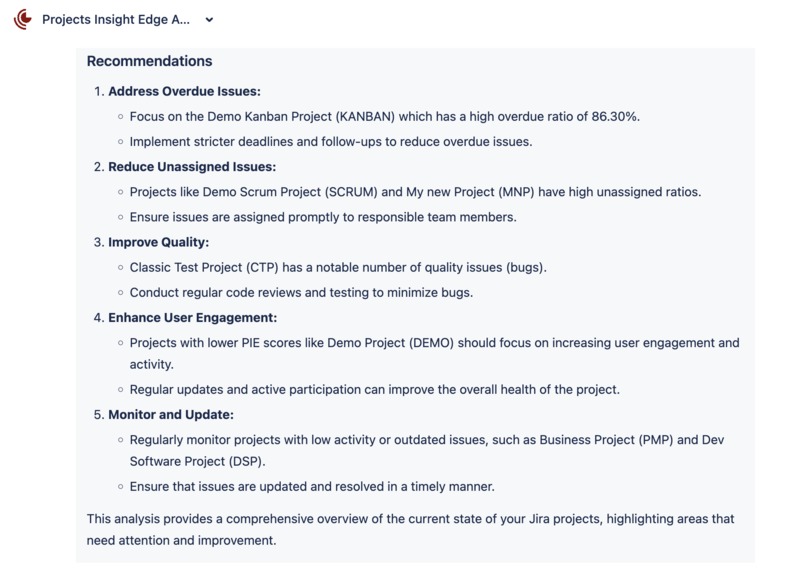
Rovo Agent - analysis and recommendations
-
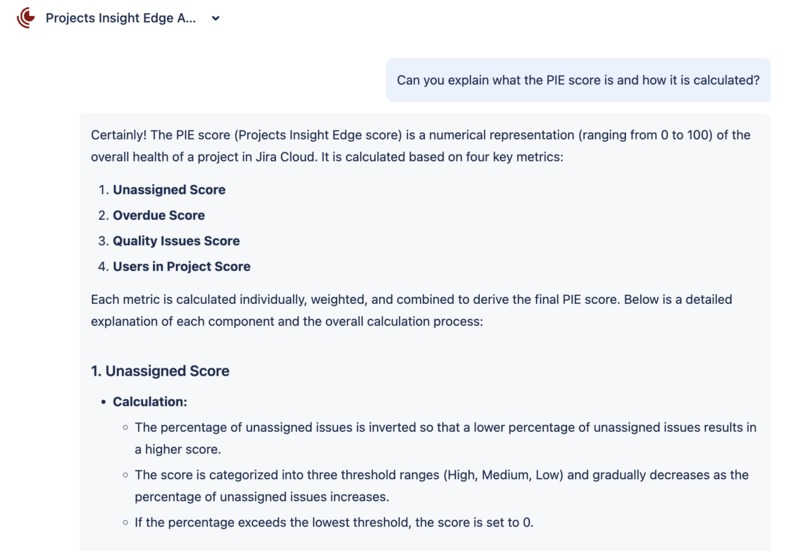
Rovo Agent - explanation of the PIE score


Projects Insight Edge
Have you ever heard of the ‘PIE score’?
No? Then you should check out the new Projects Insights Edge app for Jira - you might just hear about the PIE score in your next strategy meeting!
We created Projects Insight Edge, a powerful app for Jira that delivers instant analysis of your entire Jira project landscape. With just a few clicks, you can gain valuable insights, take necessary actions, and make data-driven decisions to shape your future strategy.
Inspiration
If you work with Jira, you’re likely familiar with the page that lists all your Jira projects (Projects tab -> View All Projects). This page is useful for quickly seeing all the projects you have access to and navigating to them with ease.
However, it lacks key insights into the data within each project, such as:
- How many issues does the project have?
- How many users have access?
- What is the current status of the project?
To obtain this information, you need to create filters or dashboards and define metrics to extract such insights. Unfortunately, there is no out-of-the-box solution that provides a comprehensive overview of your Jira projects, including their status and overall health.
This challenge inspired us to build a solution: an app that aggregates data from all your Jira projects into a single, comprehensive report.
What it does
The app adds a global page to Jira, where users can access two sub-pages. System administrators can configure the app at a global level through a dedicated settings page in the Jira system administration.
Insights Dashboard
The Insights Dashboard provides ad hoc analysis across all Jira projects the user accessing the app has access to, delivering insights into key metrics and numbers. Among other details, users can obtain the following metrics:
- Total number of issues (globally and per project)
- Number of users with project access
- Number of issues categorized as To Do, In Progress, and Done
- Percentage of unresolved issues across all issues in a project
- Percentage of unassigned issues among all open issues in a project
- Percentage of overdue issues among all open issues in a project
- Percentage of quality issues (e.g., bugs or problems) among all open issues in a project
- PIE Score: A combined metric derived from several of the above metrics
The metrics are categorized based on globally defined thresholds, indicating whether they are good, average, or bad. For metrics with low or average performance, actionable recommendations are provided.
Additionally, the dashboard includes a comprehensive list of all projects, sortable by various metrics. An overall PIE Score offers a summary of the health of the entire project landscape.
Users can save analysis results for the current day, enabling them to track metrics over time and identify trends.
Insights History
The Insights History displays saved analyses and evaluates trends over time. Users can easily track how different metrics have evolved and determine whether implemented actions have been effective.
The data is presented in both table format, showing values for each project, and as charts for better visualisation of trends.
Admin Settings
Jira administrators have full control over the app and can configure the following:
- App access for users and groups
- Metrics thresholds and weightings
- Issue types considered as quality issues (globally and per project)
- Enable scheduled analysis and set frequency
Access to the app can be restricted by individual users or user groups, ensuring that only those who should use the app can actually do that.
In addition to these settings, administrators can generate REST API URLs for running data analyses from external systems or integrating project data into other reporting tools. These APIs are secured with app-specific API tokens, which can be generated directly on the admin settings page.
Additional Features
Scheduled Analysis Users don’t need to access the app daily to track historical data and evaluate trends. System administrators can configure scheduled analyses to run at daily or weekly intervals. These analyses run automatically in the background, ensuring consistent collection of project data without manual intervention.
REST APIs As mentioned, administrators can access REST API URLs to retrieve data from external systems or integrate it into other reporting tools, making the app highly versatile and compatible with existing workflows.
Rovo Agent The app includes its own Rovo agent, a powerful feature that not only replicates user-level analyses but also provides additional insights and actionable recommendations. The Rovo Agent delivers deeper analysis and explanations about how metrics are calculated and suggests specific ways to improve them, going beyond the standard functionality of the app.
How we built it
We built the Projects Insight Edge app with Atlassian Forge (Custom UI) and used the following modules and components:
Forge modules:
Forge Functions:
We aimed to follow best practices throughout the development process, incorporating agile methodologies and iterative testing wherever possible. A suite of Atlassian tools helped us stay organized, share knowledge effectively within the team, and deliver a well-designed app on time before the submission deadline.
Atlassian tools we used
- Confluence: For brainstorming ideas, creating content, and maintaining documentation
- Jira: For project planning, tracking progress, and, of course, testing the app
- Bitbucket: For storing, managing, and sharing code
Challenges we ran into
Every app development journey comes with its own set of challenges that require innovative solutions, and building Projects Insight Edge was no exception.
Challenge with number of projects
During development, testing typically occurs in a controlled environment with a limited number of projects. While an app analyzing data across all Jira projects works seamlessly with a small number of projects, what happens when an instance has hundreds? The risk of timeouts and issues collecting data grows significantly as the number of projects increases.
We faced this challenge and designed the app to run as many requests as possible in parallel to avoid timeout limitations. However, we discovered that simply running everything in parallel wasn’t enough—it also depends on the number of simultaneous requests.
For example, when handling 10 or more projects and executing 8 requests per project, we quickly realized that running 80 requests at once overwhelmed the system. To address this, we divided the process into manageable chunks, fetching data for 4 projects at a time. Results for these projects are returned to the frontend and displayed incrementally to the user.
While this approach means analyses take longer for instances with many projects, it avoids timeout issues and ensures users can track progress in real time. This solution strikes a good balance between user experience and system performance.
REST API authentication
Another challenge was securing the REST APIs provided by the app. Using the Forge web trigger module, we found there was no built-in authentication - anyone with the URL could access the data.
We learned that using Atlassian API tokens for user authentication was not permitted for app REST APIs, so we had to develop an alternative. Our solution was to create a section in the system administration where admins can generate app-specific API tokens for authentication.
When an API is called, the app verifies whether the provided token is valid. If no valid token is found, the API returns an unauthorized status. If authentication is successful, the app processes the request and returns the requested data. This approach ensures secure access while maintaining ease of use for administrators.
Rovo agent
Building the Rovo Agent was another significant challenge as it was entirely new to us. Setting up the agent and making it functional was straightforward, thanks to resources like the tutorial and example apps.
However, customising the agent to meet specific needs and ensuring users could invoke intended actions to get valuable results required considerable effort. Through trial and error, we refined the prompt design and action invocations to deliver the most useful outcomes.
Despite the challenges, we were impressed by the quality of the results. The Rovo Agent significantly enhanced the app’s value by providing deeper insights and more actionable recommendations.
Accomplishments that we're proud of
Building an entirely new app within two months is an achievement we’re incredibly proud of. Even with prior experience using Forge, there were still new concepts to learn and challenges to overcome. For example, building a Rovo Agent was something we had never done before, so we had to explore and figure out how it works.
In addition to functionality, we focused on creating an app with an appealing, intuitive UI that looks modern and fresh. We believe we achieved this through several design choices:
- Incorporating a custom loading component featuring our company logo
- Using Motion from the Atlassian design system for the first time in one of our apps
- Implementing animated counters to display project and issue counts dynamically
- Applying traffic light colours to visually represent project health and metric scores
These elements combine to deliver a polished, user-friendly experience that we’re excited to share.
What we learned
Once again, we’ve proven that it’s possible to build an entirely new app within a short timeframe, even while learning new technologies and concepts. The presence of strict deadlines added to the challenge but also ensured that we stayed focused and delivered on time.
As mentioned earlier, building a Rovo Agent was a completely new experience for us. Despite the learning curve, we’re very satisfied with both the process and the outcome, which has significantly enhanced the app’s capabilities. The knowledge we gained here, will definitely contribute to other app developments in the future.
What's next for Projects Insight Edge
We are extremely satisfied with the results and the new Projects Insight Edge app. The obvious next step for us is to publish the app on the Atlassian Marketplace, making it available to everyone.


Log in or sign up for Devpost to join the conversation.