-
RaptorWatch Logo
-
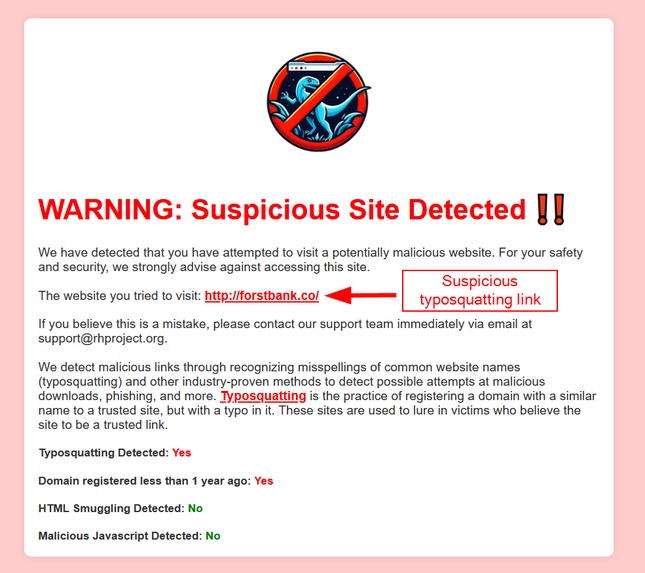
Pop-up when a suspicious link is detected


RaptorWatch Browser Extension
Inspiration
We were inspired to make RaptorWatch because of our experience with offensive security competitions and sending real phishing emails with malicious payloads. We have seen how convincing phishing emails can be, and the need for not only extra protections, but extra training against them.
What does RaptorWatch do?
RaptorWatch is a general browser extension meant to combat malicious typo-squatting links. RaptorWatch stops the page from opening on the user's browser and notifies them that they have likely just clicked on a malicious link.
What is typosquatting?
Typosquatting is the practice of registering a domain with a similar name to a trusted site, but with a typo in it. For example, someone may typosquat the domain youtube.cm when the user really meant to go to youtube.com but forgot the 'o' when typing in the url. These links are commonly used in phishing attacks against companies and individuals to perform malicious actions and abuse trust in what the user thinks is a legitimate site.
Why is RaptorWatch useful?
Our product is important because phishing attacks are one of the most common ways organizations can be breached. By proactively blocking such links with RaptorWatch, companies can mitigate the risk of data breaches, financial losses, and reputational damage.
How we built it
Our solution is built entirely with HTML, Javascript, and Python with the help of Google Cloud.
Challenges we ran into
One challenge we ran into was that Javascript was not allowed to run inline in the HTML popups of Firefox extensions. This prevented us from implementing all our features until we learned that putting the Javascript into a separate .js file will allow it to be run. We also ran into troubles implementing Google Cloud functions. This prevented us from connecting our detections in Google Cloud into our extension, but with a bit more time we think we could have solved this issue.
What's next for RaptorWatch
The next steps for RaptorWatch are to provide support for all browsers, especially Chromium-based browsers. We also have room to improve our detection mechanisms so that our true positive rate goes up and more suspicious links will be caught. This may likely involve the use of AI to perform better detections, reducing false positives and false negatives.
Steps To Install
- Clone this repository.
- Navigate to the Firefox browser and type
about:debuggingin the search bar - Click on
This Firefoxon the left side of the page - Click on
Load Temporary Add-on...and select the manifest.json file in thehttps://github.com/e-shrdlu/rowdyhax-2024/tree/main/RaptorWatchfolder in your local cloned repository. - RaptorWatch is now installed on your current browser window, enjoy!
Meet The Team
Aditya Dindi - Junior, Cyber Security
Aidan Kollar - Sophomore, Computer Science
Julian Peña - Sophomore, Computer Science
Nat Broyles - Sophomore, Computer Science


Log in or sign up for Devpost to join the conversation.