-
-
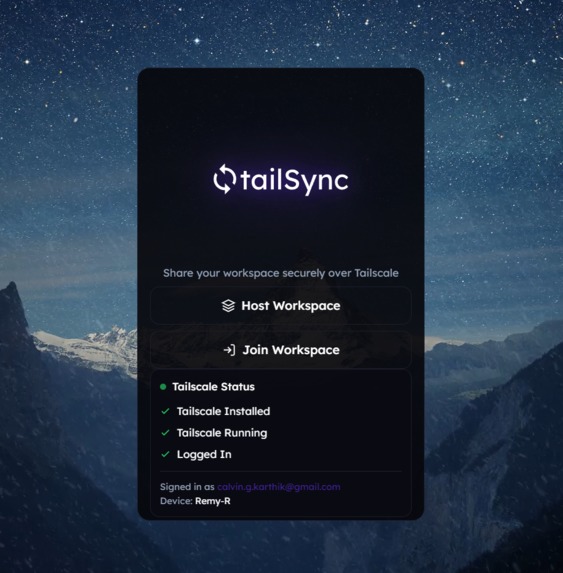
ui frontend

Inspiration
Hackathons move fast. You’re constantly sending files, screenshots, and quick context updates while coding in parallel. The usual “fast” collaboration tools under time pressure come with tradeoffs:
- public-by-default links
- accounts and permission setup
- port forwarding / exposing local services
- too much overhead for a weekend
We wanted something smaller and sharper: a tiny workspace for two devices—chat + file drops + “send this screenshot right now”—but private by design.
When we saw the Tailscale challenge prompt, we realized the cleanest solution wasn’t to bolt security onto collaboration—it was to make collaboration a tailnet-only service where ACLs are the security boundary.
That’s why we built tailSync: a secure mini-workspace built on your tailnet.
What it does
tailSync creates a shared workspace between exactly two devices on a Tailscale tailnet.
Core features
1) Realtime chat
- Instant messaging between host and joiner
- Timestamps + sender identity
2) File sharing
- Upload any file to the host workspace
- The other device instantly sees it in the feed and can download it
3) Screenshot → shared feed
- One-click screenshot capture (with optional caption)
- Posted as an image card in the workspace feed, in real time
4) Connection panel
- Shows Host/Join status, workspace code, and connection details
- Clear error if blocked: “Blocked by Tailscale ACL or not on tailnet.” tailSync does not rely on a public backend. The workspace is a private service:
- Host service runs locally
- Published to a tailnet HTTPS URL via Tailscale Serve
- Join happens only via HTTPS/WSS over the tailnet
- ACLs determine whether the joiner is allowed
Challenges we ran into...
1) Making Tailscale truly essential We avoided the common hackathon path (public server + “also Tailscale”). Instead:
- host service stays localhost-only
- Serve URL is the only join path
- ACLs control access, not app-level auth
2) Clear UX when ACL blocks An ACL denial can look like a network timeout. We built explicit error messaging so the demo is understandable:
“Blocked by Tailscale ACL or not on tailnet.”
3) Realtime correctness We kept the realtime protocol simple:
- WebSocket broadcasts for
chat,post:new,presence - HTTP endpoints for file upload/download and feed refresh
Accomplishments that we're proud of
- Tailscale demo: tailnet + ACL enforcement + Serve URL required
- Instant collaboration loop: screenshot → upload → appears on other device in realtime
- No external backend: the workspace is private and self-hosted
- Clear architecture + demo story: judges can see exactly why Tailscale matters
What's next for tailSync
- Add Tailscale identity-aware join (auto label users using tailnet identity)
- Add role-based permissions derived from tailnet groups (host/admin vs viewer)
- Add a persistent side panel mode and keyboard shortcuts
- Add lightweight encryption at rest for uploaded files
Built with
- Client: Electron + React (Vite), TailwindCSS, OS Snipping integration, notch toolbar overlay
- Backend: Node.js, TypeScript, Express, ws, multer
- Infra: Tailscale Serve (required), Tailscale ACLs (required) for access control
Built With
- acls
- docker
- docker-compose
- electron
- express.js
- multer
- node.js
- npm
- react
- tailscale-serve
- tailwind-css
- typescript
- vite
- websocket-(ws)


Log in or sign up for Devpost to join the conversation.