-
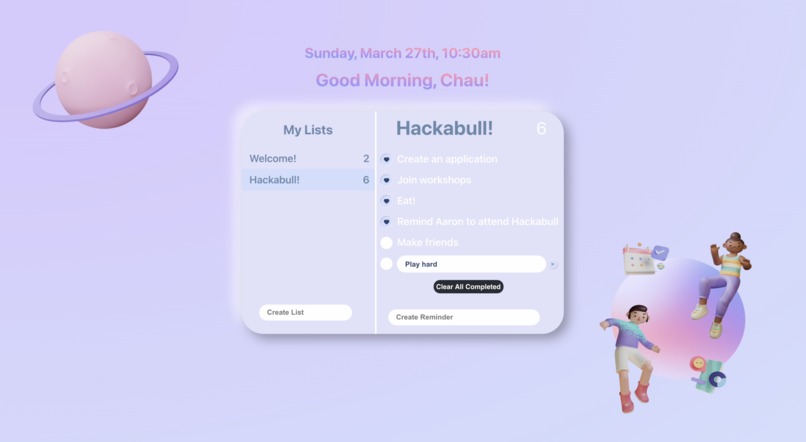
Interface

Inspiration
Our goal with this project is to make people's lives easier and more efficient. It is convenient because users do not have to download any reminder app; they can access their to-do lists every time they open a new tab in Chrome. In addition, we care about user friendliness, as we pick lilac as a theme color to boost the users' productivity.
What it does
This chrome extension allows users to add tasks and reminders. The extension also sends notifications reminding users to complete the tasks on time.
How we built it
We use React Typescript for front end and LocalStorage for back-end. LocalStorage stores data between browser sessions. There is no any expiration date, so even when the users close the tab or window, the data is still there.
Challenges we ran into
- Half of the team members is the first time hacker
- We have never used Typescript and LocalStorage before
- We tried to use Cockroach DB to store the data. However, due to the time constraints, we could not apply the Cockroach DB to the app.
Accomplishments that we're proud of
We eventually completed the basic functionalities of the app.
What we learned
We learn how to collaborate to solve problems in a short period of time. We also learn how to help each other to overcome technical challenges.
What's next for Rem!nd Me
For future improvement, we are going to set the deadline for each reminder. The user can select the date, time, and location for their to-do tasks. When the deadline/time comes closer, the app will push notification to remind the users complete the undone tasks.


Log in or sign up for Devpost to join the conversation.