-
-
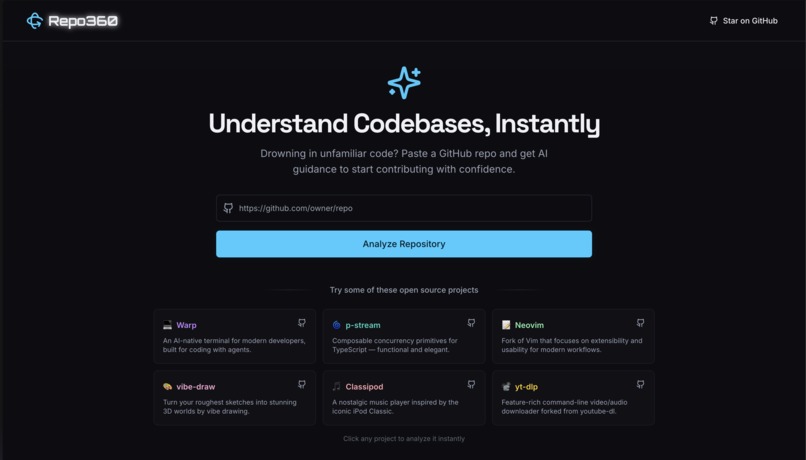
First Glance
-
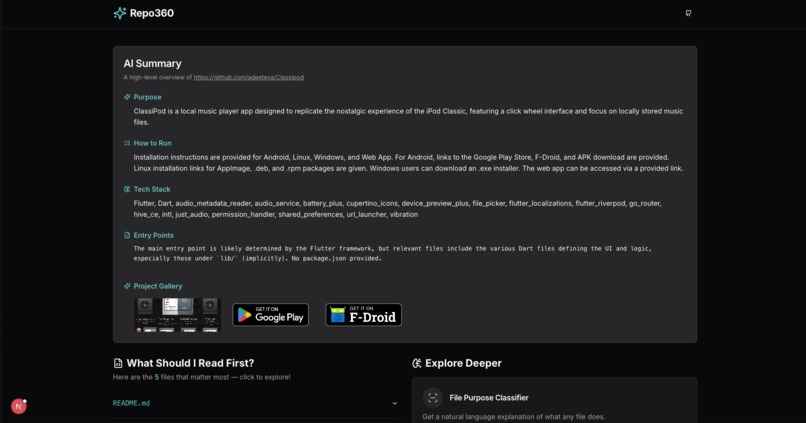
AI Summary for https://github.com/adeeteya/Classipod
-
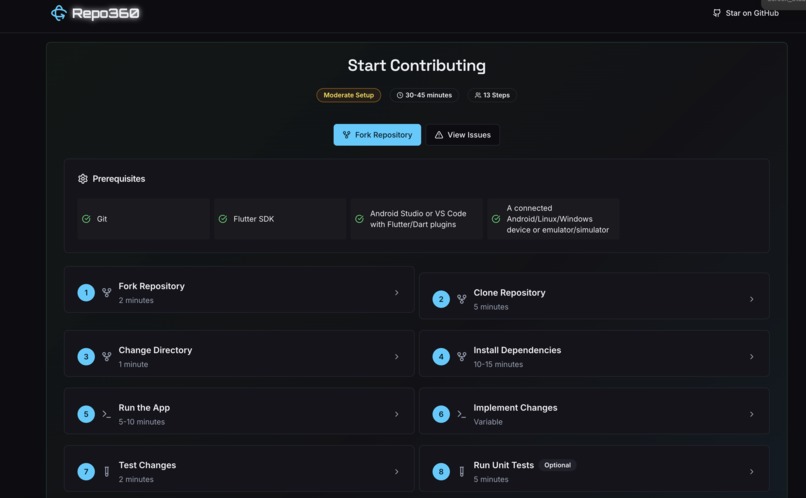
How to contribute step-by-step guide
-
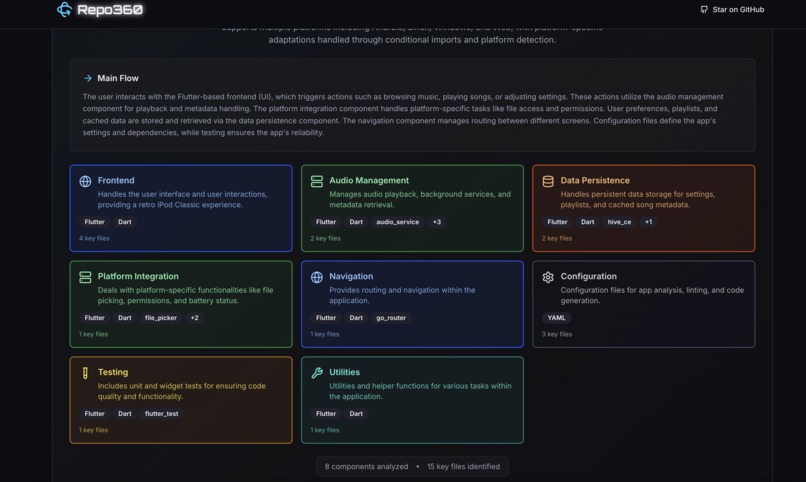
Architecture breakdown


Repo360
Understand any codebase, instantly.
Repo360 is an AI-powered repository analyzer that transforms overwhelming codebases into clear, digestible insights. Simply paste a GitHub URL and get instant architectural breakdowns, file explanations, and guided exploration paths.
Inspired by GitDiagram by Ahmed - Another great tool for visualizing Git repositories!
Why Repo360?
The Problem: Joining a new project or exploring open-source repositories can be overwhelming. Developers spend hours just figuring out where to start, what each file does, and how components connect.
The Solution: Repo360 uses AI to instantly analyze repositories and provide:
- 📊 Architecture Overview: Visual component diagrams showing how your app is structured
- 🎯 Smart Entry Points: AI-prioritized list of files to read first
- 📝 File Explanations: Natural language descriptions of what each file does
- 🔍 Interactive Exploration: Click-to-explore interface with direct GitHub links
- 🎨 Visual Project Gallery: Screenshots and demos from README files
🎮 Usage
- Enter a GitHub URL - Any public repository
- Click "Analyze Repository" - AI processes the codebase
- Explore the Results:
- 📊 Executive Summary: Purpose, tech stack, setup instructions
- 🏗️ Architecture Diagram: Visual component breakdown
- 📁 File Explorer: Prioritized reading list with AI explanations
- 🖼️ Project Gallery: Screenshots and demos
- 🔧 Tools: Environment scanner, file classifier
🛠️ Tech Stack
Frontend
- Next.js 15 - React framework with App Router
- TypeScript - Type-safe development
- Tailwind CSS - Utility-first styling
- Framer Motion - Smooth animations and interactions
- Radix UI - Accessible component primitives
- React Hook Form + Zod - Form handling and validation
AI & Backend
- Google Gemini AI - Advanced language model for code analysis
- Firebase Genkit - AI development framework
- GitHub API (@octokit/rest) - Repository data fetching
UI/UX
- Lucide React - Beautiful icons
- Custom Gaming Theme - Vibrant colors and smooth animations
- Space Grotesk & Orbitron - Modern typography
- Dark/Light Mode - Full theme support
How It Works
graph LR
    A[GitHub URL] --> B[Fetch Repository Data]
    B --> C[AI Analysis Engine]
    C --> D[Repository Summary]
    C --> E[Architecture Analysis]
    C --> F[File Classification]
    C --> G[Entry Point Suggestions]
    D --> H[Interactive Dashboard]
    E --> H
    F --> H
    G --> H
- Repository Fetching: Securely fetch repository metadata, file structure, and key files
- AI Processing: Multiple specialized AI agents analyze different aspects:
- Summarizer: Creates executive summary with purpose, tech stack, and setup
- Architect: Identifies components (frontend, backend, API, database) and their relationships
- File Classifier: Categorizes files by importance and purpose
- Entry Point Finder: Suggests optimal reading order for understanding the codebase
- Visual Presentation: Transform analysis into interactive, explorable interface
- GitHub Integration: Provide direct links to source files using correct repository branch
🚀 Getting Started
Prerequisites
- Node.js 18+ and pnpm (or npm/yarn)
- GitHub Personal Access Token (optional, for higher rate limits)
- Google AI API Key (for Gemini AI)
Local Development
- Clone the repository
   git clone https://github.com/gurkiratz/Repo360.git
   cd Repo360
- Install dependencies
pnpm install
- Environment setup
cp .env.example .env.local
Add your API keys:
   # Required: Google AI API Key
   GOOGLE_GENAI_API_KEY=your_google_ai_api_key_here

   # Optional: GitHub Token (increases rate limits)
   GITHUB_TOKEN=your_github_token_here
- Start development server
pnpm dev
- Open your browser
Navigate to
http://localhost:9002
Getting API Keys
Google AI API Key (Required)
- Visit Google AI Studio
- Create a new API key
- Add it to your
.env.localasGOOGLE_GENAI_API_KEY
GitHub Token (Optional)
- Go to GitHub Settings > Developer settings > Personal access tokens
- Generate a new classic token with
public_reposcope - Add it to your
.env.localasGITHUB_TOKEN
Deployment
Deploy easily on Vercel, Netlify, or any platform supporting Next.js:
pnpm build
pnpm start
⚡ Fast Analysis • 🏆 AI Powered • 🎮 Gaming Inspired
Built With
- genkit
- github-api
- next.js
- vellum-ai


Log in or sign up for Devpost to join the conversation.