-
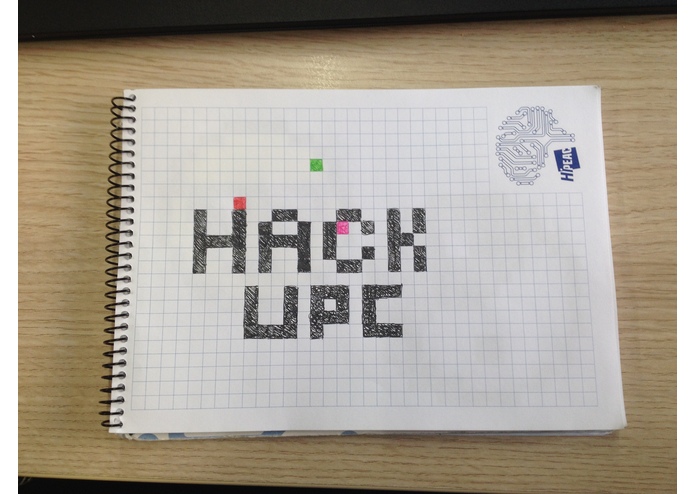
Stage 1 (Sketch it)
-

Stage 2 (Scan it)
-
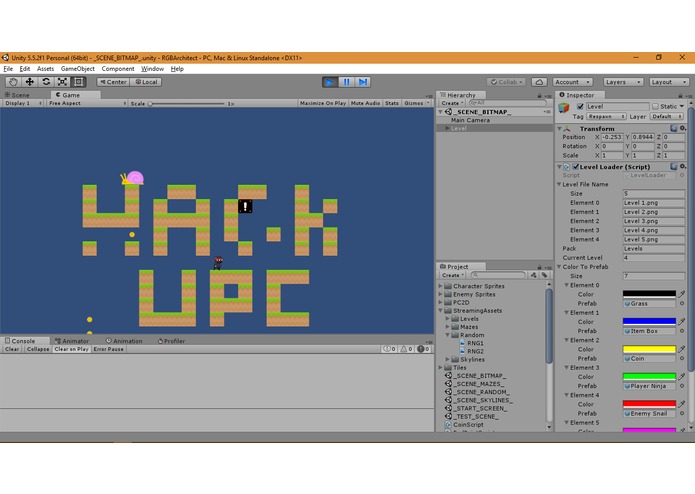
Stage 3 (Play it!)


HackUPC 2017 Winter - Computer Vision, Unity, Game Dev
About Us
We are a pair of math students at UPC who are in love with coding. Last HackUPC was our first and it was A BLAST, so we were more than happy to have, again, the chance to do what we love while drinking some energy drinks. About the idea: it all started with us buying an old Kinect 360 and wanting to do something with Computer Vision (just because). The thing is that that version of kinect is very old (cheap, though) and we just didn't find much of anything compatible with it during the first 5-6h... but still, we found a way! We love videogames too, and were a tad familiar with Unity... The challenges we were presented by the sponsors didn't appeal much to us this time around (you can't have it all) except the one that said "build something nice". Well, we had a ton of fun and learned a million things too. Here's basically the README.txt of our project, which of course you can download from git and play with (enjoy!):
RGB Architect
RGB Architect is a simple 2D platformer game with the purpose of making level design and prototyping in a 2D environment a very easy, dynamic and fun task.
This environment is meant as a tool rather than as an entertaining piece itself as it's simplicity shows. Also please bear in mind that this has been the result of 36h hours of rush coding at a hackathon by two math degree students when you think about the (multiple) flaws the game still has.
So, what does RGBA do? In it's current form this project imports and renders a fully playable level in mere seconds from a small png image. It does so by identifying the RGB values (hence the name :P) of the pixels and matching them with a game object in the Unity project. At runtime, it spawns the correct prefabs (units, terrain, sprites and game objects in general) at the right coordinates making the level playable in seconds.
Currently we use 8 different colors for 8 different prefabs, the colors being as separated as possible from each other (consider RGB colors as 3D vectors with a byte worth of info in each coordinate) in the RGB space. Those are:
- Black [0,0,0] simple terrain prefab
- Red [255,0,0] simple enemy mob (no AI yet, it's a snail)
- Green [0,255,0] player spawn
- Blue [0,0,255] object boxes (currently decoration)
- Yellow [255,255,0] coin
- Magenta [255,0,255] goal/end of level
- Cyan [0,255,255] coin (placeholder)
- White [255,255,255] empty space/background
The Unity LevelLoader class will interpret any png image following the above criteria and start a new game, making room for some awesome trickery (see the imported Skyline of Barcelona, Minnessota or NY ploted onto the Game View or toy with images that were not intended as level maps like the RNG pack). Also, if you're into that kind of stuff you can choose to design your levels pixel by pixel using any image edition software such as Ps or GIMP (or MSPaint!) and go MUCH deeper into level generation and design by making your own prefabs or using slightly different values of RGB for a much more wide variety of prefabs (for instance, use pure Red[255,0,0] for the base version of an enemy AI and [255,0,x] for as many slightly different variations of it as you want!).
Moving ahead, we've already thought on giving different options for AIs (both for Player and mobs), completing the basic game with things like health bars, scorekeeping(customizable?) or support for more than one Player at a time in the same level. Also fixing some issues (like some terribad algorithm efficiency hurting performance here and there).
On a side note, we just realized this is a pretty powerful tool for rendering really cool pixel art (you can also play a game on top of your favourite pieces!).
Huge shoutouts to quill18 for his tutorials and being the source of some of the free assets and code snippets we used when starting with this.
Image Recognition
The reason we want our colors as different as possible is that we want to be able to well distinguish between them so the second part of this project works better. You'll notice a folder named ImageDetection containing a bunch of python scripts and input/output folders. The ultimate goal of this project is to create a Computer Vision algorithm that takes pictures of handwritten sketches for levels and outputs a readable png image that our Unity interpreter can instantly make into a playable 2D Scene! (You know, it's an architect, he looks at sketches then build things, get it? ... sigh)
Current version of the CV algorithm assumes a bunch of limitations and restrictions from the pictures it takes, such as knowing from beforehand the width and height of the target png image and very low to no inclination of the pictures. Both of those restrictions can very easily be taken out, we just didn't have the time for them at the hackathon.
Looking at future versions, we could use some reference points on the corners (like in QR codes) of the sketches so we can try making it much more flexible and fix things like paper bending and weird camera angles. Code needs some cleansing and whatsoever.
And that's it! Thanks for going all the way to the bottom of this document, hope you enjoy RBG Architect as much as we did building it!
Raquel L. Pérez Arnal & Dídac Fernández Cadenas




Log in or sign up for Devpost to join the conversation.