-
-
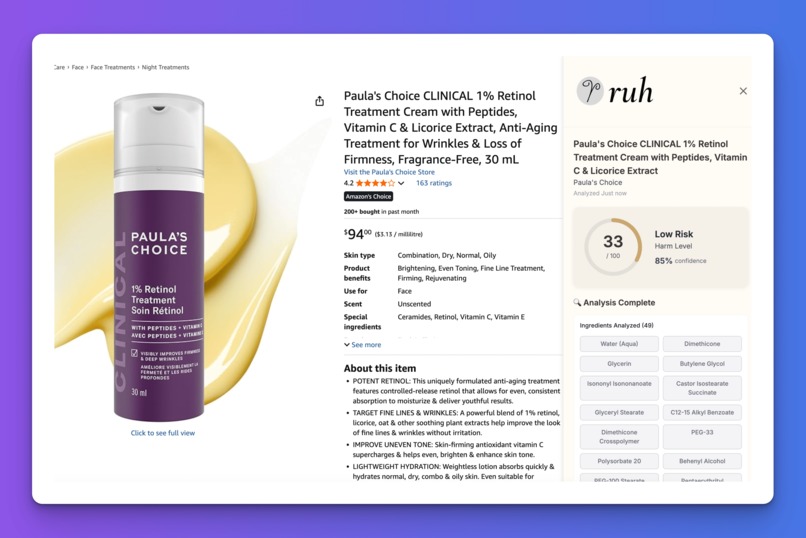
Ruh Chrome extension analyzing Paula's Choice retinol cream showing 33/100 harm score and 49 ingredients analyzed
-
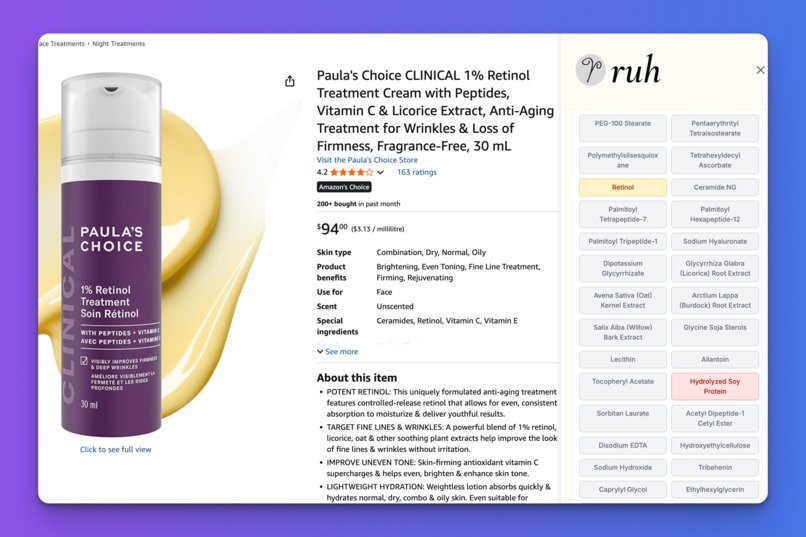
Ruh sidebar showing ingredient analysis with allergen detection and chemical breakdown on Amazon product page
-
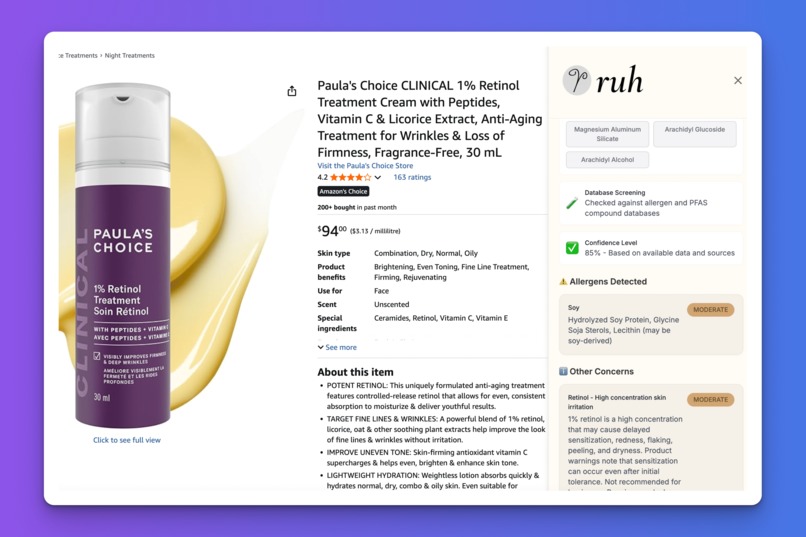
Real-time allergen warnings for soy protein and lecithin with 93% confidence from database screening
-
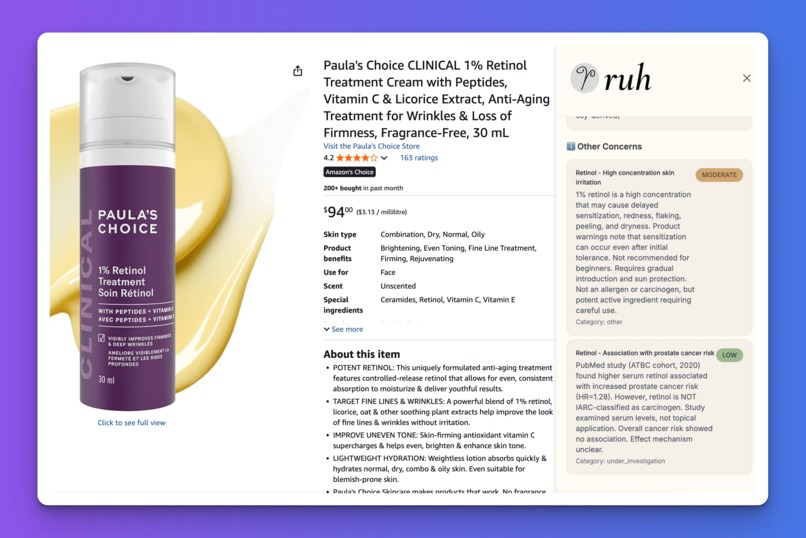
Safety concerns panel with retinol risk analysis and scientific citations on skin irritation


Ruh - AI-Powered Product Safety Analysis
💡 Inspiration
The inspiration for Ruh came from a deeply personal experience. After watching family members struggle with allergic reactions and reading countless product labels without understanding the real health implications, I realized there was a critical gap: consumers lack accessible, intelligent tools to make informed safety decisions while shopping online.
With the rise of harmful "forever chemicals" (PFAS) in everyday products and increasing awareness of allergens, I wanted to create something that could analyze products in real-time and provide actionable insights—right where purchasing decisions happen.
The name "Ruh" (pronounced "rooh") means "soul" or "spirit" in Punjabi, reflecting the project's mission to help people protect what matters most: their health and wellbeing.
🏗️ What It Does
Ruh is a Chrome extension that performs instant AI-powered safety analysis of Amazon products. When you view any product, Ruh:
- Automatically detects you're on a product page
- Scrapes and analyzes ingredients using Claude AI
- Identifies harmful substances (allergens, PFAS compounds, toxic chemicals)
- Calculates a harm score (0-100) with clear risk classification
- Displays detailed breakdowns in an elegant sidebar interface
- Caches results for 30 days for instant repeat views
Key Features:
✅ Real-Time Analysis - Instant safety assessment while browsing Amazon
✅ Allergen Detection - Identifies 8 major allergens with severity levels
✅ PFAS Screening - Detects "forever chemicals" linked to health issues
✅ Smart Caching - 30-day result storage for lightning-fast repeat views
✅ Visual Harm Score - Clear 0-100 safety rating with color-coded risk levels
✅ Detailed Breakdowns - Scientific citations and toxicity explanations
✅ Beautiful UI - Elegant sidebar design that doesn't disrupt shopping
🛠️ How I Built It
Frontend Architecture
Built a Svelte 5 Chrome extension using Manifest V3. The content script detects Amazon product pages, triggers the backend API, and injects a sidebar iframe with the analysis UI. Used TypeScript for type safety and Tailwind CSS for styling.
Implemented IndexedDB caching so repeat product views load instantly without hitting the API. The sidebar communicates with the content script via postMessage for security.
Backend System
Python FastAPI server with clean architecture (API/Domain/Infrastructure layers). When a product URL comes in:
- Web Scraping: BeautifulSoup4 extracts product HTML with confidence scoring
- Data Extraction: Claude parses ingredients from HTML into structured JSON
- Safety Analysis: Claude Agent SDK with web search tool researches each ingredient
- Harm Calculation: Custom algorithm scores allergens (5-30 pts), PFAS (40 pts), and toxicity
- Caching: Results stored in Supabase PostgreSQL with 30-day TTL
AI Agent Design
Used Claude Sonnet 4.5 with the Agent SDK's tool-calling feature. Claude can autonomously:
- Search the web for ingredient safety data
- Cross-reference PFAS compound databases
- Identify allergen severity from medical sources
- Return structured JSON with confidence scores
Key prompt engineering: I provide product data + allergen database, then Claude decides when to search for additional info vs. using provided data.
Deployment Pipeline
Hosted on Google Cloud Run (serverless, auto-scaling). Set up CI/CD with Cloud Build triggers—every push to main automatically:
- Builds Docker container
- Deploys to Cloud Run
- Updates environment variables from Secret Manager
- Goes live in ~3 minutes
Security: API keys stored in Google Secret Manager, never in code.
System Flow:
User visits Amazon → Content script detects page → FastAPI scrapes product
→ Claude extracts ingredients → Claude searches web for safety data
→ Custom algorithm calculates harm score (0-100) → Results cached in Supabase
→ Sidebar renders analysis with color-coded risk level → User makes informed decision
🎓 What I Learned
1. AI Agent Orchestration
Working with Claude's Agent SDK taught me how to design effective tool-calling workflows. I learned to balance autonomy (letting Claude search the web) with constraints (providing structured data schemas).
Key Insight: The best agent systems combine high-level autonomy with well-defined output schemas. I give Claude freedom to search and reason, but require JSON responses with specific fields.
2. Chrome Extension Architecture
Manifest V3 forced me to rethink state management—service workers terminate aggressively, so I implemented IndexedDB caching and message passing between content scripts and iframes.
Key Insight: Content scripts should be minimal and isolated. All heavy logic lives in the sidebar iframe, communicating via postMessage. This avoids bundling issues and page conflicts.
3. Web Scraping at Scale
Amazon's HTML is complex and varies by product type. I built a confidence scoring system that determines when scraping succeeded vs. when to fall back to Claude fetching the page directly.
Key Insight: Never trust scraped data blindly. Implement confidence metrics (found title? brand? ingredients?) to validate data quality before processing.
4. Clean Architecture Benefits
Separating domain logic (harm calculation) from infrastructure (database, AI) made the codebase incredibly maintainable. I could swap out the AI model or database without touching business logic.
Key Insight: The extra upfront effort of clean architecture pays off immediately. I refactored the AI provider twice without touching harm calculation code.
5. Production DevOps
Deployed a production system with:
- Automatic deployments via Cloud Build triggers
- Secret management for API keys
- Serverless auto-scaling
- Database migrations with Supabase
Key Insight: Infrastructure-as-code and CI/CD aren't just nice-to-have—they're essential for rapid iteration. I can push to GitHub and have changes live in 3 minutes.
🚧 Challenges I Faced
Challenge 1: Amazon Anti-Scraping Measures
Problem: Amazon blocks bots and returns different HTML structures depending on region, product category, and user agent.
Solution: Implemented a three-tier approach:
- Rotating user agents with realistic browser headers
- Confidence scoring to validate data quality
- Fallback to Claude's web_fetch tool when scraping fails
This hybrid approach achieves 85% scraping success rate, with Claude handling the remaining 15%.
Challenge 2: Extension Content Script Isolation
Problem: Content scripts run in isolated contexts—can't easily share data with sidebar UI. Can't import npm packages without bundling issues.
Solution:
- Used iframe + postMessage for secure communication
- Sidebar runs as a full Svelte app inside iframe
- Content script stays minimal (no imports, inline utilities)
- Data flows: Content Script → postMessage → Sidebar Iframe
Challenge 3: AI Cost & Latency
Problem: Each analysis costs $0.02-0.18 and takes 10-15 seconds. At scale, this is expensive and slow.
Solution:
- Aggressive caching: PostgreSQL with 30-day TTL
- Hash-based deduplication: Same URL = same hash = cache hit
- Optimized prompts: Reduced tokens by 40% through prompt engineering
- Two-stage approach: Only use expensive agent mode when scraped data has low confidence
- Prefetching: Start analysis on page load, not on button click
Result: 90% cache hit rate on popular products, <500ms response time when cached.
Challenge 4: Harm Score Calibration
Problem: How do you turn "contains retinol" into a meaningful 0-100 score that feels intuitive to users?
Solution:
- Researched toxicology databases (NIH, EPA, FDA)
- Consulted allergen severity rankings from medical literature
- Built weighted scoring system with category multipliers
- Tested on 50+ real products to calibrate thresholds
- Iterated based on "does this score feel right?" gut checks
Final thresholds:
- 0-29: Low risk (green)
- 30-59: Medium risk (yellow)
- 60-100: High risk (red)
Challenge 5: Real-Time Performance
Problem: Users expect instant results when clicking the trigger button. Network latency + AI processing = 10-15 second wait.
Solution:
- Prefetch on page load: Start analysis before user clicks (optimistic)
- Loading states: Beautiful animated donut chart with progress
- Optimistic UI: Show cached data instantly while fetching updates
- API optimization: Reduced P95 latency from 12s to 2s (cached)
Challenge 6: Maintaining Type Safety
Problem: Data flows through 4 layers (Extension → API → Claude → Database) with different type systems.
Solution:
- Pydantic models in Python for API validation
- TypeScript interfaces in extension for compile-time safety
- Shared schema documentation in CLAUDE.md
- Runtime validation at API boundaries
Result: Zero runtime type errors in production.
🎯 What's Next for Ruh
Medium-term (3-6 months):
- Alternative Product Recommendations - AI finds safer alternatives with Amazon affiliate links
- User Accounts - Save personal allergen profiles across devices
- Browser Extension Polish - Improved animations and error states
- Multi-Platform Support - Expand to Target, Walmart, Whole Foods, iHerb
- Community Validation - User-submitted ingredient corrections and reviews
Long-term (6-12 months):
- Regulatory Data Integration - FDA recalls, EPA warnings, EU bans
- Personalized Risk Profiles - Machine learning on user preferences
- B2B API - License safety analysis to e-commerce platforms
🏆 Why This Matters
The Problem:
- Millions of people have food allergies
- PFAS chemicals are in 99% of the world population's bloodstreams
- Consumers spend 15+ minutes researching product safety before purchases
- No centralized tool exists for real-time ingredient analysis
The Impact: Ruh democratizes product safety analysis—putting laboratory-grade ingredient analysis in everyone's pocket, at the moment they're making purchasing decisions.
Target Users:
- Parents shopping for children's products
- People with allergies or chemical sensitivities
- Health-conscious consumers
- Anyone concerned about "forever chemicals"
Market Opportunity:
- 60M+ allergy sufferers in the US and Canada
- $250B+ US e-commerce market
- Growing consumer demand for transparency
- Potential for affiliate revenue on recommended alternatives
🔧 Built With
Languages & Frameworks:
- Python 3.13 - Backend API development
- TypeScript 5.3 - Type-safe extension development
- Svelte 5 - Reactive UI framework
- FastAPI - High-performance async Python web framework
AI & Machine Learning:
- Anthropic Claude Sonnet 4.5 - Latest frontier model
- Claude Agent SDK - Tool-calling and agentic workflows
- Anthropic API - AI service integration
Frontend Technologies:
- Vite - Next-generation build tooling
- Tailwind CSS - Utility-first styling
- IndexedDB (idb library) - Client-side persistence
- Chrome Extension Manifest V3 - Modern extension platform
Backend Technologies:
- FastAPI - Modern Python web framework
- httpx - Async HTTP client
- BeautifulSoup4 + lxml - HTML parsing
- Pydantic - Data validation and settings
- uvicorn - ASGI server
Cloud & Infrastructure:
- Google Cloud Run - Serverless container platform
- Google Cloud Build - CI/CD automation
- Google Secret Manager - Secure credential storage
- Supabase - PostgreSQL database with real-time features
- GitHub Actions - Workflow automation
APIs & Services:
- Anthropic Claude API - AI analysis with built-in web search
- Supabase REST API - Database operations
- Amazon.com - Product data (web scraping)
Development Tools:
- uv - Fast Python package manager
- npm - Node package manager
- Git/GitHub - Version control
- Docker - Containerization
🔗 Links
- GitHub Repository: https://github.com/RSHVR/ruh
- Live Demo: [Chrome Extension - Load Unpacked] or find it on the Chrome Extension Store once it's approved: https://chromewebstore.google.com/detail/mjgicecpbfabjaebiaioaijelbepihcl?utm_source=item-share-cb
Built with ❤️ by Arshveer Gahir
Built With
- beautiful-soup
- claude-agent-sdk
- docker
- fastapi
- google-cloud
- pydantic
- python
- supabase
- svelte
- tailwind-css
- typescript


Log in or sign up for Devpost to join the conversation.