-
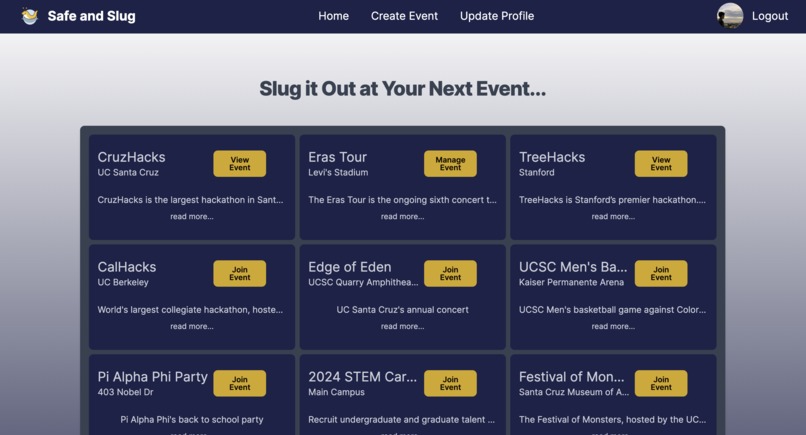
Join, view, or manage events nearby.
-
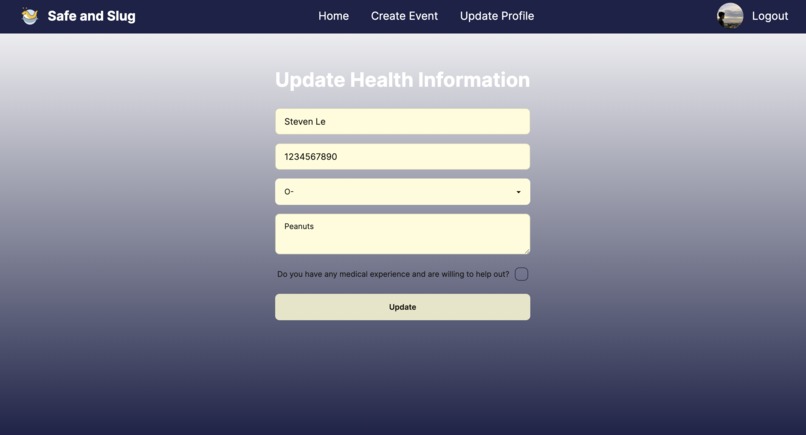
Register for an event, providing event admins with useful personal information used in the case of an emergency.
-
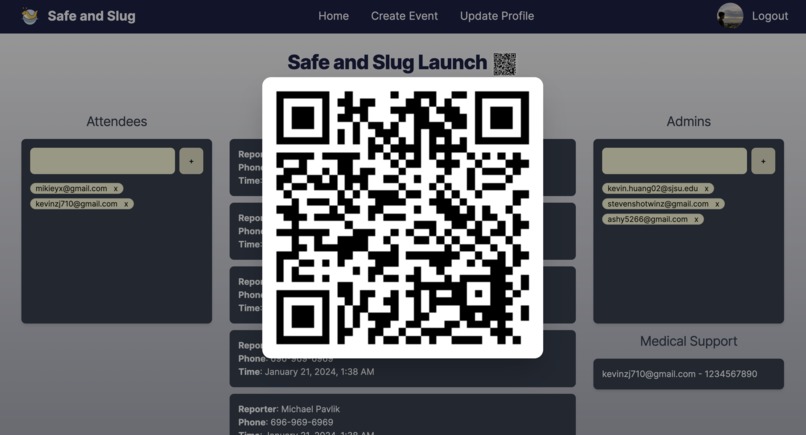
Register events by simply scanning a QR code
-
-
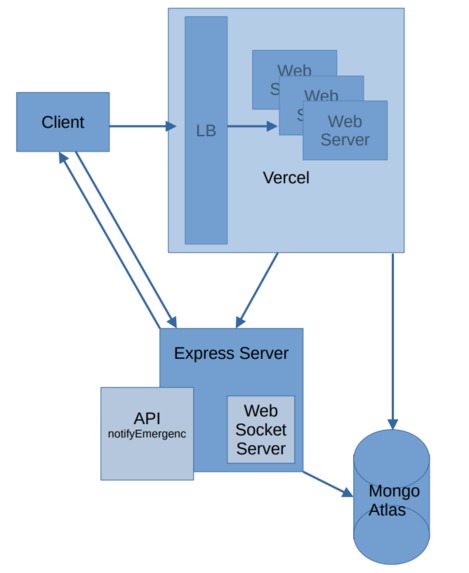
System design diagram. Showcasing the use of a websockets to overcome limitations of Next and to optimize fresh data against network usage.
-
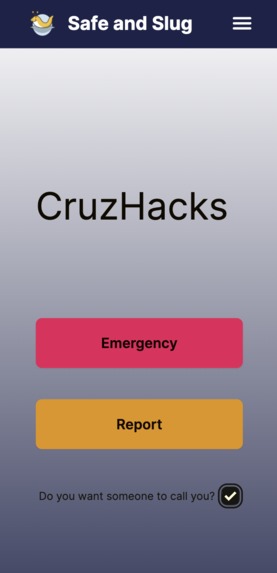
Mobile view of user event page


Inspiration
Whether it be music concerts, college parties, sporting activities, or other UCSC events, there's always a responsibility for organizers to have the resources to ensure attendees' safety. Our application aims to help distribute these resources as swiftly as possible, minimizing attendees' discomfort at these public events with discretion. Ultimately, we connect those who feel unsafe with organizers with the resources and capabilities to support them.
What it does
Safe and Slug allows individuals to host and create events, or join already-created events through scanning an event-tied QR code. When users attend events and request assistance we forward their contact information to admins who can then assist as needed. Requiring authentication to join an event, admins are given greater flexibility with the information they have on their attendees. For example, health risks, allergy information, contact information, etc... are all provided, ensuring that in the case of an emergency, event admins can react accordingly.
Users
- Register for an event
- View event details
- Instantaneously notify organizers of emergencies
- Share contact and medical information with event organizers
Organizers
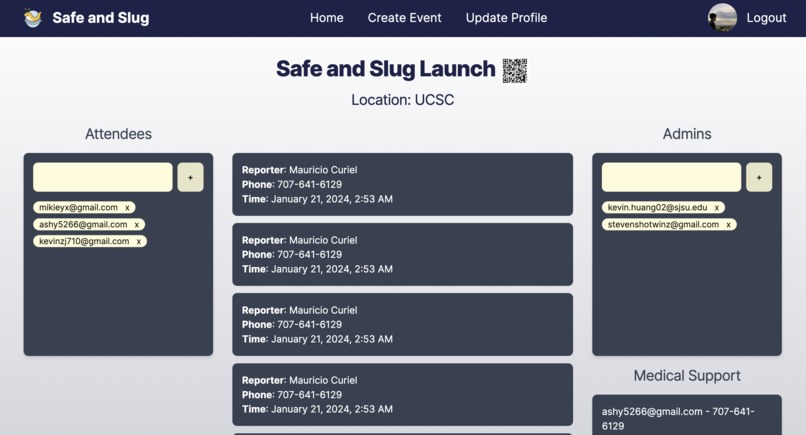
- Access to organizer dashboard with list of attendees, requests for support
- Create and share new events via event discovery page and QR code(s)
- Share real-time updates between multiple organizers
- Respond to emergency requests from event attendees
How we built it
We deployed a NextJS application on Vercel, written in Typescript and styled using Tailwind and DaisyUI.
For user login, we used Auth0. Additionally, to ensure users are accessing appropriate routes, we employed three techniques. First, we applied Auth0's middleware functions to protect all routes, ensuring all users accessing Safe and Slug will have logged in via Auth0. For event pages, we check user membership to an event role list as a means of displaying the correct page. Lastly, many routes require the user to have filled completed account registration. This includes their full name, contact information, and medical information. We created our own middleware-like wrapper to render the user registration form and soft redirect to the intended page after the user completes their account.
Concerning storing user, event, and emergency data, various models were designed for a MongoDB Atlas database which we connected to and manipulated using both MongoDB Compass and the Prisma ORM.
All database interactions are handled on the server side. The admin dashboard, however, requires real-time data to be retrieved and displayed as fast as possible. Many organizers will be accessing the dashboard at the same time. Using TCP and polling will put great stress on the server as we scale. We identified that WebSockets are the ideal solution, but Vercel doesn't necessarily support longstanding socket connections. As a result, we created an additional socket server built on Express hosted via Glitch. When admins connect to the admin dashboard, we establish a socket connection. On the other side, when users send an emergency notification, our application sends an HTTP request to the Express server, which then forwards emergency information to all socket connections for that specific event.
Challenges we ran into
A majority of our team wasn't the most familiar with using NextJS's App Router, Typescript, and especially Auth0 authentication systems. Initially, setting up authentication across our application's routes with Auth0, defining correct schemas in Prisma, and understanding how to utilize Typescript proved difficult, but reading lots and lots of docs led us to an outcome that we're all extremely proud of. Another challenge we ran into was trying to provide real-time data to all of our users without overloading our server with excessive pulling. We identified sockets as our solution; however, since Vercel doesn't support long-term sockets (they expire), we had to create our own WebSocket server. This was entirely new to us and we had complications in figuring out how to host our server in the cloud with a static URL (to communicate with our production build).
Accomplishments that we're proud of
In past hackathons, our team members tended to struggle to meet deadlines alongside the difficulties of picking up new technologies and developing full-stack applications. This time around, we were able to develop and polish, to an extent, an MVP of "Safe and Slug" alongside a production build and a custom domain: safeandslug.us. We're proud to also have created our own socket server and middleware to overcome shortcomings in the tools we used.
Ultimately, we're happy to have balanced our time successfully, planned, and divided work among team members in a manner that led to personal victories.
What we learned
A big thing we learned is that user authentication is made a lot easier through services provided by companies like Auth0. In a previous hackathon, we'd spent a HUGE amount of time developing a login system; something that Auth0 allowed us to do in a fraction of the time. We also learned a great deal about type safety and the practical differences between client-side and server-side rendering; these were key in developing Safe and Slug. We also learned how sockets work and why they're used.
What's next for Safe and Slug
Ideally, we'd like to expand our application to mobile development to make it easier for users to access the safety features of Safe and Slug. Additionally, we hope to expand how we retrieve events, expanding our reach outside of UCSC and Slug Hacks.
Built With
- auth0
- daisyui
- express.js
- mongodb
- nextjs
- prisma
- tailwind
- websocket


Log in or sign up for Devpost to join the conversation.