-
-
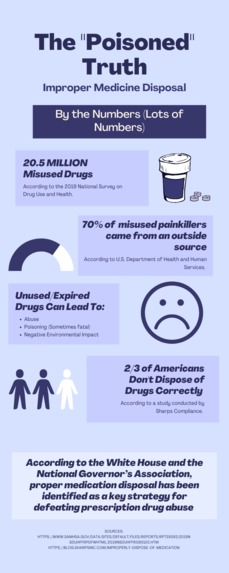
The "Poisoned" Truth
-
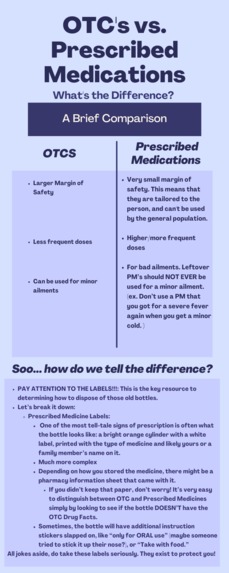
OTCs vs Prescribed Medications
-
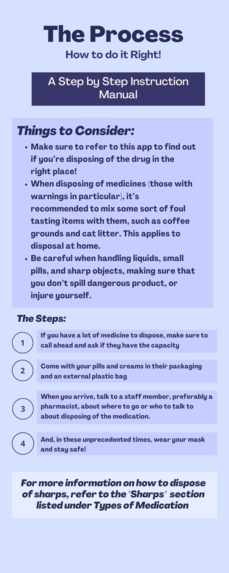
The Process
-
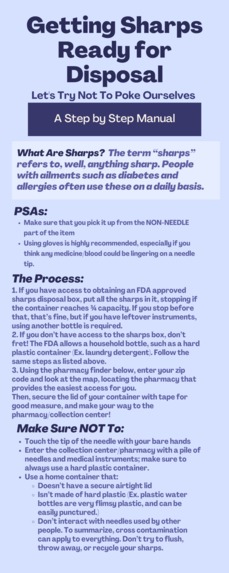
Getting Sharps Ready for Disposal
-
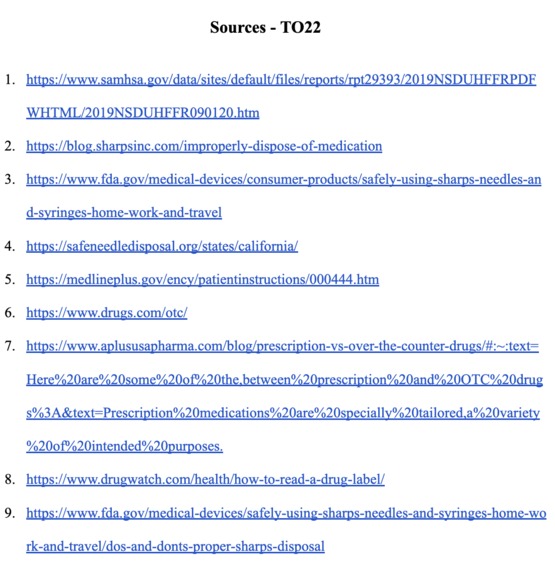
Sources for Infographics


Inspiration
Our inspiration came from the experiences we took note of in our everyday lives. We noticed that many of our friends and family members are not aware of how to disposed unused or expired medications. One of our grandparents has diabetes and uses insulin syringes. When he was visiting us, we noticed him disposing the needed in our trash bin as he didn't know where to dispose them in US. Looking at the themes and goals for this year's Tech Olympics, we decided that looking into this would be in our interest. Upon doing some surface level research, we were astonished to find out about the existence of disposal centers as a whole. We had made an assumption that mixing medications with coffee grounds/strained tea was enough to dispose them safely. At that point we knew that this was a project we had to pursue. We saw that the requirements allowed for a web application or an app, so we decided to go for an app. As we went through all the websites and started to internalize our learning, we realized just how necessary condensing this information into an easy to read format was. It was a grueling experience that the average person might not have time for. We knew by condensing this information into an app, learning all you need to know could be easy as that!
What it does
SafeMed has a variety of different functions and features. The main goal of the app is to educate the user on how to safely dispose medications based on local state and city rules. We employed the use of infographics to display this educational information in a concise, engaging and easy to read way. Secondly, one of our more complicated features is our PharmFinder. If you reference to the video demo linked to this submission, you can see the feature in its full use. The goal of the feature is to provide the person with a way to easily find medication disposal centers near them. It employs the use of an external government site and zip codes. Our app also provides quizzes under the infographics that can help users test their knowledge on this topic. They're a fun and quick way to test your medicine disposal know-how.
How we built it
We build this app using Flutter and Dart on VS Code. We started by mapping out all the screens and routing them to each other with the push command, so that the user could return to the previous page if they wanted to. We then decided to focus on the PharmFinder, the first half of our application's purpose. We wanted it to be such that when the user inputted their zip code in the app and clicked the button, the website would have the information all filled out for them. To do this, we had to do a bit of internet sleuthing. We found a pretty clever way to do so. The website took two pieces of information, which appeared in the Query String of the URL. So, we made it so the URL searched is the original URL with the zipcode that the user inputted applied. This allows for a personalized experience. The next hard part of this app was encoding the Quiz features. We wanted to make it such that we didn't have to hardcode the data, and instead could pass it through from a Map using an index. It took a bit of tinkering, but we got it working such that adding new questions and altering answers was a breeze. Our github shows all the quiz files we had to make! Then, Anvita focused on formatting, making the buttons large and easy to read, and adding the logo that we designed ourselves to the home screen. As she was doing so, Ahana created and formatted all of our infographics from scratch, pulling the information present on them from multiple sites so that each one could be presented in a concise manner. If you would like to read the infographics themselves as well, we attached them in the image gallery. We applied finishing touches such as making sure things were properly named and voila!
Challenges we ran into
We ran into a few challenges while coding. One was making the quiz in two places. We ended up having to duplicate all the quiz related files, and it took quite a bit of editing and renaming to make sure that the classes within them didn't clash with each other or lead to the wrong quiz. Another issue we faced with the app was making our infographics scrollable. We called SingleChildScrollView() to our aid! Other than that, we are beginner hackers so we still had a bit to learn about flutter's formatting system. It took a few tries to get the buttons where we wanted them to be.
Accomplishments that we're proud of
We're really proud of our PharmFinder and Quiz feature. We think it's really cool that we were able to get the app to put information into an existing website like that. We also had a lot of fun experimenting with the use of maps and indexes to make the quiz experience more cohesive.
What we learned
We definitely learned a lot about the world of medicine disposal, and how important it really is. As for CS related skills, we improved in multiple areas. We learned how to collaborate using GitHub repos and commits so that others could see our changes. It's a very valuable skill that we plan to use for future projects. In our code, we learned multiple new things. We really furthered our knowledge on using indexes to input data in a predetermined framework. We also learned about some new formatting features and the integration of a real website into our app. This is our first hackathon and it has been an amazing learning experience for us on multiple levels.
What's next for SafeMed
We thought of a couple cool improvements that we would have loved to do if we had the time. One of these was to implement a location finder into the PharmFinder. That way, the user wouldn't even need to enter their zipcode. The app would use their location to determine their zipcode and auto-input the information into the website. Another idea that we wanted to implement but didn't get to add was a hangman strike system into the quizzes. We didn't have enough content for this idea but if we were to expand the spectrum of the app it would be something that we would like to incorporate. It was a system in which every time you got an answer wrong in a section, a hangman next to the quiz would display the next body part, just like real life hangman. These were the improvements that are at the top of our list. In addition, we would also love to improve the aesthetics of the user interface of the app.
Built With
- dart
- flutter
- visualstudoc




Log in or sign up for Devpost to join the conversation.