-
-

Seva Hub logo
-
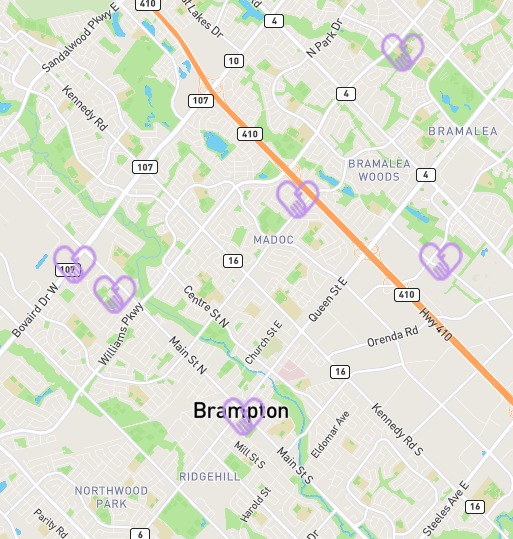
Map with volunteering near you


Seva Hub
Inspiration
Volunteering is always a great way of helping our community, but the problem arises when trying to access those opportunities. Helpful and interesting places to volunteer are difficult to find these days. This reason is why most people avoid volunteering. Only 25% of people volunteer at least once a year.
What it does
Seva Hub focuses on providing volunteering opportunities to more people and connecting coordinators and volunteers to one another. The interface includes an account page where one is required to log in to access the rest of the web application. New users also can sign up for an account with their emails. After logging in, you are brought to the opportunities search page. This page displays all the existing opportunities. Users also have the option to check the interactable map to look for different opportunities near them. Volunteer coordinators can visit the service page where they can create a post for a new opportunity. Posting the opportunity will update the interactable map on the search page with a new marker located at the input location.
How we built it
We used HTML, CSS, and JavaScript for the front-end development. We used the MapBox API to incorporate an intractable map that displays marks at volunteer locations. leaflet.js was used to edit the map and add markers based on the longitude and latitude of the locations. The back-end was built using a library for c++ called cpp-httplib, and would allow for REST endpoints to be called by the font-end, when data was sent or received, it would be parsed using nlohmann json such that the data could be managed well. Using libpqxx, the data stored in cockroachdb was parsed and often turned into json data to be sent back to the font-end.
Challenges we ran into
We ran into a problem with the map not opening where the user is located. We were able to overcome this by getting the user latitude and longitude and using those as the starting position of the map. Another problem with the map occurred when we tried to display markers at all the different locations. We solved this issue by using the position stack API to return us the longitude and latitude of the locations. We stored them in arrays and used a for loop to display the markers all over the interactable map. On the back end of the project, there were multiple rewrites of functions because they were casting variables in the wrong way, or the formation of SQL requests to the database would be incorrect. Another big problem was with Cross Origin Resource Sharing (CORS) during testing, where cookies wouldn't be allowed to be sent to the client, but in the end, they were all resolved.
Accomplishments that we're proud of
We were extremely proud of how much we were able to complete in such a short time frame. Some of us, this was our second or third hackathon, and as beginners, we managed to create a project implementing many technologies and functions that none of us were familiar with.
What we learned
Some technical skills we learned were: how to use Google Cloud, generate Snowflake IDs, how to make an API, how to use MapBox API to display an interactive map, leaflet.js to edit the map and make it functional, how to use PositionStack API to get the location of users, how to make a database using CockraochDB, and how to use Google Cloud to host the back-end server.
What's next for Seva Hub
The future of Seva Hub is very bright. We plan on creating a method for users to reach back to the coordinators directly from the site, where they can communicate from the chat feature. We're going to be creating a verification and bot detection processes for users so that all events are verifiable and trusted. Another feature we're going to implement is a search functionality, so the posts are more tailored towards what type of volunteering experience the user is looking to find. We also plan on later implementing SSL and TLS for more secure and safe connections.
IMPORTANT
Note: Run web app locally for best possible results.
Built With
- c++
- css3
- figma
- html
- javascript
- leaflet.js
- positionstack


Log in or sign up for Devpost to join the conversation.