-
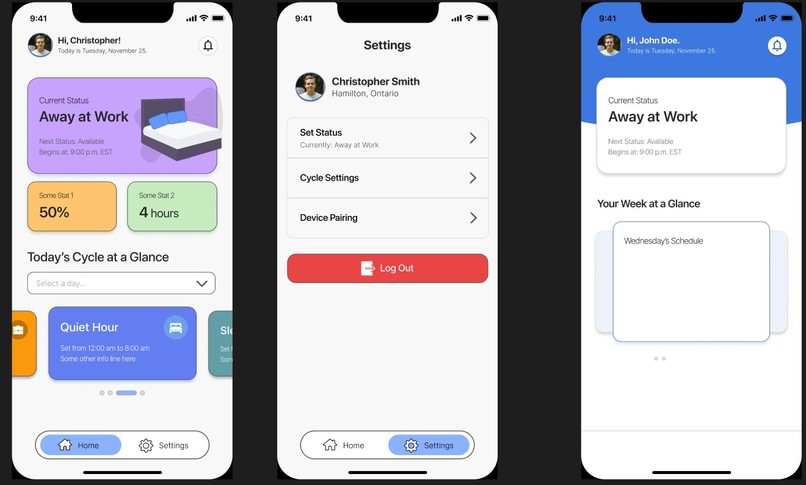
app design prototypes in figma
-
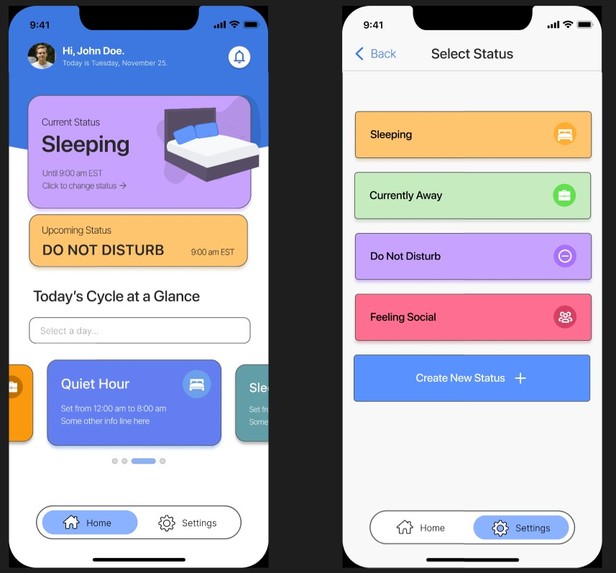
more app design prototypes in figma


Inspiration
The inspiration was from the fact that roommates have different schedules and different routines throughout the day. We thought that there should be a convenient way to alert a roommate coming back on what the other is doing so as not to disturb them or be taken by surprise. Hence why we came up with SockTag.
What it does
SockTag solves the problem of disturbing (a) roommate(s) through the use of statuses that would be posted outside the door and would be able to change based on what the roommate inside the dorm would want to display. This would be done through a website where the roommate can trigger the SockTag to different statuses, like sleeping, being bored, working, and having private matters to attend to.
How we built it
The design began using Figma to outline the structure, the scheme, and the appearance of the app. We collaborated using design thinking principles and modelling user flow in order to place the best features for consumers directly into their hands, in the most streamlined method possible. Using Figma's simple prototyping features as an all-in-one tool, we were capable of rapidly developing mockup designs and viable concepts to pursue as the application grew. SockTag itself is built using the ESP32 platform, the React framework, the websockets library, the HTTP protocol, and the Arduino IDE/C++. For the statuses, we used LEDs with 220 ohm resistors attached to each of them. These LEDs are used as a proof-of-concept, but we do have the capability to display text-based statuses on an LCD screen. The ESP32 would be used as the server for the React-based web app, sending data with a combination of websockets and HTTP. The user would be able to control the statuses with a device of their choice.
Challenges we ran into
Our first major challenge was figuring out how to protocol with the web with the Raspberry Pi. We initially tried SSHing into the machine to actually work with it headless (no monitor, mouse, keyboard attached to it). Unfortunately, that didn't work and after some formatting of the SD card that would hold the OS, it eventually didn't pan out and with the limited time span, we needed a solution fast. We resorted to using the ESP32 as the server. The next major difficulty would be trying to transfer information between. We explored many types of options, and we couldn't get the LCD screen working with one of our member's computer. That member's computer had the code for the server, and since we were using the Arduino IDE, there wasn't an easy way for live-collaboration. Finally, we had to push through sleep deprivation through this (as everyone probably has), which slowed down our progress considerably and led us to not catching errors until far later (i.e. finding out that in order to switch pages, you don't reference the first HTML page, but instead of the root HTML page, which is the first one).
Accomplishments that we're proud of
The major accomplishment that we had was persevering through our challenges. We had numerous ones, and we kept plowing ahead regardless of the challenge, eventually conquering it. This had the effect of increased morale throughout the team and learnt about the essence of troubleshooting. Another accomplishment was getting over the hurtle of transferring information from one device to another device. That was a major piece of the puzzle for our hackathon project, and we were able to get it to work for demonstration of our unique concept.
What we learned
We learnt that having a good morale between team members, getting through challenges, and being flexible on ideas makes for a great hackathon experience. We also learnt that taking breaks to have fun with the events that the hackathon offered was ultimately beneficial to us as a team, as we were able to unwind and have a clear mind going back into our project.
What's next for SockTag
SockTag can be built upon quite well with more robust features, like more application options for users. This can take on the form of more statuses and entering symbols like emojis. Another feature would be to have a TFT screen to display a UI for the statuses using LVGL, but that would take quite a bit of time to implement.
Built With
- c++
- css
- esp32
- espasyncwebserver
- figma
- html5
- http
- javascript
- react
- spiffs
- websockets


Log in or sign up for Devpost to join the conversation.