-
-
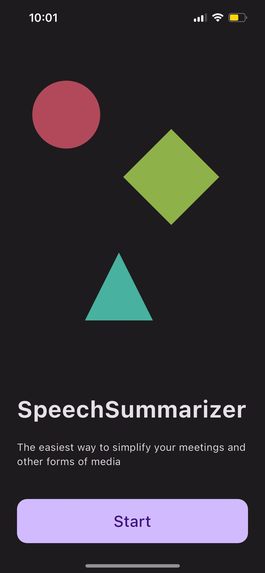
Main Screen
-
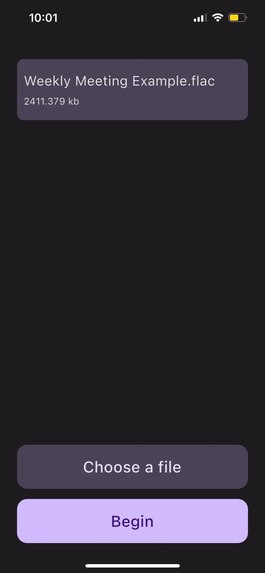
Upload Video/Audio File
-
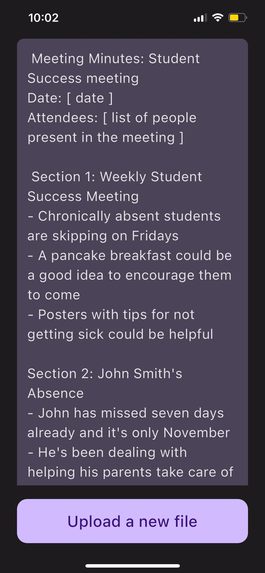
View Meeting Notes


Inspiration
The inspiration for developing our innovative app stemmed from recognizing a widespread challenge faced by professionals across industries - the time-consuming and often error-prone task of manually transcribing and summarizing business meetings. Countless hours were being spent on note-taking, diverting energy from more strategic tasks.
We envisioned a solution that would harness the power of AI and automation to streamline this process. By allowing users to effortlessly upload audio or video files and receive accurate meeting minutes in return, we aimed to transform how businesses approach their meetings. The goal was clear: to provide a tool that not only saved time but also ensured that no critical detail was overlooked, enhancing collaboration, accountability, and overall productivity. This inspiration fueled our determination to create an app that would become an indispensable asset for professionals seeking to make the most out of their meetings.
What it does
Take your business meetings to the next level with SpeechSummarizer!
Record your team having a meeting and then upload your video/audio file onto our app. SpeechSummarizer will then take that file and convert your hour long meeting into condense and informative meeting minutes.
Each meeting minute will include the company name, date of the meeting, and the people who were present. It will also include short, bullet-point summaries of the key items that were discussed. Finally, it includes a section for the next steps for anyone who missed the meeting.
How we built it
Upon the user's initiation of an audio or video file upload, the procedural sequence commences with a transformation of the content into the FLAC format, which is sent to the designated Google Cloud Storage bucket. Subsequently, the resultant Google Cloud Storage URL (gcsURL) is used in calling the API we made.
This API orchestrates a twofold mission. First, it calls Google Cloud's Speech-to-Text API, orchestrating a seamless conversion of audio content into text. Subsequently, the Cohere API is invoked, effectively encapsulating it into a concise summary.
Our application programming interface (API) is encapsulated within Docker containers, facilitating its deployment on the Google Cloud Platform (GCP). This deployment is orchestrated and managed through the Kubernetes container orchestration system, ensuring efficient resource utilization and scalability.
Challenges we ran into
In theory, SpeechSummarizer doesn't sound that hard to make, but it is insane how many issues we had to resolve. Below is a list of a few challenges we ran into:
UI Design
One of the challenges we faced with making SpeechSummarizer is designing how we wanted the UI to look like. We initially started off by using Figma to see what we wanted to add in our app and what layout we wanted. We were able to come up with something that was not only functional, but also pleasing to look at. Needless to say, the initial design was not the problem we had.
The actual issue we faced was trying to implement our designs using Flutter. We very quickly realized that not everything we had planned on Figma was not user-friendly and complicated functions of our app — or at least not possible within our time-constraints.
As a result, we had to do a lot of compromising. We could keep the colour-scheme and some of the widgets we wanted, but we needed to simplify other parts. In the end, we managed to come up with a minimalistic design that was both feasible to do and aesthetically pleasing to look at.
Linking Everything Together
SpeechSummarizer incorporates a relatively large tech stack. We used Flutter for the front-end, node.js for the back-end, and had to call two different APIs to be able to transcribe a business meeting and generate the meeting minutes.
Within our team, we split up the different parts of our app three-ways so that we would be able to finish our project faster. If we thought just finishing our own parts was difficult, nothing could have prepared us for when we had to link everything together.
Despite our best efforts, we constantly kept getting merge conflicts after merge conflicts. Every single time we would think we resolved it, we would get another error that we'd need to fix. Overall, debugging the whole linking process was a nightmare and easily took us more than 25% of the hackathon to do.
Accomplishments that we're proud of
After doing this project, it is safe to say that we are incredibly proud of what we made. Not only did we seamlessly integrated app that transforms audio/video files into FLAC format, but we were also able to orchestrate transcription through Google Cloud's Speech-to-Text API.
We are also proud that we were able to incorporate Cohere API for AI-powered summarization reflects innovation, condensing content into valuable insights. Additionally, we are happy that we made a Docker-contained API architecture which can ensure scalability, deployed efficiently on Google Cloud Platform via Kubernetes.
The app design was also a huge success, despite its rocky beginnings. We managed to come up with a easy-to-interact-with app that looks professional and modern.
Looking back at this hackathon, will definitely fill us with pride as this project showcases effective teamwork, culminating in a sophisticated app that balances cutting-edge technology with practical value.
What we learned
Hackathons typically have a steep learning curve for its participants, but it couldn't be more true with this one.
Before doing Ignition Hacks, none of us knew much about the technologies that we'd be using. For one, it was all of our first time using node.js for the backend so we had to quickly learn the basics very fast. We watched a bunch of tutorials and spent hours reading the documentation before starting our project, just so that we had a firm enough grasp on this framework to do what we needed to do to make SpeechSummarizer.
Another thing we learned was how to deploy the backend to Google Cloud Project (GCP). This was a very necessary step in our project because we needed the frontend to be able to access the API calls that we make and because the API runs on localhost by default, we needed a way around that. Therefore, we learned that we needed to make a docker image and push it to Google Cloud Registry (GCR). We also learned how to deal with authentications, make a kubernetes cluster, and how to deploy a service.
Finally, we learned how important perseverance was for our project. Making SpeechSummarizer really tested the limits of our patience, frustrations, and determination. There were so many moments during our hacking process where we wanted to give up, but we persevered through it all and ended up making a great project.
What's next for SpeechSummarizer
36 hours for a hackathon is not a lot of time, especially when trying to make a project like SpeechSummarizer. As a result, we unfortunately couldn’t add all the features we would have liked to our app.
If we did, however, have all the time and money in the world, then we would do the following things:
Add User Accounts
With this feature, users can make their own, personal account so that they can view their meeting minutes history. We also hope to be about to link user's Google Drive account to make it easier to upload their files. To accomplish this, we would use Firebase because it provides a robust and user-friendly platform for seamless integration of user accounts. With Firebase Authentication, we can effortlessly handle user sign-ups, logins, and account management. We can also implement secure user authentication methods, such as email and password, social media logins, and even multi-factor authentication for added security layers.
Use GPT-4 for faster response time and longer meetings
Currently, SpeechSummarizer uses Cohere to summarize the meeting transcript, but there are heavy limitations to this API. For one, Cohere only allows for 4096 tokens per generation. This limits how much content we can summarize into a meeting minutes.
GPT-4, however, would allow for up to 32000 tokens and would be able to handle larger transcripts and more detailed meeting note specifications.
Add a feature to connect with video meeting software like Google Meet, Zoom, and Microsoft Teams
Some video meeting software like Google Meet allows users to export their live transcripts. What we want to do is be able to link a user's Google account so that they can access their drive from the SpeechSummarizer app. Then they would be able to easily upload their transcript and get their meeting minutes uploaded into their Google Drive.
Make the meeting minutes even more detailed and comprehensive
While the meeting minutes that SpeechSummarizer generates is very comprehensive, we are well aware that there are many other details that some teams might want or need. For example, we could add meeting locations, an agenda, a follow up section to name a few. We also think it would be a good idea to allow users to choose which meeting details they would like to add to their summaries and which to exclude.
Allow users to export the generated minutes
In order to provide users with increased flexibility and convenience, we would implement a new feature that allows them to export the meeting minutes that are generated. This feature would enable users to seamlessly capture the summarized content of their meetings in a format that suits their needs. It can then be used for archival purposes, sharing with team members, or referencing key discussions.
Allow users to choose their own meeting minutes templates
We'll be honest. The generated meeting minutes doesn't look as fancy as other templates do online. Therefore, if given the time and resources, we would want to be able to update the design and allow users to pick the colour scheme, format, and overall look of their meeting notes.
Built With
- cohere
- dart
- docker
- figma
- flutter
- gcp
- google-cloud
- javascript
- kubernetes
- node.js
- typescript




Log in or sign up for Devpost to join the conversation.