-
-
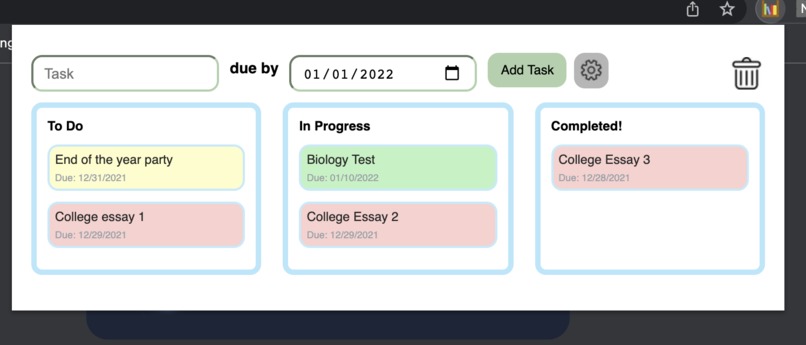
Full view of Synchro, with different color-coded tasks
-
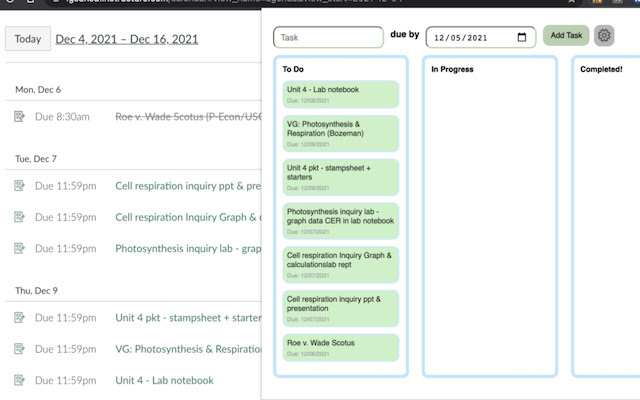
How Synchro adds tasks directly from Canvas
-
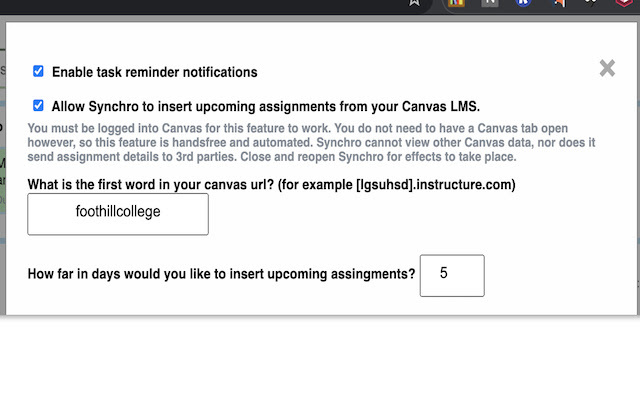
Settings tab to configure Notifications and Canvas Assignment insertion
-
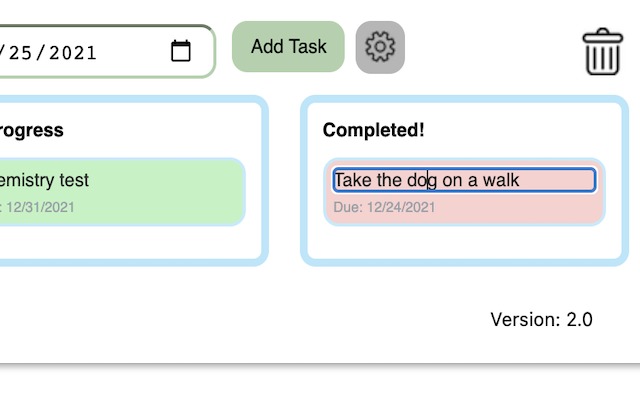
Editing capabiity


Inspiration
I was inspired by the last 3 and a half years of high school, coupled with the various productivity challenges and practices I used to create Synchro. I've found that some productivity tools today are very bloated, hard to look at, and simply uninteresting to use, which is a niche I hoped to overcome with Synchro.
What it does
Synchro has a very streamlined UI with its main feature; a Kanban-style drag-and-drop task organizer. Synchro is housed within an unobtrusive popup and no signup features - all decreasing the bar to get organized. There is no need for signing up, as all data is stored with the Chrome user, and if Synhcro needs to be accessed remotely, users simply have to Sync their Google account on that device.
These are the main, defining features. Users can create custom tasks with a title and a due date, and can drag these tasks between 3 columns: "To do, In Progress, and Completed". These tasks can also be edited whenever desired by right-clicking on each task. Additionally, each task will change color from Green to Yellow to Red as it approaches its due date, and will send a Chrome notification as the task approaches completion.
Moreover, I included one extremely unique feature never seen before in a productivity tool: Canvas Integration. Many school districts, even universities, use the Canvas LMS to create assignments and manage courses. Synchro is able to extract Assignments from a user's Canvas Agenda and insert them into Canvas - automatically with no effort from the user. These tasks behave the same as custom-added tasks. Every time Synchro is launched, users are reminded of their school assignments along with their other custom tasks. Obviously, this feature is optional, but a huge benefit to students who use Canvas. The days in advance can be completely customized - if a user wants to insert tasks 5 days ahead of time, or 1 day ahead.
Besides UX, Synchro has a backend firebase database, so I can track real-time usage of the app. I can track the usage of multiple features, such as the number of tasks in each column for each user, the last time a user has used Synchro, user notifications, and the last time the Canvas API was called per user. Thus, I know which feature is most important. This part is important for me as the developer, as I get custom insights as to how Synchro is handling, as the Chrome Extensions store provides minimal usage support. I am also using Google Cloud analytics to view the user activity through charts and graphics.
How I built it
Synchro is built purely on JS + Jquery, HTML, and CSS.
Challenges we ran into
I ran into long challenges with local storage of the tasks, as users obviously don't want to lose their data every time Synchro is closed. I also ran into significant difficulties setting up Google Analytics (separate from Firebase DB), but it is all working now.
Accomplishments that we're proud of
I am proud of being able to create an app that is actually functional and useful to me and a large number of my schoolmates. I learned a lot about User Experience and feedback, which was crucial in making a multifaceted app with features people care about.
What's next for Synchro
Now that I have established the rigorous coding features, I am looking into marketing the app.


Log in or sign up for Devpost to join the conversation.