-
-
Logo Animation
-
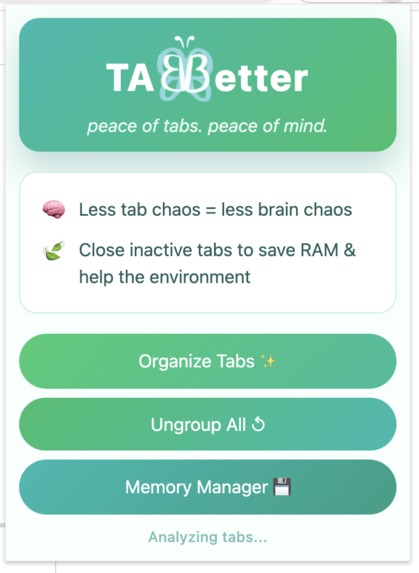
Main Page
-
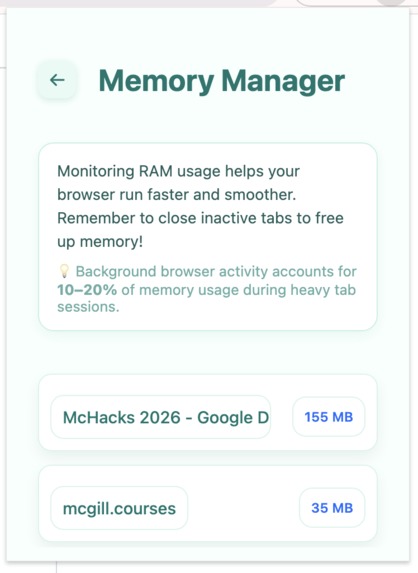
Memory Manager Page


TABBetter
Focus better by turning a chaotic browser into a structured workspace — in one click.
The Problem
Modern browsing encourages multitasking, but dozens of open tabs quickly turn into cognitive overload.
A cluttered browser:
- Breaks focus and workflow continuity
- Makes it harder to find relevant information
- Consumes unnecessary system memory
- Increases background resource usage without users realizing it
What starts as “just a few tabs” becomes a productivity and performance problem.
The Solution
TABBetter is an AI-powered Chrome extension that transforms tab chaos into clarity.
With one click, TABBetter:
- Automatically groups related tabs into meaningful categories using AI
- Surfaces which tabs are consuming the most RAM
- Encourages users to close inactive or unnecessary tabs
All through a calm, minimal interface designed to reduce visual noise.
TABBetter doesn’t just organize tabs — it restores focus.
Key Features
Smart Tab Grouping (AI-powered)
- Uses Google’s Gemini API to analyze open tab titles
- Automatically creates logical, human-readable tab groups
- Applies valid Chrome tab group colors with safe fallbacks
- Uses Google’s Gemini API to analyze open tab titles
Memory Manager
- Estimates RAM usage per tab
- Displays tabs sorted from highest to lowest memory usage
- Helps users decide which inactive tabs to close and free up memory
Note: Chrome restricts access to exact per-tab memory usage on stable builds for privacy and security.
TABBetter therefore uses estimated values, which are sufficient for comparison and fit the project’s time constraints.- Estimates RAM usage per tab
Clean, Intuitive UI
- Designed in Figma with a focus on calm, clarity, and accessibility
- Smooth animations and transitions
- Minimal text, clear hierarchy, and soft color palette
- Designed in Figma with a focus on calm, clarity, and accessibility
One-Click Actions
- Organize all tabs instantly
- Ungroup all tabs
- Navigate between main view and Memory Manager seamlessly
- Organize all tabs instantly
Tech Stack
Frontend
- HTML5 – Popup structure and layout
- CSS3 – Custom styling, animations, and responsive popup design
- Vanilla JavaScript – Logic, UI updates, and Chrome API interactions
Browser APIs
- Chrome Extensions API
chrome.tabschrome.tabGroupschrome.tabs.querychrome.tabs.groupchrome.tabs.ungroup
AI / Backend
- Google Gemini API (
gemini-2.5-flash)- Used for intelligent categorization of open tabs
- Prompt-engineered to return strict JSON output for reliability
- Used for intelligent categorization of open tabs
Design
- Figma
- UI/UX design
- Visual hierarchy and spacing
- Color system and component layout
- UI/UX design
How It Works
Smart Grouping Flow
- User clicks “Organize Tabs”
- Extension collects all open tab titles in the current window
- Titles are sent to the Gemini API
- Gemini returns structured JSON containing:
- Group name
- Tab IDs
- Suggested color
- Group name
- Chrome Tab Groups are created programmatically
- UI updates to confirm completion
Memory Manager Flow
- Tabs are scanned locally
- RAM usage is estimated heuristically based on tab type and URL
- Tabs are sorted by estimated memory consumption
- Results are displayed in descending order
Environmental Impact
Inactive tabs don’t just slow down your device — they consume energy.
- Background browser activity can account for 10–20% of memory usage during heavy tab sessions
- Fewer active tabs = less CPU & RAM usage
- Reduced resource usage contributes to lower data center energy demand
TABBetter promotes conscious browsing, benefiting both users and the environment.
Why TABBetter?
- No accounts
- No tracking
- No clutter
- No learning curve
Just a smarter browser experience, powered by AI.
Challenges & Learnings
Building TABBetter came with several technical and product challenges:
AI API access & limits
We initially explored using the OpenAI API for tab grouping, but no free tier was available for our use case. We pivoted to the Google Gemini API, which better aligned with Chrome extensions and Google’s ecosystem. While Gemini’s free tier had usage limits, we successfully worked within them by optimizing prompts and batching requests, and leveraging a free trial during development.Browser constraints on memory data
Chrome restricts access to exact per-tab memory usage on stable builds for privacy and security reasons. As a result, we implemented a simplified estimation approach that still allows meaningful comparison between tabs and enables users to identify high-impact tabs quickly.Balancing performance and UX
We had to ensure AI-powered grouping felt fast and seamless inside a lightweight popup UI. This required careful handling of async operations, loading states, and smooth transitions to avoid blocking the user experience.
Future Improvements
- Real memory usage via Chrome performance APIs
- Auto-suggest closing tabs after inactivity
- Persistent grouping profiles (Work / School / Personal)
- Dark mode
Built For
- Students
- Developers
- Researchers
- Heavy browser users
- Anyone overwhelmed by too many tabs
Hackathon Project
TABBetter was built for McHacks 2026 as a proof-of-concept demonstrating how AI can improve everyday productivity tools with minimal friction.
Built With
- css
- figma
- geminiapi
- git
- github
- html
- javascript


Log in or sign up for Devpost to join the conversation.