-
-
Title Slide
-
example shell1
-
example shell2
-

input img
-

output img
-
Gitbash Theme
-
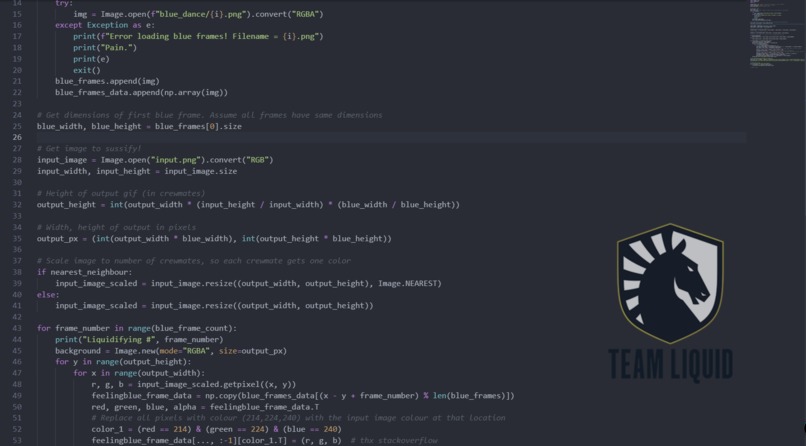
Visual Studio Code theme


Inspiration
This originally started off as a simple bash script to interface with the Liquipedia api. Because interfacing through things through a terminal allows me to look busy while not actually being busy- or so the explanation was supposed to go. Things got complicated when I tried to run stuff from the terminal... got unreasonably mad at the terminal I was using due to lack of customization... and I sort of wrote a whole series of different projects under the umbrella of a custom software suite spanning an image converter that I was trying to use for the blue-pixel-art submission, a custom terminal theme for both VS code + gitbash, and a behomoth of a project which sought to mimic functionality of a shell, but with text to speech implementation in mind for blind programmers. Yeah. I sorta got carried away...Oops?
But then I figured- why not? Not like I have a life.
Why not have a custom script that take in images and outputs a Blue (the mascot) pixel-colored gif?
Why not go beyond a bash script and write a whole custom SHELL?
Why not just add the TL logo in Visual Studio and write a plugin for it?
Why not just make a custom .minttyrc file in the style of what a TL fanatic programmer would have?
Terminally Blue is an amalgamation of several projects that I worked on throughout the week- each better than the last. But it's MY amalgamation. And I'm very proud of it.
What it does
1) So the most "*accessible" part of this project is probably the image converter which can function as a standalone product. It's pretty simple. It takes in an input image, then outputs a gif made up of pixelated blue's that ripple like a flag. You can download just this part of the code in the blue_dance folder on the repo, and run it yourself. You will need to have python installed along with pillow/ffmpeg.
This was a fun little thing I coded up but forgot to submit for the pixel art mini event... and it branched out into it's own thing.
2) Blue Shell.
I sort of struggled to explain this to my parents, as well as to everyone else who asked me what I was working on... so I'm gonna just let wikipedia explain.
"Operating systems provide various services to their users, including file management, process management (running and terminating applications), batch processing, and operating system monitoring and configuration.
Most operating system shells are not direct interfaces to the underlying kernel, even if a shell communicates with the user via peripheral devices attached to the computer directly. Shells are actually special applications that use the kernel API in just the same way as it is used by other application programs. A shell manages the user–system interaction by prompting users for input, interpreting their input, and then handling an output from the underlying operating system (much like a read–eval–print loop, REPL).[3] Since the operating system shell is actually an application, it may easily be replaced with another similar application, for most operating systems." - Wikipedia
So the TLDR is that I wrote a custom interface to the kernel, with built in functionality that I wanted in mind- like custom commands for the use of the Liquipedia api through direct commands in the terminal, or some other integrated commands. For example, I used to have an adruino hooked up to a 5$ coffee maker- that when a program is run, turns it on and makes coffee for me remotely. This terminal command could be built into my custom shell and execute when I type "sleep 300 | coffee" which would wait 300 seconds and then execute the builtin command to give me my caffeine fix.
3) minttyrc
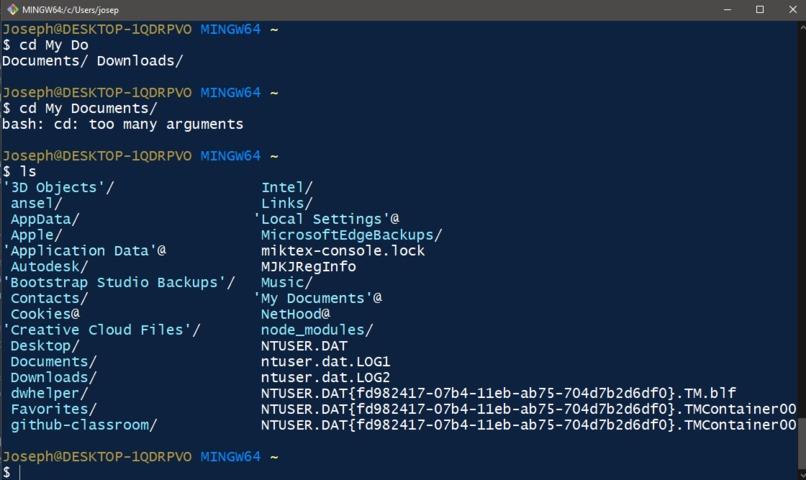
Documentation for minttyrc seems to have gone down the drain- the github page it previously was hosted on now shows a 404 error. That being said, it basically allows you to thematically customize other command line utility programs like gitbash. I just wrote a little customization script, saved it to a .minttyrc file that a user can implement to get the team liquid colors in their terminal.
4) Visual Studio Code theme
This one is relatively straightforward. I just added an image to the background of my visual studio code terminal to show the team liquid logo. More customization like the colors of the UI can be changed as well, but this was mostly proof of concept.
How we built it
1) The image converter or "blueit" as I internally refer to it as- functions as a simple python script. It takes an array of images in a file, and focuses on a range of RGB values, then swaps them from pixel samples taken from the image. The array of blue's (unit of measurement) can be adjusted and customized to be as detailed/not detailed as you want. Five images are then spawned, with alternating placement of blue png's, with the RGB values manipulated over for an iterating set. These five images are then stitched together into a git using ffmpeg, which converts the png's over to a gif.
2) Blue Shell.
You're gonna want to hang on tight for the wall of text that's gonna come with this one. So the first thing any good custom shell needs to do is taking in (parsing) and executing commands. You need to write a scanner and a parser ideally (I used an open source version of Flex and Bison), then linked it to bluecommand.hh which implements a data structure that a typical shell command would use. The struct SimpleCommand implements an argument list for a simple command (i.e. a command of the form mycmd arg1 arg2 arg3). Utilizing piping, when a command is used it's composed of multiple SimpleCommands. I also wrote in functionality for input,output, error redirection stuff. I talked about Flex and Bison a bit earlier- it's actually implemented in blue.l and blue.y, which stands for lex and yacc respectively. Modifying it to accept not only custom commands, but commands that a regular shell would use was relatively... hard- most notably I ran into issues running large strings of commands like
cmd [arg]* [ | cmd [arg]* ]* [ [> filename] [< filename] [2> filename] [ >& filename] [>> filename] [>>& filename] ]* [&] when added to custom commands.
Once I got piping down though, the issue resolved itself (and a wrestle with a stupid IO redirection line). I then moved on to simple command process creation and execution. Each additional command was called using fork() and execvp() to execute the commands in a series- with waitpid() put at every level to ascertain when the child process was finished. File redirection was next, which just involved envoking proper use of dup(). Pair that with piping to allow inter-process communication using pipe() (who would have guessed lol), I set up a pipe that redirected the output of one simple command to the input of the next simple command. At this point, the shell was able to run commands like:
ls -al | grep command
ls -al | grep command | grep command.o
The problem though, was that in other shells you typically type stuff like Ctrl-C to exit the program (common for stuff like csh, bash) but since this shell was operating inside another shell, whenever an infinite loop occurred/problem happened, hitting Ctrl-C would exit the whole program AND blue shell. Which wasn't very nice- so I had to find a way to handle Ctrl-C signals. https://man7.org/linux/man-pages/man2/sigaction.2.html was basically where I figured out how to handle that, so that if my shell was hanging, I could Ctrl-C and it would terminate the program it was running, but not blue shell itself.
After that it was a matter of working with setting custom environment variables in case I wanted to signal certain commands to ignore certain correspondence to executables- during this time for example, I implemented a custom exit function() which has less memory leaks than a typical bin/shell. I got that fixed up, and moved onto making sure functionality for transversing directories worked. That was a struggle- I will admit. All the code for this particular part of the project is located in the bluecommand.cc file- if you're actually interested in looking at the code.
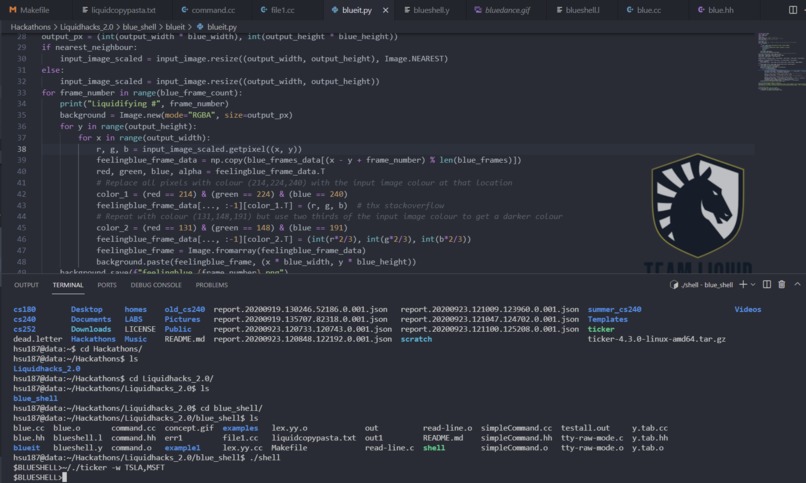
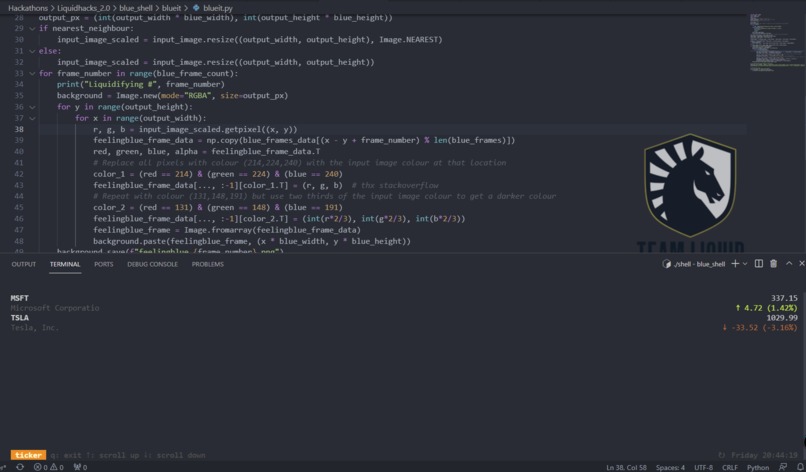
To wrap up this section of the explanation, blah blah- I implemented stuff like subshells, tilde expansions, and impemented a history freature (arrow keys go up and down to see previous commands). This was implemented in a C file- tty-raw-mode.c and all goes to say that blueshell officially sorta works as a semi-decent replacement for the default shell. You can run programs to view stock prices- and the best part is you can interact with the shell just by talking! Using voice-to-speech built into Windows 10!
3) minttyrc dosn't really have a "how I built it part" as much as I literally opened up a text editor, made an .minttyrc file, and proceeded to enter in values corresponding to team liquid's hex codes. You can download the profile itself from the folder in the github if you want the theme.
4) Visual studio code
See I didn't know there was a plugin that already existed for this, so I spent like 2 days trying to code a custom plugin that allowed images to show up without interacting with the backend of the application- I knew it was possible because there's a hatsune miku theme for VS code floating around somewhere on the market, but I tried to make my own. The end result was simply admitting defeat, downloading a base plugin on the market, then adding the code
` "background.style": { "content": "''", "pointer-events": "none", "position": "absolute", "z-index": "99999", "width": "70%", "height": "100%", "margin-left":"30%", "background-position": "right", "background-size": "cover", "background-repeat": "no-repeat", "opacity": 0.7 }, "background.customImages": [
    "https://media.discordapp.net/attachments/587462902810673181/908799764789882930/Artboard_1.png"
]
To my settings.json inUsers>myname>AppData>Roaming>Code>User>` to get this image. This is entirely customizable so you can put pretty much anything in place of it.
Challenges we ran into
I don't think there's a word limit here, but I'm pretty sure I would cause page spillage and could write a novel if I tried to go in depth about everything that went wrong. Here's a few highlights on "stuff that went wrong, ranked" from this past week.
1) Staying up all night to fix a bug in the file redirection, only to realize I was calling dup(0) instead of dup(2) in one particular spot, that was screwing over the whole shell 2) Deleting the python script by accident, trying to remove temporary files upon file generation 3) Causing my coffee maker to nearly short itself while connecting it to the Arduino. 4) Not knowing what to do for a solid 6 hours, just staring at the screen until I played a game of aaram and bashed my head against the table when I thought of a solution to implement snowball pixel bleed. Thanks ziggs.
Accomplishments that we're proud of
Not sure if I'd say more proud or morbidly bewildered at the amount of stuff I did all for something I signed up for at random. All in a days work, I suppose (or several days and sleepless nights, let's be real)
What we learned
I learned how to make a shell. For some reason that statement looks lame and insignificant, but it was akin to learning how to swim for the first time, tied down to a millstone and dipped in the ocean- just given two pool noodles. Whoever coded/contributed to the main shell that people use- has my utmost, reverent respect because I was basically blinking my eyes every couple of seconds reading documentation saying "there's a function for that???" and "no way."
I also learned how to develop plugins for visual studio code, do some basic image processing, and how to survive during an exam week with 4-5 hours of sleep a night.
What's next for Terminally Blue
Upgrades people, upgrades.
Seriously. I don't think I've managed to fall more in love/out of love with a project, ever. I managed to link together some jank workarounds with bash and python, as proof of concept that you CAN access liquipedia from the terminal, but it's a work in progress. Hopefully by the time Liquidhacks 3.0 comes around, I'll have a greater understanding of how to work with this to generate clean api results in a visually pleasing way within terminal. Because who wants to really open up a text editor or a tab of chrome? I'm lazy.


Log in or sign up for Devpost to join the conversation.