-
-
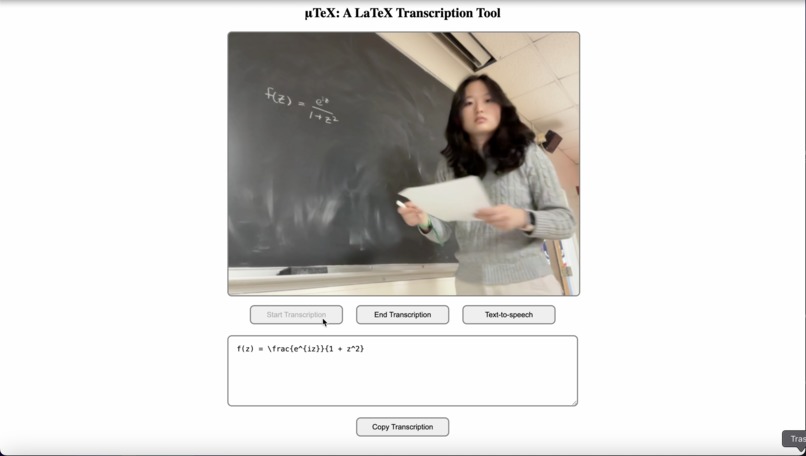
live transcription 1
-
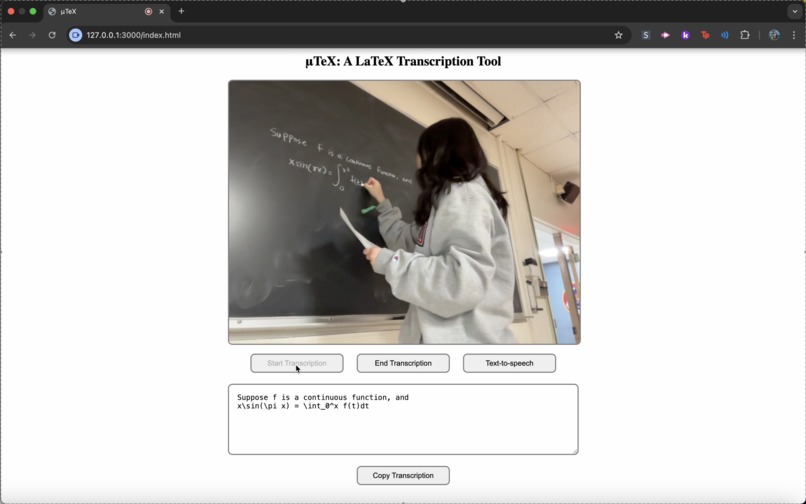
live transcription 2


μTeX: A LaTeX Transcription Tool
Pronounced Mew-tech. (MuTeX)
Inspiration
μTeX is my two loves of my life combined: chalkboard and LaTeX. However, that does not mean I am the fastest LaTeX writer. I always aspired to be that student who writes math notes in LaTeX, but my slow typing (66 wpm: embarrassing for a CS major) limits my dreams. I needed some external help for accurate LaTeX math notes. Thinking about my love for LaTeX, I remembered an essay I wrote for an English class about LaTeX. I wrote about how my professor refuses to give LaTeX source code for our homework, and why he should start doing so. One thing I learned at that time was LaTeX's accessibility.
... characteristics of standardized syntax across LaTeX users “...allow the blind user to access some mainstream mathematical resources on the web. … If a blind person reads the formulas on this page with a screen reader, she/he will hear their LaTeX representations.” (Maneki and Jeans) Verbally reading mathematical expressions is challenging, and LaTeX provides a standard tool.
Then I questioned, how does a blackboard-based math class scene translate to blind individuals? With this question and my struggles writing LaTeX notes, I decided to create μTeX.
What it does
μTeX is a web-based application that transcribes handwritten math equations from blackboards into LaTeX syntax. μTeX uses the Gemini library to recognize math equations in real-time. Live camera captures the user's view, which is then fed into Gemini with a prompt. The output is a clean LaTeX script for easy integration into notes, papers, or digital documents. A key feature is accessibility: LaTeX is accessible, and it provides real-time assistance in equation interpretation for blind and/or visually impaired individuals. TTS is available, which lets blind and visually impaired individuals engage with math content independently. The platform supports both casual users and academic institutions aiming for more inclusive education. Overall, it bridges the gap between traditional math instruction and modern, accessible digital workflows.
How we built it
I used plain HTML, CSS, and JavaScript for this project. I like the simple, old-style websites that are easy to navigate. The Gemini API was used for OCR and the browser's TTS.
Challenges we ran into
I initially planned to deploy the project via GitHub, but encountered a limitation: using plain JavaScript made it difficult to secure the API key without exposing it. Rather than compromising security, I chose to prioritize improving the core functionality of the product. I believe that building a strong, feature-rich foundation is more important at this stage. Deployment can be addressed later using a more suitable environment like Node.js, where secure key management is easier to implement.
Accomplishments that we're proud of
This is my first time solo-hacking, and I had to start late with limited resources (me and myself). I was able to create a functional product that I am passionate about, hence my two loves combined. I am proud of the hours I put into making μTeX work and keep trying despite the absence of teammates.
What we learned
I think out of all things I learned, the most important lesson was making products accessible. Balancing features with user needs is crucial, and inclusive technology can help everyone in the community.
What's next for μTeX (MuTeX)
Increased accuracy in transcription, deployment, live LaTeX compilation for visual accuracy checking, and volume and speed control for TTS




Log in or sign up for Devpost to join the conversation.