-
-
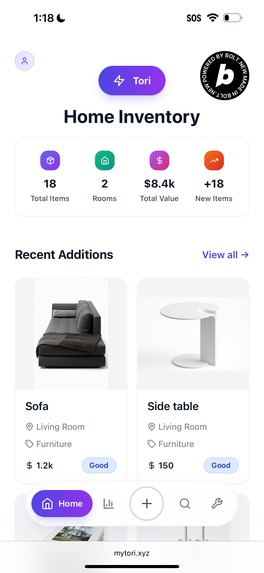
The home page is a quick look at your home inventory: 4 most recent belongings added and basic stats.
-
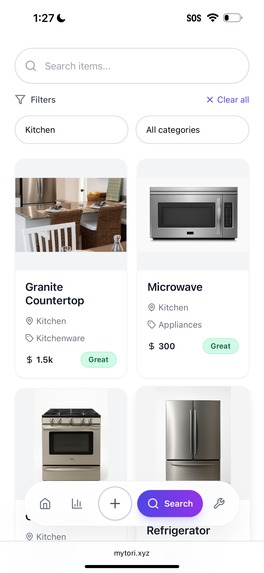
Your entire home inventory is searchable with freeform text, room, and item category options.
-
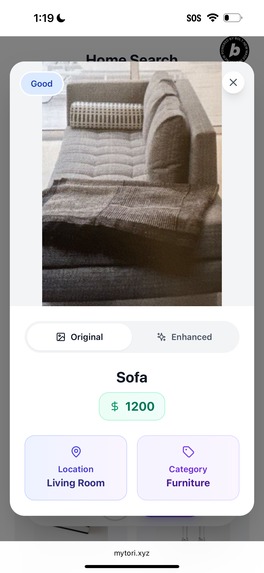
You can review and edit any cataloged belonging, including view the original image of it that you captured.
-
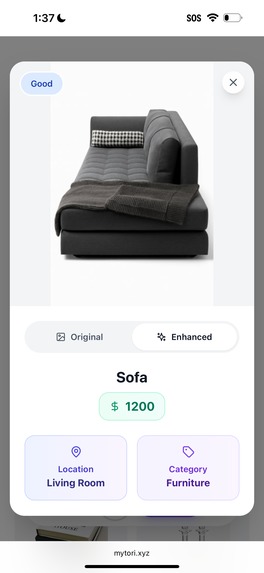
For each item, AI is used to produce an enhanced image.
-
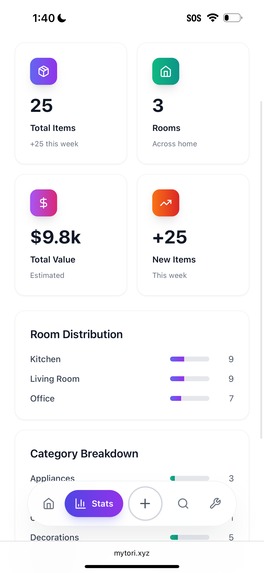
The stats page includes the breakdown of which rooms you've cataloged and how many items in each room.
-

AI Snap uses computer vision to catalog many items at once. Manual snap is one item add, without AI help.
-

It takes Tori a bit of time to analyze your image with AI. In the meanwhile, she tries to entertain you.
-
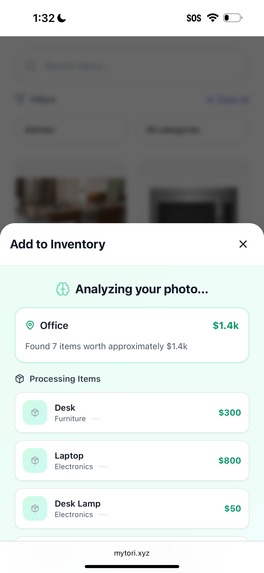
Tori automatically identifies the room, and for each item (up to 10) found in the room- its estimated value, condition, and category.
-
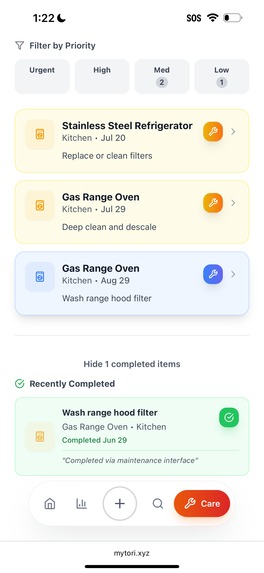
Maintenance reminders indicate priority level, and allow you to review recently completed maintenance tasks.


Inspiration
Every fall, when the Santa Ana winds pick up and sweep through open windows, I'm pulled back to a turning point in my childhood, a moment when I first felt the ache of losing something that mattered. That dry, ashy scent carries the fragility of memory and reminds me how quickly my world can disappear.
I’m thinking back to the Harmony Grove fire, and remembering swimming backstroke at practice while my coach stood on the high dive, with binoculars glued to his face as he tracked the fire's progress. It felt distant, like a dramatic backdrop.
But quickly, it became real. On the drive home, the road vanished into thick, disorienting smoke that enveloped our car before we could reach our street. That night we rested on cots in a shelter, still not knowing what we had lost, and still hoping the home was alive.
That became my first experience with Schrödinger’s cat. Until we reached the driveway, the home was both standing and not. The scorched hill gave it away, and before we saw it, we knew. As luck would have it, or really just the wind, ours was the one unlucky home on the street that burned.
Only my mom emerged from the car. She didn’t cry. Didn’t speak. Just stood there, one hand on her hip, surveying. Her calm grounded the rest of us. And when we finally found my dad later that day at a shelter, he cracked a joke. For the first time that day, we laughed; his small signal to us that, indeed, we’d be ok.
At first, it felt like a new adventure. We stayed ten days at a hotel, foraged for new clothes, and adjusted to altered routines. But the grief crept in slowly, in the quiet, when the dust had settled and there was finally space to feel what we’d lost.
Halloween brought the first sharp ache. Just ten days after our home was lost, I was heartbroken that I wouldn’t get to wear the clown costume my mom had sewn earlier that year. I’d been counting down the days for months. Instead, I trick-or-treated in my everyday swim cap and goggles, still damp from that afternoon’s practice.
The ache lingered. By December, I felt the weight of my greatest personal loss: a handmade pillow I’d sewn for my sister, already wrapped – a gift that would never be given. I was so proud of that pillow. It was the first thing I ever sewed on my mom’s machine, with her guiding hands of course! Realistically, she probably did more of it than I did. But that didn’t make me any less excited to give it as a gift. I can almost picture it now, but just barely. When I concentrate deeply, I envision its flowered ruffle. I wish I could see it again. What did it really look like?
And in my heart, that's where Tori began.
Not as a product idea, but as a wish to be able to look back and see something that mattered, and to be able to hold on to a piece of it. For me, Tori is a lightweight, on-the-go treasure chest with a record of what was there, and what made a house feel like home.
But there's also the practical side. My parents spent countless hours after the fire poring over a thick binder and filling page after page of itemized lists for the insurance claim. It was a tedious process that exhausted and overwhelmed them for over a year.
Tori is meant to help with that too. Most of us don’t keep perfect lists or file cabinet inventories. We toss receipts, forget where warranties are, and only really think about documenting valuables after something has happened. Tori makes home inventory easy: just take a photo, tag it, move on with your day.
Earlier this year, I really wished I had Tori! A nearby brush fire forced me to evacuate, and in those rushed minutes, I found myself returning to a question I first encountered in childhood: What do we really have in this home? And a small voice followed: What would I forget if it were gone?
Being in my home has given new depth to the value of remembering; it goes beyond simple nostalgia and into the practical. When was the heater last serviced? What’s the warranty for the fridge? These aren’t glamorous details, but they’re the ones that keep things working, and they’re easy to forget.
Tori helps you stay ahead of all that. Whether it's tracking when something was purchased, last replaced, or just knowing where it is, Tori makes it easy, visual, and even a little delightful.
I built Tori to honor what we lost, and to protect what we still have. And I built it for anyone who wants to remember, care for, or just keep track of the pieces that make a house feel like home.
Sometimes homes are lost. And when they are, the rebuild process isn’t just exhausting – it’s incomplete. Insurance can replace what was bought, but not what was beloved. Memories fade too quickly.
Together, the Eaton and Palisades fires destroyed more than 16,000 homes and commercial buildings in LA earlier this year. Behind each number is a family with memories and keepsakes that are often gone without warning, and without record.
Tori won't stop the winds or save what's in the treasure drawer. But maybe it can give someone, someday, a way to hold on. To remember. To rebuild.
That's why I built Tori.
What it does
Tori is a home inventory app that uses computer vision to identify objects from a single photo and log them automatically. Users can then keep track of those items and record helpful reminders for care or maintenance over time.
How it was built
I used a relatively simple prompt in Bolt.new to get started. It was close to this, but not exactly this:
i want to build a web app that i can use for home inventory management. it should be capable of taking a photo, recognizing objects in the photo, categorizing them and me being able to chat about the items that i have. i'm primarily going to view it on a mobile device
In general, Tori was built using a full-stack TypeScript setup with a focus on fast iteration, clean UX, and mobile-first design.
Development Approach
I started entirely in Bolt.new and built the frontend there, along with an initial mocked backend. Bolt was fantastic for rapid prototyping and iterating on the user interface. However, when I needed to test the app on actual mobile devices and integrate with GPT-4 Vision, I found Bolt's environment less suited for this type of backend development and mobile testing workflow.
I moved the backend development and testing to Cursor with claude-4-sonnet while continuing frontend development in Bolt. Once the image processing parts were complete, I used Bolt for the Supabase integration and entri integration for deployment on a custom URL.
Frontend (Built in Bolt.new)
React with Vite, styled using a custom design system and Tailwind-style utility classes. I built responsive modals, floating action buttons, and pill-shaped components to create a modern, touch-friendly interface. UI state is managed with React hooks, and all views are optimized for mobile usability.
Backend & APIs (Moved to Cursor for mobile testing)
While the frontend remained in Bolt, I tested and finalized the backend using Node.js after I struggled to get things working past the mocked setup with Bolt. The backend includes:
- Object Detection: GPT-4 Vision for identifying items from uploaded images, providing lists of items with estimated values, descriptions, and room detection.
- Bounding Boxes: Landing AI's object detection API for precise item cropping.
- Image Enhancement: GPT-4 image edit API for enhancing the image crops of the items.
Database & Authentication
Bolt's Supabase integration made it so easy setup the database, authentication, and do database migrations. Supabase handles authentication, data storage, and Postgres management. I defined tables for inventory items, required maintenance, and completed maintenance. I used RLS (Row-Level Security) policies to ensure users only access their own data. Each item record includes optional metadata such as condition, value estimate, category, and care notes. Both original and cropped images are saved to Supabase blob storage.
Deployment
Frontend deployed on Netlify directly from Bolt.new, and the backend runs on Railway. I partially managed Supabase schema changes through SQL migrations in Bolt (which was very convenient) and in some cases, updated schema directly by using Supabase's run SQL feature.
Home Maintenance Feature
Once the core inventory flow was working smoothly, I pivoted from the "chat your items" functionality that I originally envisioned when I started the project in Bolt. I instead opted to expand Tori beyond simple record-keeping by adding a lightweight home maintenance log that allows users to track care tasks tied to each item, like replacing filters, tightening screws, or re-sealing wood.
The goal was not to overload users with reminders or complex systems. Instead, I wanted to create a simple way to leave helpful notes for the future. It's the digital version of jotting something on a sticky note, but now it stays linked to the item it belongs to.
This addition helped shift Tori from a one-time tool to something people can return to. It also opened the door to future features like care timelines, seasonal maintenance suggestions, or even integration with service providers.
Optimizations
I found some of the UX optimizations that I wanted to do with Tori very challenging - more details on that below! While I tried to solve these in Bolt, I ultimately wasn't able to resolve them there. They involved complex state management, performance profiling, and iterative mobile testing that was more doable to iterate in my local setup. I only tackled these optimizations after the core functionality described above was complete and working in Bolt.
Challenges Encountered
What began as a dead-simple prototype with a quick snap, detect, save, rapidly unraveled into a tangle of modals, mobile crashes, and memory bugs.
Polling and Parallel Processing Pains
The initial pipeline was blissfully simple: synchronous, sequential calls to GPT-4 Vision, then Landing AI, and finally return results to the frontend. At first, this wasn't that slow. After I added the enhanced image functionality, every new logged item ground the app to a halt.
I re-architected the flow to asynchronously process each image step in parallel. Seemed like a clear UX win, until I tried to build it. Total minefield.
What was, at first, simple to describe ("parallelize this part") became a many headed monster of follow-up prompts and adjustments:
- Show partial results while individual images were still processing
- Reveal items progressively without jarring layout shifts
- Refresh data only once, after all async updates completed
- Avoid mobile memory issues with multiple images in-flight
React Modals
In the first versions of Tori, Bolt's LLM generated an AddItemModal and a separate CameraCapture modal. No doubt because of the way I described those as separate functionalities. This meant that a user had to click "Add Photo," a new modal would appear, and then they had to click another button to finally open the camera preview. It worked, but it was definitely clunky.
Unfortunately, not quite clunky enough for me to notice before I'd already added all the backend functionality with the frontend mostly done, too.
When I tried to combine the camera logic into the Add Item flow to remove the additional modal and user pain, it broke everything. I vibe code-spiraled through three separate 2-hour sessions, prompting in circles. The breakthrough finally happened when I stopped trying to describe everything I was seeing and what I wanted updated, and instead just broke it down into small bits that I could step-by-step prompt.
Supabase Egress
Oof. I hard blitzed my Supabase Egress, and they hard rate limited me back. Deserved. At some point, I was loading the data six times every app refresh. It turned out that every page was independently fetching everything on each refresh. Yikes!
It took me an embarrassingly long time to realize that I should be mocking images during development. No need to hit the DB when I'm just testing a quick UX tweak.
One Prompt to Change All the Code
Bolt's "make it better" magic is very powerful. Initially, I did not know how to properly wield the power. A single prompt would enthusiastically, creatively rewrite what felt like every file.
Once I started being substantially more specific with what parts I wanted modified, Bolt and I were flowing together. I'm pleasantly surprised by how nice the UI turned out.
Why the Heck Do I Still Use My iPhone SE?
The SE.. I know. It's not even the new one! 2020 called, and it wants my phone back.
But it kept me honest with Tori's development. I can't test Tori on every device type out there or every browser. But, if Tori could run on my SE, chances are good that it could run anywhere.
And wow, it surfaced a lot of problems: modal race conditions, massive image payloads, viewport bugs.
The most frustrating moment happened after I pushed an implementation of polling that worked great on my newer devices, only to discover the next morning that the SE reloaded every time I tried to add new images. Stubbornly, I went in circles with prompting for a solution until the LLM eventually suggested, might I consider ignoring the issue because Apple no longer supports my version of the SE?
Ultimately, I'm not 100% sure what the fix was! Maybe a combination of multiple things. Somewhere after addressing Supabase Egress and refactoring the AddItemModal , Tori started fully working again on my SE.
Points of Pride
After the initial functionality was running and I had deployed Tori to a custom URL, I went ahead and did my first user test. Sent the link to my mom without any usage instructions, and a little over four hours later, got this gem back:
"It works! I inventoried like 22 items and it did very well. Is there already something out there like this? Because it would be fantastic."
-- My mom
For me, this is a huge source of pride on multiple levels because it speaks to the interface being intuitive, Tori's utility, and validation from the original target demographic.. someone who lost their home.
Lessons Learned
These are the top three things I wish I knew going into this hackathon:
Mock first. Save your Supabase egress later. I didn’t mock anything with the DB at first, which meant every small UI tweak reloaded real data, and with image data the GBs added up quickly. The fix: mock DB calls early.
Design the UX fully before hooking up the backend. Supabase and Railway were shockingly easy to plug in with Bolt. I was blown away with how easy it was to integrate Supabase. But I built out backend logic too early and it caused some unnecessary go-backs on parts of both the frontend and backend code structure. I think Bolt actually was helping here with starting by mocking the backend first, but I didn't realize at the time. If I could do this again, I would have completely finalized my vision for the frontend before bringing in the backend. Especially in the case of Tori, where the API calls are not fast on image data, so it slowed iteration. On the positive side, I think that going through this experience once, showed me what type of small UI/UX details to pay attention to from the start. Things like:
- Button consistency across all screens
- Text boxes that remain fully in view even when pressed
- Overall flow (okay, that one is not a small detail!)
- Progressively loading the UI
- Keeping font sizes big enough that they don't trigger mobile zoom on text boxes
- Smooth page transitions with scrolling to the top when navigating to a new page
- Modal positioning consistency
3. Safari Developer Tools are non-negotiable for mobile web debugging. When my iPhone SE reloaded the app every time I tried to upload a photo, I was initially very confused how to go about helping the LLM to debug this because I couldn't just open "Inspect" on my phone and see the console logs. Eventually I learned that you can plug your phone into a Mac, open Safari → Developer → your device, and finally see the mobile logs. Game changer.
What's next for Tori
I see Tori evolving into a full ecosystem for your belongings. From preparing for the unexpected to selling a chair on FB Marketplace, Tori could help you know what you own, where it is, and how to care for it.
I also think that Tori could be made even easier to use with a few modifications: 1) seeding with images that are in your photo gallery and cataloging detected items, 2) allowing a user to just upload a video walkthrough of a room, and 3) integrations with retail platforms like Amazon, Target, and Walmart for automatic product matching, pricing, and warranty lookup.
Future features could include:
- Smart product matching: Automatically identify exact product models and pull in specs, manuals, and warranty info
- Resale integrations: One-click posting to Facebook Marketplace with auto-generated descriptions
- Insurance integration: Export formatted lists for claims, with photos and valuations
- Estate planning support: Document belongings with stories and values for inheritance planning
Built With
- bolt
- entri
- landingai
- netlify
- openai
- railway
- supabase


Log in or sign up for Devpost to join the conversation.