-
-
Figma to Web, instantiate your web design in no time!
-
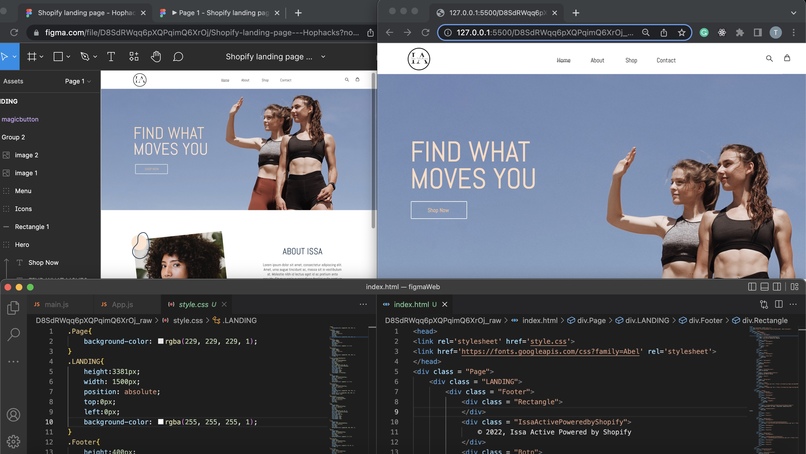
Autobots, transform and roll out!
-
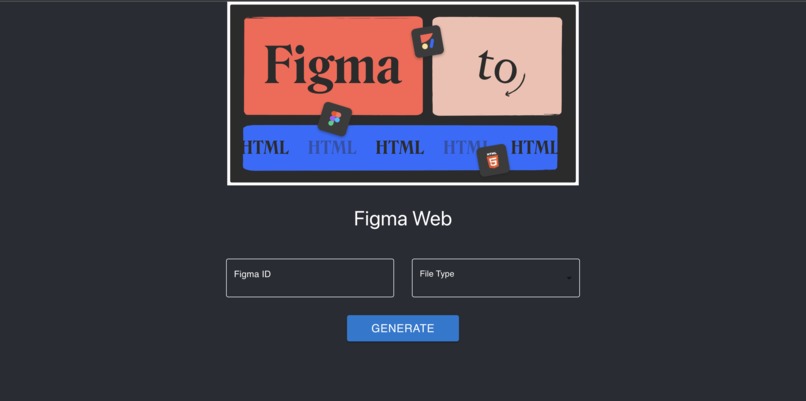
Fig2Web.com


🌠 Inspiration
Working as a front-end engineer over the summer, one of our teammates found herself spending a lot of time copying and pasting CSS properties from Figma design files into corresponding React components, and was frustrated by the trivial and repetitive process.
She was not alone. Our team related deeply, believing that an app that automatically converts Figma designs into React components or raw HTML/CSS files would be extremely useful to every web designer and developer. 😎
This was the beginning of Fig2Web. It not only expedites the work of frontend developers and allows them to work on more complicated functionalities, but also helps people with little or no technical skills to create a static website purely from Figma design files.
🔧 What it does
Fig2Web saves people the time and energy of “coding up” a website from scratch. After creating a wireframe on Figma, they can simply copy and paste the id of the design file from the URL bar to our platform, choose the desired code framework, and then ta-da, the code is automatically downloaded as a zip file to their computer.
Fig2Web provides two kinds of code generation: raw code, which contains plain html and css files, and React code, which has well-organized code files corresponding to groups of Figma design components.
In this way, Fig2Web converts wireframes into codes that can be either directly served or further used in frontend development.
💪 How we built it
API Each Figma design file has a unique identifier in the URL bar, with which we can view and extract any objects, layers, or properties of design elements in that file. This enables us to convert Figma design elements like shapes, texts, and images into DOM nodes like div and img, which can be then written into html/css files and React components.
Backend The backend of Fig2Web is served by Express, with two endpoints for generating either raw html/css or React files. A transform function takes in two parameters--mode(raw/react) and figma_id--and recursively calls findChildren function to write target code files stored in respective directories. Once conversion is complete, a function to zip and send the source files will be automatically triggered and the compressed output is automatically downloaded to the client’s computer.
Frontend The frontend of Fig2Web uses React and material UI library. It includes an input text field for users to enter the Figma identifier, a dropdown to choose between raw HTML/CSS or React, and a button to generate code files and automatically download the zip file.
🤔 Challenges we ran into
Managing the asynchronized fact of javascript. Since we were working directly with Figma API and awaiting for responses, we looped through asynchronous calls when writing to files and preparing files for download, and sometimes the results were returned in an unpredictable order which required careful handling.
Improving the efficiency of code generation. Initially there was a noticeable delay in the output of code files. To reduce the amount of waiting time for the users, we preprocessed the API data to avoid repeated reading/writing the files.
Getting the relative position of an element inside its parent. The Figma API distinguishes between absoluteBoundingBox--the absolute coordinates of the design element on the canvas relative to original size--and absoluteRenderBounds--the actual size and position rendered to the UI. So it was tricky to calculate the position of nested elements, like an image that is partially visible on the UI through the window of an overlapping layer.
😎 Accomplishments that we're proud of
- Successfully converting figma design files with average similarity of approximately 90%
- Supporting both raw HTML/CSS and React development frameworks
- Generating ready-to-go and easy-to-use code for frontend web development
- Automating code file compression and download
- User-friendly and straightforward frontend design
🔥 What we learned
- Access, extract, and process large amount of data from public API
- Download zip file from server side to client side
- Milk tea doesn't work as well as coffee
🌟 What's next for Fig2Web
- Interactive
Figma Interactive components allow us to interact with design elements such as buttons, dropdowns, and textfields. We plan to incorporate the actual functionality of those elements in our generated files to allow for keyboard or mouse events.
- Multipage With the help of hyperlinks and routers, the app will allow for page navigation.
- Responsive Some websites have both desktop, tablets, and mobile versions, so we plan to generate code files that adjust smoothly to varying screen sizes.
- More frameworks In the future, we plan to support more frameworks such as Vue, Angular, and Svelte.
Built With
- api
- coffee
- css3
- express.js
- figma
- html5
- javascript
- react


Log in or sign up for Devpost to join the conversation.