-
-
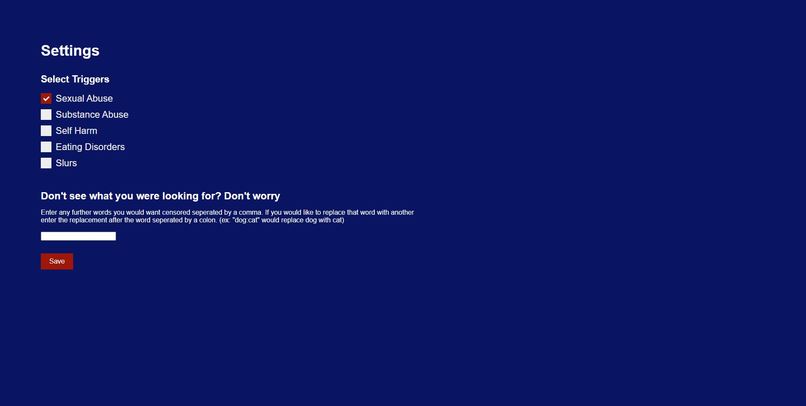
The settings page where users can select the categories that can trigger them
-
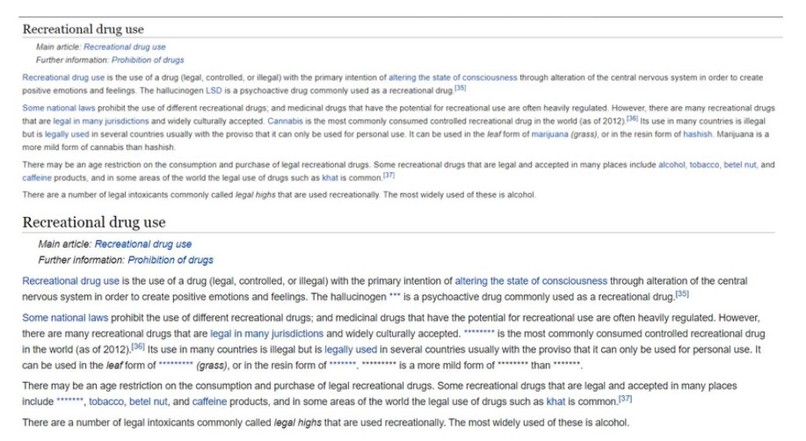
A paragraph with mentions of drugs and alcohol before and after using TriggerSafe


Inspiration
People around the world consume large amounts of online media daily, so it is important to make sure information is safe to consume. Seeing specific words or phrases occur in social media, news articles or blogs can be harmful to users and negatively affect their wellbeing.
What it does
TriggerSafe censors trigger words as specified by the user while they browse the Internet, and notifies the users when a website contains possible triggers.
How we built it
Using JavaScript, google's Manifest V3, HTML, and CSS
Challenges we ran into
We ran into challenges while thinking of ways to simplify the user experience so the user doesn’t have to expend great effort. We didn’t want the user to be burdened with the responsibility of listing out their trigger words, but we found it difficult to encompass all keywords relating to the trigger. Thus, we implemented an input field for the user to enter more specific keywords that they would prefer to be censored.
Accomplishments that we're proud of
We are proud of the fact that we were able to brainstorm and come up with this idea to create a simple web extension that would aid users in navigating through the internet safely. We are also proud of being able to create a nice looking webpage.
What we learned
We learned how to collaborate on working on a chrome extension, and the use cases that we need to address before designing for the user. We learned how to create a Chrome extension and how to style a webpage using CSS.
What's next for TriggerSafe
Our existing product could be improved by continued work building on it and possibly expanding on its functionality to make smarter and better for the users. Furthermore, since TriggerSafe is currently only a web extension and the internet is more widely browsed on mobile devices, it could be useful to implement this idea for mobile devices as well.
Built With
- css
- html
- javascript
- manifest


Log in or sign up for Devpost to join the conversation.