-
-
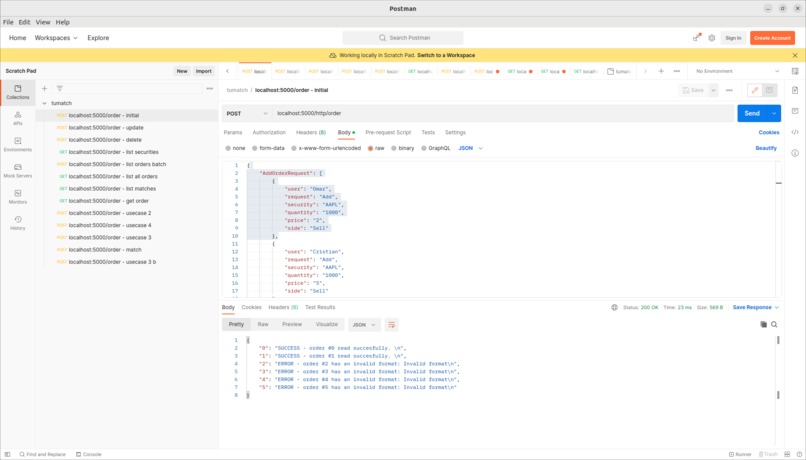
POSTMAN insert orders
-
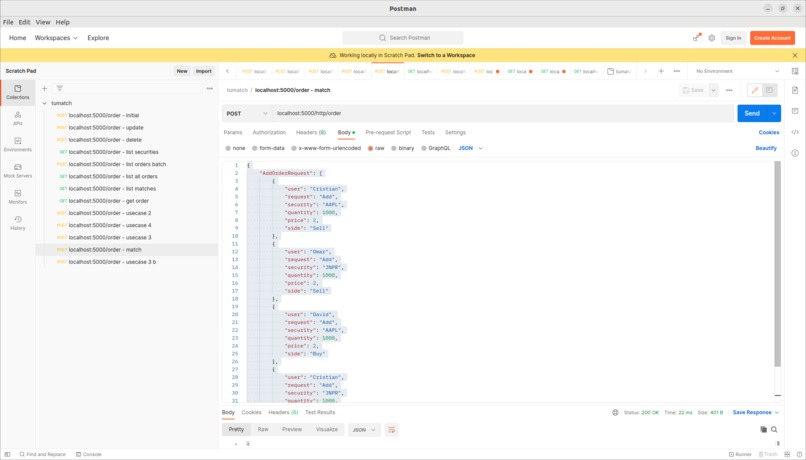
POSTMAN insert orders that will match


Inspiration of TUMatcher
TUMatcher is a stock trading platform with some cool features built within 1 day Here you will find more information about the platform, how to use, and what features you can expect to find.
Features(What it does)
We added the features based on the main requirements handed to us before dev, those were to provide mainly:
- Add orders(handling duplicated orders and track history)
- Delete(also handling duplications and invalid deletions of non-existent orders)
- List orders(owned by used)
- Matching History(All orders matched)
We treated those as SWE2 components, from which we derived SWE3(system detailed design), where we decided what will be our backend and what will be our frontend. And with more in depth design details that were discusesed amongst the team before the coding phase.
In parallel, we covered SWE5(Software Integration Test Specifications) which would help us cover the essential aspects of the system, more mentioned inthe system validation section.
Accomplishments that we're proud of
In addition to the above features, we extended TUMatcher to have some extra feats:
- History of executed commands on the system(records)
- Batched Orders Processing in the database
- Security tokens & web sockets to estables quick personal user profiles to cluster the orders by input
- Mult-Client system as our backend accepts multiple requests simultaneously via authenticated web sockets
- Non-blocking frontend order requests dispatch for single and batched orders
- List logged date and time of the received orders and recorded as meta information for the user for entered orders
- Market Stock Valuation via Moving Averages calculations(EMA, SMA)
1. Add Order to sell or buy a stock with choosen price
There is multiple options for the user to enter an order to TUMatcher:
- via GUI:
- You can input the orders via the webapp delivered as frontend of TUMatcher
2. Delete a sell or buy order of a stock
- via GUI:
- You can input the orders via the webapp delivered as frontend of TUMatcher
3. List orders you own on the platform
- via GUI:
- You can input the orders via the webapp delivered as frontend of TUMatcher
4. List the matching history of all completed orderes
- via GUI:
- You can input the orders via the webapp delivered as frontend of TUMatcher
- For batch processing:

5. Choosing Market Value of a Stock
We analyed state-of-the-art Stock Evalution tools in realtime markets. From which we found two essential indicators that can help identifying the market value of the stock:
- Simple Moving Average(SMA) is used by professional platforms to evaluate the stock based on the fixed-time intervals e.g. daily averages between Open-High-Low-Close bounds that is collected over fixed time duration configured by the user(e.g. last 10 days, 20 days, etc).
- Pros:
- More stable than more sensitive trend indicators that give more weight to recent time price changes.
- This could be more beneficial for well known stocks like
AAPLorNVDAwhich are know to generally perform well on the long run. - Simpler to implement, even weight to all time steps
- Cons:
- Slower than other moving averages to indicate an early trend which can be missed early entrance
- Pros:
- Exponential Moving Average(EMA) is similar to SMA with the main diff being adding more weight to the recent price changes of the stock rather than treating the whole price history of the stock as evenly contributing factors. EMA is giving more weight on the recent period to have a faster trend-convergence.
- Pros:
- Can be used to detect an early trend
- Cons:
- The indicating trend can be false trend. In this case, slower convergence to the trend like in SMA will give a better indication of how originally is the stock behaving.
- More complicated than SMA
- Pros:
Our analysis and the boilerplate for our equations with some data tests are provided in the source file resources/EMA - Analysis.csv
Implementation status: TBD
System Development(How we built it)
1. System Setup
We use the following:
- Flask as the backend server
- Material UI JS as frontend server
- Non-blocking single and multi orders dispatch system
- Python as the main language fullstack and JS for the frontend
- MYSQL for database management fully integrated with backend and frontend via serialization pipelines
- We used the hashtables to identify unique orders via manual seeds parsed from the requests payloads.
- The initial backend prototype of the system is done entirely containerneized inside
main.py. This file loads data from `data/clients_requests.json. It assumes batch processing by default.
2. Functional System Validation
- Requirements were given to us as SWE2 elements which from we derived SWE3. Those requirements were mentioned above in the features section.
- Based on SWE2 & SWE3 we developed our unit and integration test cases
- Covered boundry cases to increase robustness of the system
- We followed the smallest section of the V-Model to model our system for the given data, particularaly, the lower section:

You can find all the tests that we implemented and passed in:
tumatcher/tests/tests.csv
3. Installation and Running Instructions
1. Clone our github repo
git clone https://github.com/davideandres95/tumatch.git
2. Set up project environment via venv
python -m venv .
pip install -r requirements.txt
source bin/activate
3. Start the main backend server and
Please make sure you have Flask installed on your system that is 2.x.x. To install it.
Run the flask server:
python3 -m flask --app flaskr --debug run
4. Populate the database with securities
Insert in the database
python3 symbols_parser.py
sqlite3 var/flaskr-instance/project.db < securities.sql
sqlite3 var/flaskr-instance/project.db < users.sql
sqlite3 var/flaskr-instance/project.db < orders.sql
5. Start the back end and frontend servers
cd ./front/
npm install
npm start
6. Visit the webapp
http://localhost:3000
Register with your name and password. ENJOY!
7. Test our Backend also with POSTMAN!
load our config file into POSTMAN and thest the use cases
Challenges we ran into
Coding an stock trading and exchange platform in almost 1 day is challenging. Doing that in hackaTUM to to match the high expectations is even more challenging !! :)
We ran into many logistics challenges of the team. We had unstable internet connections on some floors, we didn't know most of the backend the first days where we had to bootstrap ourselves and get hooked with the simplest framework that is written in a language the team is comfortable with i.e. FLASK.
We came from different departments, different knowledge levels, and backgrounds. Integrating all of those with high intenstiy is no easy challenge.
What we learned
- How to work as a team. Since every one worked on something and we had to to sync every 3 hours max due to the limited dev window.
- Learned different technologies that others in the team know i.e. Knowledge Sharing sessions took place to boostrap the rest of the team in intersting topic.
- Time management in short dev time.
- Applying some learned software decomposition techniques and development models like the V-Model on a lower scale gave us a better understanding of how to incorporate that in the future.
What's next for TUMatch
- We feel that our app still needs somework on different market indicators rendering to help the user learning more about the available stocks for trading.
- Extend the current functionality to include graphical plotting of the orders history


Log in or sign up for Devpost to join the conversation.