-
-

-
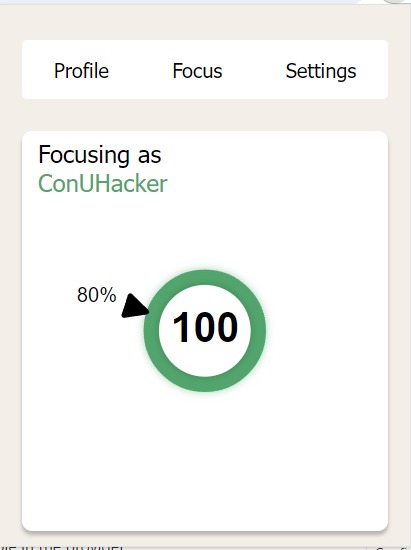
photo of the extension: Following our goal by 100%
-
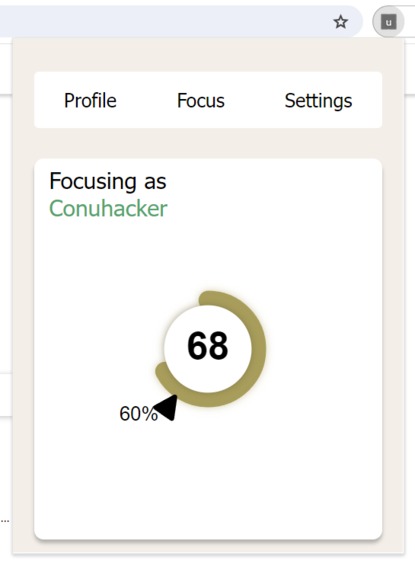
photo of the extensino: Lower threshold but finding working with tangential topics
-
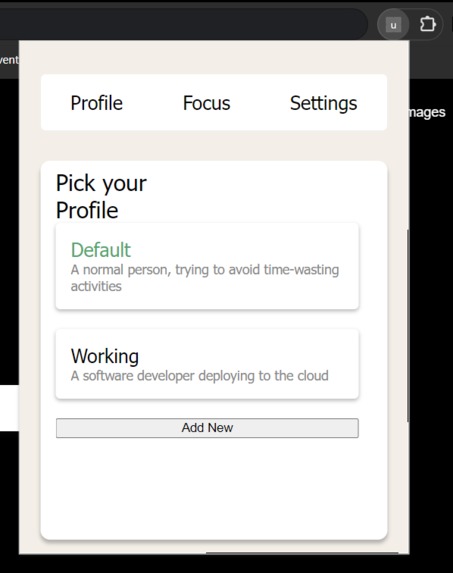
Profile picker / creator in the extension
-
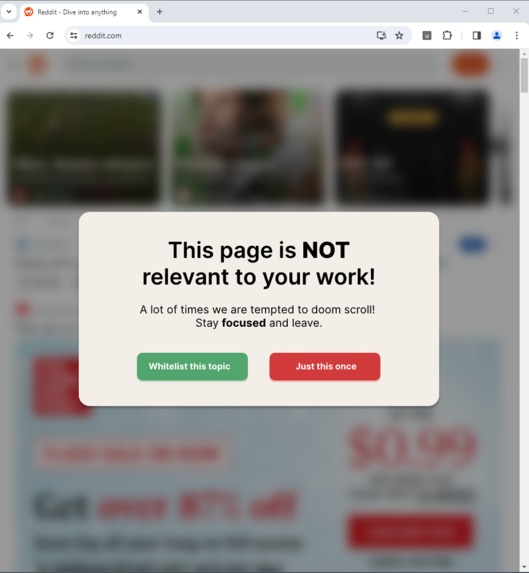
Oh no! Reddit is not relevant to my goal


Inspiration
Some day-to-day tasks are harder to concentrate than others. While it is very fun to watch videos on the internet studying that one subject or re-opening GitHub for the 10th time to check if your pull request was finally approved is not. Boredom and lack of dopamine will almost inevitably make us drift away from what we should be doing. We came up with a solution that can mitigate the unconscious desire to just do something more exciting than an important task that we decided to do.
What it does
uFocus is a Chrome extension that allows users to define objectives they want to perform during their browsing session. Based on these objectives, it will read and interpret the page content give it a "relevance score" and either warn the user if they are side-tracking or losing focus.
How we built it
uFocus is composed of three different services:
1. Chrome Extension
The extension is responsible for reading user data (both the page, extension settings, and extension profiles) and querying our reverse proxy.
Page reading
We use a best-effort parsing technique, meaning that we apply the following techniques
- We try to find headers on the page and if they are present we add them as the first line of our user prompt
- We get the page metadata, if any, and add it to the second line of the user prompt
- We remove many non-important words, further decreasing the number of tokens (and the cost) of using the OpenAI API.
- If these results do not add up to 1000 words (arbitrary value, but roughly equivalent to $0.00005 dolars per page), then we get content from the middle of the page and append to it.
2. Reverse Proxy
We wrote a reverse proxy in Rust, using Axum and Tokio. Its main goal is to query ChatGPT with a secret prompt that ensures its efficiency and the format of the output.
It's hosted on Amazon EC2 under the domain uFocus.tech:3000
3. Chat GPT
We are using Chat GPT to analyze the relevance of the page content when compared to the user's specified goal. While there were other techniques that did not involve AI, using ChatGPT created some very interesting nuances.
For example:
- If a Software Developer working on implementing EC2 on AWS reads about clearing his DNS cache, it understands that they may be trying to troubleshoot an error.
- However, if the same profile tries to read about replacing HTML nodes in JavaScript, it will find no overlap between the two tasks. How amazing is it!
Challenges we ran into
1. Our first time writing a Chrome extension.
We knew nothing about how extensions worked and styling them proved to be a real challenge. While we are very used to React, manually writing elements to the DOM using typescript was a very mind-numbing and time-consuming part of the project.
Communication between different APIs of the Chrome web-browser was also counter-intuitive at times, but it proved to be a good learning experience for all of us.
2. Injecting code into other pages
When trying to inject our alert message telling that user that they have side-tracked, we found multiple edge cases, where websites would overwrite any CSS present on their page. This rabbit hole led us to make a questionable but very efficient decision. (Read more on the next section)
3. Brand identity and Marketing of the product
One of our teammates learned how to use DaVinci Studio during the hackathon to make a promotional video Another one of us spent a questionable amount of time in Blender producing some cool transitions that we could use in the video Another one of us spent an even more questionable amount of time in Figma, designing all of our components and colors.
4. Decreasing ChatGPT response speed
ChatGPT would take up to 17 seconds to respond to our prompts, which would make the extension quite unresponsive at times. You can find in the next Section how we surpassed that problem
Accomplishments that we're proud of
1. ~1s response speed for ChatGPT api
In our reverse proxy, we implemented the streaming version of the API, which by itself would not change the response speed. However, we had the idea to change our JSON format to have the most important part of our response as the very first value. Using that, we managed to answer uFocus' API requests before even the first value of our JSON object was properly formed. The rest of GPT's response is stored in-memory on the server and can be retrieved by a further API request.
CSS in the Relevance Knob
One of our teammates did some cool CSS tricks to allow us to have a very responsive and nice-looking relevance knob, that works as the main visual component of extension.
SVG modal
The SVG modal solution solved all of our problems when it came to injecting custom elements into another website. While it's not technically impressive, it is very clever and thinking outside the box. At least for us
Teamwork
We all stayed awake for most of the night together, always helping each other. No single person worked for too long on the same task. We would change branches after a few minutes so we didn't get too tired and lost incentive.
The product itself
We all are surprised with how accurate it is and we plan to make it open source and hopefully find the time to keep working on it. We see ourselves using it daily, especially at work, where so many things can trigger an unwanted context switch
What we learned
Chrome Extension
- We can know code Chrome Extensions and have a basic understanding of the different type of workers Chrome extensions have.
- It is better to use React than to use pure CSS, JS and HTML. IT would've saved us a lot of time
- Injection of CSS
- Learned about the ShadowDOM
Rust
- Learned how to use streams in Rust
- Learned a Rest library called Axum
What's next for uFocus
- Move away from such a big large language model. ChatGPT 3.5 is over-qualified for this task. We believe that it is possible to move it to a self-hosted language model that asserts just as well the relevance of a webpage.
- More add-ons
- Rewrite most of the UI code so it's more maintainable
- Expand to other use cases, such as ensuring that you're not seeing topics that will make you feel uncomfortable.
Built With
- .tech
- amazon-ec2
- axum
- chatgpt
- css3
- html5
- rust
- typescript


Log in or sign up for Devpost to join the conversation.