-
-
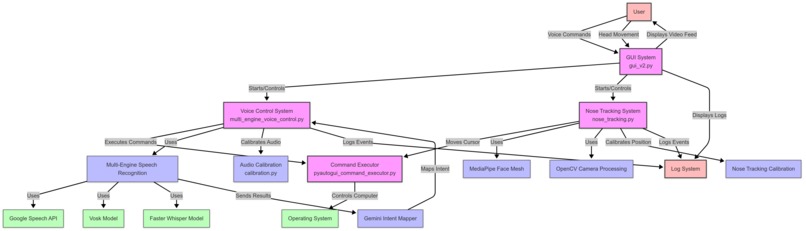
Overall Architecture Diagram
-
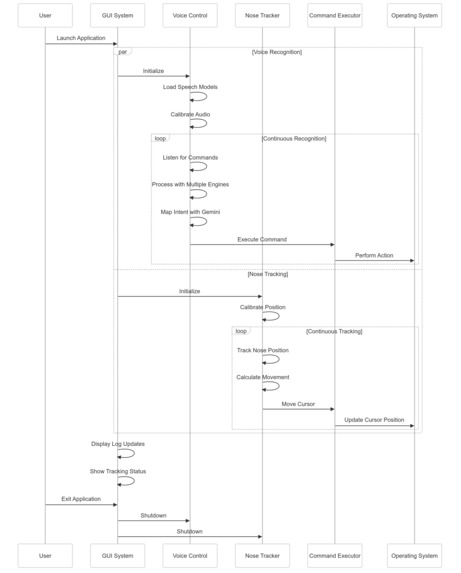
Sequence Diagram
-
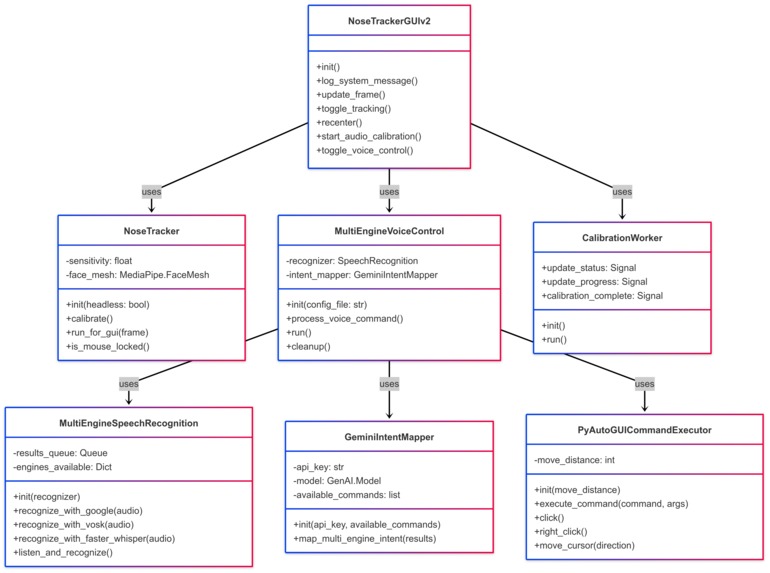
Class Diagram
-
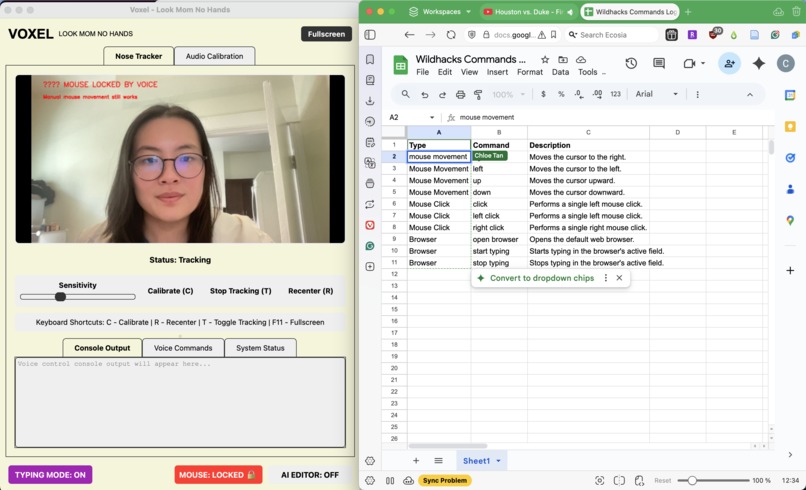
Voxel with Google Sheets
-

Voxel with Youtube
-
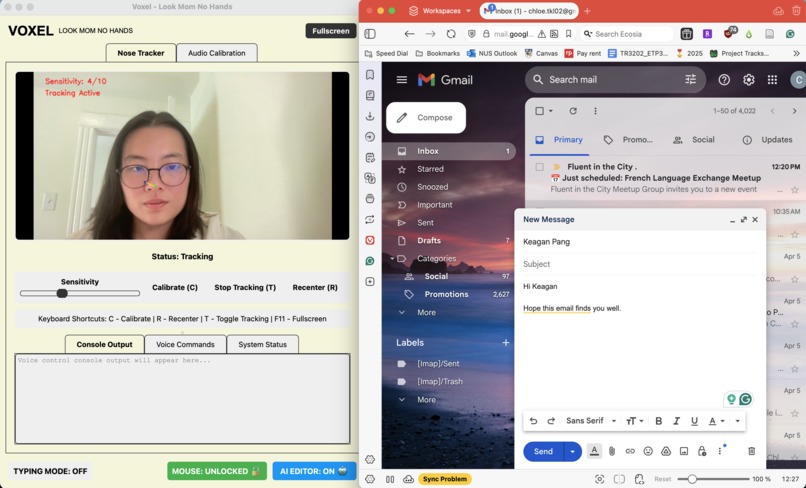
Voxel with Gmail
-
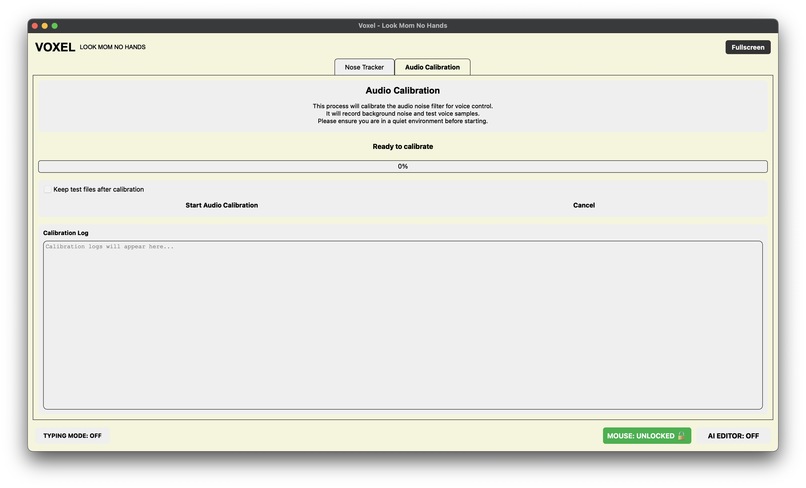
Audio Calibration Screen


Inspiration
We created Voxel to empower people who need it most - those with limited mobility and struggle with fine motor tasks like clicking and typing. But we didn’t stop there. Voxel is also for productivity powerhouses who want to keep their hands free while staying in control. Whether it’s accessibility or efficiency, Voxel unlocks a whole new way to interact with technology.
What it does
Voxel is a game-changing, hands-free program embedded into the system that transforms how you control your device. Using just your voice and subtle nose gestures, you can type, navigate, and perform tasks effortlessly. It’s intuitive, seamless, and designed to make technology work for you. With Voxel, your hands are free, but your possibilities are endless.
How we built it
Voxel is built on a sophisticated stack of cutting-edge technologies that work in harmony to create a seamless hands-free computing experience. At its core, we leverage MediaPipe's advanced face mesh detection (v0.10.21) for precise nose tracking, combined with OpenCV for real-time video processing and frame analysis. The system's voice control capabilities are powered by a multi-engine speech recognition system that intelligently combines Google's Speech Recognition, Vosk, and Faster Whisper for optimal accuracy across different scenarios. We implemented a sophisticated state management system using file-based flags to coordinate between different components (typing mode, mouse lock, AI editor) while maintaining system stability. The GUI is built with PyQt6, providing a modern and responsive interface that displays real-time tracking data and system status. For optimal performance, we recommend using a CUDA-compatible GPU, which significantly accelerates the AI-powered text enhancement features using Google's Gemini API. The system's architecture is designed for reliability, with robust error handling, resource cleanup, and multiprocessing support to ensure smooth operation even during intensive tasks.
Challenges we ran into
- Latency in models that hindered system-wide integration: We resolved this by running parallel processing to optimize for latency
- Synchronization between multiple input modalities: Coordinating nose tracking with voice commands 3. required careful state management and file-based flag systems
- Cross-platform compatibility: Ensuring consistent behavior across different operating systems (macOS, Windows, Linux) for keyboard shortcuts and system interactions
- Resource management: Handling cleanup of multiple AI models (Vosk, Faster Whisper) and preventing memory leaks during long sessions
- Real-time performance optimization: Balancing accuracy with responsiveness in the face tracking system, especially in varying lighting conditions
Accomplishments that we're proud of
- Created a seamless multi-modal interface that combines voice commands with precise nose tracking
- Implemented a robust state management system that coordinates between different components (typing mode, mouse lock, AI editor)
- Developed an intelligent text enhancement system using Gemini API that improves typing accuracy
- Built a sophisticated error handling and logging system that ensures system stability
- Achieved cross-platform compatibility with consistent behavior across different operating systems
- Created a responsive GUI that provides real-time feedback and system status updates
- Optimized memory management, process cleanup, and resource allocation to maintain high performance and prevent system bloat
What we learned
- The importance of parallel processing in reducing latency for real-time applications
- How to effectively manage multiple AI models and their resources
- Best practices for cross-platform development and system integration
- The value of robust error handling and logging in complex systems
- How to balance accuracy and performance in real-time tracking systems
- The challenges and solutions in coordinating multiple input modalities
- How to implement efficient state management in a complex, multi-component system
What's next for Voxel
The journey doesn’t stop here. We’re making Voxel smarter, faster, and more versatile. From enhancing gesture recognition to integrating AI for personalized interactions, we’re pushing the boundaries of what hands-free technology can do. Imagine Voxel in healthcare, gaming, or even as a tool for creators—this is just the beginning of a hands-free revolution. Get ready to see Voxel everywhere!


Log in or sign up for Devpost to join the conversation.