-
-

Working prototype on hugging face
-
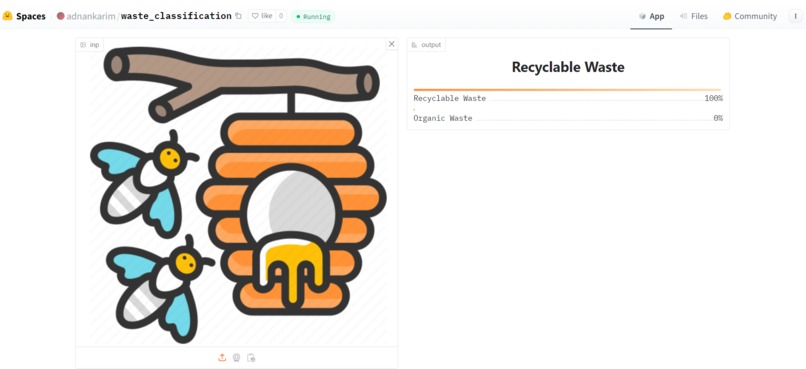
Image classificaiton (recyclable)
-
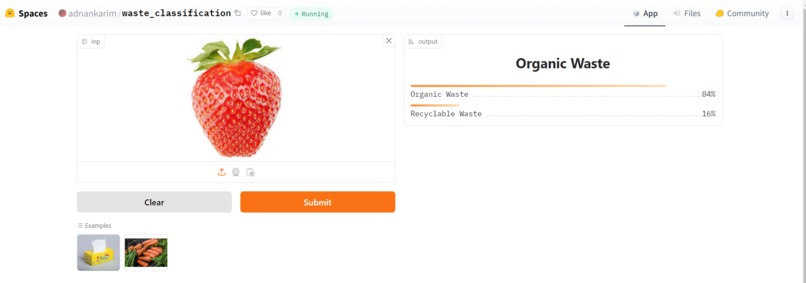
Image classificaiton (organic)


Inspiration
Our inspiration came from working closely with a small, community-based organization focused on waste management solutions. We share a vision of leaving the world better than we found it, which means embracing sustainable practices that empower communities and reduce environmental impact. Through our experiences, we noticed a common challenge: even with education, best practices in waste management can be hard to follow. People often want to recycle correctly but may not always know if an item belongs in compost, recycling, or landfill.
This observation sparked the idea for a machine learning app that could identify items by category—compostable, recyclable, or landfill-bound—using image classification. We saw the potential to make waste disposal intuitive and accessible to everyone. Inspired by this, we expanded our idea to Ansell’s RightCycle program, focusing on a critical sustainability issue: segregating PPE waste by brand. Our solution aims to optimize sorting processes to keep waste out of landfills, promoting effective recycling and minimizing contamination with automated, AI-powered sorting. By combining technology with environmental awareness, we’re making sustainable waste management more achievable for businesses and communities alike.
What it does
To address Ansell’s challenges with PPE waste management, we’ve developed a machine learning and computer vision solution that automates the sorting process based on PPE type, brand, and material. This solution tackles the core issues of effective segregation, contamination inspection, and process automation, all aimed at reducing human error, minimizing contamination, and cutting costs.
Solution Overview
Image Classification for Brand and Material Identification
The app deploys a computer vision model trained on labeled images of various PPE brands and materials. This model can identify and classify items by brand (e.g., Kimtech, KleenGuard, or others) and by material type. Expected Outcome: The automated classification process reduces the need for manual sorting, significantly lowering the risk of contamination due to human error and ensuring that only acceptable PPE is sorted for Ansell’s recycling program.
Object Detection and Automated Sorting
Once the classification model identifies the item, the app directs it to the appropriate bin through an automated sorting system. Using cameras and sensors connected to the app, the system captures each item, processes it, and guides it to the correct collection bin, minimizing the potential for human misplacement. Expected Outcome: The automated sorting mechanism speeds up the waste segregation process, lowers contamination risks, and reduces costs associated with manual sorting and inspection. This integrated machine learning and computer vision approach provides a streamlined, accurate solution for Ansell's PPE recycling program, enabling efficient sorting with minimal human involvement.
How we built it - Overview and Objective
• The code is designed to create a simple CNN from scratch to distinguish between images of organics and recyclabe products as a used case/ this would be replaced by images of personal protective gear by different brands. • It involves downloading a subset of the "Organic vs. Recyclables" dataset, loading images, building and training a model, and visualizing the results.
- Data Download & Library Import
Data Download: The data appears to be images organized into training, validation, and testing sets, although the specifics of the dataset are hidden. It uses glob.glob to count the number of images in each split, ensuring an accurate picture of how much data is available for training, validation, and testing.
- Library Import: The code imports necessary libraries for deep learning, including:
PyTorch: For defining and training the model.
EfficientNet: A pre-trained model known for efficiency and good performance on image tasks.
CUDA Support: The torch.device is set to either cuda if available, or cpu, making the model adaptable to various hardware setups.
- Model Setup
Loading EfficientNet:
The code loads EfficientNet-B0, one of the EfficientNet series models optimized for performance and computational efficiency. EfficientNet-B0 is a good choice as it balances model complexity and accuracy.
Freezing Layers:
Initially, the model's parameters are frozen to keep the pre-trained layers unchanged during training. This approach is called Transfer Learning, where the knowledge from a pre-trained model is leveraged, and only the last layer(s) are adjusted to the specific classification problem.
Modifying the Fully Connected (FC) Layer:
The last fully connected layer (_fc) of EfficientNet is modified to fit a binary classification task. The original output of EfficientNet may be designed for multiple classes, so the code replaces it with a new fully connected layer (nn.Linear) to output 2 neurons, each representing one class.
- Training Configuration
Hyperparameters:
lr = 0.001: The learning rate for the optimizer, set to a moderate value, to control the weight updates during training.
Loss Function & Optimizer:
CrossEntropy Loss: This loss function is standard for classification tasks where there are multiple classes. It measures the difference between the predicted and actual labels, guiding the model during training.
Adam Optimizer: An adaptive optimizer, Adam, is used here, as it adjusts the learning rate based on the gradients, making it effective for this classification problem.
Accuracy and Loss Tracking:
Empty lists are initialized to store training and validation losses, and accuracies over each epoch. These lists help in visualizing the model’s progress and detecting potential issues like overfitting.
- Training Function
The main part of the training process is encapsulated in a function named train, which performs the following steps:
Epoch Loop:
The model trains over a number of epochs (20 in this example), with each epoch consisting of a training phase and a validation phase.
Training Phase:
Setting to Train Mode: The model is set to training mode (model.train()), which activates layers like Dropout, used only during training to prevent overfitting.
Data Loading and Forward Pass:
Each batch of data and labels is loaded and sent to the device (GPU or CPU).
The model performs a forward pass, predicting labels for each batch.
Calculating Loss and Backpropagation:
The loss between the predicted and actual labels is calculated.
Gradients are computed, and the optimizer updates the weights based on these gradients, gradually improving the model’s accuracy.
Accuracy Calculation:
After each forward pass, predictions are evaluated by comparing with the actual labels to calculate the accuracy for the training data.
Validation Phase:
Setting to Evaluation Mode: During validation (model.eval()), Dropout layers and batch normalization layers behave differently, as validation aims to evaluate model performance without affecting weights.
Forward Pass and Loss Calculation:
A forward pass is performed without gradient computation (using torch.no_grad()), making it computationally faster and less memory-intensive.
Validation loss and accuracy are calculated similarly to the training phase, allowing for a comparison between training and validation performance.
Model Checkpointing:
After each epoch, if the validation loss is lower than the previous minimum, the model state is saved. This checkpointing ensures that the best version of the model (based on validation performance) is preserved, preventing overfitting.
- Saving the Model
Model Save Path:
If validation loss decreases in an epoch, the model is saved to the specified path, making it easier to resume training or deploy the model.
- Running the Training
Running for 20 Epochs:
The model is trained for 20 epochs. With each epoch, the accuracy and loss values provide insight into how well the model is learning the patterns in the data, and whether the model’s generalization (performance on validation data) is improving.
Summary
This setup effectively trains a pre-trained EfficientNet-B0 model for a binary image classification problem using Transfer Learning. The approach of freezing pre-trained layers, only training the final layer, and checkpointing based on validation loss is widely used for high efficiency and accuracy. This pipeline should give solid results, especially if the data is sufficiently varied and balanced.
Challenges we ran into
This result highlights the challenge of overfitting with limited data.
Conclusion
• The final model achieves good training accuracy but struggles with validation accuracy, suggesting the need for more data or regularization techniques to combat overfitting.
Accomplishments that we're proud of - Being able to classify images with highest accuracy 88-90% approx.
What we learned
Is that we need to have labeled dataset. Labeled data for Kimled and Kleenguard will be one category and all other brands will be the second category. In order to train the model using object detection we will also need hazardous and non hazardous PPE labelled data. Example format of the dataset should be as such https://universe.roboflow.com/sindhu/personal_protective_equipment_detection/dataset/4
For next steps we could train a YOLO model for object detection.
What's next for Waste Classification
Implementing on customized PPE dataset from Annsell.
Solution Process Flow
PPE Collection:
- Collection bins are strategically placed near PPE use points.
- Each bin is equipped with a QR code or RFID scanner for automatic inventory and tracking.
- Automated Sorting and Detection:
- Items from bins are moved to a conveyor-based sorting system.
- Cameras and sensors capture images of PPE items as they pass through.
AI Image Classification for Brand & Material Identification:
- A convolutional neural network (CNN) model classifies items by brand (Kimtech, KleenGuard, or other brands) and material type (e.g., nitrile, polypropylene).
- This model reduces human dependence in sorting, minimizing the chance of contamination from human error.
Non-Hazardous Material Inspection:
- Infrared (IR) or hyperspectral imaging, combined with ML methods, detects material composition and contamination levels, identifying hazardous materials.
- If hazardous material is detected, the system automatically sends an alert to initiate segregation or disposal.
Automated Bin Collection:
- Once sorted, the PPE items are directed to brand and material-specific bins.
- The system keeps track of bin levels to optimize collection schedules, reducing unnecessary pickups and emissions. ________________________________________ Key Technologies and Cost Efficiency Machine Learning Models: EfficientNet-B0 or YOLO for brand detection.
- Model trained on labeled PPE images to distinguish Kimtech and KleenGuard brands from competitors.
- Object detection and segmentation for hazardous/non-hazardous material identification.
Infrared (IR) & Hyperspectral Imaging:
- Allows precise material type identification (e.g., nitrile vs. polypropylene).
- Detects contamination based on spectral analysis, reducing the need for costly manual inspections.
Internet of Things (IoT) Sensors:
- IoT-enabled cameras, weight sensors, and RFID/QR tracking.
- Data aggregation for real-time monitoring of PPE collection and contamination levels, reducing labor costs and errors.
Automated Alerts & Data Integration:
- Real-time alerts sent if contamination or incorrect PPE brand is detected.
- Integration with Ansell’s ERP system for automated recycling reports and shipment schedules. ________________________________________ Expected Results & Benefits
Cost Savings:
- Reduced labor costs due to minimal manual sorting.
- Lower contamination rates minimize shipment rejection, reducing costs and emissions. Sustainability Benefits:
- Fewer rejected shipments decrease carbon footprint.
- Automated data collection for accurate reporting on PPE recycling, supporting sustainability metrics. Improved Brand Compliance:
- Ensures only Kimtech and KleenGuard brands enter the recycling stream, reducing operational risks.
- Greater confidence for Ansell and customers in adherence to recycling program standards.
- Object localization goes a step further to determine the precise location of objects within the image, usually in the form of bounding box coordinates. Together, detection and localization enable a computer vision system to not just classify what objects are present, but also pinpoint where they are in the visual scene.


Log in or sign up for Devpost to join the conversation.