Demo DPL
Getting access to Parse.ly’s Data Pipeline is easy. Using modern and secure data access techniques that are proven for scale and hosted by Amazon Web Services, these access patterns are friendly to a number of open source projects and data integration tools.
Further, whether storing megabytes, gigabytes, or terabytes of data, and whether tracking thousands of events per day or millions of events per day, these access patterns will work.
How it works
The Parse.ly Data Pipeline is built upon two technologies: Amazon Kinesis for real-time data, and Amazon S3 for long-term data storage. On sign-up to the Parse.ly Data Pipeline service, Parse.ly provides access credentials to an Amazon Kinesis Stream and an Amazon S3 Bucket.
Demoing Parse.ly Data Pipeline
Interested in taking a look at the data? This is the right place!
There are two options to demo the Data Pipeline Data:
- Download a csv file with 500 rows of sample data.
- See a full 30 days of Data Pipeline data by connecting to the public S3. This shows exactly how the data will be delivered.
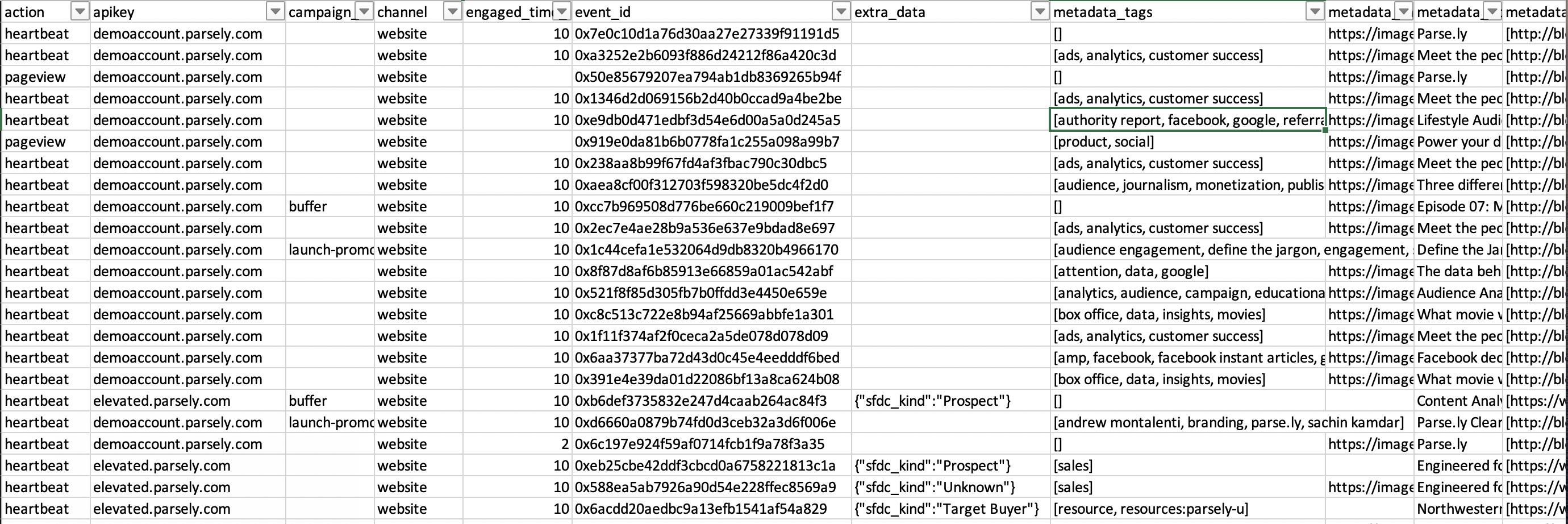
Note that these contain sample data for the Parse.ly Data Pipeline product. It is intended for public use and contains no sensitive information. All data, including IPs and UUIDs, are generated artificially and not intended to be associated with any real-world person or device.
Option 1: Download a CSV
By clicking on this link, a .csv file containing 500 rows of sample data will automatically be downloaded. To understand the data in the file, see the detailed schema page.
Option 2: Extract 30 days of data from S3
This public S3 bucket s3://parsely-dw-parse-ly-demo contains 30 days of Data Pipeline JSON data in zipped format (.gz). These files are available in a browser here. To use this S3 data, follow the steps in Getting Started to learn the different ways to connect to and extract the Data Pipeline data.
The remainder of this page is pretty technical, and goes into how, specifically, Parse.ly stores its raw data and provides access to that data. This page will likely only make sense to Data Scientists and programmers who have had some exposure to Amazon Web Services before. For those wanting to learn more, take a look at the use cases and the schema format.
Amazon Kinesis stream
Amazon Kinesis is a hosted streaming data platform that Parse.ly uses to deliver raw, enriched, unsampled streaming data. It is very similar to the one that Parse.ly uses in its own realtime data processing stream (Kafka).
The stream is similar to other “distributed message queues”, such as Kafka or Redis Pub/Sub, except no setup of the distributed infrastructure is required. Also, since it’s hosted by AWS, the stream is always available, replicated in three geographic regions, and “sharded” so that it can handle high data volumes without any ops work.
Some technical details about Kinesis Streams set up by Parse.ly:
- In the
us-east-1region. - 1 shard per stream by default.
- Data is retained for 24 hours.
- Record format is plain JSON.
- At-least-once delivery semantics.
- Secured via an AWS Access Key ID and Secret Access Key.
- Real-time delivery delays can be tracked at http://status.parsely.com.
Alternately, Parse.ly can deliver data to a customer-hosted Kinesis stream. This simply requires some additional setup and coordination with Parse.ly Support.
Kinesis has a standard HTTP API, as well as “native” integration libraries for a number of languages. In the “code” section of this documentation, the guide walks through accessing a Kinesis stream using the boto3 library in Python.
Amazon S3 bucket
Amazon S3 is a long-term, static storage engine that is globally distributed for redundancy. It is intended for more complex analysis or bulk export to different databases, like Google BigQuery or Amazon Redshift.
The S3 bucket Parse.ly provides as part of Parse.ly’s Data Pipeline is similar to the bucket Parse.ly uses internally at Parse.ly for long-term storage of data, especially the backup systems behind the “Mage” time series engine. S3 allows users to pull the data and extract the information they need from it, while also providing peace of mind that the data is safe and secure for the long-term.
Some details about S3 buckets with Parse.ly:
- In the
us-east-1region (previously called “S3 US Standard”). - 99.999999999% durability (“eleven 9’s”).
- 99.99% availability (“four 9’s”).
- Data is retained for 90 days by default, though actual retention length can vary based on contractual terms.
- All raw events stored in the
events/prefix. - Data is stored as
gzip-compressed plain JSON lines. - Typically stored in 15-minute chunks with maximum of 128 MiB of size per chunk.
- Chunks up to 2GiB are possible for historically rebuilt/backfilled data.
- Real-time data (from the current day) is stored, typically within the hour.
- Secured via an AWS Access Key ID and Secret Access Key.
- Custom one-time historical data import jobs are available upon request.
S3 also has the notion of “S3 URLs” which can be used with a variety of command-line tools.
This is the S3 bucket format:
s3://parsely-dw-mashable   # bucket name
/events            # event data prefix
/2016/06/01/12        # YYYY/MM/DD/HH
/xxxxxxxxxxxxxxx.gz # compressed JSON fileHere is an example single S3 object:
s3://parsely-dw-mashable/events/2016/06/01/12/parsely-dw-mashable-4-2016-06-17-02-16-39-6b06b63d-9c9b-4725-88df-51ced94baffb.gzAfter decompression, there would be a single JSON raw event per line, typically up 128MiB of these in a single file, which might be 10’s of thousands or 100’s of thousands of raw events.
Do not rely on the (long) .gz filename. Instead, use glob patterns or use tools that support S3 prefix or include patterns. For example:
s3://parsely-dw-mashable/events/2016/06/01/12/This pattern will match all files for the site mashable.com, date 2016-06-01, and hour 12-noon UTC. During maintenance events, Parse.ly’s systems may populate files with a different file format in that prefix; for example, all files for a single hour might be compacted into a single data.gz file in that per-hour prefix. Using a glob pattern like *.gz can guarantee matching data even in the case of these events.
Next steps
Further reading:
Help from Parse.ly Support:
- For existing Parse.ly customers, sites are already instrumented for Parse.ly’s raw data pipeline. No additional integration steps are required to start leveraging raw page view and engaged time data. Contact Parse.ly Support or an Account Manager to add this product to the contract. From there, Parse.ly will provide access and supply the secure access key ID and secret access key. From that point forward, the service is available to use, and custom events and custom data can also be instrumented.
- For new customers, go through the basic integration. Contact Parse.ly for a demo, and the team can also walk through the integration steps necessary, which are generally pretty painless.
Due to the power and flexibility of the Data Pipeline, implementation is largely bespoke on the publisher’s end and so Parse.ly cannot offer any specific implementation details here. Parse.ly does, however, offer sample implementations and use cases in an open source Github repository available here, also available in Python environments via pip install parsely_raw_data.
Last updated: November 26, 2025
