
Priskribo
The plugin has its own admin options page (settings page) where you can:
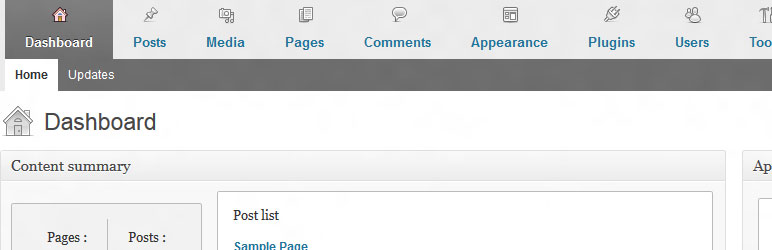
- add user-friendly horizontal menu and dashboard metaboxes
- completely remove blogging plarform widgets
- change logo and link of the login page
- customize admin bar menu
- add custom content to the admin footer
- hide notices (core update notice, plugin update notice and theme update notice)
- hide screen options and help tag
- change basic site settings e.g. hide site generator and feed links
It gives your clients a better experience of their new website.
Support for translation!
- Polish translation
- Dutch translation by Jos Wolbers
Plugin is ready for WordPress 3.6
Ekrankopioj

user-friendly horizontal menu and new dashboard metaboxes

Instalo
- Upload
cms-admin-areato the/wp-content/plugins/directory - Activate the plugin through the ‘Plugins’ menu in WordPress
- Go te the admin area options page (Settings-> Admin Area Options)
OD
If you have any questions, or require additional information, please contact me netbiel@gmail.com
Pritaksoj
There are no reviews for this plugin.
Kontribuantoj k. programistoj
“CMS admin area” estas liberkoda programo. La sekvaj homoj kontribuis al la kromprogramo.
Kontribuantoj
Traduki “CMS admin area” en vian lingvon.
Ĉu interesita en programado?
Browse the code, check out the SVN repository, or subscribe to the development log by RSS.
Ŝanĝprotokolo
1.0
- The plugin has its own admin options page (settings page) with 3 tabs
- Plugin is ready for WordPress 3.6
0.9.3
- Plugin is ready for WordPress 3.5
