Hi, I’m Phil Nelson, a writer, developer, and audio-visual maker of stuff. I have been making stuff online for over 25 years. I run RetroStrange and Set Side B. Good to see you.

Blog Archives

Month: September 2010

  • Portal Re-Created In Minecraft

    [Not just a Portal gun, but a whole game mode.][link] The question now is when will someone create Minecraft inside of Dwarf Fortress, or vise-versa?

    [link]: http://www.minecraftforum.net/viewtopic.php?f=25&t=23156 “Portal. In Minecraft. – Minecraft Forum – Official Minecraft Forums”

  • Congress To Create Internet Blacklist THIS WEEK

    [Demand Progress:][link]

    >Just the other day, President Obama urged other countries to stop censoring the Internet. But now the United States Congress is trying to censor the Internet here at home. A new bill being debated this week would have the Attorney General create an Internet blacklist of sites that US Internet providers would be required to block.
    >
    >This is the kind of heavy-handed censorship you’d expect from a dictatorship, where one man can decide what web sites you’re not allowed to visit. But the Senate Judiciary Committee is expected to pass the bill this week — and Senators say they haven’t heard much in the way of objections! That’s why we need you to sign our urgent petition to Congress demanding they oppose the Internet blacklist.

    [Head to the site, sign the petition, spread the message][link]. This is Very Bad.

    [link]: http://demandprogress.org/blacklist/?source=bb “Stop the Internet Blacklist! | Demand Progress”

  • U.S. Wants to Make It Easier to Wiretap the Internet

    [This is the worst kind of Big Brother bullshit][link]:

    >Essentially, officials want Congress to require all services that enable communications — including encrypted e-mail transmitters like BlackBerry, social networking Web sites like Facebook and software that allows direct “peer to peer” messaging like Skype — to be technically capable of complying if served with a wiretap order. The mandate would include being able to intercept and unscramble encrypted messages.

    Essentially they want a “backdoor” into every online service in the world. It’s not complicated, folks: If there’s a door, anyone who really wants to will get through it. Criminals *and* the government and wherever the twain shall meet.

    [link]: http://www.nytimes.com/2010/09/27/us/27wiretap.html?_r=3 “U.S. Wants to Make It Easier to Wiretap the Internet – NYTimes.com”

  • How To Play Civilization 5 On Your Mac With WineBottler

    Hello, gentle reader. Since the publishing of this post, Aspyr has ported Civilization 5 to Mac OS X. That means you can just Buy Sid Meier’s Civilization V for Mac OSX on AmazonImage. The information that follows is left intact for historical purposes.


    The following how to was written for Intel Macs running Mac OS 10.6. It will probably not work if either of those two prerequisites are not met. The test machine is a 2.4ghz Macbook Pro with a GeForce 8600M GT and 4gb of RAM. Your mileage, as always, may vary.


    The advances in virtualization software in the past 5 years have made it possible to enjoy PC-only games on your Mac legally, even new releases, without needing to install Windows. Leading the Windows virtualization push is a project called Wine. Wine is an open source project, and as is so often the case it suffers for lack of a user interface, which can make it a non-starter for those who prefer not to use the command line. But from the wasteland there comes a developer named Mike Kronenberg, who has created a Mac OS X native application called WineBottler.

    WineBottler handles the deeply unpleasant process of creating a Windows virtualization space for applications (called a Bottle. Get it?) on your Mac with minimal fuss for the user. Using WineBottler I was able to install Steam, purchase Civilization 5, install the game and play it in about the same amount of time it would’ve taken on a native Windows computer. Here’s how.

    Step 1: Hit The Bottle

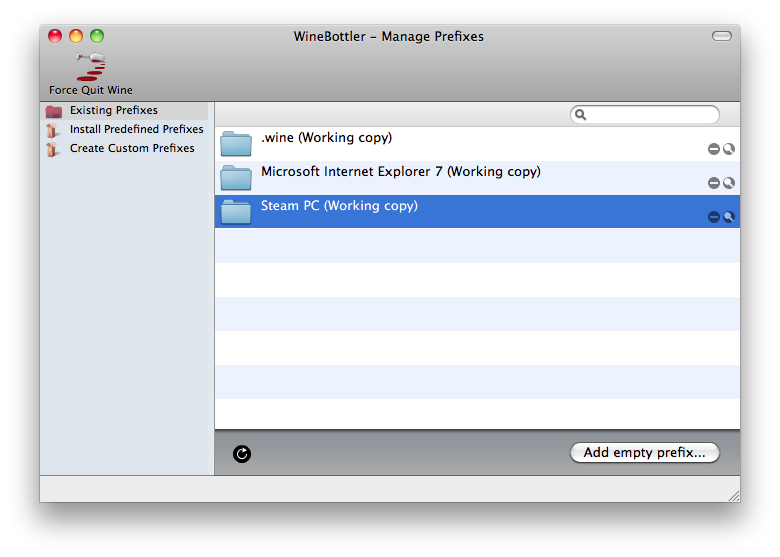
    Installing WineBottler is as simple as installing any other Mac OS X application. Go to the WineBottler website, and download the Disk Image. Once it’s downloaded, mount the disk image and drag WineBottler to your Applications folder. Once WineBottler has been copied to your Applications folder, double-click the icon to launch it. It’ll look something like this:
    Image

    Your window won’t have the extra entries in the right pane that mine does, which are Bottles I’ve made in the past. Don’t panic. To create your "Bottle" for Civilization 5, click the Create Custom Prefixes item in the sidebar on the left. This screen is a little less friendly, but don’t worry, we’ll be out of it soon. For now hide or minimize the WineBottler window, as there’s something we have to do first.

    Step 2: Steam

    Steam is the distribution platform that Civilization 5 uses. If you want to play Civilization 5 legally, the only way to do it is through Steam. Lucky for us, Steam is free. Go to Steam’s download page, and click the link that reads "also available for Windows" to download the installer. Once it’s downloaded, open up your WineBottler window then click and drag the SteamInstall.msi file onto text field labeled Install File. You don’t have to change anything else on this screen, so click the Install button in the bottom right.

    A Save As box will drop down from the WineBottler window. Type in Steam PC for the name, for the Where field select your Applications folder then click Save. WineBottler will start installing Steam. Soon you’ll see the Steam installation window, and if you’ve ever used a PC before then you’ll know what to do. If not, it is simple: Just keep clicking Next in the bottom right of the screen, and eventually click Finish. The WineBottler window and progress bar will stay on screen while Steam installs and runs for the first time, so don’t freak out if it won’t leave.

    Once Steam updates (it does so automatically on it’s first launch), go ahead and close the Steam login window. This will let WineBottler know that Steam installed correctly and we don’t need to see WineBottler’s window anymore. WineBottler will prompt you as to which Executable you’d like to run when your launch your Steam PC application. From the menu select steam.exe and click OK.

    Step 3: Try The Demo and Buy Civ 5

    Now that we’re all done with WineBottler, just go to your Applications folder and double-click the icon labeled Steam PC. You can log in to Steam or create a Steam account form there, and buy Civ 5 or download the Demo just like any other user. Once the game is downloaded it will take awhile to install, primarily the portion where the installer is fetching DirectX. This can take up to 10 minutes, and you might worry that your app has frozen. It hasn’t.

    When it comes time to launch Civ 5, select the DirectX 9 option. When the game launches the window will be complete white for a minute or two due to some weirdness with the introduction video. This is totally normal, so don’t panic. After about one minute of the white screen you’ll see the game’s welcome screen and be well on your way to getting your ass handed to you by Montezuma.

  • PORTRAIT-DEX

    [If you like Pokémon and cartoonists, then this site where cartoonists draw themselves as Pokémon will be the catnip for your soul.][link]

    [link]: http://portraitdex.tumblr.com/ “PORTRAIT-DEX”

  • Evercookie

    [I am intrigued][link]:

    >evercookie is a javascript API available that produces
    extremely persistent cookies in a browser. Its goal
    is to identify a client even after they’ve removed standard
    cookies, Flash cookies (Local Shared Objects or LSOs), and
    others.
    >
    >evercookie accomplishes this by storing the cookie data in
    several types of storage mechanisms that are available on
    the local browser. Additionally, if evercookie has found the
    user has removed any of the types of cookies in question, it
    recreates them using each mechanism available.

    Ars Technica did an [an interview with the creator][int]. All via [Andy Baio][andy].

    [link]: http://samy.pl/evercookie/ “evercookie”
    [int]: http://arstechnica.com/web/news/2010/09/evercookie-escalates-the-zombie-cookie-war-by-raising-awareness.ars?utm_source=rss&utm_medium=rss&utm_campaign=rss “Interview with Samy”
    [andy]: http://waxy.org “Waxy.org”

  • Lukas Mathis Interviews Chris Clark

    I don’t link to many interviews on ExFu but when [Lukas is interested enough in someone’s work to talk to them][link] I listen, and you should too.

    [link]: http://ignorethecode.net/blog/2010/09/21/chris_clark/ “ignore the code: Chris Clark”

  • Pure CSS Progress Bar

    [This is very pretty, but requires a WebKit-based browser (Chrome, Safari).][link]

    [link]: http://ivan.ly/ui/ “CSS Progress Bar”

  • Developer of Minecraft on How Piracy Works

    [A whole lot of truth packed into a short post:][link]

    >I won’t bother analyzing why people copy games and other digital media, as that’s really a moot point. We’ve got an amazingly effective way of distributing culture that is extremely beneficial for humanity, but it clashes with our current economical models. Piracy will win in the long run. It has to. The alternative is too scary.

    [link]: http://notch.tumblr.com/post/1121596044/how-piracy-works “How piracy works. : The Word of Notch”

  • Acorn 2.5

    [Every update to Acorn, dubbed “The Image Editor for Humans”][link] , has me spending less time in Photoshop.

    [link]: http://flyingmeat.com/acorn/ “Acorn, the image editor for humans.”