


Tokyo F.A.T



Upgrade? Downgrade? How about 5th Grade? Rogue F.A.T. Lab intern, Maddy Varner, offers this nostalgic OSX Yosemite patch to restore your system font to the classic Comic Sans. Maddy writes:
i recently upgraded from mavericks to yosemite & needless to say i was SHOCKED by the new ui changes, specifically the shift away from Lucida Grande to Helvetica Neue. like most people, i am frightened and scared by change, especially from the interfaces i use daily. i am so opposed to change, i have used my extensive “1337 haxx0r” training from middle school to create a specially-flagged font set that will change your system font to that of the popular and beloved, “Comic Sans”:

~*~*~*~DIRECTIONS YO~*~*~*~*~
to install simply unzip yosemite_sans.zip & drop the contents in your /Library/Fonts folder. log out & back in for the changes to take effect. (sometimes after the first install the font on the login screen will look a lil weird, it’s temporary & will go back to normal for subsequent logins.) to uninstall, just remove the fonts from the /Library/Fonts folder. no admin privileges should b necessary, & no system preferences r being changed.
KANYEFY YOUR DOCK: COMPUTING THE ‘YE WAY
TIRED OF YOUR #NORMCORE DOCK?
LET YEEZY FIX YR BORING-ASS COMPUTING LIFESTYLE!!!!!!!!!!!!!!!!!
FAT Lab Intern Maddy Varner shows you how to improve your OSX Dock experience. Check it.Â

STEP 1. DOWNLOAD KANYE
The good folks at kanyeheads (http://kanyeheads.
STEP 2. CONVERT KANYE
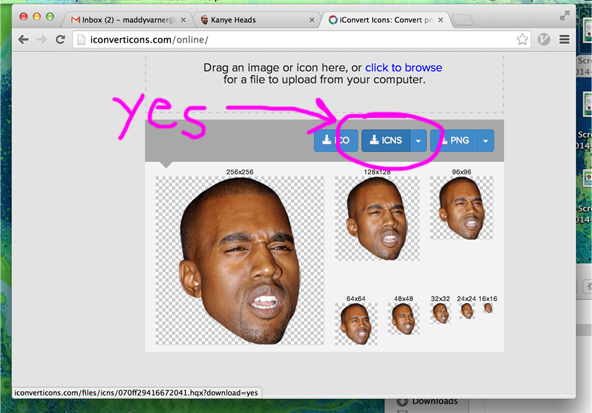
Go to http://iconverticons.com/online/, upload your Kanye heads and then download the .icns version.
STEP 3. THE SPECIAL SAUCE

Go to your OSX Applications folder and right-click the program whose icon you want to change. Then click the “Get Info” option.

Drag and drop your desired Kanye .icns onto the top left icon.
STEP 4. HACKER SHIT

Go to your Terminal app and type “killall Dock” (the caps are important) and press enter. BOOM. DONE!!!!!!!
REMEMBER 2 TRICK OUT YR COMPUTER WITH OTHER GREAT F.A.T. LAB “CLASSICS” LIKE KANYE VISION!!!!!!!!!!!!!!!!
It’s not 1988 so why live like it is?
FREE INTERNET FOREVER!!!!!!!!!!!!!!!!!!!!!!!!!!!!!!!!!
Cafes, airports, hotels and Hell usually all have ‘free’ wifi for 30 minutes and then make you pay- this is a bug, not a feature.
Limited time = fffffat unlimited time.
wifi spots are easy to hack your way into fatty goodness:
Option 1:
You can maintain the constant 30 minute wifi sessions by doing a few tricks. When you try to load a page, the router will automatically redirect you to the login page: look at the URL, because from there you can see which system the airport is using and all of them are easy to hack:
– Change your IP
– Change your MAC address
– Delete your cookies
Option 2:
You can also spoof your MAC address, MacMakeup (Win) is a good place to start.
Edit: A good tutorial for Mac users can be found here
ProTip: Find a MAC addresses already using the paid wifi. Once you have located a few, you can copy the mac address as your own and enjoy.

Option Lazy Motherfucker:
Many routers have the ability to hide a wifi network by making their names invisible to other computers (airports use these often for gates). A nice GUI option is to use NetStumbler which locates and shows all hidden networks or you can do it via the terminal:
sudo ln -s /System/Library/PrivateFrameworks/Apple80211.framework/Versions/Current/Resources/airport /usr/sbin/airport
The above command must appear on a single line to work. Enter the admin password to create the symbolic link. Now you can use the airport command without th long ass path:
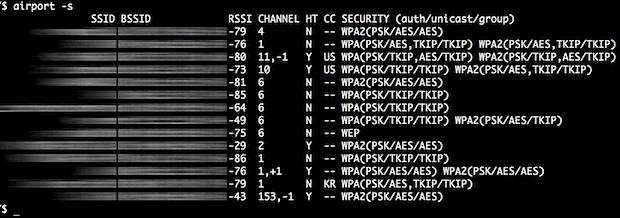
airport -s
The ping will show all available wifi networks and their router name (SSID), the router address (BSSID), signal:
Happy Sniffing!! <3


HOW TO MAKE AN IRL AIR FFFFFATENER!
1. Pick a tree from the stash on the sidewalk
(Bonus: use the one still in your living room)
2. Make it F.A.T. by tagging it pink and tying the top with twine
3. Hang up your new air freshfatener in any room for an instant outdoor scent of F.A.T.!!


Â
The expressions published in this site are all in the public domain. You may enjoy, use, modify, snipe about and republish all F.A.T. media and technologies as you see fit.
