
Kuvaus
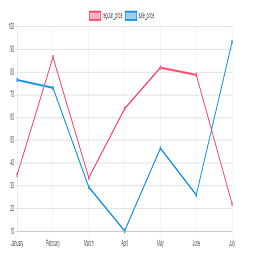
Chart plugin to view price changes of woocommerce product.
- 1-Place the Php code do_shortcode( ’[chartprice]’ ); in the single page product.
- 2-use shortcode [chartprice] in product post.
- 3-change setting in woocommerce page setting.
Arbitrary section
-
for change format date use php code below in function.php file:
Kuvankaappaukset

Plot in product 
Settting


Asennus
This section describes how to install the plugin and get it working.
e.g.
- Upload plugin folder to the /wp-content/plugins/ directory
- Activate the plugin through the ’Plugins’ menu in WordPress
UKK
1-Place the Php code do_shortcode( ’[chartprice]’ ); in the single page product.
2-use shortcode [chartprice] in product post.
3- for change format date use php code below in function.php file:
    add_filter('chart_price_apply_filter_format_date', 'format_date');

    function format_date($date)

    {

    $date=date('Y/m/d');//defult Y-m-d

    return $date;

    }
Arvostelut


Avustajat & Kehittäjät
“Plot prices woocommerce product (product price history)” perustuu avoimeen lähdekoodiin. Seuraavat henkilöt ovat osallistuneet tämän lisäosan kehittämiseen.
Avustajat
Käännä “Plot prices woocommerce product (product price history)” omalle kielellesi.
Oletko kiinnostunut kehitystyöstä?
Browse the code, check out the SVN repository, or subscribe to the development log by RSS.
Muutosloki
1.0
*head version of plugin
1.1
*chang js file to chart js
2.0
*add the variable product to plot
