


A problem my friend has...
My friend who also has to do this assignment, asked me to post her problem here, so:
-----
I am designing at the moment a mobile phone user interface for university in Flash which is due tomorrow and I still have some problems:
When I click on the red arrow buttons, the movieclip “entertainment_btns” with 4 single buttons (video_btn, games_btn, music_btn, radio_btn) above is moving to the left or the right, depending on which direction I click. Example: Initially, the music_btn (the red CD) is below the lamp, but when I click on the arrow_btn_right, the movieclip goes one position to the right and the games_btn (the chess game and the dices) are now below the lamp.
There is also a dynamic textbox in between the red arrows (entertainment_text).
The lamp is at the moment just a graphic which is on the main movieclip.
What I want to achieve are three things (if possible).
1. Only the button which is below the lamp should be enabled and when you click and another button goes below the lamp, this one should be enabled and the other ones disabled.
I have this device for the initial status which is at the screenshot, but if I am clicking the arrow, I don´t know how to change the “enabled-state” to the button which follows the music_btn and disable the others and so on.
2. The text in the textbox “entertainment_text” should change fitting to the button which goes below the lamp (e.g. “Games” for the games_btn, etc.).
3. A red arrow button should be disabled if the last button of the corresponding direction reaches the lamp. Ex: the arrow_btn_right should be disabled when “video_btn” is below the lamp.
When this is not the case, it should be enabled again.
I tried around with arrays, for loops and stuff but because I am not that deep into Flash yet, I have no real clue how everything works out.
---
my code is the following:
stop();
entertainment_text.text = "Music";
entertainment_btns.music_btn.enabled = true;
entertainment_btns.radio_btn.enabled = false;
entertainment_btns.games_btn.enabled = false;
entertainment_btns.video_btn.enabled = false;
arrow_btn_left.onRelease= function()
{
entertainment_btns ._x=entertainment_btns ._x -51.5
}
arrow_btn_right.onRelease= function()
{
entertainment_btns ._x=entertainment_btns ._x +51.5
}
here's a screenshot to help you understand:
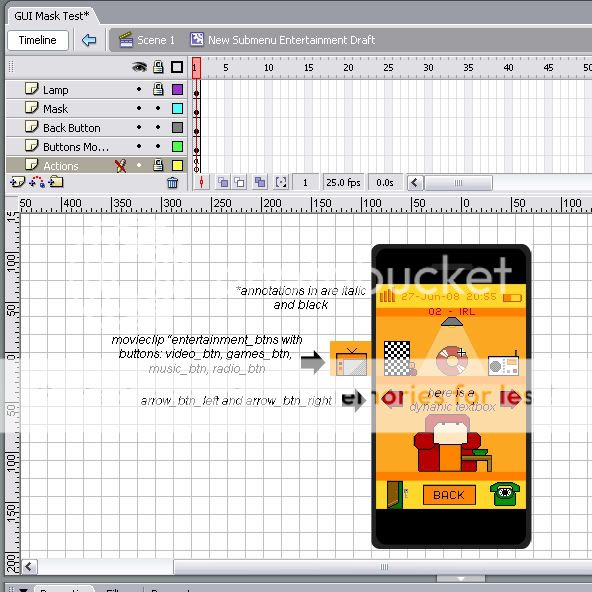
Thanks a lot in advance for answers.
-----
I am designing at the moment a mobile phone user interface for university in Flash which is due tomorrow and I still have some problems:
When I click on the red arrow buttons, the movieclip “entertainment_btns” with 4 single buttons (video_btn, games_btn, music_btn, radio_btn) above is moving to the left or the right, depending on which direction I click. Example: Initially, the music_btn (the red CD) is below the lamp, but when I click on the arrow_btn_right, the movieclip goes one position to the right and the games_btn (the chess game and the dices) are now below the lamp.
There is also a dynamic textbox in between the red arrows (entertainment_text).
The lamp is at the moment just a graphic which is on the main movieclip.
What I want to achieve are three things (if possible).
1. Only the button which is below the lamp should be enabled and when you click and another button goes below the lamp, this one should be enabled and the other ones disabled.
I have this device for the initial status which is at the screenshot, but if I am clicking the arrow, I don´t know how to change the “enabled-state” to the button which follows the music_btn and disable the others and so on.
2. The text in the textbox “entertainment_text” should change fitting to the button which goes below the lamp (e.g. “Games” for the games_btn, etc.).
3. A red arrow button should be disabled if the last button of the corresponding direction reaches the lamp. Ex: the arrow_btn_right should be disabled when “video_btn” is below the lamp.
When this is not the case, it should be enabled again.
I tried around with arrays, for loops and stuff but because I am not that deep into Flash yet, I have no real clue how everything works out.
---
my code is the following:
stop();
entertainment_text.text = "Music";
entertainment_btns.music_btn.enabled = true;
entertainment_btns.radio_btn.enabled = false;
entertainment_btns.games_btn.enabled = false;
entertainment_btns.video_btn.enabled = false;
arrow_btn_left.onRelease= function()
{
entertainment_btns ._x=entertainment_btns ._x -51.5
}
arrow_btn_right.onRelease= function()
{
entertainment_btns ._x=entertainment_btns ._x +51.5
}
here's a screenshot to help you understand:
Thanks a lot in advance for answers.
