Mocha is a JavaScript test framework for Node.js. It runs tests in sequence and shows results. It works with any assertion library and supports asynchronous tests.
Table of Content
Benefits of Mocha Framework for JavaScript Testing
Mocha helps you run JavaScript tests with control and order. It works with any assertion library, so you can pick the one you want.
Let’s look at an example to understand it:
const assert = require('assert');

describe('Math tests', function() {
  it('adds numbers', function() {
    assert.strictEqual(2 + 3, 5);
  });
});
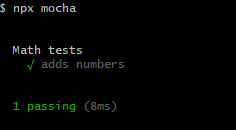
This test checks if 2 + 3 equals 5.
Here is the output in the terminal:
Install and Set Up the Mocha Framework to Test in JavaScript
Install Mocha with npm. Run this command in your project folder.
npm install --save-dev mochaAdd a test script package.json after installation in the same root of your code.
"scripts": {
  "test": "mocha"
}
Mocha with Assertion Libraries (Chai Example)
Create a file named test.js. Write a test inside it.
const assert = require('assert');

describe('Array', function() {
  it('returns -1 if value not found', function() {
    assert.strictEqual([1, 2, 3].indexOf(4), -1);
  });
});
This test checks if indexOf(4) gives -1 for an array with numbers 1, 2, 3. Here is an image that shows you the result:
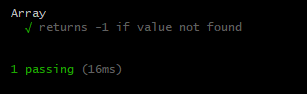
Run Test with the CLI of the Mocha Framework in JavaScript
Mocha works well with Chai. Chai gives different styles for writing assertions.
Install Chai with npm.
npm install chai --save-devHere’s how it works in practice.
const chai = require('chai');
const expect = chai.expect;

describe('Chai test', function() {
  it('checks type of value', function() {
    expect('hello').to.be.a('string');
  });
});
This test checks if 'hello' is a string.
Run tests with the Mocha CLI. Use the command below.
npx mochaThe command finds test files and runs them. It shows the results in your terminal.
Here is the result:
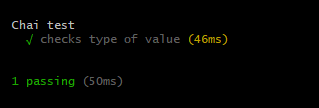
Organize Tests in Projects
Keep tests in a folder named test in your project. Mocha looks inside this folder by default. Place each test file inside it.
Use names that describe the test purpose.
Wrapping Up
You learned the role of Mocha and how to install it. Also, you understood how to write a test and how to run it.
Here is a quick recap:
- Mocha runs JavaScript tests with sequence and control.
- It works with assertion libraries like Chai.
- It runs tests from the CLI with
npx mocha. - It supports the test organization inside a
testfolder.
FAQs
What is Mocha JavaScript Test Framework?
How do I install Mocha JavaScript Test Framework?
npm install --save-dev mocha- Install globally:
npm install -g mocha - Install locally:
npm install --save-dev mocha
How do I write my first Mocha test?
const assert = require('assert');
describe('Array', function() {
  it('should return -1 when value is not present', function() {
    assert.equal([1,2,3].indexOf(4), -1);
  });
});
- Create test file:
test.js - Run test:
npx mocha
How to run Mocha tests from command line?
- Run all tests:
npx mocha - Run specific file:
npx mocha test/test.js
Similar Reads
The assignment operator in JavaScript stores and updates values. It helps you hold data in a variable and change it…
Comments in JavaScript help you explain code and prevent mixing. They guide anyone who reads or edits your script. Understand…
JavaScript Math.log() was added to help people find the natural log of a number. It solves real problems in science…
JavaScript object methods are simple ways to handle data inside objects. An object can hold many values, and methods give…
The for...of loop appeared to solve the problem of complex loops over arrays and strings. It gives you a way…
JavaScript has a statement called "with" that changes how code accesses object properties. The"with" Function makes a temporary scope, so…
The toString function in JavaScript converts a value to a string form without change. It works on numbers, arrays, and…
The toSpliced function creates a new array without changing the original array in JavaScript. It returns a copy with new…
Code mistakes used to slip by without a warning. That made bugs hard to trace and fix. JavaScript "use strict"…
The ternary operator in JavaScript keeps your code short. It helps you write conditions inside one line. JavaScript lets you…