Search the Community
Showing results for tags 'Vortex'.
Found 20 results
-
Using HumanitZ on Steam and I'm unable to get the Vortex mod manager to find the .exe file due to an update in the path and exe name. Old Path: ...\common\HumanitZ\TSSGame\Binaries\Win64\TSSGame-Win64-Shipping.exe New Path: ...\common\HumanitZ\HumanitZ\Binaries\Win64\HumanitZ-Win64-Shipping.exe
-
Bethesda games have the OMOD/FOMOD installers which greatly facilitate mod organization and distribution for authors, and mod installation for users. Other games may have similar community-driven initiatives, but not every popular game does. Since you've declared your intention to focus on the development of Vortex from now on, I thought to propose the idea of a "universal" Vortex installer specification. Something akin to *OMOD but more flexible and powerful, with the capacity to instruct the manager to add/remove and modify text and configuration files within allowed game directories. Something that works universally across all supported games. The idea is to allow authors to pack myriad variations, customizations and add-ons to their mods, into a single download file, which is then tailored and customized to the users tastes during installation. An unattended 'use the defaults' option can be included for the impatient, and auto-install collections.
-
So for a few years now i consistently get the error (shown above and attached) regardless of what game I manage. (also without managing any game) Done a far amount of digging but found little more than [] Re‑run the login/authorization [] Restart Vortex after authorization [] Check that everything else works I've done these steps multiple times over to no effect. I'm running version 1.15.2 and everything works fine, just a nuisance. Any help appreciated. Thanks

-
Hi folks, I'd like to present my use-case and how the current tools generate some amount of friction: I'm developing a large mod for Skyrim Anniversary Edition that uses a very large number of topic info fragment scripts (several thousand last I counted). Keeping track of these files is critical, as a missing file would lead to a dialogue line that has no effect and fails silently (if you've dev'd for Skyrim, you may know those are bugs that are nasty to track down from the user's perspective). Since the Creation Kit creates files with implicit names, sometimes without telling the author, I find it very hard to keep track of what it creates, so I ended up (ab)using the Vortex virtual file system; I find it very useful to: a) create a folder inside Vortex' staging directory and add something; this is going to be my dev. folder b) re-launch Vortex so it recognizes there's something new, warns me about it, and deploys it c) switch the Creation Kit's plug-in, script source, compiled paths to the dev. folder's sub-directories d) deploy before testing in-game, each time. Purge for good measure ever so often I use stuff like Pyro and PapyrusProjects, wrangling with VSCode & Git, so there's extra folders that also get deployed, notably the .vscode and .git ; these yield file conflicts if there's other dev. stuff I got deployed (which I do because I'm working on a base plus expansion), so I try to keep the load order short. I'd love if I could toggle / filter out some stuff from the deployment, notably .vscode and .git folders. If this sparks ideas or you'd like to chat, feel free to reach out! ~MP
-
Due to Vortex overwriting the actual files, users generally get confused about whether they've a file installed or not. The amount of bug reports I receive due to this issue is honestly, not pleasant to say the least. They install a mod, then another which includes the same file. Then they delete the overwriting mod and now the file is gone. Very tedious for inexperienced users, especially with NPC replacer and animation/behavior mods. Vortex would benefit greatly from this feature.
-
I have a Steam Deck and I love it, but I don't love how each game has it's own unique problems with getting mods and mod managers rubbing on the Linux platform. I would really celebrate if there was a version of Vortex that Just Worked with the Steam Deck. If Valve's Steam Machine is successful then I can imagine other users would really appreciate this as well.
-
Hello, I saw some work being done for the collections to eventually have them install mods with FOMODs in them without the user having to sit and select all the already selected options and would love if that could be a feature for general use in the Vortex mod manager? Currently, I have over 1,730 mods installed and needed to do a reinstall, but don't want to do it through adding my collection from the webpage, as this, for some reason, prevents me from making further changes to the collections and releasing them as revisions to said collections. So I decided to go to my mods, filter down to Enabled and then I highlighted every mod and hit Reinstall. It was late and I wasn't able to stay up for the process and to my expected dismay, the re-installation process sat in a follower FOMOD for 4 hours until I woke up and ran back into the room to see and accept the already selected options - with the tag (preset) next to them and just press Finish... I'm not asking for a modification to this, but an addition that is pretty much Reinstall w FOMOD Options retained without confirmation from the user. For obvious reasons this would be a much loved QoL for people in my position who also love making Collections and all users. Thank you for being open to these type of things.
-
When asking for help with Vortex, please include as much detail as possible about the issue you are experiencing. Use the list below as guidance on what you should provide: Which version of Vortex are you using? (e.g. 1.8.0) Which game are you modding and which game store did you purchase it from? (e.g. Skyrim SE from GOG) Which mods are you trying to use? What steps did you take before you encountered the error? What is the specific error message you received? (Provide a screenshot if possible) Please keep in mind that this forum is for help with the Vortex application only. If you're having pro 1. Crucial information that we need in order to help you Which version of Vortex are you on? Vortex version 1.15.2 We need to know which version of Vortex you are using as some issues are unique to older versions and may have already been fixed in the latest build. To look up which version you are using: click on the three dots in the top right corner and select "About". What game are you trying to mod with Vortex? Skyrim se with AE upgrade, purchased from Steam and installed 4 days ago on 12/24/2025 How many mods do you have installed? I am installing the immersive and adult collection, there are many mods (300-500) being installed and downloaded. Other than that it is a fresh profile. I had previously dl'd and installed skyrim on my laptop hard drive, but because of space limitations and t posing, I deleted it and installed it again on a 64 GB flash drive. My mod archive dl's are going to my C drive, I deleted some or all of them because of space. The collection has been installing and downloading for four days now and is at ~60%. Earlier in the download interval I loaded the game a few times. T posing occurred. What environment are you running Vortex on? Windows 10 Processor AMD A9-9425 RADEON R5, 5 COMPUTE CORES 2C+3G 3.10 GHz Installed RAM 4.00 GB (3.88 GB usable) Storage 119 GB SSD WDC PC SN520 SDAPNUW-128G-1006 Graphics Card AMD Radeon(TM) R5 Graphics (68 MB) System Type 64-bit operating system, x64-based processor Pen and touch No pen or touch input is available for this display MAIN ISSUE: Vortex is at 0% download and no evident installation progress for at least half or more of the time I have it install the collection. I remain logged into nexus site. Thank you. vortex1.log


-
Hi, I would like to request a mod ‘blacklist’ where you can click a button besides the Kudos or Endorse buttons that place that will prevent that particular mod from showing up during a random search query or/and appearing in the mod authors page. This feature would help users from mistakenly reinstalling any mod that doesn’t work with a game. Thanks
-
I’m having issues with Cyberpunk 2077 version 2.31, mods, and Vortex 1.15.2. I don’t remember exactly when I enabled the option “Automatically convert legacy-style .archive mods to REDmods on install” in Vortex—maybe a popup appeared, and I activated it. Now I’m not sure whether the mods I’ve installed are working correctly or not. Some are visual, so I can easily tell if they work, like the examples I mentioned. Others modify gameplay or things I can’t easily verify, so I have no idea how to check them. The same goes for updates—since they’re frequent, I don’t know if they actually update things properly or not. Here are some examples. I installed Virtual Atelier, which creates a folder at Cyberpunk 2077\mods\Virtual Atelier with two files: info.json and __folder_managed_by_vortex, plus a subfolder “archives” containing VirtualAtelier.archive and VirtualAtelier.archive.xl. When I start the game and access the apartment terminal, Virtual Atelier appears as an icon, but it’s empty. To fix this, I copied the two files VirtualAtelier.archive and VirtualAtelier.archive.xl into Cyberpunk 2077\archive\pc\mod. After restarting the game and checking the terminal, Virtual Atelier worked correctly. I tried uninstalling the mod, deleting all related files from the directories, disabling the “Automatically convert legacy-style .archive mods to REDmods on install” option, and reinstalling Virtual Atelier automatically through Vortex. The result: a redscript compilation error appears at startup, the game still launches, but Virtual Atelier doesn’t show up at all. I tried the same thing with Virtual Car Dealer—exact same issue. If I install additional cars with the “Automatically convert legacy-style .archive mods to REDmods on install” option enabled, the number of vehicles in-game increases, but the preview thumbnails are black until I manually add the files to the mod folder. I don’t understand what I’m doing wrong—this doesn’t seem like the intended behavior. So I assume that when updates are released and I update via Vortex, if I don’t manually update those files, I don’t really know what’s being updated or whether it will work properly. The questions I want to understand are: What is the correct way to install all mods using Vortex, and how should I update them later? For what’s already installed, how can I tell which mods are correctly installed and active, and which ones require manual intervention (meaning they currently don’t work, even though there are no in-game errors and Vortex shows everything as fine)? Please don’t tell me that the only solution is to copy (or move) the archive files from Cyberpunk 2077\mods\ModName to Cyberpunk 2077\archive\pc\mod.
-
Im asking myself if its possible to add files to a current BA2 archive instead of uploading the entrire BA2 archive. Like a dynamic BA2 archive stored on nexus end. The archive is compressed based on user preference either Old Gen Next Gen Since the lates FO4 update at least edited the BA2 archive version also. This would be super handy for mod users if baked into VORTEX aswell i assume. Im requesting that feature since it is super disturbing to upload large BA2 archives (hunders of MB) just because some texture were missing or added which are no bigger than a few MB. Is that planned or possible at all?
-
Recently I had to reinstall a game and all of the mods I used. Gladly I've "backed them up" into my own collection. But now I'd like to remove some mods from that collection and publish it afterwards. Currently in order to do this I have to download the whole collection, and only then the "Edit"/"Manage"(/whatever it is in English) button will be available. In simple terms: To remove a single 10 GB mod from your own collection you have to download and install it first. This looks wrong.
-
Vortex Extension are all mixed together with Game Extension and Themes and Utilities. Being able to filter by types would be useful. Something like: Vortex Extension Types: Vortex - Themes Vortex - Utilities Vortex - Games
-
While this hasnt been a problem for people in a while I think its good to bring up The way I fixed it is as followed First you want to go into your program(xx) folder head to steamapps then go into skyrim click on vortex manually, and manually uninstall vortex through the uninstall file dont uninstall the file itself, go into the "Uninstall Vortex.exe" this will uninstall the vortex related things next Go into users/<YourName>/AppData/local/VortexUpdater/pending and install the specific updated version dont go through the installer go through the vortex-setup-<version number>.exe this will install the update alongside vortex itself.
-
I'm in the middle of a modded playthrough and wanted to change the settings of a mod or patch it. Unless it has MCM integration, the only I way I can do this is by reinstalling the mod using the FOMOD installer. Is it safe to do this in Vortex? Unless it's explicitly discouraged by the mod author in the description/posts tab, I honestly can't tell.
-
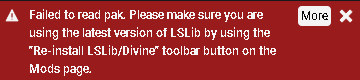
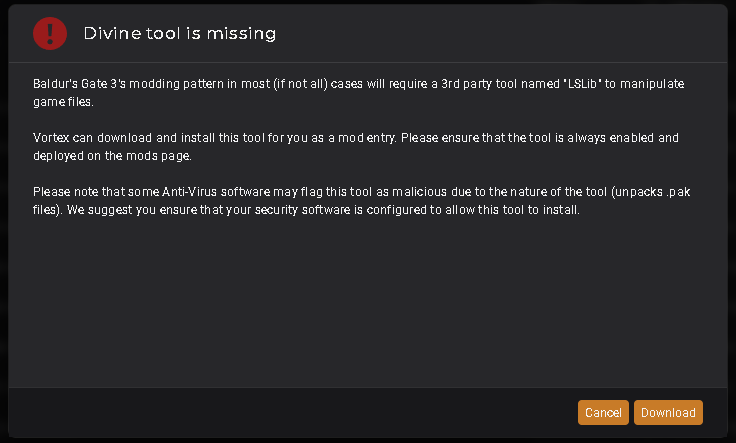
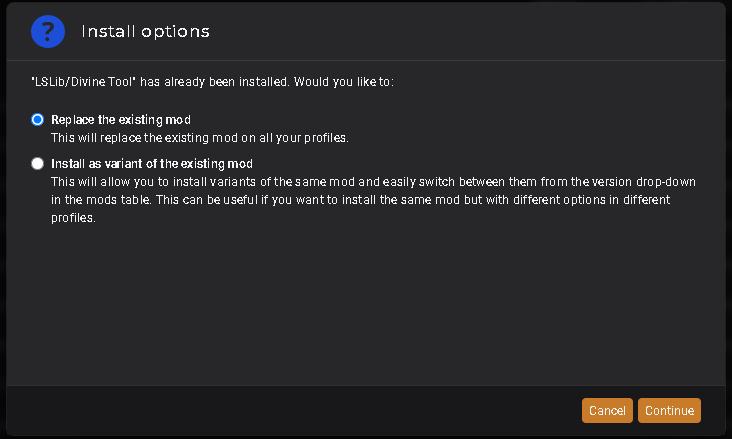
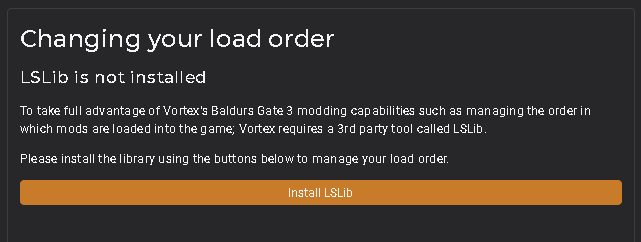
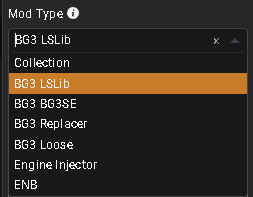
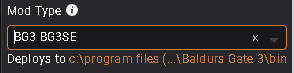
So, my mods arent working in game all of a sudden. I tried everything, even uninstalling and reinstalling BG3 and all of my mods, but still nothing. Checking Vortex, it seems as though its not acknowledging that LSlib/Divine tool is installed. Upon trying to deploy mods, or purge then deploy: see image 1. I get a 'failed to read pak' notification for every single BG3 mod. Image 2 shows that vortex thinks the divine tool is missing, despite me already installing it. So, to make it happy, I try to reinstall it. I have tried reinstalling it through the buttons on vortex, and ive tried installing it manually from elsewhere, AND i tried using a mod that automatically installs it. Which brings us to image 3, showing that I have in fact installed the divine tool, and vortex now asks if i want to replace the file or make a new one. I have tried both of these options, and both come out with the same result. Image 4 shows that it is still not acknowledging the LSLib/divine tool. I cant move or deploy mods, I cant add them to the load order and they will not import to the load order. What am I missing? Edited: When checking the options for the installed LSLib/Divine Tool mod, it gives me mod options. It defaults to the "BG3 LSLib" option, which does not deploy at all (see image 5) - despite Vortex saying that the LSLib needs to be deployed. Opening the tab, there is multiple different mod type options that do in fact deploy, just the LSLib one weirdly doesn't. (see image 6 for mod type options). I tried selecting the BG3 SE option, just to see if it would work, and it did in fact deploy (see image 7). This stopped the 'failed to read pak' notification (image 1) from popping up, but mods still cannot be moved to the load order, and the load order still says that I don't have an LSLib installed (image 4). So, I'm still stumped.

-
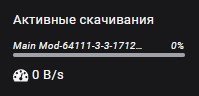
Hello. I'm facing a problem that has never happened before. When trying to install any mod. The mod appeared in the manager but the download did not last 0mb/s. If I tried to download the same mod several times, the download started but then gradually decreased to 0mb/s. An error notification (I/O error) could also appear. I have tried various ways to solve the problem. By reinstalling. By changing the manager's location folder. By checking the disk. By changing the browser. None of the ways helped me.

-
Under the current stable branch of Vortex, attempting to import your load order from a BG3 lsx load order file doesn't work. When you choose the file to import the load order from, the screen flashes REALLY rapidly and then nothing changes. I use this feature to ensure my group and I are all on the same load order for multiplayer, so it's super important for us. Same issue for all four - importing load order from file just causes our screens to flash.
-
I wish there will be a more robust solution to mod config files management. Currently if you update a mod, the changes to the config file will be overwritten. I think maybe adding a diff editor (like in vscode, in fact, how about just opening vscode if installed?) so you can choose how to merge changes if any.
-
When you check for updates in Vortex and click on the update button in the version column, you're taken to a download page on Nexus. If you want to review the changelog that the mod author posted each time you update you need to open a separate Files tab page and check out the changelog there. It would be a huge improvement and a timesaver if the changelog was displayed each time you click an update to the mod. I realize that the most important part of that page is the ad but the changelog would probably still fit there. The page I'm talking about as a reference: https://prnt.sc/B9PBl4TNMmMP