Search the Community
Showing results for tags 'gui'.
Found 24 results
-
Hi, I am currently writing a mod that includes a menu in the GUI. The associated variables come from the .w3strings files. Each of these entries, starts with an id. For example: 2112201001. where: 211nnnnxxx. So 1-3 always 211, 4-7 is the idspace and 8-10 is free to use. In the Mod Wiki it was recommended as best practice that you use your mod id for the 4 digit id space. But how can i get my mod id without publishing it? :)
-
My unmodded game has a weird issue with the start menu cutting off at the top even though the game has the correct 16:10 aspect ratio. It's like the menu is too short to reach the edge of the screen. No other UI elements seem to have this problem. The same thing happens in my modded game with the RaceMenu. I do know it's not a letterbox issue with the background because it still only happens to the menu itself even with a custom background that fills the screen. Edit: Adding another screenshot to show the same issue with a background replacer
-
Hello, I resendly reinstalled my Fallout 4 game, but now my GUI is wierd oversized, can some body help me, http://imgur.com/a/KCwuh
-
I've played a lot of RPGs, and a lot of those are older. I love Skyrim to death (played the old version for over 1400 hours) and I would love a interface retexture that would bring more of the Morrowind/Oblivion feel with it. Or just any RPG from arround 2000-2005 feel. I personally would love to keep Skyrims default font and interface (I for one actually like the default interface better then the SkyUI one), but I would love something that looks a bit more old-school (but not ES: Arena oldschool :tongue:). I really like this main menu replacer from hellstorm102 (have it running on Skyrim SE now): Also the Lore Loading Screens from 3ClaymoR are nice, but they tend too mess with the main menu replacer for some reason (instead of loading the main menu replacer it first loads the loading screens until main menu is done with loading everything). http://www.nexusmods.com/skyrimspecialedition/mods/582/? I would love an entire interface replacer trough, doing all menus and stuff.
-
Hello everyone I have run into quite a predicament as you can see in the title, you see I would be playing all normal like then out of no ware some environment objects and weapons(both NPC weapons and Player weapons) will turn into red diamonds with exclamation points, all dialog and pop up options will overlap each other and I cannot select any thing(and by that I mean I can hover my mouse over this jumbled pile of words and nothing will be highlighted), and lastly some of the pip-boy icons(the picture you see when you select an item) will be a blue box. Considering this doesn't happen immediately on loading the game and it happens only after like 20 minutes of playing, I'm thinking its a corrupted save game, but I want to make sure this is true and that there is no fix for it before I go and erase all my progress so some help in figuring this out would be greatly appreciated. btw I did try IHUD and other such mods with no luck.
-
Hey guys! I made a post on Reddit of an image I put together showing the HUD in Fallout 76. Here's the image in 8K I was advised on posting here as a few people including myself thought it would be a great mod for Fallout 4. Unfortunately when it comes to the technical side of modding I haven't a clue, so if anyone wants to turn this into a Fallout 4 mod and knows how to, let me know and I can provide the assets that I've recreated. Thanks!
-
Does anyone know of a way to add menus to the Pip-Boy? I'm working on a survival mode (hunger, thirst, sleep, etc) mod, and want to add New-Vegas style tabs to the CND section, but I have no idea where that information is stored or accessed, and prodding around the GECK has so far not yielded anything but a "Radiation" menu that seems to house the breakpoints for rad poisoning. Does anyone have any idea how to do this, or is able to point me in the general direction? Is this even doable with F3's engine? Iirc, I've seen other mods that merge menus and such but I don't remember what they are, so I can't reverse engineer them. Thank you very please
-
Before you say something hear me out. I don't like the SkyUI GUI and I think that the normal GUI suits me better. So you're probably thinking, ''Why would you install SkyUI if you don't like the GUI?'' Well, most of my mods need SkyUI to work ( Don't know why really ) and there is no getting past that. So, simple I want my mods to work, but I still don't want the GUI. Any answers on how to disable the GUI is appreciated.
-
Like an onscreen clock and the date kind of like how your health and other things are on the screen.
-
Hi, I've read the pinned post about project ideas/requests so I'm not asking anybody else to make these mods, I just want to know how much they'd involve. The only modding experience I have is adding some sound features to a silent ASCII roguelike which is probably more intimidating than Morrowind, hopefully. The first is a tiny change I'd like to make: adjusting the opacity of the menu "help" boxes (the mouse-over pop ups). I don't know what can and can't be changed but seeing as there's a setting for the menu itself, I'm hoping this can be added in. I feel like Bethesda did it backwards, only allowing the background menu to be translucent and not the overlays! The second is to have plants/ingredients' effects pop up beneath their name when you mouse over them in the game world. I don't know if this is feasible and I imagine it would be more work than such a minor change may suggest. The display that you get when mouse hovering in the menu could suffice but only in conjunction with the first idea because otherwise that black box would be to obstructive. Completely perfect vision of this would be only displaying the known effects and not the ??????s and a more elegant version could be just displaying the icons rather than text. I'm basically looking for an estimate/challenge level so your wisdom would be appreciated. Cheers.
-
So, there are SO MANY settlement mods and added official DLC content at this point. Many items are awesome, many items I literally would never, ever use. A HUGE PROBLEM with having dozens of settlement mods and DLC is that it effectively breaks the settlement menu. Nothing plays well together, load order makes things appear and disappear, etc. I have NO skills when it comes to programming, modding, etc., so I don't know if this is even something that could be done, but what if a plugin style tool existed that allowed the user to configure categories and individual items that were available to build? The player could then streamline what categories and items appear, keep within the games limits, eliminate all the stuff they don't use, and free up all the time trying to get things to work together. I know this is a stretch, but a plug-in like BodySlide or LOOT that can be pulled up in ModManager that has a simple GUI (i.e. windows folder or better yet, actual in game graphic} would be IDEAL. Anyone with any experience know if this is even possible?
-
I'm working on a mod to replace soul gems with something different. I know how to replace the model and texture, but I have no idea how to change the inventory icon to match the new model. (Well, maybe some idea, but not enough.) Most threads on this topic (changing map marker icon, changing map icons, changing crosshair) have gone unanswered. The ones that were answered tell me the GUI files are in SWF format and I have to use Fallout Mod Manager to extract the files from a .BSA. I'm real vague on this as the comments were vague. There don't seem to be any tutorials. My problem is very specific. I want to change the soul gem inventory icons. Make it simpler: the petty soul gem icon (from that I can figure out how to do the others). Anyone know how to do this, and willing to share?
-
Anybody know if there is a way to disable the white and red text that ENBseries displays in the top-left corner when first launching Skyrim? It hangs around for so long that I have loaded a game well before it goes away. If you don't already know exactly what I am talking about then check the attached screenshots to jog your memory if you are an ENB user. Although I didn't bother to take screenshots showing the text past the menu it does stay around for a moment even after completely loading a save (which is the only reason I want the text gone... see below for why). The info it displays would be useful once but not on every single time the game launches so I am wondering if I can disable it somehow? I know there is somebody out there that has to have found a way but I have googled and such to know avail. I know there has got to be a way because prominent Skyrim tutorial creators like Gopher and other individuals who do frequent "Let's Play Skyrim" video series frequently use ENB and there is no such text displayed when they launch their game. Anybody know the trick? I am sure somebody is going to say something like: "what's the big deal, just deal with it!" or "why do you care so much?" so I will preempt it and explain why: I admit that I am a serious roleplaying nut and, when it comes to a real playthrough, I treat whatever is on screen as if it is exactly what my character sees (which is why I have completely disabled my HUD and play with no visual aides on screen whatsoever) so when that text hangs around for a least a minute afterward and it is on my screen (i.e. in my characters view) it drives me nuts. It just won't do. Call me crazy, fine, but everyone has their own preferences and ways of enjoying games. As they say: "to each their own." I won't judge others for their playstyle if they won't judge me for mine. Soooo... that having been said, if anyone has any idea how to deal with this I would be extremely appreciative. I thought maybe there could be an option in the ENB GUI so I tried to launch that (which is supposed to be Shift + Enter, right?) and it doesn't come up... Thanks in advance to whoever helps me out!
-
Can anyone help me identify the mod that creates the icons on the right side of this screenshot? It's a helmet, armor, and boots, but I don't what mod adds them. I tried turning off the SkyUI active effects display in the MCM, but they are still there regardless. I can hide them with IHUD, but they are always visible when the compass is visible. Thanks for any help. http://i.imgur.com/6SA7Iol.jpg
-
ok so I just got back into Skyrim and im a very experienced Modder so I know my way around the game and its files and how to fix problems but I need a little help with something. when using any ENB I cannot change any of the enb settings in game at all. when I try to click on the check marks or tabs they just recheck or close. the only time I can mess with the enb settings is during a loading screen. im at a complete loss. I have a 7970 with the latest driver and im using the latest enb from the enb site. please if anyone can help...
-
Ok, so I could be wrong in assuming there is no such mod already in existence but I've been around the nexus a few times and I haven't seen anything the way I've been thinking of it so I figure I'll post it here as I currently have no idea as to how one would go about making it. So I'm sure that other people have noticed that in Skyrim the magic system is a bit lacking and I'm sure that a few people have also played Fable 1, so here's the idea: A menu within which you would have a tree setup sort of similar to this: LEFT HAND | RIGHT HAND CHOSEN SPELL | ANOTHER CHOSEN SPELL CHOSEN SPELL | ANOTHER CHOSEN SPELL and it goes on as such, maybe even have another part on the right or left for powers/shouts in there. Anyhow, once this tree is established, one could then hold down a key and in doing so bring up the menu (While gameplay continues, though I guess you could make it an option to pause it) then using the mouse scroll you would scroll up and down the list and click with the assigned key for your left hand/ right hand/ power/shout key and in so doing you would quickly equip the spell/power/shout that you had assigned to that part of the list This is for people such as myself who think that it would be nice to have a more tactical gameplay added rather than just spamming the same spell over and over again because you don't want to pause the game scroll through a large list and then find your spell just to resume the game to use it once and then scroll back through the list. It becomes bothersome. Granted you can assign keys 1-9 to different spells/potions/etc. but in my mind that is a)Not enough b)Does not equip to the hand you want it on and c)Somehow does not feel right If anyone is willing to make this, I would be so happy and well. I think I'd be rather speechless that it actually got made. Also I know that my words are sometimes confusing so if anyone is willing to work on making this and wants some more explanation as to what I mean, just ask. Though I think that Fable 1 gives a general idea as to what I mean, though I would like it with two hands rather than just one. Again though, I'm rather incapable of modding so if someone even bothers to make this I wouldn't be bothered if they changed up my plans a bit. Just an afterthought here, but maybe it would be possible to make it so that in by holding down the quick-menu key along with the key for the hand/power slot you want to equip the portion of the list assigned to that hand/power would move separately from the rest of the list to make it easier to keep track of your most prized spells for every hand in a more real-time method.
-
I'm attempting to make a more minimal HUD mod to suit my tastes. When you drain the stamina or endurance bars there is a dark gray (almost black) bar that runs behind the fill as a background. And although I have performed a few texture dumps trying to completely drain my endurance, I cannot seem to find it. Neither does it seem like removing any particular part of the normal HUD file affects it. I have came across a few texture files that I had thought may be the one I wanted but having edited them with proper aphas has not yielded the desired results. They are as follows; 18b02baf, 68b747a0, 6dc9a690 and 831676cc. Checking out a few of the HUD mods on the Nexus, it doesn't seem like they had the solution I am searching for. Does anyone here have some clues for me or technical data about whether or not I can even edit this part of the HUD? Thank you for any help you can provide. http://i.imgur.com/NcaYfUy.jpg
-
Good evening everybody! I just decompiled some of the UserrInterface stuff from Fallout 4 and it doesn't look too complicated. I think I could figure out how to create a custom "Level up perk menu" thing. But the part that I didn't figure out yet is how does one of those ActionScript menus(for example the LevelUpMenu.swf) "tell" the game that a certain perk was selected by the player? In this file, there are just the things like what animations to play, how ithe menu is laid out, .... But no actual "if this object is selected, check if the player meets the requirements for the perk and then apply the perk to the player". I know that the perks, their effects and requirements are defined in the CK, but how does the game "know" that the player selected a certain perk? Is there another "thing" "between" the SWF and the "game engine" and how can I find it / modify it? What I eventually want to make is a custom perk system for crafting, the vanilla level up menu should stay the way it is. So that when the player presses a key , let's say H, my custom perk menu will show up.
-
Requesting an amazing mod that will make skyrim item inventory amazing! This one from bd online. Hope somebody can overhaul gui
-
I was wondering if anyone created a Mod that shows wether or not,... An enemy has been poisoned, or damage taken from protagonists weapon.
-
Hi! Everybody knows after patch 1.20 and B&W expansion interface of The Witcher 3 has been redone almost completly. I like this changes basically, but I dont ugly white squared selector and other UI elements in such style, so I want to request somebody to rework UI elements and bring back old UI look before B&W patch with brown solid selectors and fonts. Also I attached some comparsion screenshots to make clear my request. Old good UI elements: Ugly new UI elements:
-
Hello, I am currently working on modifying certain parts of the HUD. However, I can't find where the exclamation mark icon is located in the game archives. To be clear, I am not referring to the round exclamation mark icon, I am referring to the square (with a diagonal edge) icon that is shown next to a quest objective. Any help would be much appreciated!
-
Hi all! Taking a moment to introduce myself. Loving the work that I see done for many different games I play. So much good stuff, I hope to dig deeper and, one day, begin working on mod development myself. I've got about 15 years software development/programming experience and think it might come in handy. Ignore the text below, I realize I've asked my question in the wrong forum. So, now I'm off to find out where it belongs posted. See ya 'round peeps! I can't seem to figure it out, and I have a suspicion why...but I thought I'd just ask the community and find out from the experienced, instead of guessing and living with my frustration. I have noticed that though it's not exactly consistent, many mods will allow some option selection as soon as you enable the mod. The problem I have is that I cant seem to get back to those options if I want to try something different later. Obviously, I can remove the mod and reinstall it to get the option again. But, that doesn't seem like it should be the only method to achieve that. Disabling and re-enabling the mods has never given me the options dialog box for any mod again ever... I keep thinking this cannot be...I must be missing something...So, here I am humbly asking, what do I do, to get back to the options dialog of the average mod with options.
-
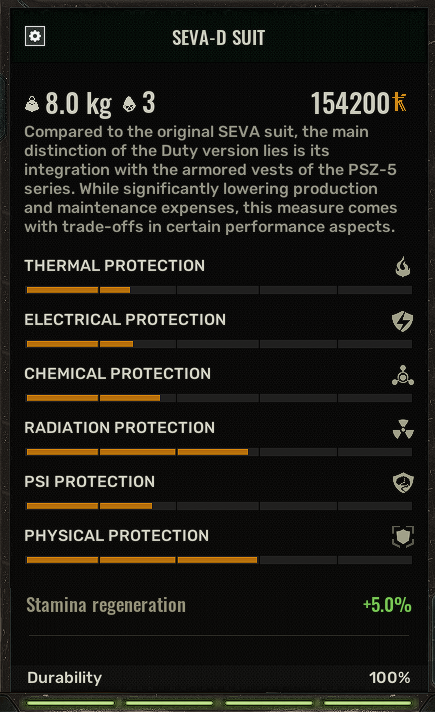
Is it possible for someone to make a mod for STALKER 2 that's like another UI screen next to the inventory, showing all your combined stats? Health, Stamina, Protections, Buffs, Debuffs, Hunger, etc... Why? Currently there is no way to see what the player stat values are. If you say Drink a buff like "Non-Stop Energy" it just says "Weak" stamina buff. Or if you equip an armor piece, it's just a bunch of random orange bars... what do these mean? no one knows. There's also a discussion going on in the community "Is a FULL SUIT like SEVA-D, better than a ARMOR + HELMET?" The answer of course is just speculation, no one knows for sure. The game doesn't tell you if 2 separate armor pieces Stack or not. This would be very easy to Check if there was a Player Stats screen that takes the current values of the player like "Total Chemical Protection" and displays them in a GUI next to the Inventory. Other players seem to want this too: https://steamcommunity.com/app/1643320/discussions/0/4626981087516601336/