
Search the Community
Showing results for tags 'install'.
-
I have RDR2 on steam. I have Vortex and have downloaded several RDR2 mods. I have followed numerous videos and âhow toâsâ on how to download and install Vortex. Along with how to download mods. I also have the correct file path for the RDR2.exe. However, I cannot get mods to work in Vortex. They are downloaded, installed, and RDR2 is ready but they are not showing up. For example, some mods have hot keys of some kind and there are not working. Anyone have some advice or have another thread that talked about RDR2 on Steam and using Vortex?
-
Hello, I have modded a few games with Vortex and want to keep this setup. However, I need to move my vortex installation (the tool itself) to a different drive, since the drive it is installed on will be used for something else. If I simply move Vortex, it complains, that the "unistall path" doesn't match and might cause issues when updating Vortex. Question: Can I use the database backup feature + "Save a copy" to backup my whole modding setup and load it back in after reinstalling Vortex? Intended procedure: Create backup of the database: Vortex > Settings > Workarounds > [Create Backup] > [Save a copy] --> a 2.8 MB json file is created, after I choose to create the file (despite the button in the dialog saying "Open"). Uninstall Vortex --> Will this remove the mod staging folders and archives? Install Vortex on the other drive Vortex > Settings > Workarounds > [Restore ...] Will this result in the intended outcome of Vortex transforming back into its pre-uninstall shape with all the managed games and installed mods back to how they were?
-
First of all, good morning/good afternoon/good evening. It's the first time I install mods on Elden Ring, and I wanted to add two specific mods: Berserk amor with dragon slayer and Unlocked Unique Skills. The Berserk mod I love for being simpler, I managed to install it smoothly, it worked ingame, but when I tried to install the UUS, it replaces the other mod's files. I tried using Yapped RuneBear to merge the mods, but I didn't quite understand how it works, In fact, USS didn't even work in my game, even though I only had it installed. I ask for help to be able to install these mods together (if possible). Thank you in advance. Mods links: https://www.nexusmods.com/eldenring/mods/1410 https://www.nexusmods.com/eldenring/mods/729 Attached just a print of when berserk love worked...
-
hey says, is it possible for someone to guild me through how to install the ascended mod with either UXM or mod engine? tried youtube videos but it didn't work even though I followed all the steps.
-
So I got new laptop cause previous one died last week. I copied all the files from old to new using disk reader device. I run Steam on new laptop and it veried Steam files from Starfield. When using Vortex, I got this load list. Game is not starting on double click - it's 'thinking', but not opening window, nothing. Any ideas what should I do now to test?
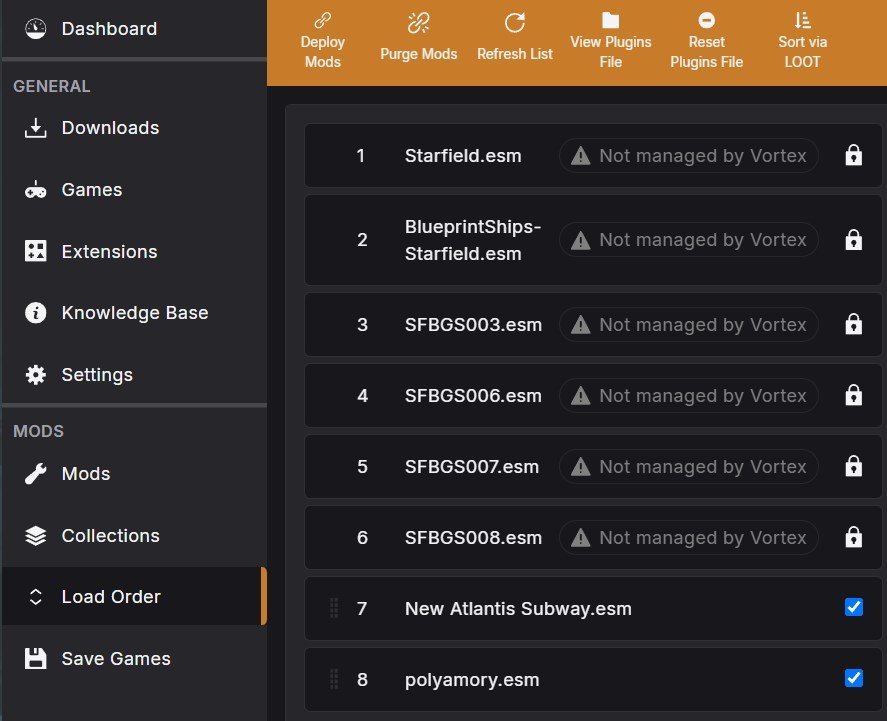
-
I've been thinking about installing RDR2 and playing the game through again, but I wanna use the Intro Completed save game. I don't have any RDR2 game files on my PC atm. Can I use that save file, right after installing the game or does the save game folder get created when I have completed the Intro chapter (meaning that I can't use that save game file with a fresh install)
-
My game hasn't been running as good as I'd like with my Nvidia GPU so I figured I'd try some visual mods. I installed PureDark's Upscaler along with Ziyakid's performance optimization mod. I wasn't loving how my performance and picture were after installation so I decided to remove the mods. Now when I run the game my graphics look worse than ever before. Everything is super dark and the quality seems super low. Did I somehow corrupt my save file? I have tried verifying the integrity of my game files, uninstalling and reinstalling, uninstalling and reinstalling to a different SSD, pretty much everything. Any advice here would be great because I am struggling to even play the game now. I even tried starting a new save file to see if it was something related to my character/save and it had the same issues. It won't let me publish the screenshots as the size is too large, however everything is super dark in them if that gives any context.
-
I need to know the Install path, the Install Path Registry Key, and the Local Data Path for how it is on loot to SkyrimSE so I can correct it. If you tell me how it is on the Windows path, I can find it easier on Linux please.
-
I need to know the Install path, the Install Path Registry Key, and the Local Data Path for loot to SkyrimSE. If you tell me how it is on the Windows path, I can find it easier on Linux please.
-
Sorry if this is a dumb question but here goes. If I'm using Nexus Mod Manager to download mods into Cyberpunk 2077, do I need to do something first or do the mods just work by simply activating them in the NMM? E.g. in Fallout 4 you need to make adjustments in couple .ini files to enable mods so I'm wondering if something similar is needed with 2077.
-
I downloaded and installed FALLOUT 4 via steam and would not start. I them started using administrator but would not go past the menu screen, I performed Compatibility Troubleshooting and it now say that the game is not compatible. Can anyone help me please?????????
-
so basically most mods that I install with NMM are working but recently I ran on ECE mod and I really want it, but the problem is installing it, I tried everything, My SKSE is updated I even tried to manually install and then I tried to activate it through NMM but nothing works! what am I doing wrong? when I right click to active the mod it just loads for some seconds and then nothing, no error sign, and no activated sign. am I doing something wrong? can someone explain to me how to install it? did I miss something and I need to install another mod to install ECE? when I put my mouth over the skyrim sign it says legendary edition. (after it finishes to load it shows no sign of activate or error)
-
Okay, I need help with this one. This is pretty much my mod install order list from last time, with a few things installed in new locations where they make sense due to their FOMod's patching options. This is not reflective of LOOT order!! This is an INSTALL order only. Not asking anyone to error check things or do anything super-intensive, just a quick glance-over to see if everything is in the right order for installing. Changelog is at the bottom in the spoiler tags as I will be revising this periodically until I'm satisfied with it. I tried to group them where it made sense and where they would/should be overwritten. This is going to be my masterlist of mods, so I figure, if I can get these mods in a proper install order, I can just reinstall in the same order over and over. This isn't all that many mods, but this would give me a good base to start playing with the CK with to start learning. I'm using NMM 0.63.17, the final version of NMM ever. Any help or feedback would be very sincerely and greatly appreciated. Thank you ahead of time. Again, any help anyone can provide, even if its just to look it over and say looks good, or install this here first, then you're good, I would greatly appreciate it. Thank you again in advance. Changelog: Tools/Notes For Converting Oldrim Mods To Special Edition:
-
Hey, everyone. I'm fairly experienced with modding, but I have kind of a conundrum. I've been trying to mod NV on an external SSD for the first time with no luck. When I install a mod with NMM nothing happens! The esp is checked, I have the green check mark, it says it's installed, but nothing. I know you're thinking that I have the directory set to the wrong place, but it's not. I've quintuple checked. I've been trying to get Toasty Fresh's Colt N99 10mm Pistol replacer to work as a test, but all I've been getting is that wonderful giant exclamation point. That means NMM knows where NV is and is removing NV's default 10mm pistol, but isn't replacing it with Toasty Fresh's Colt. Even more confounding is that all of Toasty Fresh's file folders appear in the data folder for NV, but they are all absolutely empty. The corresponding folders in NMM's virtual install folder, on the other hand, are flush with all of the assets necessary to make the mod work. The mod install worked when I uninstalled NV from my external drive and reinstalled it onto my C: drive and I've gotten the mod to work on the external SSD via a manual install. I've tried with NMM on the SSD and with NMM on C:. Neither worked. NMM just refuses to install mods on my external SSD! Any help would be greatly appreciated.
-
I dont know if its just me or anyone else but i cant get nmm to install most fnv mods correctly, it wont install NMC texture pack project nevada or anything with a scripted installer, I am running the latest version of nmm. I think this problem started just before fallout 4 came out and just blamed it on out of date mods but im seeing people who can install them without problems, if you know how to fix that would be great i really want to go play a fallout that is a rpg not a linear shooter.
-
Hi, I have a problem for install NMM, First, the program ask me to chose the file where to install NMM. I have not changed the default file. Then, I must chose the game with what I will use NMM (so, skyrim) After that, It asks me to chose differents file locations. If I let the default location, It makes an an error message and I can do nothing. So what location must I chose? http://img15.hostingpics.net/pics/917105Sanstitreskyr.png The default location proposed here does not exist in my computer
-
When i try to install NMC's small texture pack via nexus mod manager it says that a problem occurred during install, if i click on the error icon i get a pop up window that says: Failed A problem occurred during install: Access to path c:\Games\Nexus Mod Manager\FalloutNV\Mods\cache\NMCs Textures NV SMALL Pack SINGLE FILE FOR NMM-43135-1-0\NMCsTexPack_SMALL\fomod\info .xml denied. This mod was not installed. Has anyone encountered a problem like this? I have successfully installed other mods before. for example CONELRAD radio mod, populated casinos.
-
Help me please, i've got a fatal error when launching witcher 3 (steam version). If i try to start the game a red engine 3 window shows up and this error appears Error [content0]game\temp.ws(8702): Could not find function 'AddSessionTag'Error [content0]game\temp.ws(8707): Could not find function 'RemoveSessionTag'Error [content0]game\temp.ws(10731): Cannot call exec function 'XDPPrintUserStats' from scripts instead of the console.Error [content0]game\temp.ws(10736): Cannot call exec function 'XDPPrintUserAchievement' from scripts instead of the console.Error [content0]game\temp.ws(11134): Could not find function 'SetGameProgress'Error [content0]game\gameplay\alchemy\alchemymanager.ws(318): Could not find function 'LogWithLabelAndValue'Error [content0]game\gameplay\alchemy\alchemymanager.ws(322): Could not find function 'LogWithLabelAndValue'Error [content0]game\gameplay\leveling\levelmanager.ws(277): Could not find function 'LogWithValue'Error [content0]game\gameplay\leveling\levelmanager.ws(286): Could not find function 'LogWithValue'Error [content0]game\gameplay\leveling\levelmanager.ws(409): Could not find function 'LogWithValue'Error [content0]game\npc\npc.ws(1880): Could not find function 'LogWithLabelAndValue'Error [content0]game\npc\npc.ws(2726): Could not find function 'LogWithLabelAndValue'Error [content0]game\player\player.ws(1089): Could not find function 'LogWithLabel'Error [content0]game\player\r4player.ws(8339): Could not find function 'LogWithLabelAndValue'Error [content0]game\player\r4player.ws(11159): Could not find function 'LogWithLabel'Error [content0]game\player\r4player.ws(13137): Could not find function 'LogWithLabel'Error [content0]game\player\playerwitcher.ws(5418): Could not find function 'LogWithLabelAndValue'Error [content0]game\player\playerwitcher.ws(5826): Could not find function 'LogWithLabelAndValue'Error [content0]game\player\playerwitcher.ws(6290): Could not find function 'LogWithValueStr'Error [content0]game\player\playerwitcher.ws(6689): Could not find function 'LogWithLabel'Error [content0]game\components\inventorycomponent.ws(181): Could not find function 'LogWithValue'Error [content0]game\components\inventorycomponent.ws(194): Could not find function 'LogWithValue'Error [content0]game\components\inventorycomponent.ws(768): Could not find function 'LogWithLabelAndValue'Error [content0]game\components\inventorycomponent.ws(2231): Could not find function 'LogWithLabelAndValue'Error [content0]game\r4game.ws(1663): Could not find function 'SetCommonStatI32'Error [content0]game\gameplay\focus\focus.ws(207): Could not find function 'LogWithName'Error [content0]game\gameplay\focus\focus.ws(267): Could not find function 'LogWithName'Error [content0]game\gui\hud\hud.ws(1188): Could not find function 'LogWithLabel'Error [content0]game\gui\hud\hud.ws(1189): Could not find function 'LogWithLabelAndValue'Error [content0]game\gui\hud\hud.ws(1193): Could not find function 'LogWithLabelAndValue'Error [content0]game\gui\menus\gwintgamemenu.ws(107): Could not find function 'LogWithName'Error [content0]game\gui\menus\gwintgamemenu.ws(123): Could not find function 'LogWithValue'Error [content0]game\gui\menus\gwintgamemenu.ws(128): Could not find function 'LogWithValue'Error [content0]game\gui\menus\inventorymenu.ws(2872): Could not find function 'LogWithLabelAndValue'Error [content0]game\gui\menus\inventorymenu.ws(2945): Could not find function 'LogWithLabelAndValue'Error [content0]game\gui\menus\craftingmenu.ws(287): Could not find function 'LogWithLabelAndValue'Error [content0]game\gameplay\ability\playerabilitymanager.ws(443): Could not find function 'SetCommonStatFlt'Error [content0]game\gameplay\ability\playerabilitymanager.ws(495): Could not find function 'SetCommonStatFlt'Error [content0]game\gameplay\ability\playerabilitymanager.ws(618): Could not find function 'LogWithValueStr'Error [content0]game\gameplay\ability\playerabilitymanager.ws(1620): Could not find function 'LogWithValueStr'Error [content0]game\player\states\vehicles\usevehicle.ws(1601): Could not find function 'LogWithValueStr'Error [content0]game\player\states\vehicles\horseriding.ws(49): Could not find function 'LogWithName'Error [content0]game\player\states\vehicles\sailing.ws(56): Could not find function 'LogWithName'Error [content0]game\player\states\playerdialogstate.ws(48): Could not find function 'LogWithName'Error [content0]game\player\states\aimthrow.ws(42): Could not find function 'LogWithName'Error [content0]game\player\states\combat.ws(124): Could not find function 'LogWithName'Error [content0]game\player\states\exploration.ws(55): Could not find function 'LogWithName'Error [content0]game\player\states\swimming.ws(252): Could not find function 'LogWithName' Warning [content0]engine\environment.ws(30): Global native function 'EnableDebugOverlayFilter' was not exported from C++ code.Warning [content0]engine\environment.ws(32): Global native function 'EnableDebugPostProcess' was not exported from C++ code.Warning [content0]engine\showflags.ws(11): Global native function 'DebugSetEShowFlag' was not exported from C++ code. In this case only used "All Quest Objectives On Map" but i've tried lots of other mods before I'd be very glad if you can help me.
-
Hello all... I have recently decided to stumble into making/editing meshes using Blender v.2.49b, I have followed the instructions on the Niftools wiki style web page for assistance, however I am unable to get PyFFI2.2.3 to install.bat. "cannot find registry value". I understand what registry entries are to a degree, and have installed Python 2.6.6(x32) as was recommended by the Niftools webpage. I am running Windows 7 x64. Learning the nuances of 3d modeling is daunting enough without running into a wall like this, which probably is my own fault for not understanding something. I'm working with another on some projects, and I have come to the forums to inquire those who may be wiser than I, but not giving up.
-
these are the mods I want to use, as well as Joy of Perspective -Legend of the Eagles Nest -FNIS Sexy Move -FNIS 6.3 -New Animation for Magic Casting (i dont think this one works) -No spinning death animation -Pretty Jump Animations -XP32 Maximum Skeleton Extended (Groovetama) -Arise Chapter 1 Black Sacrament -Blades Bikini Armor CBBE HDT -Daedric Chainmail Refined CBBE TBBP HDT -Dragonball Outfit -DBZ Scouter (2 or3 more armor mods more) -Eyes Glitch fix -JK's Skyrim (Major Cities Only) ( I have some clothing mods) -Blocking Combat Behavior Improvement -Interrupt Attack for Better Blocking -Dungenon Quest Awareness -Bloody Facials Reblooded -No Falling Damage -Proper Aiming -Quick Start - Skip Opening Sequence -ApachiiSkyHair -Beards 1k -Superior Lore Friendly Hair -The Eyes of Beauty -Univision Face -Take Notes - Face Light -Better Jumping -ALSL CBBE Body Preset -amidianBorn Blades Armor -x2 different Book of Silence patches -BOS Creatures, Dragonborn DLC, Unique Items, Weapons, and AMB Elven Dark -Better Beast Races v2.0 Lite (will probably replace with full version) -CBBE -Closer Quivers and Longer Arrows (Sometimes caused really bad clipping, full quiver going through charachter, or at least I think it caused it) -CoverKhajitis Male Version -Elven Weapons for Silence -Fair Skin Complexion for CBBE -Fine Face Textures for Men -skyrim HD 2k textures -Ultimate HD Fire Effects -Archery Gameplay Overhaul -DBZ Overhaul Post CK -Nock to Tip Hotfix 802 -Nock to Tip -HDT Physics Extension -showRacemenu precache killer -Unofficial Skyrim Legendary edition patch -Unofficial High Resolution Patch -The Dark Brotherhood Resurrection Part 1 -A quality World Map and Solstheim Map (At no point has this mod ever worked, I have no mods that should conflict with it) -Racemenu 3-4-5 -SkyUI5.1 -Auto Unequip Ammo -BodySlide Outfit Studio -SKSE ini pre download for lazy users -enhanced Blood Textures
-
Alright so I'm having an issue with activating/installing certain mods while I can can still activate others. Whenever I try to activate them, I look for the "Mod Activation Queue" tab on the bottom of NMM and under where it says status, it says "a problem occurred during install." Mods that fail to activate include: Nightstrikers Snap 'N Build Harley Quinn Outfit CBBE f4se Crafting Fury 9000 GTX
-
Hello People of the Modding Scene, I'm new to the modding scene so i don't the best way to install my mods in order so no errors happen: and btw 1 - i'm using fallout mod manger and btw 2 - if you can to make it a bit easier like Install First: Base Mods Like - UIO, NVSE, JIP NVSE(mods likes that) Install Second: mods that go here are master files that other mods uses(like MCM) Install Third: Other and you may add more Install # if you need to Here Is The Mods: 5x Faster Waiting v2AMS - Start Menu Text Color ChangerAQS - Sack of HatsBetter Tag SkillsCheater terminal ReduxDelay DLC CombinedDUINVF4QuicklootFallout Character OverhaulI Got SpursNVSE + JIP NVSEJIP Companions Command & ControlLight Up and Smoke Then CigsNoPipBoyNovac Apartment Revamp RangerProject NevadaRoleplayer's Alternative StartSleep and Wait For 3Days(rename) a.k.a longer waiting timesThe Couriers CacheThe Strip OpenUIO - User Interface Organizer Thank you In Advance
-
About five months ago I got two drives for my computer for the first time. I had planned to install Skyrim on my SSD for loading purposes and NMM on my HDD for space purposes. However when went to install NMM I got a message that said something to the effect that it works better or quicker when it and its folders are on the same drive as the games it is managing mods for. I don't remember the exactly what it said as it was five months ago. I decided for simplicity's sake to just put it on my SSD and live with it. Now, I've seen a couple people mention that they don't have a problem with NMM on one drive and Skyrim on another. However I'm super cautious and a worrier. I would really appreciate it if someone could elaborate to me: 1. Why such a message would come up during install if there is no real issue. 2. Am I correctly remembering the existence or wording of the message. 3. Is there any threat to the stability of my modded games in the event that I chose to migrate NMM to my HDD / Should I uninstall then reinstall all mods prior to and post migration.
-
So what I'm trying to do is install this mod: http://robton.nu/vanilla-armors-and-clothes-tmb/ Know that I'm kind of handicap with this stuff, all the mods i've been using this far have only been the ones that had the nice green button "download/install with nexus mod manager" and if i had to do i manually i just skipped it. But someone explained to me today how to do it manually and i figured it out, its really easy even for me lol but anyways, I downloaded this TMB armors and clothes mod and I installed it on my nexus mod manager properly it has the green check mark. But it wont run properly My game will start, I will hit Continue or Load to another save, the load screen will show up and it will go like normal but as soon as the loadscreen is done and it is about to show my charachter and game and all, it just crashes. I know its this mod because when i deactivate it it doesnt crash and when I activate it it crashes. But I'm not sure how to fix this. My laptop is pretty strong. the strongest laptops u can get. Model: GL752VW Processor: INtel® Core™ i7-6700HQ CPU @ 2.60GHz RAM: 16.0 GB System type 64bit please help me figure this out, its probably something easy and i sounds a special kind of retarded writing this lol but i think i just require a nice dumbed down step by step or something explanation how to fix this. I want this mod, it makes the clothing look fricken sexy instead of slutty xDDDDD lol
-
I've posted this on the Bethesda forum and here. Don't really want to but the B. forums don't get a lot of traffic. I'm using Wrye Mash ver 87 to manage installing/unistalling my mods. I've downloaded several mods that use the new MWSE features (LUA ???) and would like to use them, or at least test them out. Some have an esp file and others do not. WM recognized the file structure only of those that have an esp in them. Each mod appears to add content to the MWSE folder . Can Wrye Mash install/uninstall the new MWSE mods? Is there a way to structure the folders so that WM will recognize and properly install/uninstall the contents of the mod? The readmes left me confused regarding how involved I'll need to get regarding installing/uninstalling mods made using the newest features of MWSE. One of the readmes implied that even though Wrye Mash would install the mod, I would still need to install the MWSE folder contents myself. My concerns are: 1. Is there a worry that content from one MWSE mod will overwrite another MWSE mod's files? Wrye Mash warns and normally keeps track of that. 2. If I install an MWSE mod, will I need to keep a manual record and backup of what files are overwritten during installation so that I can uninstall? Wrye Mash handles that record keeping chore for me re: non-MSWE mods. 3. Say that I've installed several MWSE mods. How do I go about uninstalling a specific one without disturbing the others? As a lay person, what are the points to be aware to manage installing and uninstalling the mods using the new MWSE featured mods? I remember the old days when you had to manually keep track of what files a mod may add, and keep a back up of the overwritten files in case you wanted to uninstall the mod. Wrye Mash was a godsend, but the readmes suggest that Wrye Mash, at least for the moment, isn't able to do that. The mods I'm looking at are: 2.1 Enchantment Services 1-03.7z 2.1 Sky Diversity Auto Launch Add On.7z Diligent Defenders v1.1.0.zip Easy Escort v1.1.1.zip Equipment Requirements 1-1.7z Graphic Herbalism Ownership Add-on1-0.7z Happy Harvesting v1.0.1.zip Ingredient Flavor Texts 1.3.7z nc-souls 1-0-0.zip PoisonCrafting 1-0.7z Proportional Progression v1.0.zip Putting Power In Willpower 1-10.7z Sophisticated Save System v1.0.2.zip Tamrielic Lore Tooltips 1.11.7z Value_Weight_Ratio_Tooltip 1-0.7z Glow in the Dahrk 2-2-0.7z Thanks, John


