Search the Community
Showing results for tags 'intel'.
Found 19 results
-
I'd like to request a mod that allows the Intel Team to mark enemies automatically, or just any form of Auto-Marking like what D-Dog does. This functionality already exists via "The Ultimate Phantom Pain Mod" but that mod is no longer upkept and isn't compatible with Infinite Heaven. Essentially rather than them showing the possible location of enemies, the Intel Team just marks them directly for you. Link to Mod: https://www.nexusmods.com/metalgearsolidvtpp/mods/188 - game_ENABLE_autoMarking: Enables auto marking if Intel Unit Scouting Function is S rank - game_ENABLE_autoMarkWithoutSRank: Enables auto marking even if Intel Unit Scouting Function is not S rank It'd be great to get this as a standalone version that's compatible with current mods. It would allow you to use whichever buddy you wanted without feeling the need to use one of the scouting ones since the process would be automated. I've searched for this but couldn't find anything so I'm sorry if it has already been made or requested. I'm not sure how easy it would be to just pull the effect from TUPPM and make it a standalone but hopefully someone who's smarter than me could figure this out, or if someone would just be able to make their own version of this from scratch obviously that'd be fine too. It doesn't need to be tied to the intel team or anything, just auto marking of any kind. Although the intel team has very nice range and would probably be a good way to do it. Thanks!
-
GPUs: Intel® HD Graphics 530 + Nvidia GTX 1060 (notebook)Intel Driver: 21.20.16.4534 (Auto-installed via Windows Update)Nvidia Driver: 376.33 I recently found that some Skyrim mods cannot be installed, modified, or removed, even with administrator rights. The game itself also failed to load some textures or mods with proper file system rights. Later I used Process Explorer, and searched for the word ”Skyrim” for any process that might be occupying the game resources, then I found the executable called ”igfxEM.exe” has been opening a lot of Skyrim resource files for some reason. I googled this program and it was a part of the Intel Graphics driver. The process simply opened the files and actually did nothing to them. It had no disk IO, but kept the files open. I tried to modify some settings in the Intel control panel, but it didn't stop the process from occupying the Skyrim files. Reinstalling or updating the Intel driver didn't help. I force-stopped the process, and I successfully took back control of the resources again. Any solution or suggestion? Thanks in advance.
-
Original thread on Anandtech: https://forums.anandtech.com/threads/ryzen-w-amd-gpu-performance-in-fallout-4.2501467/ For those not in the know, AMD's previous processors (Excavator and older) were terrible at draw calls. Core 2 was Intel's big jump, being easily over twice as fast as AMD's Athlon II and Phenom architectures, as far as displaying objects on screen is concerned. Nehalem sealed the coffin, being even faster than Core 2, with each subsequent architecture being better at processing draw calls. Now, if you ever looked at benchmark results for Fallout 4, they're completely worthless. If you're lucky, the reviewers tested Sanctuary Hills post-war, without any settlement building. What's more likely, is they played the opening sequence for a couple minutes. That ain't good. Anyone who's been to Corvega or Diamond City knows that you're not going to score up in the high 50's with a Piledriver CPU. And with AMD's Ryzen architecture now released, I'm collecting user results based on draw calls, and general performance. The former is done through a save at the top of Corvega, the latter in Diamond City. If you have an ENB, and know how to disable mods, you're almost ready; just gotta copy over my .ini files that have been optimized for low GPU load + high CPU load. Low res textures + shadows + display resolution, high object & shadow distance. Here's the step-by-step guide on getting the game ready for testing: 1. Download these two save files, and place them in your "My Games\Fallout4\Saves" folder: https://mega.nz/#!bxljwZiQ!foEekBl-RWzM8XY5HZYztBOQrBeEpbloSsgZNVH8yLw 2. Backup & replace your .ini files in "My Games\Fallout4" with these: https://mega.nz/#!X88FDB6I!x9FCxGAB79AsFLXN16xyiI4mRjs_CQ_FPOBZ-zYIsJs 3. In FalloutPrefs.ini, replace: sD3DDevice="AMD Radeon HD 7800 Series" with the value from your original FalloutPrefs file. 4. Download and install the latest ENB mod, by placing the files inside the "WrapperVersion" folder, into the same folder as your Fallout4.exe file: http://enbdev.com/mod_fallout4_v0311.htm 5. Replace the ENB .ini files with these: https://mega.nz/#!3kUHTY7K!GnxkhGoqX1WjnqxUsVHMbPhfmO5zFmB5Ys8dcMva048 6. Disable VSync in your GPU driver settings program And once you're in the game: 1. Load the save(s) 2. Press Shift+Enter to bring up the ENB overlay 3. Click on the "Profiler" category. Pan the camera around until you get the same number of draw calls, as the number in the save. So for "Corvega11700draws21fps", try and get as close to 11700 draw calls as possible. Same gig for the DiamondCity save. 4. Note down your framerate, and number of draw calls. Finally, when submitting your results, use the following format: OS: CPU: RAM: GPU: GPU Driver: First Save (Corvega) Draw Calls: FPS: Second Save (Diamond City) Draw Calls: FPS:
-
Hi all. I apologize if this has been posted elsewhere, but I am just wondering that if I'm going to run FO3 on intel HD4000 with the appropriate mods if there are any mods that people know I should avoid. I'm guessing some of the graphics mods will be off the table, but I am wondering if anyone who has run it has had any special success or failures with certain mods. Thanks.
-
Hi, Has anyone posted a good tutorial on understanding and manipulating the Screenstack, yet? I'm at my wit's end with all of this. Initially, I just wanted to add the intel options panel to every mission, similar to the existing intelligenceSpending mod. It looks like that author ran into the same problems I did with trying to modify the existing Flash widgets. Eventually, I may just spend the $250 for a license of ScaleForm. I moved on to creating a second Black Market and populating it with the hacker rewards. It's great, and even better than the intel options panel actually. The only problem is that I can't get it to show anytime after you select a mission Initial Mission Screen: 1 of 7 UIMission screens with 2 Flash widgets (BuildMissionPanel and BuildOptionsPanel) -Tried calling the Black Market screen anywhere in here and nothing happens, even when you push to the front of the stack. I assume 2 Flash screens can't overlap, but since there is no documentation, that's only an assumption. Squad Select: I may have to cram it in here as a button on the bottom, but with all the mods already using this, I'm trying to keep the UI clean. Pre-Skyranger Screen: Also has 2 Flash widgets and will not allow the Black Market screen to be overlayed. Again, assuming that somehow 2 Flash based screens are incompatible for some reason.
-
Operating System: Windows 7 Pro Processor and Speed: i5-4200M, 2.50GHz RAM and Speed: 1x4GB, 2996.1 MHz Graphics Card: Intel HD Graphics 4600 If i can I am ok with bad graphics and 30 Fps willing to mod it as well.
-
I am planning out a PC build for my first gaming PC(leaving consoles finally) and I am going to be playing a lot of skyrim with graphics mods and other mods. I have everything planned out except for my gpu and I would like some insight on which one to buy, I have a budget of $250 and it has to be under 11" due to my case(EDIT: I am looking at the r9 270x). I have a list of graphics mods I would like to run. Here it is: Textures(will be using texture combiner) Weapon Retexture Project - WRP Silly Level of Detail - Potions and Poisons -- SLOD PnP Skyrim HD - 2K Textures aMidianBorn Book of Silence Skyrim Realistic Texture Overhaul aMidianBorn Landscape Landscape and Lighting Ultimate Lighting Overhaul Skyrim Flora Overhaul(maybe) Real Clouds Realistic Water Two(maybe) Waves
-
Happy holidays, I am going to build my first gaming PC ever(PS I am writing this from my tablet). I am going to be playing Skyrim with the the Realvision ENB plus most of the mods that are recommended(and SMIM). I would like to know how well it will run will my planned specs, any and all changes are welcome, just keep the OS and PSU(under $850). Here are my planned specs: PCPartPicker part list: http://pcpartpicker.com/p/2pTAM Price breakdown by merchant: http://pcpartpicker.com/p/2pTAM/by_merchant/ Benchmarks: http://pcpartpicker.com/p/2pTAM/benchmarks/ CPU: Intel Core i5-4570 3.2GHz Quad-Core Processor ($159.99 @ Microcenter) Thermal Compound: Zalman ZM - STG1 3.5g Thermal Paste ($5.98 @ Amazon) Motherboard: MSI H81I Mini ITX LGA1150 Motherboard ($66.15 @ Mwave) Memory: Kingston Black 8GB (2 x 4GB) DDR3-1600 Memory ($69.29 @ Amazon) Storage: Kingston SSDNow V300 Series 60GB 2.5" Solid State Disk ($52.99 @ Amazon) Storage: Western Digital Caviar Blue 1TB 3.5" 7200RPM Internal Hard Drive ($59.99 @ NCIX US) Video Card: EVGA GeForce GTX 760 2GB Video Card ($259.98 @ SuperBiiz) Wireless Network Adapter: Encore ENUWI-1XN45 802.11b/g/n USB 2.0 Wi-Fi Adapter ($9.98 @ OutletPC) Case: Cooler Master Elite 130 Mini ITX Tower Case ($49.99 @ Mwave) Power Supply: OCZ ZT 650W 80+ Bronze Certified Fully-Modular ATX Power Supply (Purchased For $59.99) Operating System: Microsoft Windows 8.1 (32/64-bit) ($112.13 @ NCIX US) Total: $906.46 (Prices include shipping, taxes, and discounts when available.) (Generated by PCPartPicker 2013-12-25 20:45 EST-0500) Thanks so much in advance, and once again happy holidays.
-
When i wanted to change my graphic adapter in the fallout new vegas launcher options, it only shows my Intel HD Graphics and not my NVIDIA Seriously, I've tried forcing it via the Nvidia app. It just refuses to use anything but my Intel HD Graphics instead of my NVIDIA GeForce GT 750M Is there seriously no way to get it to use that?
-
I have a hp laptop, windows 7, with integrated intel graphics, as well as amd radeon 6700m. Ive heard that my performance would increase(I run 50 mods currently) if I made skyrim use the dedicated card, but I know for sure it is using the intel one( it says it in options menu as well as in the skyrimpref.ini). How do I go about doing this? When I right click on the desktop and select "configure switchable graphics" or "graphic properties" it says there is no amd driver installed. Yet when i go to device manager it says radeon 6700m is working properly and installed. Any suggestions?
-
Already posted in Tech Support, but I think this might be the appropriate area to ask this. My System: Asus GTX 770, clocks at 1306 MHz Intel 4770k clocked at 4.4 GHz 16 gb 2400 MHz G. Skill Trident X Asus Hero VI Mobo, Azza 1000W Platinum PSU, Samsung 256gb 840 Pro, Windows 8 Pro CPU and the GPU never go above 60 degrees. Problem: I have tried multiple different texture mods: Skyrim HD 2k, Skyrim Ultra HD Texture Pack, Skyrim Realistic Texture Overhaul, and all of them are causing me random HUGE FPS drops outdoors. My game pretty much never goes below 59 FPS, but in areas with large amounts of mountain rock my fps will drop heavily, to what is probably less than 1 FPS. I have tried turning off all of my mods and keeping the texture mods on and the problem will still occur, I have verified the integrity of the game cache multiple times, uninstalled and re-installed multiple times, but the problem persists. I use project ENB. I have actually never tried running the texture mods with the ENB off, but I couldn't imagine this being the problem. My vram doesn't go above 1.7 Gb, and my system should absolutely be able to handle what I am giving it. Does anyone have any ideas about a solution? I have the most recent drivers possible. I am actually not sure if this was occurring when I initially put this rig together, prior to updating my drivers, but I think I would have noticed if it only started occurring directly after updating my drivers. Though I could have updated my drivers and spent time playing Bioshock and The Witcher 2. I guess I can try reverting to old drivers, but I already wrote all of this out so I'm going to see if there are any possible known solutions to this problem.
-
ALREADY SOLVED!!! READ THE LAST POST FOR SOLUTION!!! For reasons unknown to me - Skyrim keeps using wrong graphics adapter. I have two of them: Integrated: Intel® HD Graphics 4600 and High-Performance: NVIDIA GeForce GT 740M. Both of them are fully updated. My game wants to use only integrated one. What did I try to change them: Simply change it in launcher. It doesn't detect second one. Change SkyrimPrefs.ini. Under display I have found option "sD3DDevice" I have carefully rewritten Intel® HD Graphics 4600 to NVIDIA GeForce GT 740M few times. Launcher always changes it back to Intel® HD Graphics 4600. When I try to skip using launcher - game simply CTD-s on save load. Change global settings in NVIDIA Control Panel. I have changed "Preffered graphics processor" Box from "Auto-select" to "High-performance NVIDIA processor". Nothing happened. Change program settings in NVIDIA Control Panel. In: tesV.exe, skyrimlauncher.exe and skse_loader.exe - I have changed "Preffered graphics processor for this program" to "High-performance NVIDIA processor", changed "Power management mode" to "Preffer maximum performance", "Threaded optimization", "Triple buffering" and "Vertical sync" are now all off. Completly diseable integrated card to force using High-Performance card (Because I'm dumb as fu*k). It only made my screen go black (As you can probably imagine. ). Luckily some BLACK MAGIC BILL GATES MAGIC happened and system has been using screen wiithout any graphics adapter active (That's why I believe in Jesus). Solitaire has been working in like 1.5 frames-per-second thou... Quite a story... :psyduck: As you see - I have tried everything I have heard of, so I'm not making this post without reason. Things about my game that MIGHT be somehow linked into this but probably THEY AREN'T: After installing the game - I have moved my files (Only mods and DLC-s) from previous Skyrim installation (On the same computer). I don't know if it was using correct adapter because I have just noticed that it's incorrect now. Judging from frames-per-second then and fact that I had some graphical mods installed then - it was using correct one. Still as far as I remember - Skyrim always has been setting graphics to low when it was launching for first time. First time I have installed the game - it was to laggy to even play on high or ultra but it has changed over time for some reason. Maybe adapter has changet itself; I don't know if that's possible, I'm not good at these things. I'm using ENBoost that runs from injector version of the game. I didn't use it before but it was simply too laggy to record anything now. It still would be better to have less stutter, so I want to change adapter to correct one. I'm sort-of frustrated now because I have been modding this game for days and it still isn't working in the way, I want. I'm not using many graphics mods. Most of them are based on gameplay (Mainly combat). I want to overhaul this game in realistic way and put whole list with videos on Nexus but I don't want my videos to be recorded on lowest settings and laggy. :hurr: :hurr: :hurr: Sorry for long post but I want to make sure that it will grab your attention and include all information needed.
-
About 6 months ago i purchased a new pc build in order to improve skyrim performance. going from a measly old Amd athlon processor to an Amd fx8350 (@4.5ghz) and from a radeon 5770 to a radeon r9 290. Note, I am not a fan of AMD, but at the time, these parts happened to be on offer and made any other purchase look silly in terms of price to performance. Of course the performance was a massive jump, but perhaps not quite as much as I had hoped for. My question is, I have heard that skyrim can be fairly unkind to AMD users (is this true?) and so would like to ask on behalf of myself and a friend and myself (in the future) what pc specs fellow skyrim users would pick if they were to build the "ultimate" skyrim gaming pc? And yes i do know people have different preferences and loyalties, but its a simple question, and one which might help a great many people looking to at least get somewhere near skyrim in-game bliss even when a hefty amount of mods and textures are installed. So....A friend recently asked me, if he had roughly £2000 ($3000) and wanted to build a computer purely to play Skyrim and install an OVERKILL amount of mods, what should he get? I want to point out that although it could be said that money is not a big factor in this, i would rather edge towards a 'within reason' budget, aka not including 10k 2x intel xeon with 4 way sli style computers which are out of reach for the majority of people. The last reason I ask is because it may answer my separate question of whether i should switch to Intel processors (and which type the Haswell-E or the Haswell?) for my own Skyrim playthroughs because I also dream of playing skyrim with ALMOST EVERY highest res texture installed and a gargantuan amount of mods installed (merged to avoid the 255 limit of course!). Many Thanks for any help
-
I have a laptop with Intel® HD Graphics 4000 and NVIDIA GeForce GT 740M. When I installed Skyrim for the first time (a couple years ago) it automatically set my graphics settings to low. Then I enabled it to use my NVIDIA card in the NVIDIA Control Panel and it automatically set my graphics settings to high instead. Since then I think I've reinstalled the game a couple of times (also installed and uninstalled many mods, including ENB mods and other graphic mods) and whatnot and now when I start the launcher it automatically sets the graphics to low again, which makes me worry It's not using the NVIDIA card any more. (I have all the latest updates for the card, etc.) I've checked that the NVIDIA Control Panel is set to use Skyrim with the NVIDIA card (both TESV.exe and SkyrimLauncher.exe). In the drop down menu for choosing graphics adapters in the Skyrim launcher I have two identical options "NVIDIA GeForce GT 740M". I've read that you should not always trust that the launcher is showing the right card, though. The line in the SkyrimPrefs.ini file that identifies the graphics card, "sD3DDevice", is set to "Intel® HD Graphics 4000". There is also a RendererInfo.txt file that says "Renderer Device Information: Intel® HD Graphics 4000". I've tried to manually write "NVIDIA GeForce GT 740M" in the .ini but it just changes back to the Intel card whenever I start the game. Also, when I used an ENB mod there was a text in the upper left corner of the screen whenever I started Skyrim and it said the the game was using the Intel® HD Graphics 4000 card. (I also tried the optimus fix but it still said it was using the Intel card.) So which information should I trust? Is Skyrim using the Intel or the NVIDIA card? Thanks.
-
Hey, when I'm trying to make one part of an armour invisible, by deleting in Photoshop said part of the texture, it just turns white ingame. Let's say i want to remove horns on an armour. What I do is open the textures (usually there are 3 textures, I think the actual colour texture, one for light and shadows and one that looks very simplistic and unicoloured<- not sure about that one). Anyway... I remove the lock from the layer and delete everything I don't want with the eraser tool, for all 3 textures, which leaves me with the tiles representing "nothing" in Photoshop. Then i save them like I usually do as dds file, using intels dds work plug-in. When I load ingame the horns are still there, but white (colourless). I thin the game runs on the Unreal Engine. Am I doing something wrong or is it simply not possible like that?
-
First of, pardon any spelling mistakes that i might make. I have a really odd problem with my Laptop, Lenovo Z500, which i simply can't fix on my own. After a few minutes of normal pc usage on my external monitor yesterday i realized that my laptop-screen had suddently become very, very dark. My first thought was that i might have accidently changed the brightness whilst playing or something, but the brightness would not change at all. (Now, before you come up with silly things like these; Yes, i have tried to switch it off and back on. Yes, i have tried to fix it using the energy-settings. And yes, i have tried to roll back/ reinstall both my nVidia and Intel HD driver.) The problem did not vanish, and my laptop screen is so dark that i can barly see anything. The external-screen still works fine, and the problem did not occure when i started the laptop but a few minutes after . Thus i might take the guess that this is a software/ settings problem, but i simply can't find any serious solution to this problem anywhere. I really hope that some of upcomming patches for Windows or some new GPU-drivers might fix this soon, but i do not want to send my beloved laptop to a expensive repair. Please, help me! My System: Intel Core i5 - 3230m (2C / 4T @ 2.6 - 3.0 Ghz) 8 Gb of DDR3 Ram GPU 1: nVidia GT 740m GPU 2: Intel HD 4000 HDD: 1 Tb SSHD OS: Windows 10, 64-bit all up to date.
-
Basic questions and troubleshooting about building my first PC. (Pardon any spelling mistakes etc.) After a couple of years my time has finally come, and i've decided that i'll switch from my beloved Laptop to 'proper' PC. ("Gaming PC", <-- really hate calling it that...) Now, as you might have guessed from the topic title, i've never done anything like this before. And thus I'am afraid of doing something wrong during the process. (Pluging in something wrong on the Motherbord and killing my CPU and so on...) Which is why I'm going to ask you guys (and girls) some basic questions about building my first PC. 1. Now, first of, how big is the chance of me messing up badly by killing my CPU or something like that? How good are the instructions that come with the parts and does it help to watch a few videos and read a couple of guides on this? 2. I currently run the 64-Bit Home version of Windows 10 on my Lenovo lapto. If i download the ISO-tool that is delivered by Microsoft on their webpage and create a bootable USB-stick or something like that to install Win10 on my 'new' PC, can i use the Windows 10 Key from my current Laptop (found by using a key finder) to activate Windows on my 'new' PC? Or do I have to buy Windows all over again? 3. I've made a lot of research on this, and i think i've 'hit the sweet spot' of getting the best out of my budget. (700 - 800 Euros / something in that area Dollars.) Now, here is a screenshot of my current idea of what my first build will look like, and I'm open to any suggestions or tips, thanks you! (The price is in NOK because i live in Norway, 7000 NOK should equal 750 Euros) Screenshot: http://imgur.com/nr0rkgE RAM: 8 GB of DDR4 Thanks for any kind of help!
-
Any toughts about the new cpu generation? I compared the 3gen i5 3500k to his new version the i5 4660k and the only diference I spotted was the socket :x Can anyone help me understand the big changes in the mew gen?
-
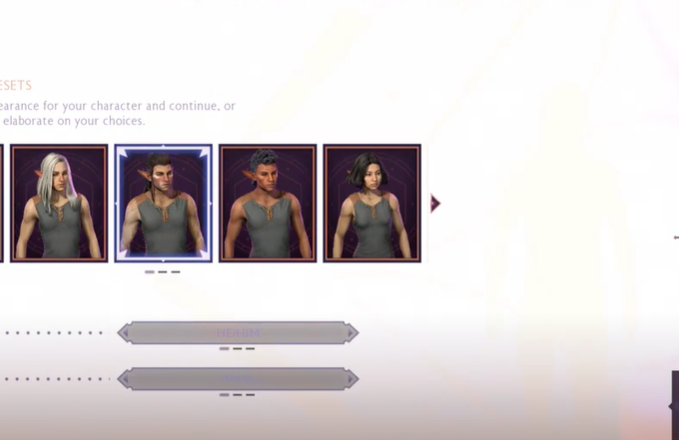
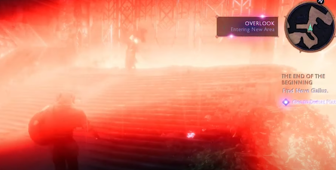
Hello, this is the first time that I ever request or ask for a mod, but I don't know where else to check, I've played every Dragon Age game and I've been waiting for this game for a while, after purchasing the game on Steam I start playing and this blinding light in the character creation is everywhere, at the beginning I thought it would only be during character creation but no, is all over the game. The light spoils the experience a lot. My Laptop is Intel Xe graphics, 16Gb and all that, I know is garbage (Im 19 I can't buy another Pc at the moment, at least for a while XD ) but it runs the game ok in low/medium settings is just the damn light, I've seen other people on reddit, youtube and stuff with the same issue but no solutions right now, and all of them run on Intel Xe, so I guess that's the common link. I was just wondering if there's anyone out there with a hero complex or somthng that knows and maybe wants hahaha to help someone fix this, I honestly have NO IDEA about computers outside of like, installing mods (with Vortex hahah) Im going to attach some images of how the light I talk about so you can see how freaking crazy this light is. I hope someone can help!! And THANKS in advance!! THE CHARACTER SELECTION.....