Search the Community
Showing results for tags 'missing'.
-
I'm at a point in my modding journey where I'm trying to eliminate errors, create patches, and find missing files. After recently running a NIF/DDS tool, I'm astounded by the number of missing files!! (I'm very diligent when it comes to reviewing and getting a mods 'Requirements') It would be great if we can search for file names. It's easy enough to track down what mod made the change but the mod author dosn't include the _P.DDS file, nor do they refrence any requirement(s) for me to look into. An example is I have modded a food item: MammothCheeseBowl.nif But I can not find the missing: textures\plants\mammothcheese01_p.dds I think this would be very helpful. -- DSBash

-
I don't know what's causing it, but I have a number of various quest items missing from various places, Black book: waking dreams wont show up in my inventory to finish the miraak quest, other quest items won't show up in containers, on dead bodies, etc. even as the quest marker points to that spot If you know how I can get a text list of my mods, id be happy to include it, im fairly new at this, thank you for any help or advice. I have GOG skyrim AE 1.6.1179.0, and i use vortex as a mod manager
-
I don't know what's causing it, but I have a various number of quest items missing from various places, Black book: waking dreams wont show up in my inventory to finish the miraak quest, other quest items won't show up in containers, on dead bodies, etc. even as the quest marker points to that spot If you know how I can get a text list of my mods, id be happy to include it, im fairly new at this, thank you for any help or advice
-
My door teleport marker is missing in the creation kit for skyrim se please help, i need this marker otherwise you can't control where you appear after opening a door.
-
I've been modding Fallout 4 for years and have never once encountered this issue. As per the title, all my rugs - both in the workshop and in the world - are black. No other textures/models are effected. I don't have any mods that explicitly change rugs. Has anyone here encountered such a thing and what was the cause? Spanx R x
-
In LOOT For example for Dead Money it says "FNVEdit found 403 ITM records and 51 deleted references. A guide to cleaning plugins using xEdit can be found here." I went through MO2 and unchecked every single mod and then opened LOOT again and it still says the same thing. I do still have NVSE installed though. This is my first NV playthrough and I'm pretty new to modding. Is this somtehing I can ignore or do I need to fix this? And if I need to fix it would do I need to do? Thanks
-
So, I recently got a new computer, so when I transferred my second drive to the new computer, my installation of FO4 and my nexus mods are on here. I've done this before; and all I had to do was reinstall FO4 and redeploy the mods, and everything worked. This time, however, nothing works. - Some mod weapons are completely invisible and the sounds are missing. - Some mod several of the mod apparel are in visible - Almost all of the player settlement mods (walls, etc) are invisible - My character is bald, because the hair was a mod. Fallout would also crash upon startup, at the main menu when you'd 'Press Enter Key' any time I would deploy mods. To get the game to load at all, I'd have to delete the configuration INIs in the Documents\my games\fallout 4 directory. Anyway, on to troubleshooting. I completely deleted everything, F04, the mods, everything, and redownloaded the game. Runs fine vanilla. Started downloading my mods fresh from Vortex. Same problem as above; first FO4 crashing at the menu, requiring me to delete all of the INIs from the Documents\my games\fallout 4 directory. Then, after the game loads launches, it's the same as before; lots of invisible things. This last time, I even repeated the process, but this time only installing one mod. A single weapon, and it still doesn't work. I just don't know what the issue could be at this point any more. Any thoughts?
-
So I've been ripping my hair out recently trying to figure out what could possibly be causing my errors but things simply don't make sense for me when it comes to using grass cache for using extended grass. I have watched video after video, looked at forum post after forum post with similar issues, and I have yet to find anything that works for me to clear up the two main issues I have. I can fix one or the other individually, but I can not find a setting that will allow me to fix both. The issues are as follows Issue 1: When using DynDOLODGrassMode = 2 My grass looks great at distance and close up with good transitions from LOD to full rendered... until I go to certain cells notably in the falkreath area and around Helgen areas where the grass simply does not render in any way shape or form. Bushes and such which aren't considered grass obviously show up, but no grass objects Issue 2: When using DynDOLODGrassMode = 1 My grass looks amazing close up no matter where I go it seems. Absolutely beautiful! But then when I look off to the distance, I see a ring of cells with no LOD or rendered grass in them, but with LOD grass off further than that ring showing up just fine Things to note: - Yes, I precached the grass under each of these modes and didn't accidentally swap numbers between the config file and the mode selected in DynDOLOD for corresponding grass caches rendered under each mode - I have actually done this more than once for each mode once using Step Project recommendations and once using references from this video which really the only difference is the distance and fade ranges - Am currently using the newest NGIO, precachy, and DynDOLOD files
-
Hi, I don't know if somebody has the same problem as me, but after installing a few mods some quest indicators are missing. For example, in the neuro dance where you see Evelyn talking with Brigitte the flyers on the ground doesn't show when you look with the scanner. I also experience the same issue in some side quests as I can't interact nor I can't see the yellow magnifying glass or the yellow exclamation icons. If someone has experienced the same problems would be nice to know if it's related to any particular mod. I've installed the next mods: Input LoaderMod SettingsNative SettingsRed4ExtRedScriptTweakXLAppearance Change UnlockerBaby DriverBetter Vehicle First PersonCar Modification ShopCrouch vignette effect removerCustom QuickslotsDamage ScalingImmersive First PersonJB Third Person ModReal Vendor NamesVehicle CombatAccurate SpeedometerAlternative Midair MovementCyber Vehicle Overhaul - Gear RatioCyber Vehicle OverhaulHotscenes Next GenLewder Nudes from PanamNight City InteractionsNow PlayingPanam Romanced EnhancedUse Your Cybernetic Eyes to AimWeapons of Night CityBreast Jiggle Physics ModerateBreast Jiggle Physics for TPPCyberarms Collection MaleCyberarms Collection Head Slot MaleHide Your GearJudy Alternate ClothesNo Special Outfit LockPanam Enhanced BodyRealistic Skin (for Panam)Set 02 Panam ClothesSpawn0 Male Body ModSpawn0 Female BodyCreatorUnique V FrameworkUnique Panam FrameworkUV Framework for non-Redmod usersVirtual Atelier
-
I'm trying to track down a mod that replaces the female raider texture with, what I think is, a very well done tattoo'd texture. I fat-fingered in MO2 recently, no idea what exactly I managed to do but the texture has gone missing. It's not in my mod folder, recycling bin or anywhere else I can think to look for it. I can't find it here on the Nexus. Its not under my DL history. If it wasn't in my save game thumbnails I'd think it never existed to begin with. The tattoo's are what I believe to be tribal influenced with bold linework. kinda feathery looking on the abdomen, wings on the back, mirrored designs I couldn't describe on the breasts. And some work on the arms and legs I don't recall the look of. I figure this is a long-shot, but if anyone has any information I'd appreciate it.
-
Can someone help? I had to reinstall Elden Ring, and I use mods for the game to spice it up, but I am missing many of the files in the root directory, i.e. steamapps/common/EldenRing the main folders I am missing are the parts, msg, chr and many others. Not the saved games, all of my progress is there. If someone has any advice, that would be much appreciated. The game runs fine, with no errors or problems, it just seems to be missing files in the root directory, and I don't know why. Here is an attached screenshot of my root directory if someone could help that would be great, Thanks!
-
Hi guys, my game displayed water fine until i installed ORC, while i love the mod all the water in the game is invisible. Is there any fix for this besides disabling water reflections? Thanks. System specs and mods below. Device name DESKTOP-BO4GQSG Processor Intel® Core™ i7-6700K CPU @ 4.00GHz 4.00 GHz Installed RAM 16.0 GB Device ID DF96EFEE-F3F9-444E-A8EF-5DA3D309D864 Product ID 00325-96005-01990-AAOEM System type 64-bit operating system, x64-based processor Pen and touch Pen support
-
Hi guys, my game displayed water fine until i installed ORC, while i love the mod all the water in the game is invisible. Is there any fix for this besides disabling water reflections? Thanks. System specs and mods below. Device name DESKTOP-BO4GQSG Processor Intel® Core™ i7-6700K CPU @ 4.00GHz 4.00 GHz Installed RAM 16.0 GB Device ID DF96EFEE-F3F9-444E-A8EF-5DA3D309D864 Product ID 00325-96005-01990-AAOEM System type 64-bit operating system, x64-based processor Pen and touch Pen support
-
if anyone can help it'll mean the world as I'm quite new to fallout 4 mods so in anyone could help that would be nice
-
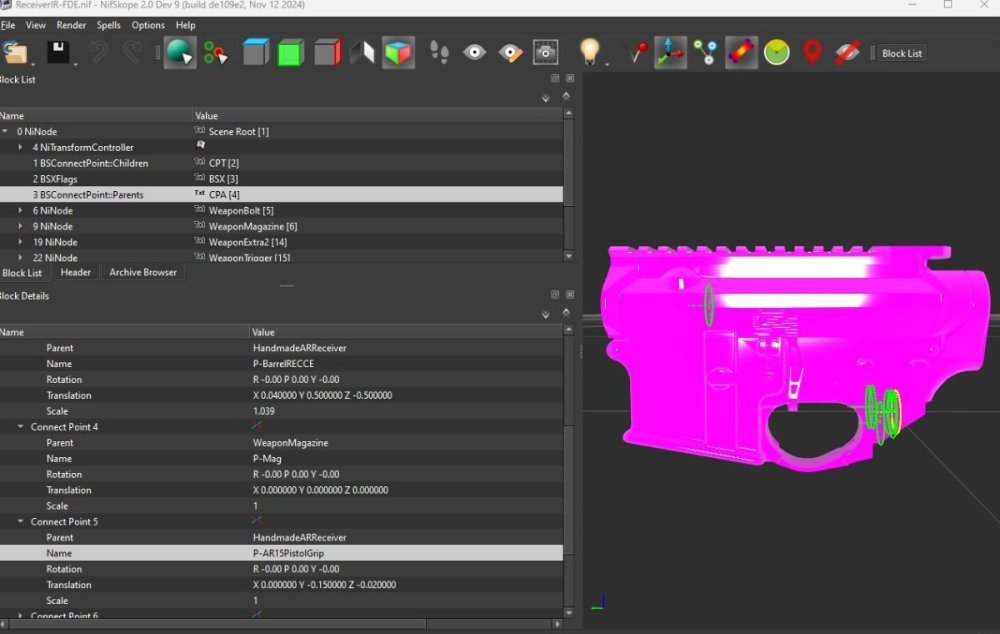
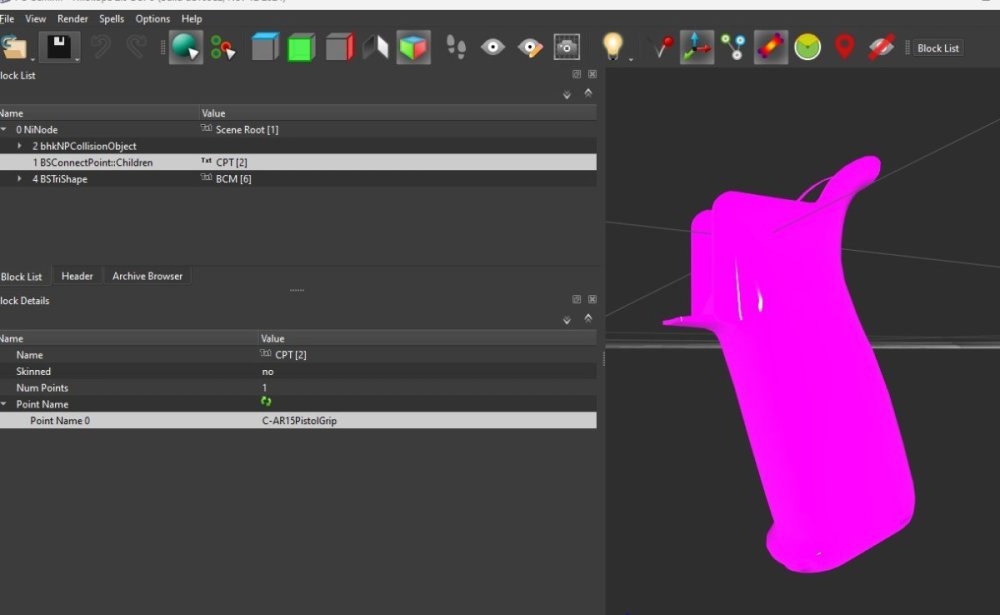
Some of you may have encountered a problem where a certain weapon mod will have invisible weapon attachments. Usually its the pistol grip, as is the case with the Noveske REECE mod, and the Zenit AK mod. I have heard others having the same issue but for scopes on some other. Until now there has never been a fix other than acknowledging that this is a game engine problem and that it is unfixable. Can't really blame mod authors because they usually never encounter this problem, because of course they wouldn't publish a mod with invisible meshes. But since I had this bug keep showing up for me across different mods, I finally managed to fix it. The root of the problem has to do with weapon attachment naming in the NIF file. I don't know why the game engine will have some attachments attached to a certain named attachpoint show up as invisible, but that's just how it works. Sovereign, the wonderful mod author of the EFT weapons pack, told me it had something to do with if you have a lot of mods using the same attachpoint name, the game engine will get confused and that particular attachpoint won't work for that weapon. The weirdest thing is that this only happens to a minority of us, so thats why mod authors have never been able to fix it. From a modding perspective, its hard to fix something when you don't even know what's wrong since you can't replicate the issue. Again, why this happens to some of us, and whether or not the game engine gets confused with attachpoint names I can't say for certain. I only know that I used this premise to troubleshoot and figure out the solution. The easy fix is to simply rename the the attach-point on both the parent and the child mesh. For example, in the case of a missing pistol grip attachment, you need to open the mesh .nif file in nifskope for both the Recievers and the Pistol Grips and rename the the Parent attachment (usually its something like P-PistolGrip) for the receiver, and the children attachment on the grip (usually C-PistolGrip). It can be renamed to anything but for my fixes I chose AR15PistolGrip, so for the example of P-PistolGrip and C-PistolGrip, I changed it to P-AR15PistolGrip and C-AR15PistolGrip. Those are the only two changes that need to be made. Nothing else in FO4edit needs to be changed. I don't know if this is the case for other attachments like a vertical grip or lens, where animations are rigged to that attachment. That could be more complicated maybe someone else can shed some light on that, but my recommendation for best practice for all weapon mod authors is to come up with unique attachpoint names for their particular mod so this bug doesn't happen. So for the ZenitAK, instead of adding the "AR15" part, I made it "AK" so it looked something like P-AKPistolGrip and C-AKPistolGrip. This fix 100% works because I only changed 1 reciever and a few pistol grips for the noveske REECE mod and after I made the fixes, when I went in game, only that particular receiver and those grips I changed were fixed. The remaining pistol grips that I didn't change still showed up as invisible. I've tried this for the EFT pack and the Zenit pack and the fix has worked for all of them. Check the screenshot to see what exactly needs to be fixed. Hope this helps you guys. I've seen this issue be unresolved for a few years, so just glad its finally fixed for us.
-
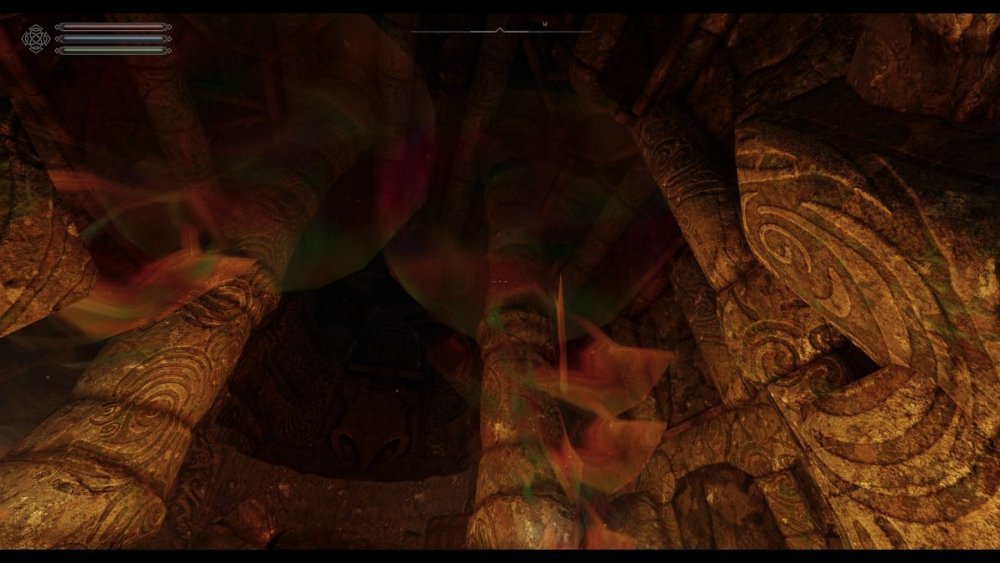
I played this afternoon and did not install any new mods. After I exited the game using the console command qqq and entered the game in the evening, this problem appeared. I am not strong in SSEdit and use such mods as Embers HD, ELFX with patches. In the order of mod list, they are above everything else and in priority
-
There is a mod that changes how base game legendaries work, and it's not (to my knowledge, based on the website) DSM. The one I'm referring to changes "disassembler" to electrify the targets, as well as doing more damage to robots. I think it also changed "med theft", "chilled" (to "frenzied" or made your weapon fire slower while increasing the cold damage), and a few others. I just noticed it's not working right anymore, so I might need to place it lower in the LO, but I don't know which mod it is. I think the mod might also overhaul perks? My carry weight perks aren't as strong as they were; the first was was 25 or maybe 75kg improvement, and the second was up to ~100kg extra, and now it's starting with 10kg followed by 25kg. Does anyone know the name?
-
I have Morrowind GOTY plus Morrowing Rebirth. I have noticed that a texture is missing in Balmora. Its on the riverside footpath at the South of the town not far from the South Wall building. Is there any way to fix this please?
-
So I recently returned to Sanctuary after a long-ish period around Diamond city, and I noticed a pretty annoying visual bug that starts at Red Rocket and continues until about the protagonist's old house in Sanctuary. Basically the roof of the station is missing huge chunks of it's textures, there is missing terrain next to the road, and once you get into Sanctuary itself, the road just disappears until the protagonist's house (though it must physically still be there because my character just floats above the dirt). Not only that but the walls of some of the houses have disappeared (completely in this case. I can walk through where they should be) and when I stand inside what should be the house, a whole lot more disappears from my screen, including all of the nearby terrain and buildings. The only mods I can think of being the cause of this are ones that affect Sanctuary and settlements more generally. Those being in my case Sim Settlements 2 and it's addons, repairable sanctuary, and higher settlement budget. I have tried disabling each of these and starting a new game, and each time the problem is still there. The only notable change that occurred was when I disabled Repairable Sanctuary and loaded my main save and the bridge was gone, but I expected that. I've reinstalled the game and validated my files and none of it is making any difference. Any suggestions would be welcome. I did take screenshots but apparently they're too big to upload. 250kb is a ridiculous size limit.
-
So I've been playing as a raider who set up in the Red Rocket near sanctuary. At level 16, went out to hunt for resources. Upon returning I found there was no power. It wasn't just one generator that was down... it was both. Went to repair them and found I was suddenly missing hundreds of steel, copper, ceramic, no telling what else. I loaded a save game just before I left to go hunting, and all those resources were there. Settlement bug, or did my raider get raided? O.o
-
I'm running my build with: Unofficial Skyrim Special Edition Patch - 4.2.5b Unofficial Skyrim Creation Club Content Patches - 7.2 After patching it with the: Unofficial Skyrim Special Edition Downgrade Patcher - Best of Both Worlds - 1.6.640.0 to 1.5.97.0 ----- I can't seem to find a fix for this missing file in my Papyurs logs anywhere online. - Cannot open store for class "DefaultDebugMagicEffect", missing file? Q:Does anyone have this line within their Papyrus logs as well? Q:If no would you have an idea on how to fix this problem? (if so can you describe it to me) Running the game bear without any of those two unofficial patches doesn't fix the problem either, but generates all the unpatched bugs those had fixed. Reinstalling doesn't fix it either.
-
I at one time downloaded a mod titled simply Hearthfire patch. It stopped the cells of your houses from resetting. Now I can no longer find it. I checked my mod download history and it’s not in there either.
-
Copy and pasted from Reddit as I'm looking to expand my search for this issue. I'm having this issue in the game that's causing the vanilla headwear to either cause me or NPCs to go bald, be invisible, or be bugged in my chest (at least from what I've seen with the bowler hat). Very few have hair clipping, but that's mainly with the modded headwear which seems unaffected. I've tried disabling and re-enabling mods on my list with little to no effect. Yes, I did configure the ini's as the mods have instructed me to, and yes, I did try to set them to "just read", didn't work. I'm honestly not too sure what could be causing this as I've never had this kind of bug before other than in Skyrim (I remember it when I've modded Skyrim before but don't really remember the cause). If anyone could possibly help me or knows what the cause of it might be, please let me know. Any help is appreciated. A heads up; this is a long mod list as this was something I was building in my own spare time, so I will understand if there are those of you that may be a bit resentful to that fact. I'm a bit of a mod fanatic, and I do apologize for that unfortunate trait of mine. I am done modding the game though, just trying to clean up anything that's not working for me (like the issue here). I'll provide a Google Doc link for the list and images (bottom of doc) to get a better idea of what I'm dealing with here. Commenting is enabled in the doc if anyone wants to highlight a certain part of it.
-
Vehicle Headlights after the 1.5 update no longer have the option to be switched between Normal, High-Beam(or Auxilliary) or OFF. Now it's just ON/OFF. It would be so cool if there's a way to retun that removed functionality, as I've seen quite a bit of posts both on Nexus and Reddit addressing that issue, breaking immersion for some, me included. Thank you in advance if someone is willing to do it!
-
Hello! Recently I've begun updating all of my mods for Patch 3 (Er, the mods I'm playing) and it seems "The Art of Imbuing" has vanished, and there doesn't appear to be any explanation or replacement. Does anyone know what happened to it? I'm pretty out of the loop on a lot of things.