Search the Community
Showing results for tags 'mouse'.
-
After installing FWE Part 1, 2, and the Hotfix my game stopped working properly. When the initial loading screen starts my mouse cursor doesn't appear and I'm unable to skip to the main menu, even with the keyboard. It goes through each screen until it gets to the main menu, but I still have no mouse cursor and none of the options appear on the right side of the screen. 00 Fallout3.esm 01 Anchorage.esm 02 ThePitt.esm 03 BrokenSteel.esm 04 PointLookout.esm 05 Zeta.esm 06 CRAFT.esm 07 CALIBR.esm [Version 1.4] 08 StreetLights.esm 09 FO3 Wanderers Edition - Main File.esm 0A FO3 Wanderers Edition - Alternate Travel.esp 0B AlternateStart.esp 0C GNR Enhanced.esp 0D Flora Overhaul.esp 0E Fellout-Full.esp 0F Fellout-PointLookout.esp 10 Fellout-Zeta.esp 11 FO3 Wanderers Edition - Main File.esp 12 FO3 Wanderers Edition - DLC Anchorage.esp 13 FO3 Wanderers Edition - DLC The Pitt.esp 14 FO3 Wanderers Edition - DLC Broken Steel.esp 15 FO3 Wanderers Edition - DLC Point Lookout.esp 16 FO3 Wanderers Edition - DLC Mothership Zeta.esp 17 FO3 Wanderers Edition - Followers Enhanced.esp ++ Fellout-Anchorage.esp [Version 1.0] ++ Fellout-BrokenSteel.esp [Version 1.1] ++ Fellout-pipboylight.esp 18 Bashed Patch, 0.esp I've been installing these mods one at a time using FOMM and rebuilding my patch one at a time using Wrye Bash. I've been loading the game one at a time using FOSE. I'm pretty sure I'm using the latest version of FOSE. I'm using the one from Nexus: https://www.nexusmods.com/fallout3/mods/8606?tab=files I've had no problems until installing FWE. I uninstalled FWE and the game works fine again. I reinstalled FWE and I still have the same problem. I don't understand what I'm doing wrong. Will someone please help me?
-
The only mod i would want for this game so i can start play it, is aiming with ur mouse, i cant play the game without having this and im also confused af why a game on 2022 that will prob win game of the year title dont let you aim with ur mouse and make the game experince for PC so much worse and im not even talking bout the imput delay on dodge... This mod will help alot people like me that wanna play the game with basic mouse controls that literally every indie PC game has
-
I have recently started trying to play Skyrim SE (not AE), and I am having an issue I can't find any info on anywhere. Whenever I talk to an NPC, the mouse pointer not only vanishes, it *stays* vanished after I exit the dialogue. The only way I can get it back is to exit and return, but that is a damned inconvenient "fix", and it does nothing to bring the pointer back while I am in the dialogue. This is especially cumbersome when trying to interact with a merchant. Yes, I do have mods... but I've *always* had a lot of mods when I've played... and I did update them before I tried to play again. I did try to get AE to work, but when it didn't, I ran the 1.5.97 rollback "patch", and I updated the mods to the most current non-AE versions available. Any ideas?
-
This was propably asked a hundred times before, but this bug is really a game breaking for a mage-oriented characters. When casting something on a spell with a left mouse button it seems to stuck and never release it at all! The spell is stuck in non-released state and is basically useless. The bug has happened after i have equipped a staff that had a fire buff, but it didn't shot a single fireball, just a simple "magic" sphere. Now the similar buff effect happens even on a non-buffed staffs too! This game has just several buttons for skills to please the console crowds, but getting that number dropped by a third? That's a game breaking bug for sure. What have i tried before: searching the net ( steamcommunity.com/app/367500/discussions/6/451851477882517413 comes first), reloading from a checkpoint, killing yourself, resurrecting yourself, giving the staff away. Didn't try to load from the backup, because it took me too much time to notice the bug.
-
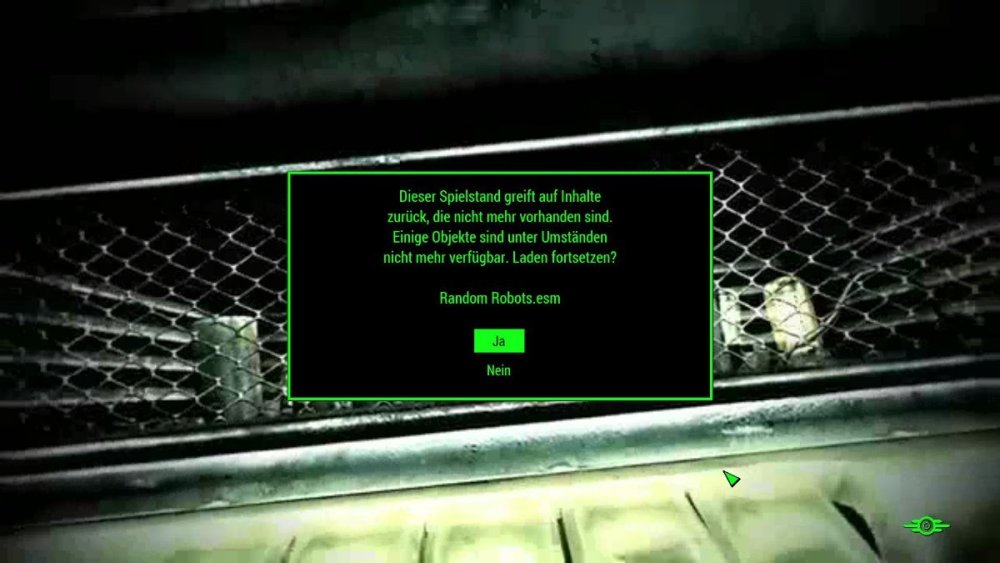
Summary in bullet points: F4 update Steam,| Mods updated, | Controls in the main menu lost - Controls as far as available, up to the pop-up window with the question: Continue starting? (Due to changed mods) Hello dear community. I have been using Nexusmods for years and have always been able to cope with any mod installation, strange instructions and have also been able to correct minor and major errors. Now I have actually reached my limits and my patience has run out. (And this is my first time, I ask you for help) Every now and then I start F4, ES5 or other games. Today was a mammoth task to complete. F4 latest patch. Before the F4 update I was able to successfully start and play F4 in offline mode. Then I started the Steam update, which involved countless updates to my mods. Mods and game are now fine, BUT... A new game can be successfully made to run. An old save game needs my confirmation (an ESP file was replaced with an ESM, so the old file is of course no longer there.) SKSE, user interface and other mods are up to date. Vanilla F4 - New Game - works perfectly Modded F4 - New Game - works perfectly Vanilla F4 - started old save - problem Modded F4 - started old save - same problem. Modded F4 - New Game - Save / load - works fine Modded F4 - New Game - Save - Change any Mod - my problem has arisen As I have read in other forums, there seems to be a script with a message in the background that prevents me from confirming this "YES" or "OK" button with the mouse / keyboard. The author's suggestion was: Let the game run for 1-2 minutes, at some point you will have control. (I made 2 rolls in the oven and ate them afterwards, ... gave it 10-20 minutes) I also connected a controller as a test and changed the INI accordingly. Fallout4Prefs.ini (bGamepadEnable=0 ;pad off | bGamepadEnable=1 ;pad on) In summary. I can't press YES or NO on the message that appears via mouse or keyboard or gamepad. The mouse can be moved freely. With the keyboard I can take screenshots and open the debug console and also enter data. Do you have any suggestions for me that I can try? Praise the nuke.
-
I'm sure some of you hyper- / competitive gammers have already developed a muti-button mouse mapping optimized for Starfield. If you have, could you please consider posting that in a text file mod? I'm going to be using a Logitech G502 even though I'm left-handed and don't/can't really use my right hand for fine control motion activities like gamming.
-
Hello everyone! I wish navigate back/exit in the menus (inventory, settins, etc.) with right Mouse Button. I really want RMB to get the same result as pressing ESC key. Just imagine all the time humanity would save with this :c
-
Hello everyone. I work in a company which has created a 3D mouse designed for graphic designers and 3D designers. I find the format suitable for video games and I would like to know your opinion on the subject. Our mouse is called "Lexip 3D", it has a joystick and a tilt allowing movements in 3 dimensions on 6 axes. Companies like Dassault Systems have had the opportunity to work with. The mouse always targets professionals these days but I would like to present some mouse’s configurations on video games to my superiors to propose the development of a Lexip gaming mouse. I had the opportunity to do some tests on your game: http://www.ark-innovation.com/img/gifs/Fallout4.gif You can set the tilt, the joystick, the buttons as well as the classic keys of the mouse. As regular players, what do you think of our mouse? Would it be interesting for Fallout 4 or another Bethesda game ? Do you have any configuration ideas? Thank you for reading :laugh:
-
Playing at 4K resolution, and the mouse icon is much too small (arrow head is 3/8" long on a 65" screen!!!!) Is it possible to enlarge the mouse icon?? Like 10x would be good
-
I recently switch from using keyboard &mouse to controller. Since then i cant assign magic to right hand. That or theres a new mod i recently install that make that. Its not the problem with controller because it happens only partially. ie i can equip conjuration to both hands left and right but for others like fast healing, alteration, lightning bolt i cant equip it with right hand I tried custom controller mod, some bug fix mod and updating FNIS with no avail Anyone can help me?
-
Hi! I'm making another mouse cursor based on Ghost in the Shell. I need your ideas to design it. i can easily do everything with the mouse, such as the click effect,trails,animations,etc. also keep in mind; theme: cyberpunk style
-
Hello Nexus community, I guarentee I am not the first to notice this issue, but Skyrim disables use of both mouse and keyboard when a controller is plugged in, assuming we all use the xbox controller. The steam controller is not an Xbox controller, and the mouse joypad settings, and the joypad settings for the right track pad are a bit blocky in movement. However, like in multiple games I have now played with the steam controller, the mouse setting is marvelous for the right pad but does not work in skyrim due to teh previously mentioned disable. I am requesting a mod that will enable or fix this by allowing both controller and keyboard/mouse use at the same time. this would allow full use of the steam controller in skyrim for everyone.
-
I can find hundreds of complaints about this but not a fix. I hope I'm just missing it somehow. I want my L Hand bound to my L Mouse Button and my R Hand my R Mouse Button. Easy enough but .... I still want to Fire with the LMB and block/zoom with the RMB FFS! OMG! Rant! Rave! How F'Kn stupid are the people at Bethesda?
-
When I let go of the button in the direction I'm heading while moving the mouse, for some reason the character continues to move a bit like if suddenly it wanted to add a "deceleration"-phase to the whole movement or that it has an animation loop that needs to be finished before stopping the player's movement. This is very noticeable while in crouch (stealth). This issue doesn't occur if I'm not moving the mouse at all. I'm playing the game on ultra high with no FPS issues. I've tried both with and without V-sync enabled (set in the .ini file). Here is a list of my currently installed mods: http://i.imgur.com/ko2oMlv.png In the comment section of this YouTube video an user suggested using a nexus mod which sadly in its current state is set as "hidden". The user described it as an 'animation-fix', but yeah, as it currently stands I've not been able to get my hands on it to try it out. I did however try this nexus mod which alters the animations but it sadly did not fix the issue :sad: If you have any suggestions they would be extremely appreciated! This issue really screws up the precise movement. Thanks!
-
I got a new mouse recently and I've had zero problems with it except in Skyrim: Special Edition. When I look around the mouse "jumps" skipping about a half centimeter of space almost to illustrate it would look like this - - - - - - - as oppose to ----------. I haven't noticed this problem in any other games, Titan Fall 2, Mass Effect 3, Fallout 4, Borderlands, and Warframe all work fine. I've used Skyrim: SE in the past without this issue. My mouse is a zealotes T-80 BigMac gaming mouse. My Skyrim is up to date, unmodded barring some ini changes to disable vsync, and running ENBoost to enable vsync/ a 50 fps frame limit. I enabled those settings to try to fix the problem but I noticed no change and running the game as 60 makes no difference. *Solutions I've already tried* .I've tried to disable "enhance pointer precision" .Adjusting DPI settings with my mouse and windows settings, as well as adjusting in game mouse sensitivity .Switching from my mouse pad to the table, and then a piece of paper *no difference* If anyone can think of something I haven't already listed I'd really appreciate it, if you need any more information just let me know.
-
Hello Folks! After searching through the whole net several times, i still couldn't solve this problem. When performing attacks in combat, the mouse sensity always drops down really low, so it's really hard to move (idk if this is supposed to be) and it's really annoying, since after the animation is done, there's still a time like a second, for the attack to end. If you guys have any ideas or mods, that could help me to solve this, i'd really appreciate.
-
Hello, sorry but I'm quite new to modding and have been trying to work around the clock to fix one small issue with this mod. Basically, everytime I duck, (which is one of the combat moves), my mouse sensitivity is set to 0 and does not revert. (I think it's supposed to change back after.) I was wondering if I could just edit the script themselves to either always make sure it sets mouse sensitivity to e.g. 30 instead of 0 or just remove that it changes it in the first place. (Preferably the change to 30 as this could have less problems.) Is there any way I could locate the specific lines of code and make a small edit? (Not sure what program to use for this either.) P.S. I don't want to reinstall as I've installed somebody else's edit of the mod to fix a few small things. Reinstalling with the same edit to the mod might just end up with the same issues. :/ Thanks in advance.
-
Hey folks, I updated a bunch of mods via Nexus mods manager and now my first person views gone all haywire. It looks "zoomed out", half th bodys missing, and when i mive and stop, the screen carries on moving vertically, up or down. I've disabled various mods but to no avail. I've attached a screenshot - any help or pointers will be greatly appreciated. let me know if you need more info. Thanks Evren
-
This is a problem that for some reason appeared out of nowhere... but every once in a while, my mouse button stops working in menus and my pipboy. The weird thing is that's ONLY where it stops working. I can use my mouse buttons when in combat/moving around etc.. To describe what is happening: I would open my pipboy or pause menu, and I cannot select anything. I would click on an item or an option and nothing would happen. A box doesn't even highlight what my mouse is hovering over. I've tried verifying my game, and disableplayercontrols and re-enabling them in console, nothing is working. The only way I can get it to work again is keep restarting my game until it decides it's time to allow me to click things, only to stop working again when I enter some place at a random time. It's frequent though. I only have a few mods installed: Tale of Two Wastelands, CASM (Autosaver), and 4GB New Vegas (I just recently got 4GB, I had this problem before I got it). I use FOMM (Fork version) so it came with NVSE, I didn't manually install NVSE. Please if anybody has a solution, let me know, thanks. EDIT: When playing around, I noticed if I Alt-Tab, I can regain control of the pause menu, but I still don't have control of the item section of the pipboy, I can use the Data section though for some reason.
-
I'm having a strange issue where when I play Skyrim my mouse wheel does not work in-game unless I alt-tab out of the game and then back in. This is a new issue. I have made no changes to my mouse or drivers. This started happening after I did a clean reinstall(uninstall then install) of the game through steam due to issues with NMM. After the reinstall I started using Mod Organizer and installed all of the mods that I was using before the reinstall. But the issue is still present even when I have all mods turned off. It also doesn't make a difference whether I run skyrim through SKSE or the skyrim launcher. Any idea what I can do about this? Edit: I verified the game cache in steam but this didn't resolve the issue.
-
Hi everyone, So basically i'm having an issue with mouse clicks sometimes not registering with certain weapons. If I have either 1. Only a one handed weapon equipped 2. A two hand weapon equipped 3. Two weapons equipped (i.e. duel wielding) then the game doesn't register my mouse clicks if they are too fast. We aren't talking about absurdly fast clicks either. Basically a normal mouse click won't register, but if you hold down the mouse button for even 0.2 seconds then it registers. In menus, the game always registers my mouse clicks no matter how fast. The weirdest part, is that if equip a sword in my main hand, and a spell in my off hand, then it will always register mouse clicks and the issue is gone. Same goes for a sword and shield. It is only the 3 weapon combinations listed above that cause issues. I have tried using other mice, all of them end up with the same issue. All of my drivers are up to date. My computer is the ASUS ROG G750JX intel core i7 4700HQ 2.4 GHz 16GB DDR3 memory nvidia geforce gtx 770m 3GB GDDR5 SDRAM I don't think it could be any issue with my computer lacking the power to run the game, as It runs at 60+ fps with maxed settings. I do not have any mods installed (not even skse or skyui), and even on a completely fresh install of skyrim I am getting this issue. I DO have all of the DLCs installed including the high resolution texture pack(not a mod, the one that is installed along with skyrim as DLC) I get this issue with or without v-sync enabled, on any resolution, and with my fps limited to a plethora of values (everything from about 10-85 fps) so i'm fairly sure it isn't related to any of those things. If i rebind the attack button to a button on my keyboard then it also has the same issue. Playing with a controller doesn't seem to have any issues, however I strongly prefer keyboard and mouse. I know it might be a little bit too late to get help with something like this, but I'm getting desperate so any help would be greatly appreciated!
-
So new vegas used to work for me just fine, but one time after i booted up my computer and started playing the menu sensitivity was all kinds of f***ed up. I've tried putting the lines in fallout_default.ini, but it doesn't work and i just can't find a solution.
-
So, one of my favorite types of 3rd person movement systems are the one that is being used by games like Smite. Basically, the camera is stuck on your back, so when you move your mouse, both your character camera turns. It feels way more intuitive to me, and i'm sure many others. What are your guys thoughts on this? Yay, nay, hell nay?
-
I would like to know, if there is a way, how to replace or configure Morrowind's software mouse cursor. Any setting of mouse in windows (speed, smoothing) is overwritten in game. I just want to record smooth camera movement and don't know, how to do it=(
-
Hi guys! I have installed some mods on fallout 3 (Cinematech, Dynavision, Imaginator, Street Lights, Street Lights Wasteland, Project Reality, Fellout, Flora Overhaul, Directors Chair). It looks really good, but after a few minutes of play mouse and keyboard is not responding (only the gane, if i press CTRL+ALT+SPR launch to task mánager). It's possible that mods are responsable of this? What can i do? Sorry my bad english Thanks in advance