
Search the Community
Showing results for tags 'pc'.
-
To start it off, i walked to camp searchlight, and sergeant astor ran up to me and instead of telling me about the rads and opening a dialogue tree, he said a basic ncr soldier line and the dialogue ended, and whenever i try to talk to him he spews the basic ncr soldier lines. i tried to use commands to start the quest to no avail, and tried using console commands on sergeant astor, the quests will not work. if it helps, when i click on sergeant astor with the console opened, it says "Functional post game ending" at the too, and astor death script at the top. does anyone know of anything that could be causing this? its making a lot of side quests involving camp searchlight unplayable. also, the quest with jerry the punk ended after i gave him medx, instead of allowing me to continue the line and send him to the followers, console commands also did not work on this quest. I do not know why many quests are not working, and there might be more not working that i havent discovered/tried to go for yet. i used viva new vegas guide, and i will attach my load order below. loadorder.txt
-
Complete newbie with mesh editing so i've most likely done something incorrect. I've done a simple edit of a beard mesh to remove the moustache, but in-game it doesn't appear correct and i have zero clue of what to do. I've edited the mesh files for the beard in nifskope (this is as far as I can go with editing things lol) - but when i put the mesh into the meshes folder as an overwrite, it doesn't appear correctly in-game. The texture is (half)there, but not the mesh. Is there anyone out there that could get this fixed/working? Does it need to have it's own eps/mod file in order to actually work in-game? Here's the files if anyone can help me out! I'd be eternally grateful! I'm willing to send over some $ for the hassle to someone who'd like to take this on https://drive.google.com/file/d/15ZTAOrLo2fU1RAnast4sq5mBxXK096dY/view?usp=sharing pic attached, how it appears in nifskope vs how it looks ingame. Not Right.

-

What Happened to the Doom Eternal / Doom Slayer Armor Mod for Fallout 4?
Guest posted a topic in Fallout 4's Mod Ideas
I’m looking for an old Fallout 4 mod that recreated the Doom Slayer / Doom Eternal armor (the Praetor Suit). It was showcased years ago in a YouTube video where the creator also featured the “666 Demon Reaper” mod. The armor was a full Doom Slayer suit — helmet, chest, arms, legs — and it looked very close to the Doom Eternal design. The PC download link mentioned in the video no longer works, and the original hosting site is gone. I’m trying to find out whether anyone still has a copy saved, remembers the author, or knows what happened to it. -
I have a hope for the future of modding — a future where achievements and creativity don’t have to be enemies. Right now, any mod, whether it’s a bug fix, a texture improvement, or a simple QoL tweak, disables achievements. This punishes players for using the same fixes and improvements that Bethesda themselves rely on the modding community to create. My hope is for a more modern, fair system — one that recognizes the difference between enhancing a game and breaking it. A categorized approach could look like this: • Aesthetic mods (textures, models, UI) • Bug‑fix mods • Quality‑of‑life mods • Gameplay mods • Cheat mods Only cheat mods would disable achievements. Everything else would remain achievement‑safe. This would finally bridge the gap between PC and console modding, reduce frustration, and reflect how players actually use mods today. If a mod can run safely on PC, it should be able to run safely on consoles without disabling achievements. This isn’t a complaint — it’s a hope for a healthier, more player‑friendly modding ecosystem. One where creativity, accessibility, and fairness can coexist.
-
My character simply cannot move. WASD, F, Alt, pretty much every standard keybind do not work. I can only work with tilde, alt-tab and escape. Tried but failed: - change the ini-files; - change in-game settings; - start skyrimse.exe (not the skse-loader); - a mod to alter the keybinds; - turned off Steelseries GG (I have a keyboard and a mouse from Steelseries); - re-installing SKSE and SkyUI; - switched from SkyUI to Nordic UI; - removed Vanargand animations: The end result is, so far, always the same: stuck. STUCK! This all started after I updated the Community Shaders. After installing, the loader could not find the official exe. So I downgraded and tried everything desribed above. Could it be updates from either Steelseries GG or Path of Exile 1? Seems farfetched, but who knows. The last thing I could do is to uninstall all the mods, Vortex and then re-install the base AE game, but I'd rather not. I already made a list of all the mods currently running which makes over four pages, with two columns on each. Re-installing everything: no, thank you. What solutions are there that you know of and would probably never occur to me?
-
The spell color is a dark purple with a black outline but I can edit the aura color to match ur character or style and let's make it more fun that's also give this spell to random enemies and every time you start a new game a different enemy will have to spell it won't be the same one a boss could get it and you wouldn't even know Level 1 ## Absorption Hold Mechanics ### Absorption Hold (Human Variant) - *Type*: Control/Absorption - *Target*: Single human target (scales with level) - *Effect*: Holds target(s) in place and absorbs their spell slots. - *Absorption Effect*: Absorbs spell slots, rendering them unusable for the target's duration. *No spell slots or health are restored to the caster.* - *Visual Effects*: Pulsating Aura - *Duration*: Up to 10 turns, contingent on maintaining concentration. - *Scaling*: - Level 1-5: 1 target - Level 6-10: 4 targets - Level 11-12: 8 targets Level 3 ## Absorption Cloak - *Effect*: Temporarily enchants a weapon (yours or a teammate's) to absorb magic from enemies when hit. - *Duration*: Lasts for 3 turns. - *Effect on Enemy*: Absorbs enemy magic when the enchanted weapon hits, randomly taking one of the enemy's spell slots. - *No Benefit to Caster/Allies*: The absorbed magic doesn't replenish or benefit the caster or allies; it simply neutralizes the enemy's spell and costs them a slot. Level 4 ### Absorption Hold: Monster Variant - *Type*: Control/Absorption - *Target*: Single monster target (scales with level) - *Effect*: Holds target(s) in place and absorbs their abilities or vitality. - *Absorption Effect*: - Absorbs special abilities or attacks. - Absorbs health, dealing damage to the monster. - *No health or abilities are gained by the caster.* - *Visual Effects*: Glowing Chains, Pulsating Aura - *Duration*: Up to 10 turns, contingent on maintaining concentration. - *Scaling*: - Level 1-5: 1 target - Level 6-10: 4 targets - Level 11-12: 8 targets *Absorption Bolt* - Fires a bolt of energy that hits a target enemy - On the first turn, the enemy is marked with a small smoke aura - On the second turn, the smoke aura spreads - On the third turn, the enemy's body is enveloped in a dense smoke aura, and tav can activate the Absorption Beam effect # Absorption Bolt - *Effect*: Marks enemies with a dark purple aura (with black outline), gradually spreading over 3 turns. - *Purpose*: Prepares multiple enemies for Absorption Beam. ## Absorption Beam - *Effect*: Drains health and magic from enemies prepared by Absorption Bolt. - *Targeting*: Fires a single beam at one target. But multiple Targets with absorption bolt - *Requirement*: Targets must be in view for Absorption Beam to take effect. Absorption Bolt doesn't work on physical attacks, making enemies that rely on melee attacks more resistant to the spell's effects Level 5 *Absorption Beam* - *Effect:* Drains health and magic from enemies prepared by Absorption Bolt. - *Targeting:* Fires a single beam at one target, but multiple targets can be prepared with Absorption Bolt. - *Requirement:* Targets must be in view and have the Absorption Bolt aura for the Absorption Beam to take effect. ## Visual Effects - *Beam Color:* The Absorption Beam is a light dark purple color with a black outline, giving it a mysterious and ominous appearance. - *Stasis Effect:* As the beam takes hold, dark swirling clouds form around the target and are slowly pulled towards the caster, swirling along the beam's path. - *Target's Pose:* The target's arms are stretched out towards the caster, with their body leaning in as if being drawn towards them. You can see the mana and health being pulled from their arms, visualized as glowing streams of energy that flow through the beam towards the caster. ## Mechanics - *Health Drain:* Absorption Beam deals damage to the target, draining their health. - *Magic Drain:* Absorption Beam also drains the target's magical energy, potentially disrupting their spellcasting abilities. - *Absorption:* The caster absorbs the drained health and magic, allowing them to replenish their own health and magical energy. ## Limitations - *Physical Attacks:* Absorption Bolt and Absorption Beam do not affect physical attacks, making enemies that rely on melee attacks more resistant to the spell's effects. - *Line of Sight:* Targets must be in view for Absorption Beam to take effect, making it vulnerable to enemies with stealth or concealment abilities. ## Tactical Considerations - Absorption Beam can be a powerful tool for draining health and magic from enemies, but it requires careful setup and targeting. - Caster should prioritize targets with strong magical abilities or high health, and ensure they have line of sight to the target. - Enemies with melee attacks may be less affected by Absorption Beam, so the caster should consider alternative strategies for dealing with them. *Limitations* - Absorption Bolt doesn't work on physical attacks, making enemies that rely on melee attacks more resistant to the spell's effects Can be cast at any time - Targets a single enemy - Absorbs enemy's health and magic slots over 10 turns - On the 10th turn, tav declares "I want it all!" or "Give me everything!" followed by a wicked laugh, and then absorbs all remaining health and magic slots, instantly killing the enemy - Leaves behind a Dead ghoul in the enemy's clothes Level 7 *Absorption Wave* - *Type*: Area/Absorption - *Target*: Enemies within large area - *Effect*: Releases a wave of energy that absorbs health and magic from all enemies within the area. A powerful wave that absorbs health and magic from all enemies within its range. Level 8 *Soul Drain* - *Type*: Damage/Absorption - *Target*: Enemy - *Effect*: Drains a target enemy's soul, absorbing their health, magic slots, and potentially other abilities. A spell that drains a target enemy's soul, absorbing their health, magic slots, and potentially other abilities. Level 9 *Vitality Drain* - *Type*: Damage/Absorption - *Target*: Enemy - *Effect*: Drains a target enemy's vitality, slowing them down and absorbing their health over time. A spell that drains the vitality of a target enemy, slowing them down and absorbing their health. Level 10 *Absorption Dome* Absorption Dome Spell Details ### Spell Overview - *Dual Domes*: Creates two Absorption Domes, one for allies and one for enemies. - *Dome Interaction*: Enemies' vitality and magic slots are drained and transferred to the ally dome. ### Effects - *Vitality Restoration*: Allies receive restored vitality from drained enemies. - *Magic Slot Restoration*: Allies have their magic slots restored from absorbed enemy magic slots. ### Absorption - *External Absorption*: Enemy dome absorbs external damage and magical effects. - *Internal Absorption*: Enemy dome absorbs spells and magical effects cast by enemies within. ### Enemy Movement - *Slowed Movement*: Enemies within the dome have their movement speed slowed, making it harder for them to escape. ### Duration - *Concentration-Based*: Lasts as long as the caster maintains concentration. - *Maximum Duration*: Up to 5 turns. ### Visual Effects - *Aura Drain*: Enemies' auras are sucked into the enemy dome and transferred to the ally dome. - *Pulsating Dome*: Ally dome pulsates with absorbed energy. - *Spell Absorption*: Visualize spells being absorbed by the enemy dome. This updated spell description includes the additional effect of slowed enemy movement, making it even more challenging for them to break free from the dome. ## Absorption Dome Spell Details ### Spell Overview - *Dual Domes*: Creates two Absorption Domes, one for allies and one for enemies. - *Dome Interaction*: Enemies' vitality and magic slots are drained and transferred to the ally dome. ### Effects - *Vitality Restoration*: Allies receive restored vitality from drained enemies. - *Magic Slot Restoration*: Allies have their magic slots restored from absorbed enemy magic slots. - *Damage Over Time*: Enemies within the dome take damage over time. ### Absorption - *External Absorption*: Enemy dome absorbs external damage and magical effects. - *Internal Absorption*: Enemy dome absorbs spells and magical effects cast by enemies within. ### Enemy Movement - *Slowed Movement*: Enemies within the dome have their movement speed slowed, making it harder for them to escape. ### Duration - *Concentration-Based*: Lasts as long as the caster maintains concentration. - *Maximum Duration*: Up to 5 turns. ### Visual Effects - *Aura Drain*: Enemies' auras are sucked into the enemy dome and transferred to the ally dome. - *Pulsating Dome*: Ally dome pulsates with absorbed energy. - *Glowing Effect*: The dome itself has a glowing or pulsing effect. ### Mobility - *Caster Mobility*: The caster can move freely while the dome is active. - *Dome Stationary*: The dome remains stationary, anchored to its initial position. ### Dismissal - *Voluntary Dismissal*: The caster can dismiss the dome at will. - *Dispel*: The dome can be dispelled if the caster's concentration is disrupted. This revised version incorporates elements from the provided description, enhancing the Absorption Dome's functionality and visual effects. Level 12 *Absorption* - Casting Time: 1 action - Duration: Until long rest - Effect: Your body emits a purple aura, and your hands are surrounded by purple smoke. You gain the ability to absorb magical spells cast at you. - Absorption Mechanics: - When an enemy casts a spell at you, you can use your reaction to capture the spell with your hand. - The absorbed spell refills one of your spell slots of the same level, if available. If not, it refills a random available spell slot. - The enemy who cast the spell takes damage equal to the original spell's effect (as if it was reflected back at them). - If all your spell slots are full, the absorbed spell instead heals you for an amount based on the spell's level. - Friendly Fire Absorption: - If your teammates cast a spell at you, instead of dealing damage, the spell is absorbed and refills your spell slots or heals you (following the same rules as above). - This allows your teammates to intentionally cast spells at you to refill your magical energy or heal you. - Area Effects: - If a spell with an area effect (like a fireball) hits you, you absorb the spell's magical energy, but you still take damage from the spell's effects (e.g., burn damage from the fireball). - You absorb the spell's energy, but not the physical consequences of the spell (e.g., flames, debris, etc.). - Beam Attack Counter: - If you're targeted by a beam attack, the beam becomes stuck to your body, locking the attacker in place. - For 3 turns, your purple aura begins to flow through the beam, building up energy and connecting to the enemy's hands. - After the 3 turns, the aura connects to the enemy's hands, initiating a secondary absorption process. - For another 3 turns, the absorption process drains the enemy's magical energy, refilling your spell slots (following the same rules as above). - Total duration: 6 turns (3 turns for aura connection + 3 turns for absorption). - The enemy can attempt a Concentration save to break free from the beam at any point during the 6 turns. If they succeed, the absorption process is interrupted. - Your concentration can also be broken, freeing the enemy from the beam and interrupting the absorption process. - Immunity: While Absorption is active, you are immune to magical damage that can be absorbed. However, you may still take damage from area effects or physical consequences of spells. Only physical attacks can affect you in terms of non-magical damage. - Cancellation: Absorption remains active until you take a long rest, at which point you need to recast it to regain its benefits. A list that counts as beam attacks 1. Eldritch Blast 2. Guiding Bolt 3. Moonbeam 4. Sunbeam 5. Scorching Ray 6. Ray of Frost 7. Ray of Enfeeblement 8. Ray of Sickness 9. Witch Bolt And mod beam spells New update # Control Spell Absorption - If an enemy casts a control spell (such as Hold Person) that restricts your movement or actions, the spell will hold you for 1 turn. - The spell's color will change to purple, indicating that it has been marked for absorption. - On your next turn, you will automatically absorb the spell, dealing damage to the enemy who cast it based on the original spell's effect. - The absorbed spell will refill one of your spell slots, following the standard absorption mechanics Level 20 *Ultimate Absorption: "Omni Drain"* ## Omni Drain Details - *Type*: Ultimate/Absorption - *Target*: Enemy - *Effect*: Drains health, magic, spells, and resistances from target, absorbing them into the caster. - *Range*: Medium to Long range via Absorption Bolt or Beam - *Duration*: Instantaneous ## Effects 1. *Health Drain*: Absorbs target's health. 2. *Magic Drain*: Absorbs target's magic slots and spells. 3. *Resistance Theft*: Steals target's resistances (physical, magical, elemental, etc.). 4. *Spell Theft*: Steals target's spells and abilities. ## Visuals - *Absorption Bolt/Beam*: A concentrated beam connects the caster to the target. - *Swirling Aura*: Surrounds the caster, indicating absorbed energy. This is a quick reaction doesn't have to go off The color purple it goes off the aura color you chose for yourself ## Magic Absorption Reflect Summary ### Ability Details - *Type*: Defensive/Absorption - *Target*: Self - *Effect*: Absorbs incoming magical attacks and reflects them back. ### Mechanics - *Absorption Gesture*: Raise left hand, and the aura envelops the incoming spell, absorbing it. - *Reflection*: The absorbed magic is then reflected back. - *Damage Scaling*: Reflected spell's damage based on original spell's level/potency. - *Visual Effect*: Reflected spell turns purple. ### Action Type & Cooldown - *Quick Action*: Can be used rapidly in response to incoming magic. - *Cooldown*: Activates every 3 turns. Let me know if that's it! And with this spell u should be able to see aura of the enemy's if there undead there aura will be green for necrotic or if the enemy is yellow holy magic aura red fire magic and if u absorb the health or magic u see there aura being pulled twords u is your character would say mmmm that was good or I never tasted anything like this before
-
Hi, trying not to sound overly pathetic as this is my first time posting and first time actively asking for help after googling and searching for answers everywhere else, including my own basic knowledge. For some reason my character is stuck in t-pose (or rather its more that his arms are by his sides) and I can't get him to move other than turning, although the animation for that doesn't show, so it looks like he's just spinning in circles when I try to get him to move in any direction. I used to be able to make him move, though it was still in t-pose so he was just floating ominously to wherever he was directed. I've tried: Uninstalling and reinstalling the game. Starting a brand new game. Disabling every mod and then attempting a new game with only the very basic essential mods that vortex would allow. Skyrim Script Extender, Address Library, Unofficial Special Edition Patch, Papyrus (Extender, Tweaks and Util), Alternate Perspective. Uninstalling and reinstalling Vortex whilst attempting to play basically vanilla Skyrim via Steam in between the reinstallation, which then went into a different issue when attempting a fresh start wherein I think I was clipped inside the starting wagon on the way to Helgen. Tried removing 0_master.hkx in Data>meshes>actors>character>behaviors because that was mentioned in other posts in forums. Removed Skyrim.ini, and Skyrimprefs.ini Attempted using console commands. Going into racemenu and exiting again. Enableplayercontrols. Running both FNIS and Pandora with all mods enabled, mods disabled, essential mods enabled. Even tried just waiting a while in the hope that maybe I had too many animations. Using earlier saves and going through doors when the ominous gliding was still available. Unfortunately I have gotten nowhere aside from losing the ability to actually move and have now been reduced to spinning on the spot. Or be clipped into the internals of a wooden cart on its way to Helgen with only the sight of mild landscape, wood and the occasional shin/calf. I've run out of anything else to try that I can find which fits the issue I'm experiencing. It's been frustrating me to the brink of tears for about 24 hours now. So if anyone is able to help, it would be so immensely appreciated. (Also, if I need to show/attach mods, please inform and tell me how, I'm still rather new and rather stupid.)
-
TLDR Putting "player.modav dragonsouls 1000" in console then purchasing a bunch of unused shouts magically jumpstarts all the game's systems involving dragon souls. Remove mqkilldragonscript.pex from Data\Scripts too just to be safe. I was having an issue with my current modded save where dragons would not burn up properly and allow me to absorb souls at all. This started with the first dragon quest at the watchtower, and I had to use commands to complete the quest and move on. Since then, I just never used shouts (my save is pretty heavily modded, so I had plenty of other things to use instead). Eventually, I decided to pull out everything I could to see if I could fix this. None of the fixes I've found worked (uninstalling mods, unofficial patches, removing mqkilldragonscript.pex, etc.). Even if I installed other mods dependent on absorbing dragon souls like Cinematic Dragon Soul Absorption or AbsorbDragonSoulsTALENT, they would just not proc anything when used. It was like the scripts for absorbing dragon souls and dragon corpses burning up just didn't exist. I even downloaded Dragonactorscript Infinite Loop Fix just to get my hands on another user's dragonactorscript.pex/pac in case mine was corrupted somehow. No change. Only after I gave up did the problem get solved, of course. I figured "I'll just give myself unlimited souls and ignore the fact the dragons don't die right during this playthrough. I don't care anyways as long as I can use shouts." So I used "player.modav dragonsouls 1000" in console, then purchased a bunch of unused shouts that I'd collected from word walls over time. This seems to have kickstarted the whole dragon soul script system somehow. Now after testing by spawning in dragons and killing them, they burn up and the soul is absorbed correctly. After looking back at my files I saw I still had mqkilldragonscript.pex moved out of SSE\Data\Scripts, but having this present or not made no change before, and putting it back in afterwards didn't re-break anything. I've left it removed for now since that's the game state I was running when things began working. IDK why/how being able to absorb dragon souls is dependent on first spending dragon souls. I'm also still not clear on whether mqkilldragonscript.pex affected anything or not. Is there anyone with in depth knowledge on the game's workings who might have a clue as to wtf happened here? As stated, the bug was present since before the first dragon fight. At the start of my playthrough, I didn't have many script heavy mods. Mainly just visual ones (ENB, grasses/landscapes, armors, and animations), essentials like USSEP/Race Menu, and Alternate Start. All that matters is that if someone in the future has this problem, they can hopefully stumble onto this post and get some sort of results on fixing the issue.
-
As of late, I have had CTD issues associated with Shadow Node Scene and World Root Camera. However, I'd like to see if anyone could help me figure out anything else which could be altered for improved stability. Any help is appreciated. Crash Log https://pastebin.com/7MHdrTtF Skyrim.ini https://pastebin.com/SphEBpDL SkyrimPrefs.ini https://pastebin.com/qteHn8Tr Load Order https://pastebin.com/t2bVyEks Plugins https://pastebin.com/ybTs91wn
-
Simply put, when using Fallout 4’s Creation Kit, the preview windows for viewing meshes and textures to maps, NPCs, and items would end up being blank. For months, I struggled to find a solution but always found nothing helpful. I nearly gave up at one point. I had the very same problem with the GECK editors for Fallout 3 and Fallout: New Vegas. My current PC is a Windows 11. I have a Windows 10 that I’m in the process of getting rid of. I tried the Creation Kit on both PCs, yet it didn’t have any of those rendering problems while operating on the Windows 10. I knew that the issue couldn’t be related to the operating system. Otherwise, the modding community would be dead. I mean, I’m pretty sure that the folks from Team FOLON are using Windows 11 PCs while patching Fallout: London. Well, I finally figured it out, and I feel so stupid that it took me so long. My problem was that my Windows 11 PC has a monitor refresh rate of 360Hz. I had to lower it to 60Hz, and that solved it for me. On Windows 11, go to Settings, Display, Advanced Display; and you’ll see a small drop-down menu that lets you choose a different refresh rate. Just don’t forget to change it back when you’re done using the Creation Kit. This solved it, also for the two GECK editors that I mentioned previously. I don’t know if it solves any similar problems with Skyrim’s Creation Kit since I don’t have that game on PC, but you’re welcome to try this method and see. If this method does not work for you, then I don’t know how else I can help you. And for those of you who found this solution helpful, congratulations.
-
- 1
-

-
- creationkit
- fallout
- (and 4 more)
-
Hey chooms! I'm going to get straight to the point first. Every time I start up Arasaka Tower 3D my game crashes without fail, it is the only problem I have in my game with a bunch of mods installed, every other arcade game works fine along with every other part of my game. That's the problem, here are the details: As soon as I hit play the arcade game crashes my game without fail. Everything in my game works perfectly even though I have over a hundred mods installed. I have modded this game 5 separate times with a set of 200 new mods each time and know all the usual tricks to fix issues but this one has me stumped. Being an experienced modder, I understand that my mods are causing the problem, therefore I understand that I either sacrifice some mods or suck it up, the only issue is I have no clue which mod or mods out of all the mods I have could be the problem. The reason I'm here asking for help is just to have a more experienced player/modder help me figure out what kind of files Arasaka 3D uses so that I can narrow down my search to find the mod that is conflicting with the game or to tell me if there is a solution for this in any way. I have never posted on here but I am now because after a whole day of searching for a solution I realized that this issue isn't brought up, I could literally only find two people that mentioned they were having the same problem as me. So I hope that this post can offer a solution for other people having this issue since Arasaka 3D seems like a super fun part of the game and the car that you get for completing the mystery is awesome! Anyways, if this post is confusing or anyone wants to the know the solution just let me know and I'll be happy to go on the hunt for an answer with you. I love nexus mods because since my first day of PC gaming it has been the greatest community ever and people are always helping each other out and so I want to do my part too (sorry if that last bit is cheesy)
-
FO4 crashes after: picking up some (not every) legendary gear | trying to upgrade certain gear | after inspecting certain gear in Pip-Boy Crash log: Unhandled exception "EXCEPTION_ACCESS_VIOLATION" at 0x7FF69995C44B Fallout4.exe+0B2C44B [Compatibility] F4EE: true [Crashlog] AutoOpen: false PromptUpload: false [Fixes] ActorIsHostileToActor: true CellInit: true CreateD3DAndSwapChain: true EncounterZoneReset: true GreyMovies: true MagicEffectApplyEvent: true MovementPlanner: true PackageAllocateLocation: true SafeExit: true TESObjectREFRGetEncounterZone: true UnalignedLoad: true UtilityShader: true [Patches] Achievements: false ArchiveLimit: false BSMTAManager: true BSPreCulledObjects: true BSTextureStreamerLocalHeap: true HavokMemorySystem: true INISettingCollection: true InputSwitch: false MaxStdIO: -1 MemoryManager: false MemoryManagerDebug: false ScaleformAllocator: true SmallBlockAllocator: true WorkshopMenu: true [Warnings] CreateTexture2D: true ImageSpaceAdapter: true SYSTEM SPECS: OS: Microsoft Windows 11 Home v10.0.22631 CPU: GenuineIntel 13th Gen Intel(R) Core(TM) i9-13900H GPU #1: Nvidia AD107M [GeForce RTX 4060 Max-Q / Mobile] GPU #2: Intel Raptor Lake-P [UHD Graphics] GPU #3: Microsoft Basic Render Driver PHYSICAL MEMORY: 9.95 GB/15.64 GB PROBABLE CALL STACK: [ 0] 0x7FF69995C44B Fallout4.exe+0B2C44B -> 1036948+0x5B [ 1] 0x7FF69994B363 Fallout4.exe+0B1B363 -> 1560747+0x53 [ 2] 0x7FF6999501CB Fallout4.exe+0B201CB -> 79462+0xBB [ 3] 0x7FF699948085 Fallout4.exe+0B18085 -> 1395000+0xA5 [ 4] 0x7FF69AE73629 Fallout4.exe+2043629 -> 910928+0xF9 [ 5] 0x7FF699AED34F Fallout4.exe+0CBD34F -> 1453703+0x6F [ 6] 0x7FF69A980F26 Fallout4.exe+1B50F26 -> 329005+0xC6 [ 7] 0x7FF69A981432 Fallout4.exe+1B51432 -> 194800+0x202 [ 8] 0x7FF69A983F67 Fallout4.exe+1B53F67 -> 1492866+0x67 [ 9] 0x7FF69A94CFED Fallout4.exe+1B1CFED -> 1079791+0x3D [10] 0x7FFAD88F257D KERNEL32.DLL+001257D [11] 0x7FFAD9E8AA58 ntdll.dll+005AA58 REGISTERS: RAX 0x0 (size_t) RCX 0x0 (size_t) RDX 0xFFFF (size_t) RBX 0x2422343DBC0 (void*) RSP 0x57D9EEF8B0 (void*) RBP 0x57D9EEF9B0 (void*) RSI 0x0 (size_t) RDI 0x241C3083540 (NiNode*) Name: "BASE meshes\Armor\CombatArmor\M_Torso_Lite.nif" R8 0x30 (size_t) R9 0x7FF69E80A3C0 (void* -> Fallout4.exe+59DA3C0) R10 0x241C4E2B240 (void*) R11 0x241C4E2B240 (void*) R12 0x57D9EEFB40 (void*) R13 0x2420DFEDD90 (void*) R14 0x0 (size_t) R15 0x5 (size_t) STACK: [RSP+0 ] 0x2422343DBC0 (void*) [RSP+8 ] 0x57D9EEF8E0 (void*) [RSP+10 ] 0x241C4DB0500 (NiNode*) Name: "P-Paint" [RSP+18 ] 0x241C3083540 (NiNode*) Name: "BASE meshes\Armor\CombatArmor\M_Torso_Lite.nif" [RSP+20 ] 0x24200000003 (void*) [RSP+28 ] 0x24100000010 (size_t) [RSP+30 ] 0x241C4DB0500 (NiNode*) Name: "P-Paint" [RSP+38 ] 0x241AA8E1CA0 (BGSKeyword*) File: "FactionDistributionFramework.esm" Flags: 0x00000009 Form ID: 0x0024A0FA Form Type: 04 [RSP+40 ] 0x241AA06C580 (void*) [RSP+48 ] 0x1 (size_t) [RSP+50 ] 0x0 (size_t) [RSP+58 ] 0x2420147C270 (void*) [RSP+60 ] 0x242014C6960 (BSScaleformTranslator*) [RSP+68 ] 0x7FF69BA796C8 (void* -> Fallout4.exe+2C496C8) [RSP+70 ] 0x2422343DBC0 (void*) [RSP+78 ] 0x0 (size_t) [RSP+80 ] 0x746E6961502D50 (size_t) [RSP+88 ] 0x0 (size_t) [RSP+90 ] 0x0 (size_t) [RSP+98 ] 0x0 (size_t) [RSP+A0 ] 0x0 (size_t) [RSP+A8 ] 0x0 (size_t) [RSP+B0 ] 0x0 (size_t) [RSP+B8 ] 0x0 (size_t) [RSP+C0 ] 0x0 (size_t) [RSP+C8 ] 0x0 (size_t) [RSP+D0 ] 0x0 (size_t) [RSP+D8 ] 0x0 (size_t) [RSP+E0 ] 0x0 (size_t) [RSP+E8 ] 0x0 (size_t) [RSP+F0 ] 0x0 (size_t) [RSP+F8 ] 0x0 (size_t) [RSP+100] 0x0 (size_t) [RSP+108] 0x0 (size_t) [RSP+110] 0x0 (size_t) [RSP+118] 0x0 (size_t) [RSP+120] 0x0 (size_t) [RSP+128] 0x0 (size_t) [RSP+130] 0x0 (size_t) [RSP+138] 0x0 (size_t) [RSP+140] 0x0 (size_t) [RSP+148] 0x0 (size_t) [RSP+150] 0x0 (size_t) [RSP+158] 0x0 (size_t) [RSP+160] 0x0 (size_t) [RSP+168] 0x0 (size_t) [RSP+170] 0x0 (size_t) [RSP+178] 0x0 (size_t) [RSP+180] 0x20100000000 (size_t) [RSP+188] 0x57D9EEFB78 (void*) [RSP+190] 0x2422343DC88 (void*) [RSP+198] 0x2422343D780 (ExamineMenu*) [RSP+1A0] 0x242B50FEBB0 (void*) [RSP+1A8] 0x9C0 (size_t) [RSP+1B0] 0x0 (size_t) [RSP+1B8] 0x2420DFEDAC0 (TESObjectARMO*) File: "ConcealedArmor.esp" Flags: 0x00000009 Form ID: 0x0011D3C3 Form Type: 29 Full Name: "Combat Armor Chest Piece" [RSP+1C0] 0x57D9EEFB19 (void*) [RSP+1C8] 0x7FF69994B363 (void* -> Fallout4.exe+0B1B363) [RSP+1D0] 0x57D9EEF9B0 (void*) [RSP+1D8] 0x2422343D780 (ExamineMenu*) [RSP+1E0] 0x242263C0101 (void*) [RSP+1E8] 0x57D9EEFB78 (void*) [RSP+1F0] 0x2010000001D (size_t) [RSP+1F8] 0x57D9EEFB90 (void*) [RSP+200] 0x242263C0101 (void*) [RSP+208] 0x57D9EEFB60 (void*) [RSP+210] 0x10000000C (size_t) [RSP+218] 0x57D9EEFB90 (void*) [RSP+220] 0x241ADC00101 (void*) [RSP+228] 0x57D9EEF9D0 (void*) [RSP+230] 0x57D9EEFA90 (void*) [RSP+238] 0x57D9EEFAB0 (void*) [RSP+240] 0x57D9EEFA20 (void*) [RSP+248] 0x242266A15D0 (HUDAmmoCounter*) [RSP+250] 0x7FF69E9000D0 (void* -> Fallout4.exe+5AD00D0) [RSP+258] 0x242266A15D0 (HUDAmmoCounter*) [RSP+260] 0x242078000F0 (char*) "ndard\Suit.bgsm" [RSP+268] 0x57D9EEFBC8 (void*) [RSP+270] 0x10000001D (size_t) [RSP+278] 0x57D9EEFAA0 (void*) [RSP+280] 0xC27170D3A907 (size_t) [RSP+288] 0x242266A15D0 (HUDAmmoCounter*) [RSP+290] 0x2422343D780 (ExamineMenu*) [RSP+298] 0x57D9EEFB90 (void*) [RSP+2A0] 0x242B50FEBB0 (void*) [RSP+2A8] 0x0 (size_t) [RSP+2B0] 0x2422343DC88 (void*) [RSP+2B8] 0x7F019A0AAA00 (size_t) [RSP+2C0] 0x57D9EEFBC9 (void*) [RSP+2C8] 0x7FF6999501CB (void* -> Fallout4.exe+0B201CB) [RSP+2D0] 0x100000000 (size_t) [RSP+2D8] 0x242266A15D0 (HUDAmmoCounter*) [RSP+2E0] 0x0 (size_t) [RSP+2E8] 0x2420DFEDD88 (BGSAttachParentArray*) [RSP+2F0] 0x0 (size_t) [RSP+2F8] 0x0 (size_t) [RSP+300] 0x0 (size_t) [RSP+308] 0x0 (size_t) [RSP+310] 0x3C23D70B (size_t) [RSP+318] 0x0 (size_t) [RSP+320] 0x242B50FEBB0 (void*) [RSP+328] 0x0 (size_t) [RSP+330] 0x9C0 (size_t) [RSP+338] 0x0 (size_t) [RSP+340] 0x243BE010038 (void*) [RSP+348] 0x7FF69994F7D9 (void* -> Fallout4.exe+0B1F7D9) [RSP+350] 0x9C0 (size_t) [RSP+358] 0x2422343D780 (ExamineMenu*) [RSP+360] 0x0 (size_t) [RSP+368] 0x2422343D780 (ExamineMenu*) [RSP+370] 0x243BE010038 (void*) [RSP+378] 0x7FF699948085 (void* -> Fallout4.exe+0B18085) [RSP+380] 0x2422343D780 (ExamineMenu*) [RSP+388] 0x0 (size_t) [RSP+390] 0x12A5D (size_t) [RSP+398] 0x0 (size_t) [RSP+3A0] 0x42 (size_t) [RSP+3A8] 0x7FF69AE73BF8 (void* -> Fallout4.exe+2043BF8) [RSP+3B0] 0x7FF69BA796C8 (void* -> Fallout4.exe+2C496C8) [RSP+3B8] 0x2422FE860E0 (VignetteMenu*) [RSP+3C0] 0x0 (size_t) [RSP+3C8] 0x0 (size_t) [RSP+3D0] 0x2 (size_t) [RSP+3D8] 0x7FF69AE73629 (void* -> Fallout4.exe+2043629) [RSP+3E0] 0x0 (size_t) [RSP+3E8] 0x243BE010020 (void*) [RSP+3F0] 0x7FF69E896DD0 (UI*) [RSP+3F8] 0x7FF69E896DD0 (UI*) [RSP+400] 0x242B50FF4D0 (ScrapHeap*) [RSP+408] 0x243BE010010 (void*) [RSP+410] 0x7FF600000005 (size_t) [RSP+418] 0x7FF600000005 (size_t) [RSP+420] 0x7FF69EA18084 (void* -> Fallout4.exe+5BE8084) [RSP+428] 0x1 (size_t) [RSP+430] 0x7FF69EA18080 (void* -> Fallout4.exe+5BE8080) [RSP+438] 0x7FF69EA18088 (void* -> Fallout4.exe+5BE8088) [RSP+440] 0x241AA9D11E0 (void*) [RSP+448] 0x0 (size_t) [RSP+450] 0x0 (size_t) [RSP+458] 0x7FF699AED34F (void* -> Fallout4.exe+0CBD34F) [RSP+460] 0x7FF600000000 (size_t) [RSP+468] 0x243BE010020 (void*) [RSP+470] 0x0 (size_t) [RSP+478] 0x7FF69EA18B98 (void* -> Fallout4.exe+5BE8B98) [RSP+480] 0x241AA9D0B60 (void*) [RSP+488] 0x7FF69A980F26 (void* -> Fallout4.exe+1B50F26) [RSP+490] 0x7FF69EA18B98 (void* -> Fallout4.exe+5BE8B98) [RSP+498] 0x7FF69EA18B98 (void* -> Fallout4.exe+5BE8B98) [RSP+4A0] 0x0 (size_t) [RSP+4A8] 0x0 (size_t) [RSP+4B0] 0x0 (size_t) [RSP+4B8] 0x0 (size_t) [RSP+4C0] 0x7FF69EA2E900 (void* -> Fallout4.exe+5BFE900) [RSP+4C8] 0x0 (size_t) [RSP+4D0] 0x7FF69EA18B48 (BSJobs::JobThread*) [RSP+4D8] 0x7FF69A981432 (void* -> Fallout4.exe+1B51432) [RSP+4E0] 0x0 (size_t) [RSP+4E8] 0x7FF69EA18B48 (BSJobs::JobThread*) [RSP+4F0] 0x0 (size_t) [RSP+4F8] 0x57D9EEFE00 (char*) "`M" [RSP+500] 0x0 (size_t) [RSP+508] 0x0 (size_t) [RSP+510] 0x0 (size_t) [RSP+518] 0x7FF69A983F67 (void* -> Fallout4.exe+1B53F67) [RSP+520] 0x7FF69EA18B48 (BSJobs::JobThread*) [RSP+528] 0x0 (size_t) [RSP+530] 0x0 (size_t) [RSP+538] 0x0 (size_t) [RSP+540] 0x7FF69EA18B48 (BSJobs::JobThread*) [RSP+548] 0x7FF69A94CFED (void* -> Fallout4.exe+1B1CFED) [RSP+550] 0x4D60 (size_t) [RSP+558] 0x57D9EEFE20 (void*) [RSP+560] 0x241AA9CEE70 (void*) [RSP+568] 0x0 (size_t) [RSP+570] 0x7FF69EA18B48 (BSJobs::JobThread*) [RSP+578] 0x0 (size_t) [RSP+580] 0x0 (size_t) [RSP+588] 0x7FFAD88F257D (void* -> KERNEL32.DLL+001257D) [RSP+590] 0x0 (size_t) [RSP+598] 0x0 (size_t) [RSP+5A0] 0x0 (size_t) [RSP+5A8] 0x0 (size_t) [RSP+5B0] 0x0 (size_t) [RSP+5B8] 0x7FFAD9E8AA58 (void* -> ntdll.dll+005AA58) [RSP+5C0] 0x0 (size_t) [RSP+5C8] 0x0 (size_t) [RSP+5D0] 0x0 (size_t) [RSP+5D8] 0x0 (size_t) [RSP+5E0] 0x0 (size_t) [RSP+5E8] 0x0 (size_t) [RSP+5F0] 0xFF12B48500000000 (size_t) [RSP+5F8] 0x0 (size_t) [RSP+600] 0x4F0FFFFFB30 (size_t) [RSP+608] 0x7FFAD763C720 (void* -> KERNELBASE.dll+015C720) [RSP+610] 0x57D9EEE9C0 (void*) [RSP+618] 0x280003FFD1438B9D (size_t) [RSP+620] 0x7FFA287173A5 (size_t) [RSP+628] 0x57D9EEE9C0 (void*) [RSP+630] 0x0 (size_t) [RSP+638] 0x0 (size_t) [RSP+640] 0x0 (size_t) [RSP+648] 0x0 (size_t) [RSP+650] 0x0 (size_t) [RSP+658] 0x0 (size_t) [RSP+660] 0x0 (size_t) [RSP+668] 0x0 (size_t) [RSP+670] 0x0 (size_t) [RSP+678] 0x0 (size_t) [RSP+680] 0x0 (size_t) [RSP+688] 0x0 (size_t) [RSP+690] 0x0 (size_t) [RSP+698] 0x0 (size_t) [RSP+6A0] 0x0 (size_t) [RSP+6A8] 0x0 (size_t) [RSP+6B0] 0x0 (size_t) [RSP+6B8] 0x0 (size_t) [RSP+6C0] 0x0 (size_t) [RSP+6C8] 0x0 (size_t) [RSP+6D0] 0x0 (size_t) [RSP+6D8] 0x0 (size_t) [RSP+6E0] 0x0 (size_t) [RSP+6E8] 0x0 (size_t) [RSP+6F0] 0x0 (size_t) [RSP+6F8] 0x0 (size_t) [RSP+700] 0x0 (size_t) [RSP+708] 0x0 (size_t) [RSP+710] 0x0 (size_t) [RSP+718] 0x0 (size_t) [RSP+720] 0x0 (size_t) [RSP+728] 0x0 (size_t) [RSP+730] 0x0 (size_t) [RSP+738] 0x0 (size_t) [RSP+740] 0x0 (size_t) [RSP+748] 0x0 (size_t)
-
The only mod i would want for this game so i can start play it, is aiming with ur mouse, i cant play the game without having this and im also confused af why a game on 2022 that will prob win game of the year title dont let you aim with ur mouse and make the game experince for PC so much worse and im not even talking bout the imput delay on dodge... This mod will help alot people like me that wanna play the game with basic mouse controls that literally every indie PC game has
-
Hello all, I am considering switching my OS over to Linux, the Pop! version specifically. I will be getting a PC soon for the sole purpose of running Skyrim. I am thinking that being the case I would be better off sticking with Windows and avoiding all the pitfalls of Skyrim compatability especially wanting to Mod as well. Any Linux users out there care to share thier experience with Skyrim, Modding, Linux in general? I would appreciate any insight anyone has. I don't really want to continue being dependant on Microsofts OS anymore, but for a cheap machine, soley for modded Skyrim... not sure its worth building a Linux machine with learning curves, only to end up having potential and severe compatability issues with Skyrim. I have already done plenty of Youtube and web search research, I find the best advice often comes from forums like these though. Thanks to any who have advice to offer!
-
I would love to see this in Spider-Man Remastered. If anyone could make this happen, that would be awesome.
-
hello there, is someone know if valheim plus will be update ??? Under the last up,for the crosplay, we must deactivate the plus mod if we want to play.....
-
If ya'll can, can ya port over the Japanese Spider-Man suits
-
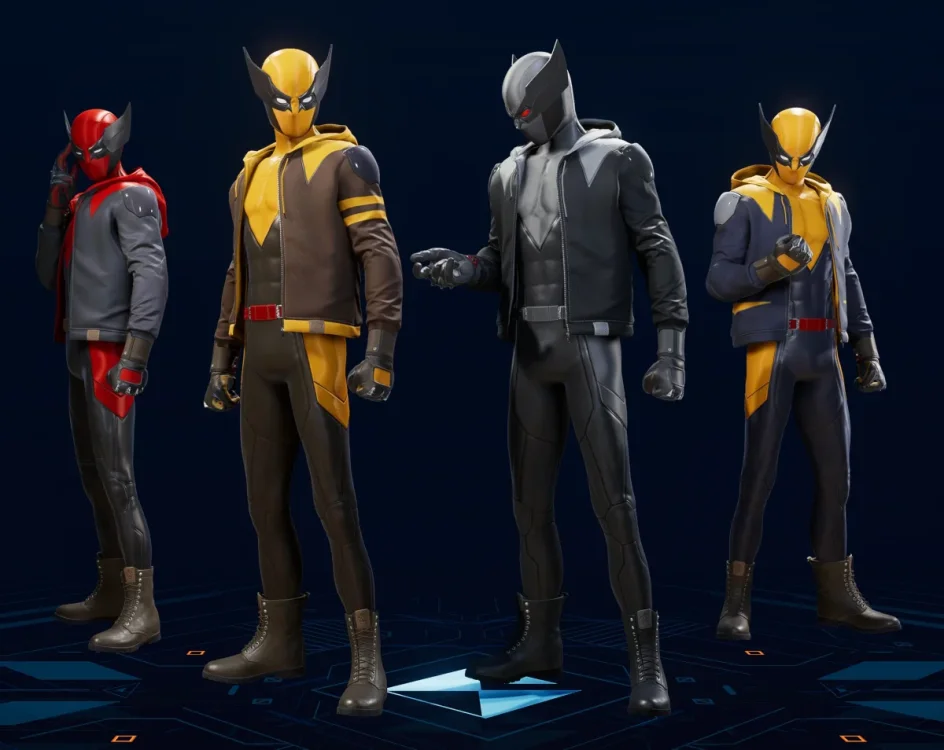
Can you guys create a mod that replaces the Wolverine mask on the Miles suit "Best There Is," with a Spidey Mask instead?
-
I would like to request a different walk animation for miles. An example would be a mod similar to this, Orca's Alternative Walk Animation at Marvels Spider-Man: Miles Morales Nexus - Mods and community
-
I couldn't find a solution to my problem, so hopefully someone else has already encountered it. https://www.youtube.com/watch?v=n6RBYXkZHmo As we can see my hands seem to teleport when I stop. How to fix this? SSE 1.6.1179.0, vanilla version without mods. My system configuraion: Ryzen 5 5600, NVIDIA rtx 4060, 16GBs, 60hz monitor I don't seem to have any issues with the system's performance, as the game consistently runs at 60 fps without any drops. Additionally, I haven't experienced any drops in other games either. I have a new question regarding this: Could the motherboard be responsible for such a visual bug, particularly because it operates on PCIe 3.0? I'm also considering that I had to install a new BIOS to get the 4060 to work.
-
I want to create a greeting that you will only get if you are a specific class, I made a new class and I want the dialogue to be filtered for that class. I have already tried the "Not Class" function / variable but I can't get it to work. I have also looked in the Morrowind Scripting for Dummies.pdf but I can't find anything about filtering dialogue for PCClass.
-
I'm a long time fan of the Fallout series and 3 is one of my favorite games out there. I started playing on 360 when it came out over a decade (wow i feel old lol) and I enjoy using a controller to play both it and NV. Well here recently I decided to give 3 another go but this time hopefully spicing the game up with some mods for a brand new experience. I'm not really a kb&m guy I play most of all of my games with a DS4 controller. So after spending an afternoon getting all my mods working I decide to start up a new character. Almost immediately I notice something feels just off about the way the aiming feels. It's just not as smooth and responsive as it's console counterpart. I've looked around and tried messing with the sensitivity and it would seem that the Steam PC version just doesn't want the game to feel very good with a controller. Now for my question, is there anyone at all that understands this issue? Have any of you guys also experienced this or is it just me? Also if there is anything I can do to fix this issue I would really appreciate any help. I really want to re-experience this game with my brand new mods and once again adventure into the Capital Wasteland. :smile:
-
Trying to make a bed that you can rent as the player, in a tavern I made. I tried to see how the original developers made this happen but it is not very clear to me. Does anybody know how to do this?
-
I want to create a player home with a ring or spell that will teleport you there when you use it. I could make a local script and attach it to the ring, this won't be very difficult to do but then the PC will continiously have an extra active script when carrying the ring around. This seems like a bad idea perfomance wise but perhaps this isn't much of an issue anymore in 2022? I figured it would be easier to add a spell to the PC and have the script activate when you cast the spell but I don't know if that's possible without MWSE. Should I create the ring with the local script or can I make a spell?
-
I think the screenshots speak for themselves, I have this odd pixel effect on all my textures, as if there was a pixel grain effect over all of them. This one shows the issue over the entire wall. https://i.imgur.com/XveU4lB.jpg This one shows it pretty hard on the vertical wall piece and Nora's neck. https://i.imgur.com/XoBnlna.jpg Does anyone have any idea what could be causing this? This persists even after I remove all Enbs and Reshade. This is also a newly installed game that I'm still working on before playing in earnest. The fact that it's effecting both player models and environment textures alike suggests it's not an issue with either but some general overlay. I'm running a 5900x, RTX 3090, 64 bits of ram, stored on an M.2 SSD. I'm also playing on a 4k monitor but at 1440p resolution. Mod list. None of these are meant to be set in stone, just experimenting to see what works.


